
python_learn1
1、python在命令行获取当前的路径。
import os
os.getcwd()
os.chdir(r"C:\Users\szlon\Desktop\pythonexer")
2、在Python中\是转义符,\u表示其后是UNICODE编码,因此\User在这里会报错,在字符串前面加个r表示就可以了。
Note:python中的字符串定义不是单引号吗?
3、解答上面的Note问题,Python中的单引号、双引号和三引号。
4、python安装过程及怎么在windows命令行运行python文件。
python安装过程不叙述,记得勾选将python路径放入Windows运行环境。
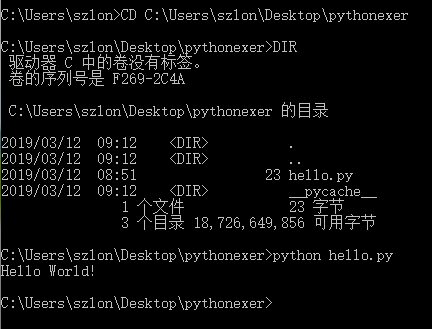
上面用到了两个Windows命令,CD转换运行路径。DIR显示当前路径下的所有文件。
import 文件名即可。
6、教程中最开始的$符号是Linux命令行默认开始符号。
内置len函数。
S1 = [1,2,3]
S2 = [0,[1,2,3]]
len(S1) = 3
len(S2) = 2
也就是list可以当任意类型当做一个元素来对待,即使它本身也是个list类型。
元组合list都是序列。
8、获取命令行输入
直接input就好,是系统内置函数,不需要import。
例:
 >>> mac_addr = input('请输入MAC地址:')

 请输入MAC地址:10:23:45:67:89:10

 >>> print(mac_addr)

 10:23:45:67:89:10
9、练习一早上
 Python 3.7.2 (tags/v3.7.2:9a3ffc0492, Dec 23 2018, 23:09:28) [MSC v.1916 64 bit (AMD64)] on win32

 Type "help", "copyright", "credits" or "license()" for more information.

 >>> print('Hello World!')

 Hello World!

 >>> $python hello.py

 SyntaxError: invalid syntax

 >>> import os

 >>> os.getcwd()

 'C:\\Users\\szlon\\AppData\\Local\\Programs\\Python\\Python37'

 >>> os.chdir("C:\Users\szlon\Desktop\pythonexer")

 SyntaxError: (unicode error) 'unicodeescape' codec can't decode bytes in position 2-3: truncated \UXXXXXXXX escape

 >>> os.chdir('C:\Users\szlon\Desktop\pythonexer')

 SyntaxError: (unicode error) 'unicodeescape' codec can't decode bytes in position 2-3: truncated \UXXXXXXXX escape

 >>> os.chdir(r"C:\Users\szlon\Desktop\pythonexer")

 >>> os.getcwd

 <built-in function getcwd>

 >>> os.getcwd()

 'C:\\Users\\szlon\\Desktop\\pythonexer'

 >>> hello.py

 Traceback (most recent call last):

   File "<pyshell#9>", line 1, in <module>

     hello.py

 NameError: name 'hello' is not defined

 >>> import hello

 Hello World!

 >>> a = 10

 >>> print(a)

 10

 >>> print(type(a))

 <class 'int'>

 >>> a = 1.3

 >>> print(a,type(a))

 1.3 <class 'float'>

 >>> a = True

 >>> print(a,type(a))

 True <class 'bool'>

 >>> a = 'Hello!'

 >>> print(a,type(a))

 Hello! <class 'str'>

 >>> s1 = (2,1.3,'love',5.6,9,12,False)

 >>> print(s1,type(s1))

 (2, 1.3, 'love', 5.6, 9, 12, False) <class 'tuple'>

 >>> s2 = [true,5,'simle']

 Traceback (most recent call last):

   File "<pyshell#22>", line 1, in <module>

     s2 = [true,5,'simle']

 NameError: name 'true' is not defined

 >>> s2 = [True,5,'simle']

 >>> print(s2,type(s2))

 [True, 5, 'simle'] <class 'list'>

 >>> s3 = [1,[3,4,5]]

 >>> print(s3,type(s3))

 [1, [3, 4, 5]] <class 'list'>

 >>> print(s3.count)

 <built-in method count of list object at 0x0000021356CD5AC8>

 >>> print(s3.count())

 Traceback (most recent call last):

   File "<pyshell#28>", line 1, in <module>

     print(s3.count())

 TypeError: count() takes exactly one argument (0 given)

 >>> print(len(s3)

      )

 2

 >>> print(len(s3))

 2

 >>> print(s1[0])

 2

 >>> print(s2[2])

 simle

 >>> print(s3[1][2])

 5

 >>> mac_addr = input('请输入MAC地址:')

 请输入MAC地址:10:23:45:67:89:10

 >>> print(mac_addr)

 10:23:45:67:89:10

 >>> print 1+9

 SyntaxError: Missing parentheses in call to 'print'. Did you mean print(1+9)?

 >>> print (1+9)

 10

 >>> print (1.3 - 4)

 -2.7

 >>> print (3*5)

 15

 >>> print (4.5/1.5)

 3.0

 >>> print(3**2)

 9

 >>> print(10%3)

 1

 >>> print( 5 == 6)

 False

 >>> print (8.0 != 8.0)

 False

 >>> print( 3 < 3, 3 <= 3)

 False True

 >>> print(4 > 5, 4 >= 0)

 False True

 >>> print(5 in [1,3,5])

 True

 >>> print(True and True, True and False)

 True False

 >>> print(True or False)

 True

 >>> print(not True)

 False

 >>> print( 5==6 or 3 >=3)

 True

 >>>
10、input输入的是字符串,怎么输入整数或者基本类型的数。
a = int(input('请输入一个整数'))
11、一个求绝对值的小模块
 a = int(input('请输入一个数:'))

 if a >= 0:

     a = a

 else:

     a = -a

 print('a的绝对值为:',a)
12、1-100求和
 sum = 0;

 for i in range(101):

     sum += i

 print(sum)
python_learn1的更多相关文章
随机推荐
- JavaScript中的普通函数和箭头函数
最近被问到了一个问题: javaScript 中的箭头函数 ( => ) 和普通函数 ( function ) 有什么区别? 我当时想的就是:这个问题很简单啊~(flag),然后做出了错误的回答 ...
- dump_stack的简单使用
转载:http://blog.csdn.net/sanchuyayun/article/details/39183941 刚刚接触内核,在调试过程中用printk打印信息当然是直接有效的办法,但当我们 ...
- devicemapper: Error running deviceCreate (ActivateDevice) dm_task_run failed
在一台新机子上面,docker处理完lvs数据卷之后,启动docker服务时,出现了启动失败,失败信息如下: [root@hxin221 ~]# systemctl status docker ● d ...
- Android性能专项测试之耗电量统计API
版权声明:本文为Doctorq原创文章,未经博主允许不得转载. https://blog.csdn.net/qhshiniba/article/details/49155979 参考文章:Androi ...
- 【重点突破】——Canvas技术绘制音乐播放器界面
一.引言 在用Canvas练习制作了验证码之后,还有一个用Canvas技术很综合的练习——制作音乐播放器.在做这个练习的过程中,还有一个重要的观察点,那就是理解Canvas的一大问题. 二.要求 点 ...
- [转]MySQL的简单使用和JDBC示例
MySql简单操作 //启动mysql net start mysql //登陆 mysql -u root -p //创建建数据库 create database mydb; create data ...
- 为什么要点两下才能删除一个li节点 原来是空白节点作怪
奇怪吧,下面的代码居然要点两次button才能删除一个li节点: <!DOCTYPE HTML PUBLIC "-//W3C//DTD HTML 4.01 Transitional// ...
- Timus : 1002. Phone Numbers 题解
把电话号码转换成为词典中能够记忆的的单词的组合,找到最短的组合. 我这道题应用到的知识点: 1 Trie数据结构 2 map的应用 3 动态规划法Word Break的知识 4 递归剪枝法 思路: 1 ...
- Synchronous XMLHttpRequest on the main thread is deprecated because of its detrimental……
Synchronous XMLHttpRequest on the main thread is deprecated because of its detrimental effects to th ...
- props default 数组(Array)/对象(Object)的默认值应当由一个工厂函数返回
1.场景: Object: <!-- 步骤 --> <template> <div> <div class="m-cell"> &l ...