
jQuery EasyUI/TopJUI基本的数字输入框(保留两位小数,带前缀后缀...)
jQuery EasyUI/TopJUI基本的数字输入框(保留两位小数,带前缀后缀...)
numberbox(数值输入框)
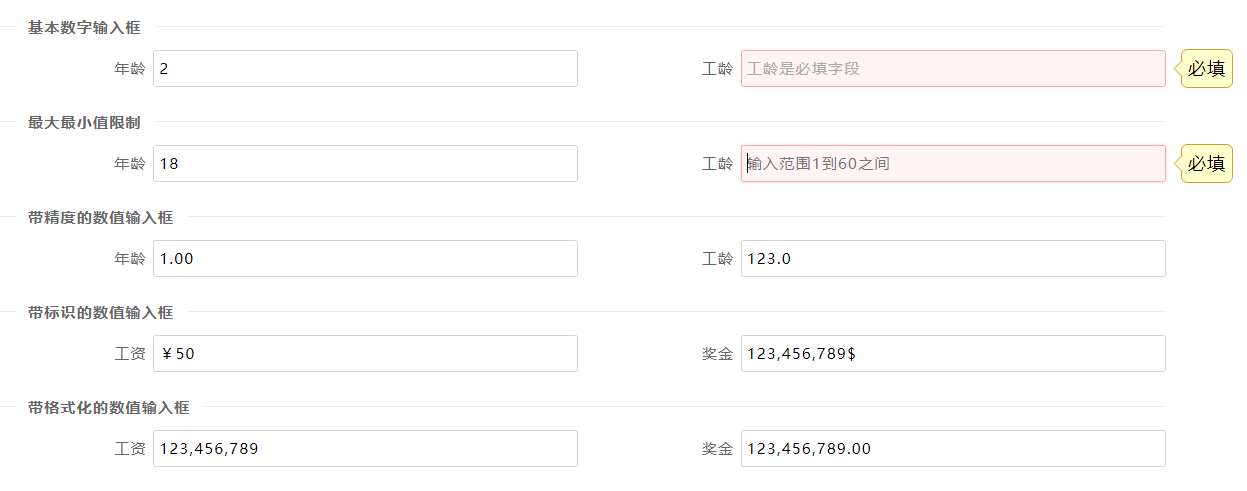
HTML
required:必填字段,默认为false;prompt:显示在输入框的提示性文字;min/miax:最小/最大值;

precision:保留的小数位数;prefix:'¥':带前缀;suffix:'$':带后缀;groupSeparator:','字符分割整数组
    <fieldset>

        <legend>基本数字输入框</legend>

    </fieldset>

    <div class="topjui-row">

        <div class="topjui-col-sm6">

            <label class="topjui-form-label">年龄</label>

            <div class="topjui-input-block">

                <input type="text" name="age" data-toggle="topjui-numberbox">   //自然数

            </div>

        </div>

        <div class="topjui-col-sm6">

            <label class="topjui-form-label">工龄</label>

            <div class="topjui-input-block">

                <input type="text" name="gonglin" data-toggle="topjui-numberbox"

                       data-options="required:true,prompt:'工龄是必填字段'">

                </td>

            </div>

        </div>

    </div>

    <fieldset>

        <legend>最大最小值限制</legend>

    </fieldset>

    <div class="topjui-row">

        <div class="topjui-col-sm6">

            <label class="topjui-form-label">年龄</label>

            <div class="topjui-input-block">

                <input type="text" name="age" data-toggle="topjui-numberbox"

                       data-options="min:18,max:120,prompt:'输入范围18至120之间'">

            </div>

        </div>

        <div class="topjui-col-sm6">

            <label class="topjui-form-label">工龄</label>

            <div class="topjui-input-block">

                <input type="text" name="gonglin" data-toggle="topjui-numberbox"

                       data-options="required:true,min:1,max:60,prompt:'输入范围1到60之间'">

                </td>

            </div>

        </div>

    </div>

    <fieldset>

        <legend>带精度的数值输入框</legend>

    </fieldset>

    <div class="topjui-row">

        <div class="topjui-col-sm6">

            <label class="topjui-form-label">年龄</label>

            <div class="topjui-input-block">

                <input type="text" name="age" data-toggle="topjui-numberbox"

                       data-options="precision:2,prompt:'保留2位小数'">

            </div>

        </div>

        <div class="topjui-col-sm6">

            <label class="topjui-form-label">工龄</label>

            <div class="topjui-input-block">

                <input type="text" name="gonglin" data-toggle="topjui-numberbox"

                       data-options="precision:1,prompt:'保留1位小数'">

                </td>

            </div>

        </div>

    </div>

    <fieldset>

        <legend>带标识的数值输入框</legend>

    </fieldset>

    <div class="topjui-row">

        <div class="topjui-col-sm6">

            <label class="topjui-form-label">工资</label>

            <div class="topjui-input-block">

                <input type="text" name="age" data-toggle="topjui-numberbox"

                       data-options="prefix:'¥',prompt:'带前缀的输入'">

            </div>

        </div>

        <div class="topjui-col-sm6">

            <label class="topjui-form-label">奖金</label>

            <div class="topjui-input-block">

                <input type="text" name="gonglin" data-toggle="topjui-numberbox"

                       data-options="suffix:'$',prompt:'带后缀的输入'">

            </div>

        </div>

    </div>

    <fieldset>

        <legend>带格式化的数值输入框</legend>

    </fieldset>

    <div class="topjui-row">

        <div class="topjui-col-sm6">

            <label class="topjui-form-label">工资</label>

            <div class="topjui-input-block">

                <input type="text" name="age" data-toggle="topjui-numberbox"

                       data-options="groupSeparator:',',prompt:'输入123456789试试'">

            </div>

        </div>

        <div class="topjui-col-sm6">

            <label class="topjui-form-label">奖金</label>

            <div class="topjui-input-block">

                <input type="text" name="gonglin" data-toggle="topjui-numberbox"

                       data-options="groupSeparator:',',precision:2,prompt:'输入1234567.89试试'">

            </div>

        </div>

    </div>

</div>
js
<input type="text" id="nn">

$('#nn').iNumberbox({

    min:0,

    precision:2

});
设置输入框的值
$('#nn').iNumberbox('setValue', 206.12);
获取输入框的值
var v = $('#nn').iNumberbox('getValue');

alert(v);
EasyUI中文网:http://www.jeasyui.cn
TopJUI前端框架:http://www.topjui.com
TopJUI交流社区:http://ask.topjui.com
jQuery EasyUI/TopJUI基本的数字输入框(保留两位小数,带前缀后缀...)的更多相关文章
- layui table 前台数字格式保留两位小数,不足补0(mysql 数据库)
layui table 对于后台json数据,有数字的,默认不会原样显示,而是只取数值,即100.00显示为100.如果想原样显示,需转为字符串. 项目采用mysql数据库,字段类型为decimal( ...
- vue input框数字后保留两位小数正则
<el-input type="text" v-model.trim="ruleForm2.marketPrice" maxlength="10 ...
- js-格式化数字保留两位小数-带千分符
很多时候发现有时候js会提示自带函数不能使用,所以自己找了很多资料实现了个 html <input type="text" class="input_text in ...
- td内的所有数字格式化保留两位小数
$("td").each(function(i,el){ var td = parseFloat($(el).text()); if(!isNaN(td)){ $(el).text ...
- (Math.round(num*100)/100).toFixed(2); 将输入的数字变成保留两位小数
<input type="number" @input="onInputPrice" @blur="onPrice" data-id= ...
- js保留两位小数的数字格式化方法
// 格式化数字(保留两位小数) numberFormat (num) { let percent = Number(num.toString().match(/^\d+(?:\.\d{0,2})?/ ...
- Java保留两位小数的几种做法
1. String类型数字始终保留两位小数 , RoundingMode.HALF_UP); return bd.toString(); } /** * 使用DecimalFormat,保留小数点后 ...
- Oracle中保留两位小数
在最近的项目开发中,有个业务需求是界面显示的数字需要保留两位小数,目前我想到的解决方法有两种: (1)在写SQL的时候,直接保留两位小数 (2)在java代码里面将查询出来的数进行格式化处理,保留两位 ...
- JS限制input输入的为数字并且有小数的时候最多保留两位小数
JS限制input用户输入的为数字并且有小数的时候最多保留两位小数,代码如下: html部分: <input type="number" onkeypress="r ...
随机推荐
- Python网络编程--Echo服务
Python网络编程--Echo服务 学习网络编程必须要练习的三个小项目就是Echo服务,Chat服务和Proxy服务.在接下来的几篇文章会详细介绍. 今天就来介绍Echo服务,Echo服务是最基本的 ...
- github 博客模板
http://www.jianshu.com/p/d658ba3b4351 http://jekyllthemes.org/
- PYTHON 爬虫笔记十:利用selenium+PyQuery实现淘宝美食数据搜集并保存至MongeDB(实战项目三)
利用selenium+PyQuery实现淘宝美食数据搜集并保存至MongeDB 目标站点分析 淘宝页面信息很复杂的,含有各种请求参数和加密参数,如果直接请求或者分析Ajax请求的话会很繁琐.所以我们可 ...
- JavaScript多态
function Master(){ //给动物喂食 this.feed=function(animal,food){ window.alert(animal.constructor); docume ...
- 清除float浮动三种方式
Float的作用? w3c的官方解释: Content flows down the right side of a left-floated box and down the left side o ...
- OpenCv-Python 图像处理基本操作
1. 图片加载.显示和保存 import cv2 img = cv2.imread("01.jpg") imgGrey = cv2.imread("01.jpg" ...
- 机器视觉 之 Gabor Feature
在机器视觉中,gabor feature是一种比较常见的特征,因为其可以很好地模拟人类的视觉冲击响应而被广泛应用于图像处理, gabor feature 一般是通过对图像与gabor filter做卷 ...
- Gym - 101673:B Craters (几何,求凸包)
题意:给定几个圆,求最短的围合,把这几个包围起来,而且到圆的距离都不小于10. 思路:把每个圆的半径+10,边等分5000份,然后求凸包即可. #include<bits/stdc++.h> ...
- Codeforces Round #397 题解
Problem A. Neverending competitions 题目大意 一个团队有多个比赛,每次去比赛都会先订机票去比赛地点,然后再订机票返回.给出\(n\)个含有起止地点的购票记录(不按时 ...
- 【Lintcode】070.Binary Tree Level Order Traversal II
题目: Given a binary tree, return the bottom-up level order traversal of its nodes' values. (ie, from ...