
运用swagger编写api文档
一.什么是swagger
随着互联网技术的发展,前后端技术在各自的道路上越走越远,他们之间的唯一联系变成了api接口,api接口文档编程了前后端人员的纽带,而swagger就是书写api文档的一款框架.
相关资源下载地址: https://download.csdn.net/download/zhixingwu/12008773
推荐: 也可以使用 showdoc来书写api文档. 官网: https://www.showdoc.cc/
二.SwaggerEditor的安装与启动
- 下载 swagger-editor.zip
- 解压swagger-editor
- 全局安装http-server(http-server是一个简单的零配置命令行http服务器)
npm install ‐g http‐server
- 启动swagger-editor
http‐server swagger‐editor
- 浏览器打开: http://localhost:8080
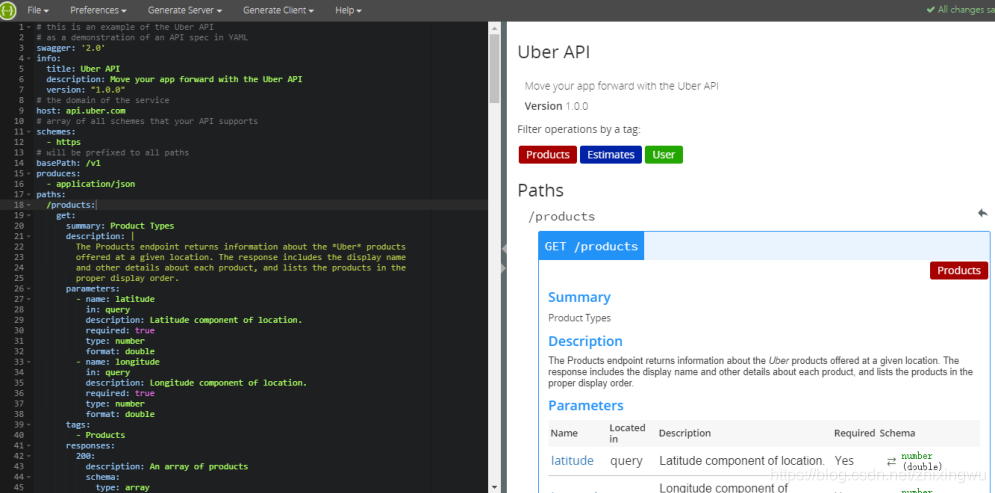
三.语法规则
1.固定字段
| 字段名 | 类型 | 描述 |
|---|---|---|
| swagger | string | 必需的。使用指定的规范版本 |
| info | info Object | 必需的。提供元数据API |
| host | string | 主机名或ip服务API |
| basePath | string | API的基本路径 |
| schemes | [string] | API的传输协议。 值必须从列表中:"http","https","ws","wss"。 |
| consumes | [string] | 一个MIME类型的api可以使用列表。值必须是所描述的Mime类型 |
| produces | [string] | MIME类型的api可以产生的列表。 值必须是所描述的Mime类型 |
| paths | 路径对象 | 必需的。可用的路径和操作的API |
| definitions | 定义对象 | 一个对象数据类型生产和使用操作 |
| parameters | 参数定义对象 | 一个对象来保存参数,可以使用在操作。 这个属性不为所有操作定义全局参数。 |
| responses | 反应定义对象 | 一个对象响应,可以跨操作使用。 这个属性不为所有操作定义全球响应 |
| externalDocs | 外部文档对象 | 额外的外部文档 |
| summary | string | 什么操作的一个简短的总结。 最大swagger-ui可读性,这一领域应小于120个字符 |
| description | string | 解释操作的行为 |
| operationId | string | 独特的字符串用于识别操作。 id必须是唯一的在所有业务中所描述的API。 工具和库可以使用operationId来唯一地标识一个操作,因此,建议遵循通用的编程的命名约定 |
| deprecated | boolean | 声明该操作被弃用。 使用声明的操作应该没有。 默认值是false |
2.字段类型与格式定义
| 普通名字 | type | format | 说明 |
|---|---|---|---|
| integer | integer | int32 | 签署了32位 |
| long | integer | int64 | 签署了64位 |
| float | number | float | |
| double | number | double | |
| string | string | ||
| byte | string | byte | base64编码的字符 |
| binary | stirng | binary | 任何的八位字节序列 |
| boolean | boolean | ||
| date | string | date | 所定义的full-date- - - - - -RFC3339 |
| datetime | string | date-time | 所定义的date-time- - - - - -RFC3339 |
| password | stirng | password | 用来提示用户界面输入需要模糊 |
四.示例-城市API文档
swagger: '2.0'

info:

  version: "1.0.0"

  title: 基础模块-城市API

host: api.pcloud.com

basePath: /base

paths:

  /city:

    post:

      summary: 新增城市

      parameters:

        -

          name: body

          in: body

          description: 城市实体类

          required: true

          schema:

            $ref: '#/definitions/City'

      responses:

        200:

          description: 成功响应

          schema:

            $ref: '#/definitions/ApiResponse'

    get:

      summary: 返回城市列表

      responses:

        200:

          description: 成功响应

          schema:

            $ref: '#/definitions/ApiCityListResponse'

  /city/{cityId}:

    put:

      summary: 修改城市

      parameters:

        - name: cityId

          in: path

          description: 城市ID

          required: true

          type: string

        - name: body

          in: body

          description: 城市实体类

          required: true

          schema:

            $ref: '#/definitions/City'

      responses:

        200:

          description: 成功响应

          schema:

            $ref: '#/definitions/ApiResponse'

    delete:

      summary: 根据ID删除城市

      parameters:

        - name: cityId

          in: path

          description: 城市ID

          required: true

          type: string

      responses:

        200:

          description: 成功响应

          schema:

            $ref: '#/definitions/ApiResponse'

    get:

      summary: 根据ID查询城市

      parameters:

        - name: cityId

          in: path

          description: 城市ID

          required: true

          type: string

      responses:

        200:

          description: 成功响应

          schema:

            $ref: '#/definitions/ApiCityResponse'

  /city/search:

    post:

      summary: 根据条件查询城市列表

      parameters:

        - name: body

          in: body

          description: 城市实体类

          required: true

          schema:

            $ref: '#/definitions/City'

      responses:

        200:

          description: 成功响应

          schema:

            $ref: '#/definitions/ApiCityListResponse'

  /city/search/{page}/{size}:

    post:

      summary: 城市分页列表

      parameters:

        - name: page

          in: path

          description: 页码

          required: true

          type: integer

          format: int32

        - name: size

          in: path

          description: 页大小

          required: true

          type: integer

          format: int32

        - name: body

          in: body

          description: 城市实体类

          required: true

          schema:

            $ref: '#/definitions/City'

      responses:

        200:

          description: 成功响应

          schema:

            $ref: '#/definitions/ApiCityPageResponse'

definitions:

  City:

    type: object

    properties:

      id:

        type: string

        description: ID

      name:

        type: string

        description: 城市名称

      ishot:

        type: string

        description: 是否热门

  ApiResponse:

    type: object

    properties:

      flag:

        type: boolean

        description: 是否成功

      code:

        type: integer

        format: int32

        description: 返回码

      message:

        type: string

        description: 返回信息

  ApiCityResponse:

    type: object

    properties:

      flag:

        type: boolean

        description: 是否成功

      code:

        type: integer

        format: int32

        description: 返回码

      message:

        type: string

        description: 返回信息

      data:

        $ref: '#/definitions/City'

  CityList:

    type: array

    items:

        $ref: '#/definitions/City'

  ApiCityListResponse:

    type: object

    properties:

      flag:

        type: boolean

        description: 是否成功

      code:

        type: integer

        format: int32

        description: 返回码

      message:

        type: string

        description: 返回信息

      data:

        $ref: '#/definitions/CityList'

  ApiCityPageResponse:

    type: object

    properties:

      flag:

        type: boolean

        description: 是否成功

      code:

        type: integer

        format: int32

        description: 返回码

      message:

        type: string

        description: 返回信息

      data:

        properties:

          total:

            type: integer

            format: int32

          rows:

            $ref: '#/definitions/CityList'
五.批量生成API文档
使用<<黑马程序员代码生成器>>自动生成所有标的yml文档,自动生成的文档中类型均为string ,我们这里需要再对类型进行修改即可.
步骤:
(1)执行建表脚本
(2)使用《黑马程序员代码生成器》生成脚本(HeimaCodeUtil_V2.4_64.zip)
六.swaggerUI
SwaggerUI是用来展示Swagger文档的界面,以下为安装步骤
(1)在本地安装nginx
(2)下载SwaggerUI源码 https://swagger.io/download-swagger-ui/
(3)解压,将dist文件夹下的全部文件拷贝至 nginx的html目录
(4)启动nginx
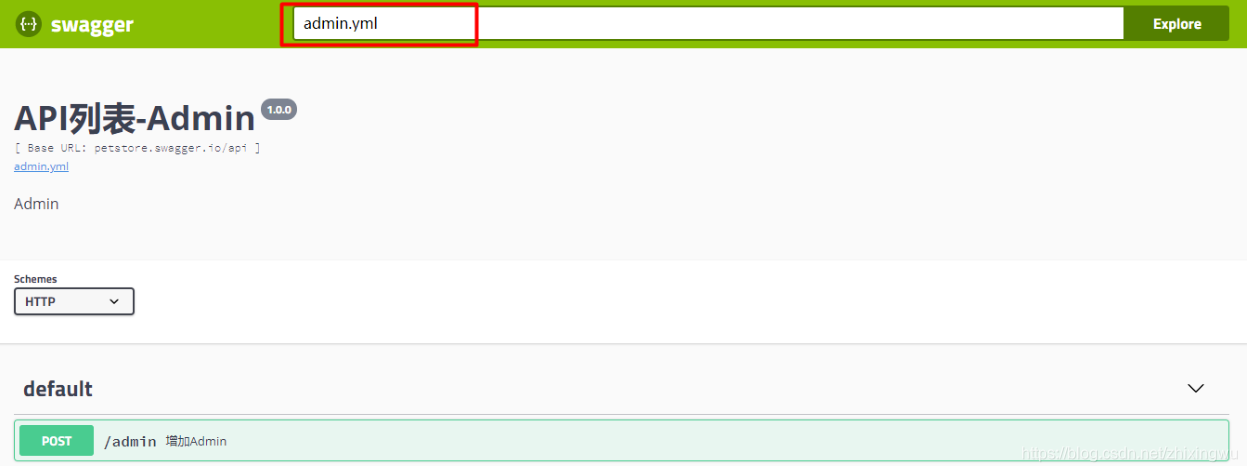
(5)浏览器打开页面 http://localhost即可看到文档页面
(6)将编写好的yml文件也拷贝至nginx的html目录,这样我们就可以加载我们的swagger文档了
运用swagger编写api文档的更多相关文章
- SpringBoot系列: 使用 Swagger 生成 API 文档
SpringBoot非常适合开发 Restful API程序, 我们都知道为API文档非常重要, 但要维护好难度也很大, 原因有: 1. API文档如何能被方便地找到? 以文件的形式编写API文档都有 ...
- swagger在线api文档搭建指南,用于线上合适么?
在上一篇文章中,我们讲解了什么是 api,什么是 sdk: https://www.cnblogs.com/tanshaoshenghao/p/16217608.html 今天将来到我们万丈高楼平地起 ...
- 在ASP.NET Core Web API上使用Swagger提供API文档
我在开发自己的博客系统(http://daxnet.me)时,给自己的RESTful服务增加了基于Swagger的API文档功能.当设置IISExpress的默认启动路由到Swagger的API文档页 ...
- Core Web API上使用Swagger提供API文档
在ASP.NET Core Web API上使用Swagger提供API文档 我在开发自己的博客系统(http://daxnet.me)时,给自己的RESTful服务增加了基于Swagger的AP ...
- 【WebAPI No.4】Swagger实现API文档功能
介绍: Swagger也称为Open API,Swagger从API文档中手动完成工作,并提供一系列用于生成,可视化和维护API文档的解决方案.简单的说就是一款让你更好的书写API文档的框架. 我们为 ...
- springboot+mybatis-puls利用swagger构建api文档
项目开发常采用前后端分离的方式.前后端通过API进行交互,在Swagger UI中,前后端人员能够直观预览并且测试API,方便前后端人员同步开发. 在SpringBoot中集成swagger,步骤如下 ...
- Swagger实现API文档功能
介绍: wagger也称为Open API,Swagger从API文档中手动完成工作,并提供一系列用于生成,可视化和维护API文档的解决方案.简单的说就是一款让你更好的书写API文档的框架. 我们为什 ...
- springboot利用swagger构建api文档
前言 Swagger 是一款RESTFUL接口的文档在线自动生成+功能测试功能软件.本文简单介绍了在项目中集成swagger的方法和一些常见问题.如果想深入分析项目源码,了解更多内容,见参考资料. S ...
- 基于.NetCore3.1搭建项目系列 —— 使用Swagger做Api文档 (上篇)
前言 为什么在开发中,接口文档越来越成为前后端开发人员沟通的枢纽呢? 随着业务的发张,项目越来越多,而对于支撑整个项目架构体系而言,我们对系统业务的水平拆分,垂直分层,让业务系统更加清晰,从而产生一系 ...
随机推荐
- requestAnimationFram
window.requestAnimationFrame() 告诉浏览器——你希望执行一个动画,并且要求浏览器在下次重绘之前调用指定的回调函数更新动画.该方法需要传入一个回调函数作为参数,该回调函数会 ...
- JPA学习(一、JPA_Hello World)
框架学习之JPA(一) JPA是Java Persistence API的简称,中文名Java持久层API,是JDK 5.0注解或XML描述对象-关系表的映射关系,并将运行期的实体对象持久化到数据库中 ...
- BZOJ 2121: 字符串游戏 区间DP + 思维
Description BX正在进行一个字符串游戏,他手上有一个字符串L,以及其他一些字符串的集合S,然后他可以进行以下操作:对 于一个在集合S中的字符串p,如果p在L中出现,BX就可以选择是否将其删 ...
- DVWA--upload
文件上传漏洞 0x01了解文件上传漏洞的用处是用来干什么的 什么是文件上传漏洞? 文件上传漏洞是指由于程序员在对用户文件上传部分的控制不足或者处理缺陷,而导致的用户可以越过其本身权限向服务器上上传可执 ...
- java8 stream初试,map排序,list去重,统计重复元素个数,获取map的key集合和value集合
//定义一个100元素的集合,包含A-Z List<String> list = new LinkedList<>(); for (int i =0;i<100;i++) ...
- EasyHook
EasyHook实用指南 所谓实用指南就是全是干货,没那么多虚头巴脑的东西,真正要用的人会发现对自己有用的东西,浅尝辄止的人看起来会不知所云. FileMon自己实做的过程中遇到的问题: 1. exe ...
- 【C++进阶】getline
在<istream>中的getline函数有两种重载形式: istream& getline (char* s, streamsize n );istream& getli ...
- c++实验10 图的应用实验
大体与上次实验相同,特点为图是邻接表存储结构 --博客后半部分有程序的所有代码-- 1.图邻接表存储结构表示及基本操作算法实现 所加载的库函数或常量定义及类的定义: #include "Se ...
- C# WinForm 添加Windows Media Player 控件调试出现未能加载文件或程序集Interop.WMPLib,该怎么解决
C# WinForm 添加Windows Media Player 控件调试出现未能加载文件或程序集Interop.WMPLib如标题,在窗体中添加Windows Media Player 控件,当调 ...
- Object 的 property descriptor
property descriptor 属性描述符: o = { get foo() { return 17; } }; d = Object.getOwnPropertyDescriptor(o, ...