
运用swagger编写api文档
一.什么是swagger
随着互联网技术的发展,前后端技术在各自的道路上越走越远,他们之间的唯一联系变成了api接口,api接口文档编程了前后端人员的纽带,而swagger就是书写api文档的一款框架.
相关资源下载地址: https://download.csdn.net/download/zhixingwu/12008773
推荐: 也可以使用 showdoc来书写api文档. 官网: https://www.showdoc.cc/
二.SwaggerEditor的安装与启动
- 下载 swagger-editor.zip
- 解压swagger-editor
- 全局安装http-server(http-server是一个简单的零配置命令行http服务器)
npm install ‐g http‐server
- 启动swagger-editor
http‐server swagger‐editor
- 浏览器打开: http://localhost:8080
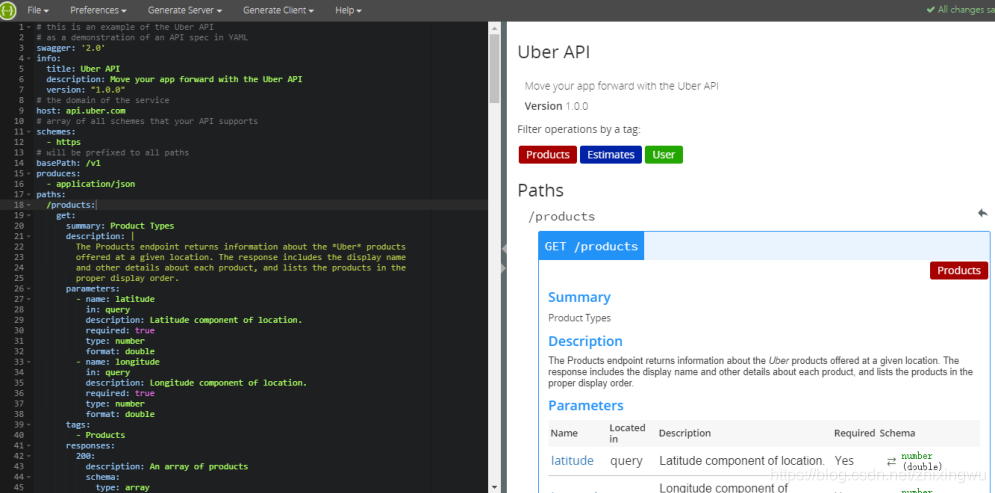
三.语法规则
1.固定字段
| 字段名 | 类型 | 描述 |
|---|---|---|
| swagger | string | 必需的。使用指定的规范版本 |
| info | info Object | 必需的。提供元数据API |
| host | string | 主机名或ip服务API |
| basePath | string | API的基本路径 |
| schemes | [string] | API的传输协议。 值必须从列表中:"http","https","ws","wss"。 |
| consumes | [string] | 一个MIME类型的api可以使用列表。值必须是所描述的Mime类型 |
| produces | [string] | MIME类型的api可以产生的列表。 值必须是所描述的Mime类型 |
| paths | 路径对象 | 必需的。可用的路径和操作的API |
| definitions | 定义对象 | 一个对象数据类型生产和使用操作 |
| parameters | 参数定义对象 | 一个对象来保存参数,可以使用在操作。 这个属性不为所有操作定义全局参数。 |
| responses | 反应定义对象 | 一个对象响应,可以跨操作使用。 这个属性不为所有操作定义全球响应 |
| externalDocs | 外部文档对象 | 额外的外部文档 |
| summary | string | 什么操作的一个简短的总结。 最大swagger-ui可读性,这一领域应小于120个字符 |
| description | string | 解释操作的行为 |
| operationId | string | 独特的字符串用于识别操作。 id必须是唯一的在所有业务中所描述的API。 工具和库可以使用operationId来唯一地标识一个操作,因此,建议遵循通用的编程的命名约定 |
| deprecated | boolean | 声明该操作被弃用。 使用声明的操作应该没有。 默认值是false |
2.字段类型与格式定义
| 普通名字 | type | format | 说明 |
|---|---|---|---|
| integer | integer | int32 | 签署了32位 |
| long | integer | int64 | 签署了64位 |
| float | number | float | |
| double | number | double | |
| string | string | ||
| byte | string | byte | base64编码的字符 |
| binary | stirng | binary | 任何的八位字节序列 |
| boolean | boolean | ||
| date | string | date | 所定义的full-date- - - - - -RFC3339 |
| datetime | string | date-time | 所定义的date-time- - - - - -RFC3339 |
| password | stirng | password | 用来提示用户界面输入需要模糊 |
四.示例-城市API文档
swagger: '2.0'

info:

  version: "1.0.0"

  title: 基础模块-城市API

host: api.pcloud.com

basePath: /base

paths:

  /city:

    post:

      summary: 新增城市

      parameters:

        -

          name: body

          in: body

          description: 城市实体类

          required: true

          schema:

            $ref: '#/definitions/City'

      responses:

        200:

          description: 成功响应

          schema:

            $ref: '#/definitions/ApiResponse'

    get:

      summary: 返回城市列表

      responses:

        200:

          description: 成功响应

          schema:

            $ref: '#/definitions/ApiCityListResponse'

  /city/{cityId}:

    put:

      summary: 修改城市

      parameters:

        - name: cityId

          in: path

          description: 城市ID

          required: true

          type: string

        - name: body

          in: body

          description: 城市实体类

          required: true

          schema:

            $ref: '#/definitions/City'

      responses:

        200:

          description: 成功响应

          schema:

            $ref: '#/definitions/ApiResponse'

    delete:

      summary: 根据ID删除城市

      parameters:

        - name: cityId

          in: path

          description: 城市ID

          required: true

          type: string

      responses:

        200:

          description: 成功响应

          schema:

            $ref: '#/definitions/ApiResponse'

    get:

      summary: 根据ID查询城市

      parameters:

        - name: cityId

          in: path

          description: 城市ID

          required: true

          type: string

      responses:

        200:

          description: 成功响应

          schema:

            $ref: '#/definitions/ApiCityResponse'

  /city/search:

    post:

      summary: 根据条件查询城市列表

      parameters:

        - name: body

          in: body

          description: 城市实体类

          required: true

          schema:

            $ref: '#/definitions/City'

      responses:

        200:

          description: 成功响应

          schema:

            $ref: '#/definitions/ApiCityListResponse'

  /city/search/{page}/{size}:

    post:

      summary: 城市分页列表

      parameters:

        - name: page

          in: path

          description: 页码

          required: true

          type: integer

          format: int32

        - name: size

          in: path

          description: 页大小

          required: true

          type: integer

          format: int32

        - name: body

          in: body

          description: 城市实体类

          required: true

          schema:

            $ref: '#/definitions/City'

      responses:

        200:

          description: 成功响应

          schema:

            $ref: '#/definitions/ApiCityPageResponse'

definitions:

  City:

    type: object

    properties:

      id:

        type: string

        description: ID

      name:

        type: string

        description: 城市名称

      ishot:

        type: string

        description: 是否热门

  ApiResponse:

    type: object

    properties:

      flag:

        type: boolean

        description: 是否成功

      code:

        type: integer

        format: int32

        description: 返回码

      message:

        type: string

        description: 返回信息

  ApiCityResponse:

    type: object

    properties:

      flag:

        type: boolean

        description: 是否成功

      code:

        type: integer

        format: int32

        description: 返回码

      message:

        type: string

        description: 返回信息

      data:

        $ref: '#/definitions/City'

  CityList:

    type: array

    items:

        $ref: '#/definitions/City'

  ApiCityListResponse:

    type: object

    properties:

      flag:

        type: boolean

        description: 是否成功

      code:

        type: integer

        format: int32

        description: 返回码

      message:

        type: string

        description: 返回信息

      data:

        $ref: '#/definitions/CityList'

  ApiCityPageResponse:

    type: object

    properties:

      flag:

        type: boolean

        description: 是否成功

      code:

        type: integer

        format: int32

        description: 返回码

      message:

        type: string

        description: 返回信息

      data:

        properties:

          total:

            type: integer

            format: int32

          rows:

            $ref: '#/definitions/CityList'
五.批量生成API文档
使用<<黑马程序员代码生成器>>自动生成所有标的yml文档,自动生成的文档中类型均为string ,我们这里需要再对类型进行修改即可.
步骤:
(1)执行建表脚本
(2)使用《黑马程序员代码生成器》生成脚本(HeimaCodeUtil_V2.4_64.zip)
六.swaggerUI
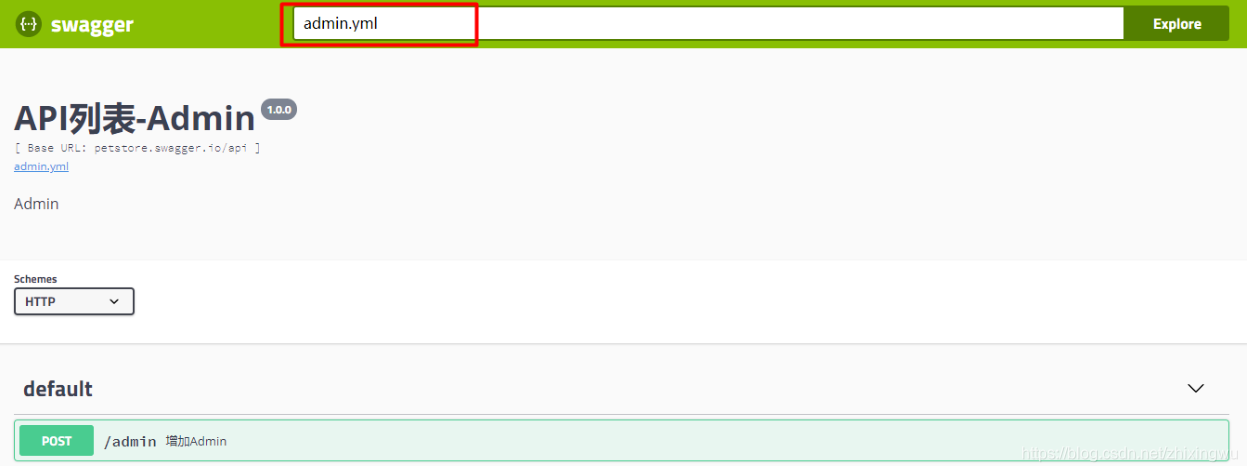
SwaggerUI是用来展示Swagger文档的界面,以下为安装步骤
(1)在本地安装nginx
(2)下载SwaggerUI源码 https://swagger.io/download-swagger-ui/
(3)解压,将dist文件夹下的全部文件拷贝至 nginx的html目录
(4)启动nginx
(5)浏览器打开页面 http://localhost即可看到文档页面
(6)将编写好的yml文件也拷贝至nginx的html目录,这样我们就可以加载我们的swagger文档了
运用swagger编写api文档的更多相关文章
- SpringBoot系列: 使用 Swagger 生成 API 文档
SpringBoot非常适合开发 Restful API程序, 我们都知道为API文档非常重要, 但要维护好难度也很大, 原因有: 1. API文档如何能被方便地找到? 以文件的形式编写API文档都有 ...
- swagger在线api文档搭建指南,用于线上合适么?
在上一篇文章中,我们讲解了什么是 api,什么是 sdk: https://www.cnblogs.com/tanshaoshenghao/p/16217608.html 今天将来到我们万丈高楼平地起 ...
- 在ASP.NET Core Web API上使用Swagger提供API文档
我在开发自己的博客系统(http://daxnet.me)时,给自己的RESTful服务增加了基于Swagger的API文档功能.当设置IISExpress的默认启动路由到Swagger的API文档页 ...
- Core Web API上使用Swagger提供API文档
在ASP.NET Core Web API上使用Swagger提供API文档 我在开发自己的博客系统(http://daxnet.me)时,给自己的RESTful服务增加了基于Swagger的AP ...
- 【WebAPI No.4】Swagger实现API文档功能
介绍: Swagger也称为Open API,Swagger从API文档中手动完成工作,并提供一系列用于生成,可视化和维护API文档的解决方案.简单的说就是一款让你更好的书写API文档的框架. 我们为 ...
- springboot+mybatis-puls利用swagger构建api文档
项目开发常采用前后端分离的方式.前后端通过API进行交互,在Swagger UI中,前后端人员能够直观预览并且测试API,方便前后端人员同步开发. 在SpringBoot中集成swagger,步骤如下 ...
- Swagger实现API文档功能
介绍: wagger也称为Open API,Swagger从API文档中手动完成工作,并提供一系列用于生成,可视化和维护API文档的解决方案.简单的说就是一款让你更好的书写API文档的框架. 我们为什 ...
- springboot利用swagger构建api文档
前言 Swagger 是一款RESTFUL接口的文档在线自动生成+功能测试功能软件.本文简单介绍了在项目中集成swagger的方法和一些常见问题.如果想深入分析项目源码,了解更多内容,见参考资料. S ...
- 基于.NetCore3.1搭建项目系列 —— 使用Swagger做Api文档 (上篇)
前言 为什么在开发中,接口文档越来越成为前后端开发人员沟通的枢纽呢? 随着业务的发张,项目越来越多,而对于支撑整个项目架构体系而言,我们对系统业务的水平拆分,垂直分层,让业务系统更加清晰,从而产生一系 ...
随机推荐
- day_04 基本数据类型的结构和使用方法
1. 简述Python的五大数据类型的作用.定义方式.使用方法: 1). 数字类型: 整型(int): 表示年龄.号码.级别:变量名=值,变量名=int(值):加减乘除.逻辑判断: 浮点型(float ...
- Python 3标准库第三章
时间过得很快,又是一周过去了,今天感觉迷迷糊糊的,不在状态,然后,下面开始我们的讲解,还是跟大家分享一下我自己的一些想法,第一.怎么讲了,就是各位如果有怀才不遇的想法,我感觉最好不要有这种想法;第二. ...
- PHP 字符串相关常识
0x00 前言 第一次遇见字符串这个概念是在学 C 语言的时候,那时候觉得字符串也没有什么难的,不就是一个以 \0 结尾的 char 数组而已咯.后来在学习 PHP 的过程中也同样保持这个观念,不过在 ...
- UINX标准C - 进程管理
进程与程序的关系: 1.程序就是存储在磁盘上可执行的二进制文件, 2.进程是一个正在执行的的程序,不过一个程序可能存在多个进程实例. 查看进程中的pid和获取pid(进程号) 1.终端指令:ps a ...
- Sdoi2017试题泛做
Day1 [Sdoi2017]数字表格 推式子的莫比乌斯反演题. #include <cstdio> #include <algorithm> #include <cst ...
- Redis大key的发现与删除方法全解析
个推作为国内第三方推送市场的早期进入者,专注于为开发者提供高效稳定的推送服务,经过9年的积累和发展,服务了包括新浪.滴滴在内的数十万APP.由于我们推送业务对并发量.速度要求很高,为此,我们选择了高性 ...
- springBoot 配置url 访问图片
需要添加依赖: <dependency> <groupId>org.springframework.boot</groupId> <artifactId> ...
- 数据库MySQL(课下作业,必做) 20175225
作业要求: 1.下载附件中的world.sql.zip, 参考http://www.cnblogs.com/rocedu/p/6371315.html#SECDB,导入world.sql,提交导入成功 ...
- Found duplicate classes/resources
很可能是多个三方依赖重复了,依赖个插件,这个插件能查找出依赖关系, duplicate-finder-maven-plugin 使用命令显示 mvn dependency:tree [INFO] \- ...
- UNITY ET 框架
GITHUB上近3000星的开源框架,包括了服务器客户端,IL RUNTIME热等特点,对于新项目,值得拥有