
Spring源码阅读环境搭建
本文将粗略的搭建一个Spring源码的阅读环境,为后面的源码阅读做一个准备。做任何事情不管是有一个完美的或者是不太完美的开头,只要去做了,那么就是一种胜利。
由于spring使用了gradle构建工具,接下来先安装gradle。
安装gradle
- 从Gradle官网下载gradle安装包,打开https://gradle.org/releases/
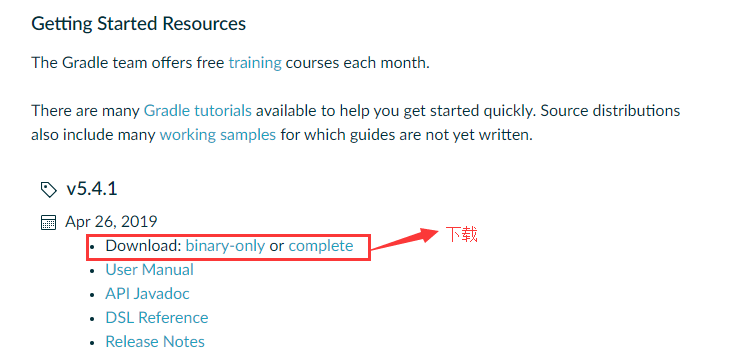
- 将下载的安装包gradle-x.x.x-all.zip解压到当前目录

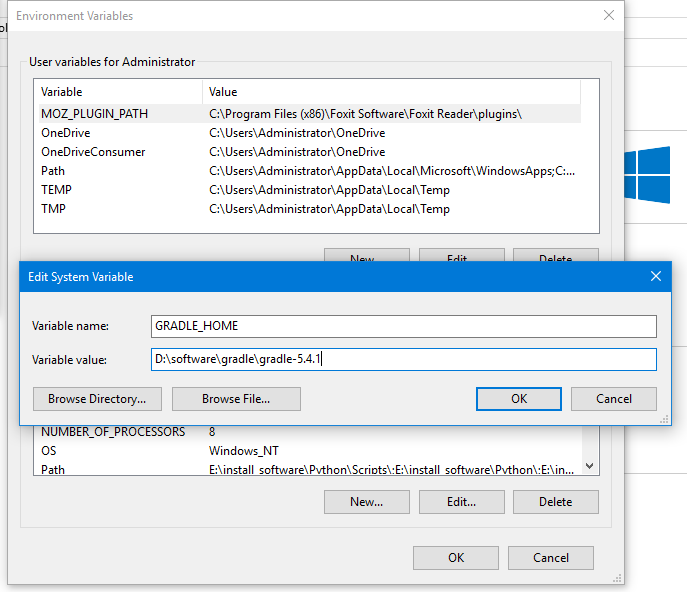
- 环境变量配置
- 配置GRADLE_HOME
- 配置Path
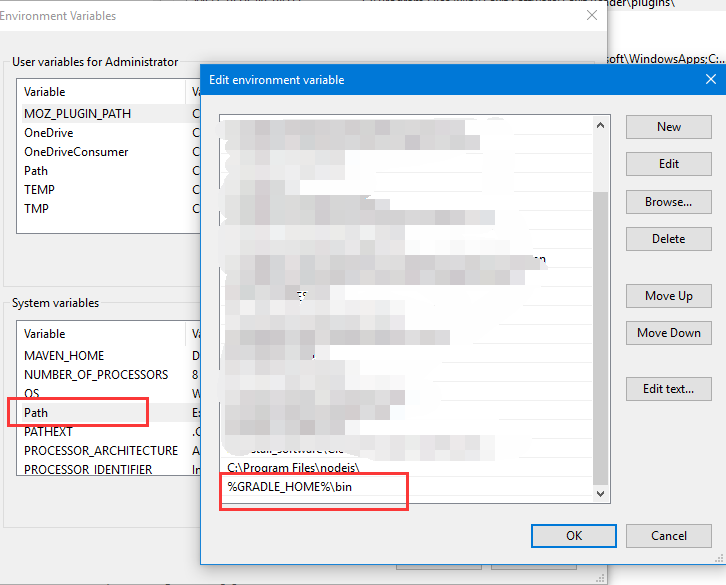
- 配置GRADLE_HOME
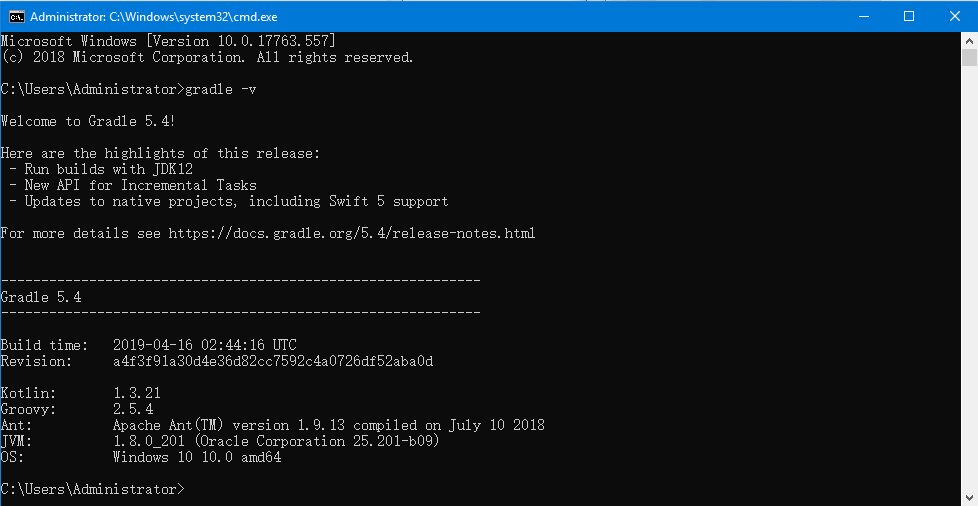
- 打开目录行工具,输入
gradle -v,能看到gradle的版本信息表示安装已经成功
导入Spring源码
Spring在github上的仓库地址是:https://github.com/spring-projects/spring-framework,本文不会直接去github上去下载源码,网速实在太慢。本文使用的码云上Spring仓库的镜像,该镜像每日同步一次,地址是https://gitee.com/mirrors/Spring-Framework
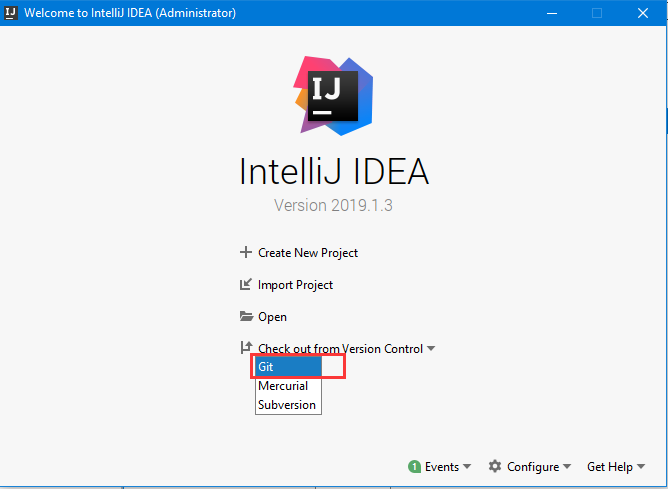
从git导入项目
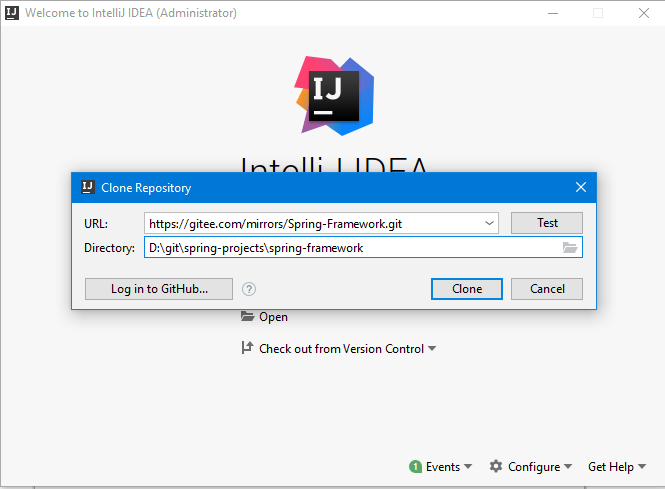
填写要克隆的git仓库信息,可以点击右边的【Test】按钮测试,等待仓库克隆完成
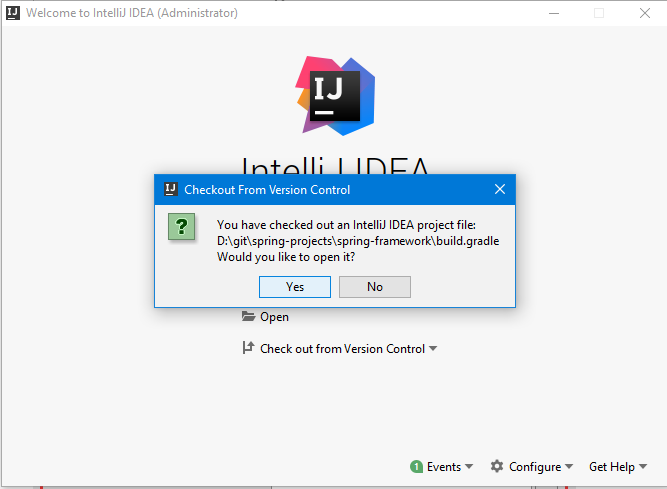
打开导入的Spring项目
从gradle导入Spring项目,等待gradle build完成
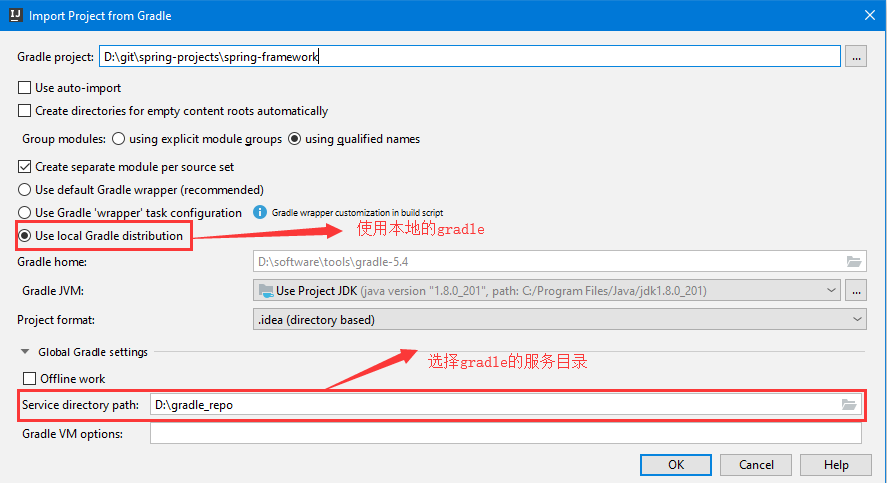
注意:- 上面使用的是本地自己安装的gradle。
- idea中gradle默认的服务目录路径是用户目录下的
.gradle目录,对于Administrator用户,对应的目录是C:\Users\Administrator\.gradle。该目录占用的空间一般比较多,所以在这里将这个目录放到其他的盘中。
构建完成后报错如下(只列出了一部分):
...

Error:(63, 30) java: cannot find symbol

symbol:   class Signature

location: class org.springframework.cglib.core.KeyFactory

...

location: class org.springframework.cglib.proxy.Enhancer

Error:(152, 30) java: cannot find symbol

...
spring未了避免与cglib和objenesis冲突,将cglib和objenesis相关的包重新repack到org.springframework.cglib和org.springframework.objenesis包中,这部分的代码没有包含到源码当中。构建之前,可以通过添加Gradle任务来解决,见:https://github.com/spring-projects/spring-framework/blob/master/import-into-idea.md#known-issues和https://youtrack.jetbrains.com/issue/IDEA-160605
解决办法如下:
- 在idea中打开Gradle面板
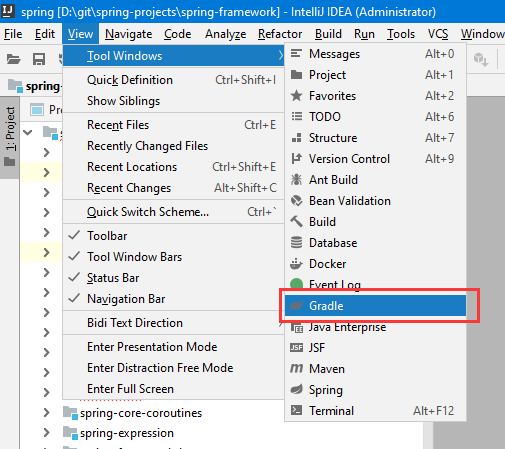
- 在右侧的Gradle面板Spring -> Tasks -> other -> cglibRepackJar
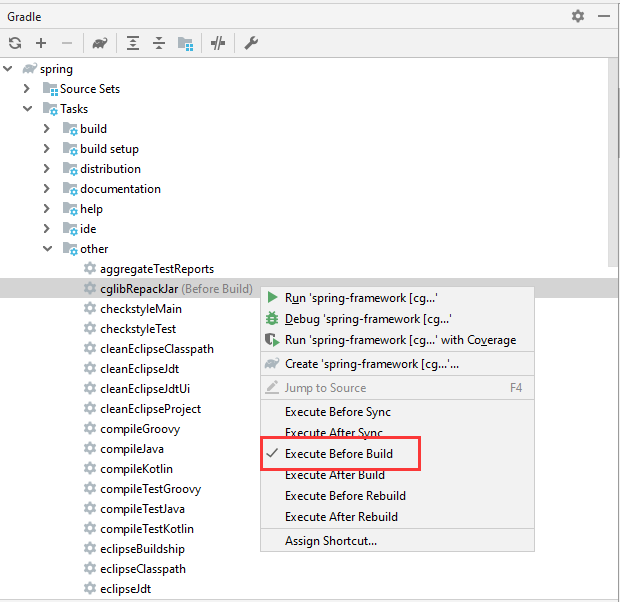
- 激活任务

- 选择要激活的cglibRepackJar任务

- 重新构建项目(花费的时间较长)

创建测试模块my-test
为了方便编写测试spring的代码,在spring-framework单独新建一个模块my-test
右键spring-framework项目->New->Module...

输入ArtifactId: my-test
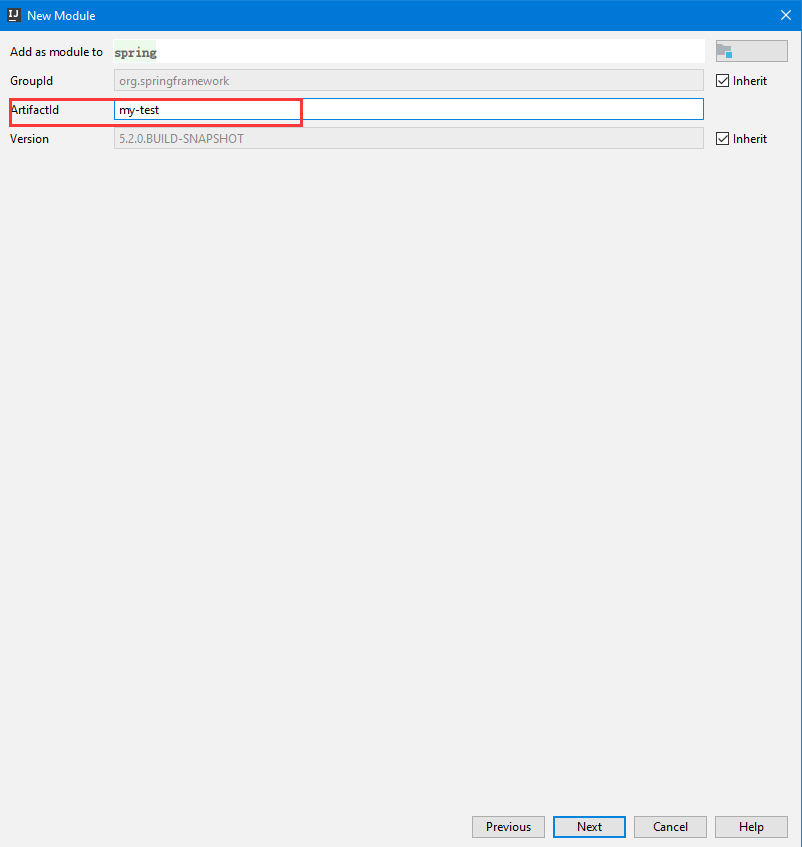
一路下一步,最后点击完成,新的模块就建好了
添加依赖:
api(project(":spring-context"))
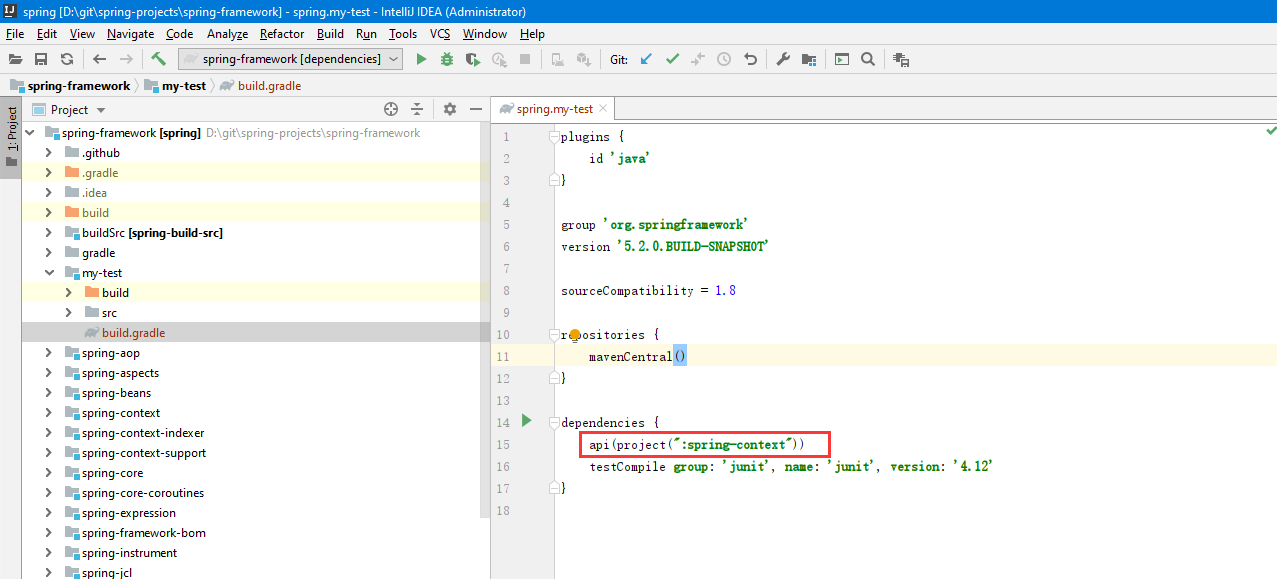
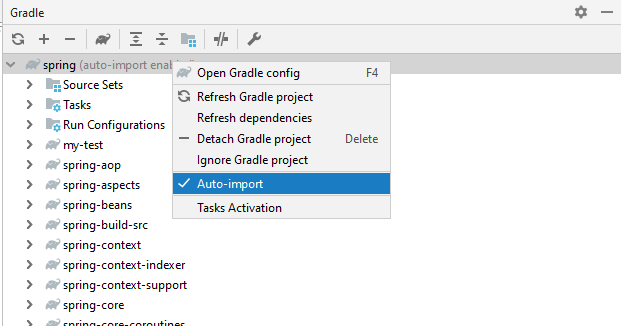
为了能让my-test自动导入相关的依赖,在Gradle面板中右键spring节点
在my-test模块中编写程序测试
创建
MyApplicationpackage com.zfx; import org.springframework.context.ApplicationContext;
import org.springframework.context.support.ClassPathXmlApplicationContext; public class MyApplication { public static void main(String[] args) {
ApplicationContext ac = new ClassPathXmlApplicationContext("classpath:applicationContext.xml");
Hello hello = (Hello)ac.getBean("hello");
hello.sayHello();
} }
在resources目录下新建
applicationContext.xml<?xml version="1.0" encoding="UTF-8"?>
<beans xmlns="http://www.springframework.org/schema/beans"
xmlns:xsi="http://www.w3.org/2001/XMLSchema-instance"
xsi:schemaLocation="http://www.springframework.org/schema/beans http://www.springframework.org/schema/beans/spring-beans.xsd"> <bean id="hello" class="com.zfx.Hello"></bean> </beans>
新建
Hello类package com.zfx; public class Hello { public void sayHello() {
System.out.println("Hello, zhangfengxian");
} }
运行
MyApplication,可以看到控制台输出:Hello, zhangfengxian
至此整个环境算是搭建好了
其他问题
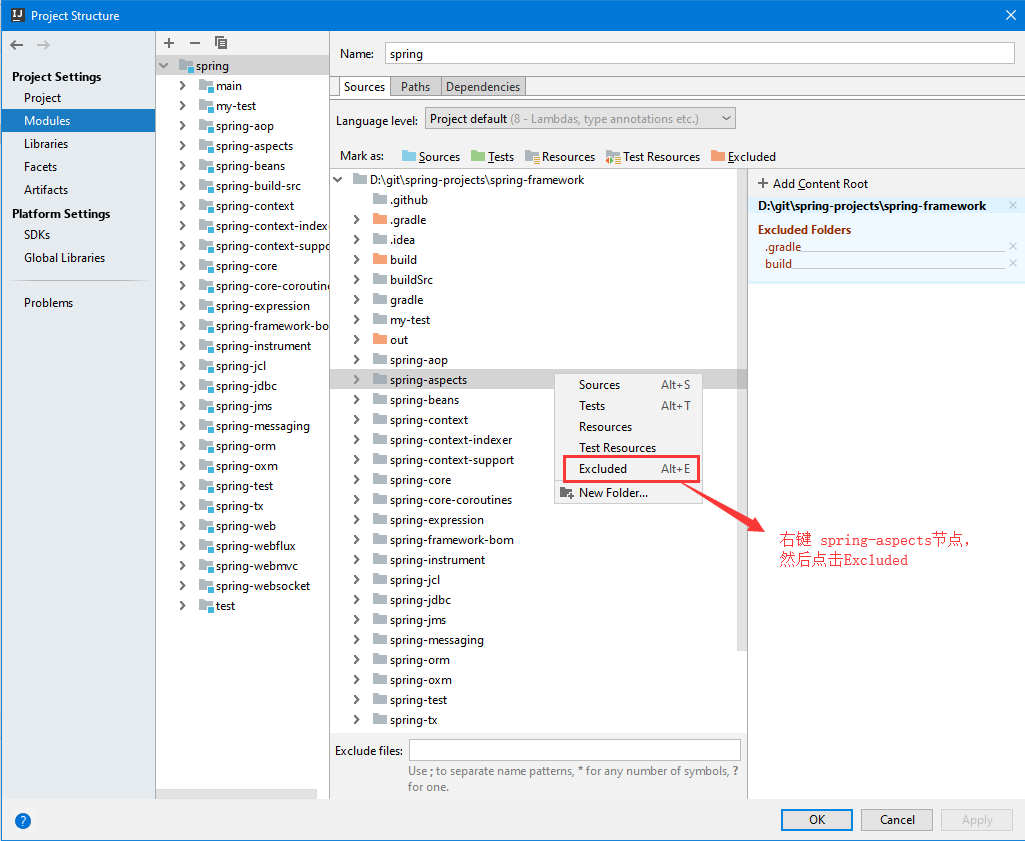
spring-aspects模块构建时报错
解决办法一:排除spring-aspects模块
在工具栏点击File -> Project Structure...
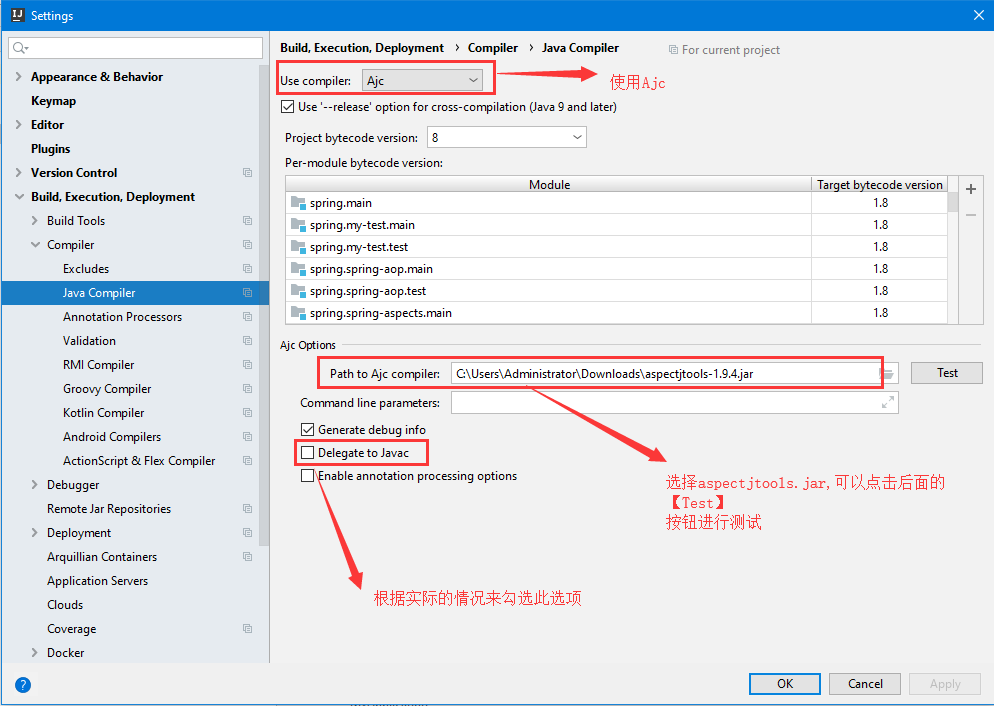
解决办法二:使用Acj或者Eclipse编译
在工具栏点击File -> Settings...
此问题的相关链接:
- https://youtrack.jetbrains.com/issue/IDEA-64446
- https://www.jetbrains.com/help/idea/2016.2/using-the-aspectj-compiler-ajc.html
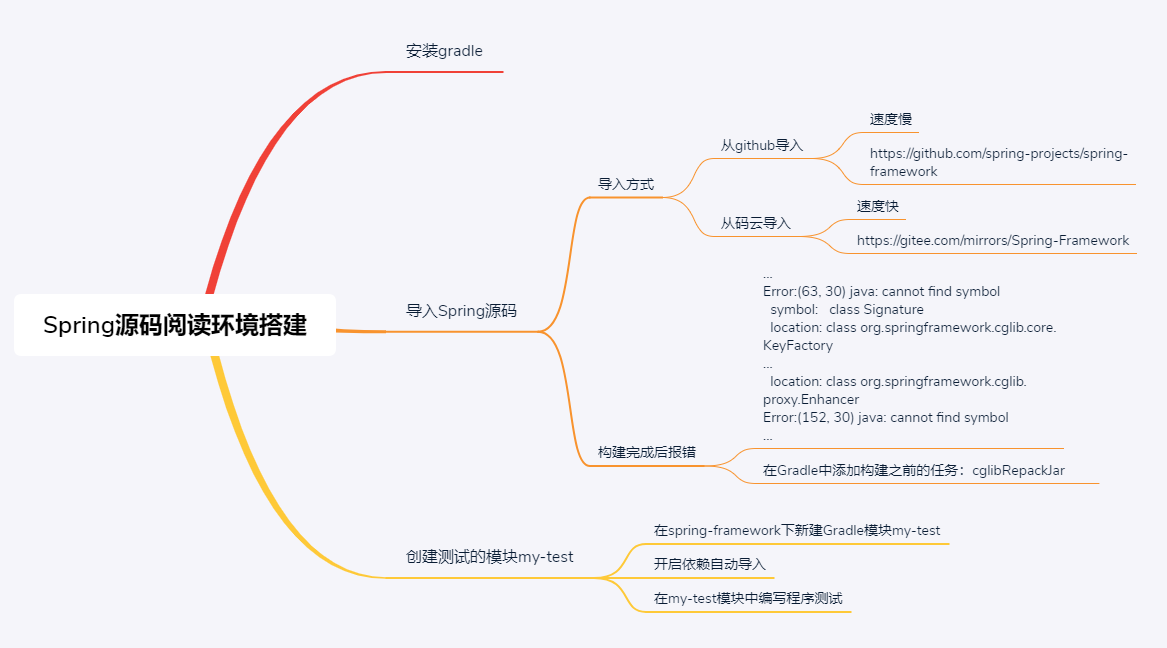
本文思维导图
Spring源码阅读环境搭建的更多相关文章
- Sping学习笔记(一)----Spring源码阅读环境的搭建
idea搭建spring源码阅读环境 安装gradle Github下载Spring源码 新建学习spring源码的项目 idea搭建spring源码阅读环境 安装gradle 在官网中下载gradl ...
- 搭建 Spring 源码阅读环境
前言 有一个Spring源码阅读环境是学习Spring的基础.笔者借鉴了网上很多搭建环境的方法,也尝试了很多,接下来总结两种个人认为比较简便实用的方法.读者可根据自己的需要自行选择. 方法一:搭建基础 ...
- Spring5源码阅读环境搭建-gradle构建编译
前沿:Spring系列生态十分丰富,涉及到各个方面.但是作为Spring生态的核心基础Spring,是最重要的环节,需要理解Spring的设计原理,我们需要解读源码. 在构建Spring源码阅 ...
- 基于Eclipse IDE的Ardupilot飞控源码阅读环境搭建
基于Eclipse IDE的Ardupilot飞控源码阅读环境搭建 作者:Awesome 日期:2017-10-21 需准备的软件工具 Ardupilot飞控源码 PX4 toolchain JAVA ...
- Hadoop源码阅读环境搭建(IDEA)
拿到一份Hadoop源码之后,经常关注的两件事情就是 1.怎么阅读?涉及IDEA和Eclipse工程搭建.IDEA搭建,选择源码,逐步导入即可:Eclipse可以选择后台生成工程,也可以选择IDE导入 ...
- Spring 源码阅读环境的搭建
前言 本文记录了 Spring 源码环境的搭建方式,以及踩过的那些坑!当前版本:5.3.2-SNAPSHOT. 环境准备 Git JDK master 分支需要 JDK 11 5.2.x 分支, J ...
- Spring源码分析_01_ idea搭建spring源码阅读环境
二.参考资料 1.Intellij Idea如何导入spring源码
- idea构建spring源码阅读环境
注:由于文章不是一次性完成,下文中的test1目录和test目录应为同一个目录. (一)安装git和Gradle Spring项目托管在github之上,基于Gradle来构建项目.所以要想搭建Spr ...
- spring-framework-4.1.x源码阅读环境搭建(导入Eclipse)
注意:搭建spring-framework-4.1.x源码 eclipse工作空间需要安装jdk8. spring-framework-4.1.x项目采用目前主流的项目管理工具gradle进行构建,至 ...
随机推荐
- Springboot项目全局异常统一处理
转自https://blog.csdn.net/hao_kkkkk/article/details/80538955 最近在做项目时需要对异常进行全局统一处理,主要是一些分类入库以及记录日志等,因为项 ...
- Java 工厂方法模式的简单示例
工厂方法模式:也叫工厂模式,属于类创建型模式,工厂父类(接口)负责定义产品对象的公共接口,而子类工厂则负责创建具体的产品对象. 目的:是为了把产品的实例化操作延迟到子类工厂中完成,通过工厂子类来决定究 ...
- 原生js实现Ajax请求,包含get和post
现在web从服务器请求数据,很多用到Ajax,不过都是用的JQuery封装好的,之前做项目,由于无法引用JQuery,所以就只能用原生了,话不多说,请看代码. /*------------------ ...
- Linux使用技巧汇总
Debian是我日常使用的桌面系统,这里记录了我在使用Debian和其他Linux时所有的问题和解决办法,以及一些其他的心得体会. 向Debian致敬! 找回桌面系统关机按钮 在/etc/polkit ...
- 如何配置IIS使其支持APK/WGT文件的下载
1.打开Internet 信息服务(IIS)管理器: 2.选择需要配置的网站: 3.右侧功能界面双击进入“MIME类型”: 4.点击右侧“添加”按钮,在弹出窗口里文件扩展名输入:apk,MIME类型输 ...
- Python 面向对象Ⅴ
基础重载方法 下表列出了一些通用的功能,你可以在自己的类重写: 运算符重载 Python同样支持运算符重载,实例如下: 以上代码执行结果如下所示: 类属性与方法 类的私有属性 __private_at ...
- k8s命令自动补全
Linux yum install -y bash-completion source /usr/share/bash-completion/bash_completion source <(k ...
- UVA 11181 Possibility Given
#include<bits/stdc++.h> #include<stdio.h> #include<iostream> #include<cmath> ...
- poj 3579 Median 二分套二分 或 二分加尺取
Median Time Limit: 1000MS Memory Limit: 65536K Total Submissions: 5118 Accepted: 1641 Descriptio ...
- R_Studio(学生成绩)数据相关性分析
对“Gary.csv”中的成绩数据进行统计量分析 用cor函数来计算相关性,method默认参数是用pearson:并且遇到缺失值,use默认参数everything,结果会是NA 相关性分析 当值r ...