
使用win2d实现萤火虫粒子效果
这几天我在做游戏的标题画面,需要实现随机飞舞的萤火虫。萤火虫会闪烁黄绿色的光,远近不同,并且飞出屏幕边界不久会自动飞回来。
我前一阵子用win2d写了个简单的游戏引擎(现在还是alpha阶段),用它可以减少代码量。
https://github.com/Nukepayload2/Nukepayload2.Graphics.N2Engine
那么,大概设计一下。
萤火虫用粒子系统实现比较方便,所以Models有两个类,一个是FireflyParticle,另一个是FireflyParticleSystem。
游戏标题画面有一个ViewModel。
萤火虫呈现类是FireflyParticleSystemView,自定义的游戏视图一个类。所以有2个Views的类
资源文件夹里面要添加xxxResourceManager,尽管这次我们不用任何图片素材。
开始代码。首先拿FireflyParticle开刀。
Public Class FireflyParticle

    Inherits Particle

    Public Property Radius As Single

    Public Property CenterColor As Color

    Public Property Opacity As Single =

    Public Property Parent As FireFlyParticleSystem

    Public Sub New(acceleration As Vector2, lifeTime As Integer, location As Vector2, velocity As Vector2, radius As Single, centerColor As Color, parent As FireFlyParticleSystem)

        MyBase.New(acceleration, lifeTime, location, velocity)

        Me.Radius = radius

        Me.Parent = parent

        Me.CenterColor = centerColor

        delta = 0.3 + 0.12 * Rndf()

    End Sub

    Dim delta!

    Public Overrides Sub Update()

        MyBase.Update()

        Opacity -= delta!

        Dim ub = Math.Max(,  - Age / LifeTime)

        If Opacity <  OrElse Opacity > ub Then

            delta = -delta

            If Opacity <  Then

                Opacity =

            ElseIf Opacity > ub Then

                Opacity = ub

            End If

        End If

        Radius -= Radius / LifeTime

        Velocity += New Vector2(Rndf() - 0.5, Rndf() - 0.5).WithLength(0.5)

        Const bound =

        Dim lx = Location.X, ly = Location.Y, vx = Velocity.X, vy = Velocity.Y

        If lx < -bound Then

            lx = -bound

            vx = -vx

        ElseIf lx - bound > Parent.Width Then

            lx = Parent.Width + bound

            vx = -vx

        End If

        If ly < -bound Then

            ly = -bound

            vy = -vy

        ElseIf ly - bound > Parent.Height Then

            ly = Parent.Height + bound

            vy = -vy

        End If

        Location = New Vector2(lx, ly)

        Velocity = New Vector2(vx, vy).WithLength(Parent.MaxSpeed)

    End Sub

End Class
FireflyParticle类实现的是单独的萤火虫的飞舞,闪烁产生的数据变动。大多数的变量名很规范,所以不多解释了。
接下来的是粒子系统。实现了自适应窗口大小的一半功能,还关联了一个呈现用的类(这里为了利用Intellisense的自动创建类代码的功能减少工作量才这样设计,粒子系统类不访问呈现类的任何成员)。
Public Class FireFlyParticleSystem

    Inherits ParticleSystem(Of FireflyParticle)

    Public Sub New(spawnInterval As Integer, initialCount As Integer, width As Integer, height As Integer, baseColor As Color)

        Me.InitialCount = initialCount

        Me.SpawnInterval = spawnInterval

        Me.Width = width

        Me.Height = height

        Me.BaseColor = baseColor

        For i =  To initialCount -

            Dim part = CreateParticle()

            part.Age = part.LifeTime - i / initialCount * part.LifeTime

            Particles.Enqueue(part)

        Next

    End Sub

    Protected Overrides Sub OnParticleRemoved()

        MyBase.OnParticleRemoved()

        Particles.Enqueue(CreateParticle())

    End Sub

    Public Overrides Property Particles As New Queue(Of FireflyParticle)

    Public Overrides ReadOnly Property Presenter As GameVisualView = New FireFlyParticleSystemView(Me)

    Public Overrides Property SpawnCount As Integer =

    Public Overrides Property SpawnDuration As Integer = Integer.MaxValue

    Public Property InitialCount As Integer

    Public Overrides Property SpawnInterval As Integer = Integer.MaxValue

    Public Property Width As Integer

    Public Property Height As Integer

    Public Property BaseColor As Color

    Public Property MaxSpeed As Double = 1.4

    Protected Overrides Function CreateParticle() As FireflyParticle

        Return New FireflyParticle(New Vector2, (SpawnInterval * (0.6 + 0.4 * Rndf())), New Vector2(Rndf() * Width, Height * Rndf()), New Vector2(Rndf() - 0.5, Rndf() - 0.5).WithLength(MaxSpeed),  + Rndf(), BaseColor, Me)

    End Function

End Class
下面是ViewModel。向AnimObjects集合绑定了上面的萤火虫粒子系统,并且通过事件更新粒子系统的宽度和高度(绑定方式略原始,我正考虑怎样改进这个过程)。
Public Class ImTheBossTitleScreenN2ViewModel

    Inherits GamePanel

    Public Sub New(SpaceSize As Size)

        MyBase.New(SpaceSize)

    End Sub

    Dim FireflySys As FireFlyParticleSystem

    Protected Overrides Sub InitializeGameVisuals()

        FireflySys = New FireFlyParticleSystem(, , SpaceSize.Width, SpaceSize.Height, Colors.YellowGreen)

        AnimObjects.Add(FireflySys)

    End Sub

    Private Sub ImTheBossTitleScreenN2ViewModel_SizeChanged(NewSize As Size) Handles Me.SizeChanged

        FireflySys.Width = NewSize.Width

        FireflySys.Height = NewSize.Height

    End Sub

End Class
View代码只发呈现萤火虫。
萤火虫的光可以用对实心圆进行扩大组织变换再进行高斯模糊模拟。
Friend Class FireFlyParticleSystemView

    Inherits TypedGameVisualPresenter(Of FireFlyParticleSystem)

    Public Sub New(Target As FireFlyParticleSystem)

        MyBase.New(Target)

    End Sub

    Public Overrides Sub OnDraw(sender As GamePanelView, DrawingSession As CanvasDrawingSession, Canvas As ICanvasResourceCreator)

        For Each fireFly In Target.Particles

            Using cl As New CanvasCommandList(DrawingSession), ds = cl.CreateDrawingSession

                Using glow As New GlowEffectGraph

                    Dim color = fireFly.CenterColor

                    color.A = CByte(fireFly.Opacity * )

                    ds.FillCircle(fireFly.Location + Target.Location, fireFly.Radius, color)

                    glow.Setup(cl, fireFly.Radius)

                    DrawingSession.DrawImage(glow.Output)

                End Using

            End Using

        Next

    End Sub

    Public Overrides Sub OnGlobalQualityChanged(Quality As GraphicQualityManager)

    End Sub

End Class

Class GlowEffectGraph

    Implements IDisposable

    Public ReadOnly Property Output() As ICanvasImage

        Get

            Return blur

        End Get

    End Property

    Private morphology As New MorphologyEffect() With {

        .Mode = MorphologyEffectMode.Dilate,

        .Width = ,

        .Height =

    }

    Private blur As New GaussianBlurEffect() With {

        .BlurAmount = ,

        .BorderMode = EffectBorderMode.Soft

    }

    Public Sub New()

        blur.Source = morphology

    End Sub

    Public Sub Setup(source As ICanvasImage, amount As Single)

        morphology.Source = source

        Dim halfAmount = Math.Min(amount / , )

        morphology.Width = CInt(Math.Truncate(Math.Ceiling(halfAmount)))

        morphology.Height = CInt(Math.Truncate(Math.Ceiling(halfAmount)))

        blur.BlurAmount = halfAmount

    End Sub

#Region "IDisposable Support"

    Private disposedValue As Boolean ' 要检测冗余调用

    ' IDisposable

    Protected Overridable Sub Dispose(disposing As Boolean)

        If Not disposedValue Then

            If disposing Then

                ' TODO: 释放托管状态(托管对象)。

                Output?.Dispose()

                morphology.Dispose()

                blur.Dispose()

            End If

            ' TODO: 释放未托管资源(未托管对象)并在以下内容中替代 Finalize()。

            ' TODO: 将大型字段设置为 null。

        End If

        disposedValue = True

    End Sub

    ' TODO: 仅当以上 Dispose(disposing As Boolean)拥有用于释放未托管资源的代码时才替代 Finalize()。

    'Protected Overrides Sub Finalize()

    '    ' 请勿更改此代码。将清理代码放入以上 Dispose(disposing As Boolean)中。

    '    Dispose(False)

    '    MyBase.Finalize()

    'End Sub

    ' Visual Basic 添加此代码以正确实现可释放模式。

    Public Sub Dispose() Implements IDisposable.Dispose

        ' 请勿更改此代码。将清理代码放入以上 Dispose(disposing As Boolean)中。

        Dispose(True)

        ' TODO: 如果在以上内容中替代了 Finalize(),则取消注释以下行。

        ' GC.SuppressFinalize(Me)

    End Sub

#End Region

End Class
这里我纠正了win2d gallery示例代码的错误:GlowEffectGraph类最好实现IDisposable,这样可以避免内存释放不及时带来应用闪退,或者产生性能问题。
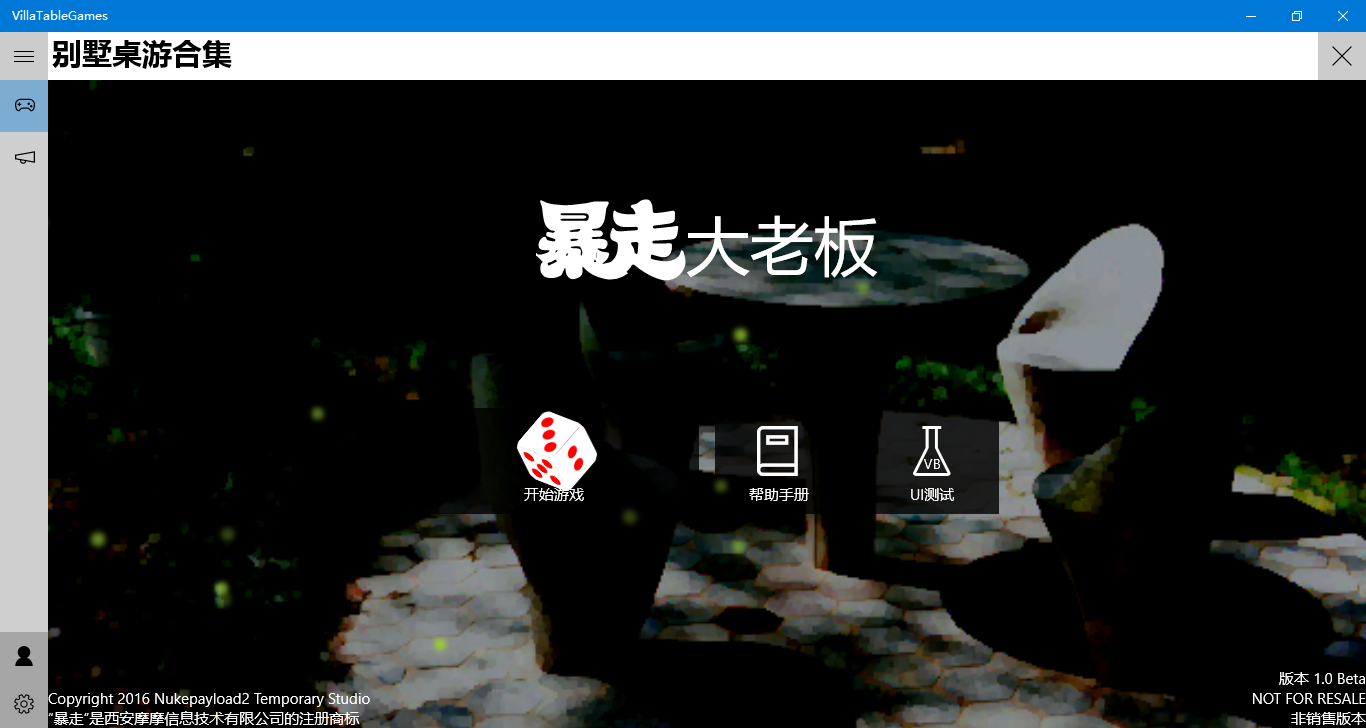
效果图(注意看那些绿色光斑):
效果视频:
http://v.youku.com/v_show/id_XMTU3MzA1ODg3Ng==.html
使用win2d实现萤火虫粒子效果的更多相关文章
- 优化win2d实现的萤火虫粒子效果
前几天我发了个技术博客,告诉大家怎样用Win2D 画萤火虫动画 . 那种绘制萤火虫的方式虽然画质高,但是性能不好,萤火虫数量超过50就可以感受到帧数下降. 我今天想到了一种牺牲画质提升性能的绘制方式, ...
- 超炫的HTML5粒子效果进度条 VS 如何规范而优雅地code
最近瞎逛的时候发现了一个超炫的粒子进度效果,有多炫呢?请擦亮眼镜! // _this.ch){ _this.particles.splice(i, 1); } }; this.Particle.p ...
- 简直要逆天!超炫的 HTML5 粒子效果进度条
我喜欢粒子效果作品,特别是那些能够应用于实际的,例如这个由 Jack Rugile 基于 HTML5 Cavnas 编写的进度条效果.看着这么炫的 Loading 效果,即使让我多等一会也无妨:)你呢 ...
- CodePen 作品秀:Canvas 粒子效果文本动画
作品名称——Shape Shifter,基于 Canvas 的粒子图形变换实验.在页面下方的输入框输入文本,上面就会进行变换出对应的粒子效果文本动画. CodePen 作品秀系列向大家展示来自 Cod ...
- iOS开发——UI进阶篇(十八)核心动画小例子,转盘(裁剪图片、自定义按钮、旋转)图片折叠、音量震动条、倒影、粒子效果
一.转盘(裁剪图片.自定义按钮.旋转) 1.裁剪图片 将一张大图片裁剪为多张 // CGImageCreateWithImageInRect:用来裁剪图片 // image:需要裁剪的图片 // re ...
- 能产生粒子效果的CAEmitterLayer
能产生粒子效果的CAEmitterLayer 下雪效果: // // RootViewController.m // Cell // // Copyright (c) 2014年 Y.X. All r ...
- cocos基础教程(8)粒子效果
简介 粒子系统是指计算机图形学中模拟特定现象的技术,它在模仿自然现象.物理现象及空间扭曲上具备得天独厚的优势,为我们实现一些真实自然而又带有随机性的特效(如爆炸.烟花.水流)提供了方便. 粒子属性 一 ...
- 用仿ActionScript的语法来编写html5——第八篇,图片处理+粒子效果
用仿ActionScript的语法来编写html5系列开发到现在,应该可以做出一些东西了,下面先来研究下图片的各种效果预览各种效果看下图效果和代码看这里,看不到效果的请下载支持html5的浏览器 ht ...
- iOS 开发之粒子效果
本文由糖炒小虾.Benna翻译 ,校对:sai.u0u0.iven.子龙山人 iOS 5中的UIKit粒子系统教程 Ray的话:这是第15篇.也是最后一篇<iOS 5 盛宴>中的iOS 5 ...
随机推荐
- WPF总结
WPF UI布局 模板总结控件可以通过ItemTemplate="{StaticResource Template}"绑定指定的模板: 数据源总结控件可以通过ItemsSource ...
- 実行時にMicrosoft.ACE.OLEDB.12.0プロバイダーはローカルコンピュータに登録されていませんが出てしまう
環境 Windows8 64bit Visual Studio 2010 Access 2010 32bit 接続プロバイダは「Microsoft.ACE.OLEDB.12.0」 対応 Downloa ...
- Two classes have the same XML type name 排错【转】
今天遇到一个问题,webservice发布的时候报下面的错误: <strong>Caused by: com.sun.xml.bind.v2.runtime.IllegalAnnotati ...
- Angular 使用
tks: 使用: http://developer.51cto.com/art/201302/380661.htm http://www.infoq.com/cn/news/2013/02/angul ...
- Spring3系列6 - Spring 表达式语言(Spring EL)
Spring3系列6-Spring 表达式语言(Spring EL) 本篇讲述了Spring Expression Language —— 即Spring3中功能丰富强大的表达式语言,简称SpEL.S ...
- Jconsole加载Jtop插件
Jconsole加载Jtop插件http://automationqa.com/forum.php?mod=viewthread&tid=3719&fromuid=2
- js实现表单序列化的两种方法。
function serialize(form) { var parts = [], elems = form.elements, i = , len = elems.length, filed = ...
- C++ Low level performance optimize 2
C++ Low level performance optimize 2 上一篇 文章讨论了一些底层代码的优化技巧,本文继续讨论一些相关的内容. 首先,上一篇文章讨论cache missing的重要性 ...
- iTunes Connect突然登录不了的原因
突然使用开发者账号登录不了iTunes Connect了,提示:Your Apple ID or password was entered incorrectly. 这是由于iTunes Connec ...
- SVN上传代码
概述 SVN上传代码 使用SVN工具上传代码到新浪SAE 1.下载SVN工具http://tortoisesvn.net/downloads.html 2.创建一个文件夹,Checkout,输入SAE ...