
模拟alert和confirm
啥也不说,先上图,有图有真相 :)
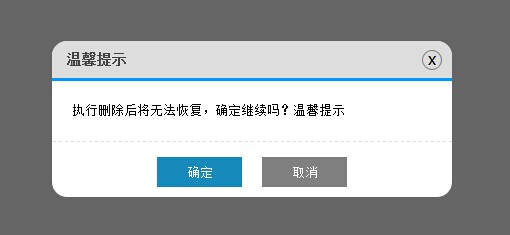

现在绝大多数网站都不用自带的alert和confirm了,因为界面太生硬了。因此这个插件就这样产生了...
来看插件的实现代码吧:

(function () {

    $.MsgBox = {

        Alert: function (title, msg) {

            GenerateHtml("alert", title, msg);

            btnOk();  //alert只是弹出消息,因此没必要用到回调函数callback

            btnNo();

        },

        Confirm: function (title, msg, callback) {

            GenerateHtml("confirm", title, msg);

            btnOk(callback);

            btnNo();

        }

    }

    //生成Html

    var GenerateHtml = function (type, title, msg) {

        var _html = "";

        _html += '<div id="mb_box"></div><div id="mb_con"><span id="mb_tit">' + title + '</span>';

        _html += '<a id="mb_ico">x</a><div id="mb_msg">' + msg + '</div><div id="mb_btnbox">';

        if (type == "alert") {

            _html += '<input id="mb_btn_ok" type="button" value="确定" />';

        }

        if (type == "confirm") {

            _html += '<input id="mb_btn_ok" type="button" value="确定" />';

            _html += '<input id="mb_btn_no" type="button" value="取消" />';

        }

        _html += '</div></div>';

        //必须先将_html添加到body,再设置Css样式

        $("body").append(_html); GenerateCss();

    }

    //生成Css

    var GenerateCss = function () {

        $("#mb_box").css({ width: '100%', height: '100%', zIndex: '99999', position: 'fixed',

            filter: 'Alpha(opacity=60)', backgroundColor: 'black', top: '0', left: '0', opacity: '0.6'

        });

        $("#mb_con").css({ zIndex: '999999', width: '400px', position: 'fixed',

            backgroundColor: 'White', borderRadius: '15px'

        });

        $("#mb_tit").css({ display: 'block', fontSize: '14px', color: '#444', padding: '10px 15px',

            backgroundColor: '#DDD', borderRadius: '15px 15px 0 0',

            borderBottom: '3px solid #009BFE', fontWeight: 'bold'

        });

        $("#mb_msg").css({ padding: '20px', lineHeight: '20px',

            borderBottom: '1px dashed #DDD', fontSize: '13px'

        });

        $("#mb_ico").css({ display: 'block', position: 'absolute', right: '10px', top: '9px',

            border: '1px solid Gray', width: '18px', height: '18px', textAlign: 'center',

            lineHeight: '16px', cursor: 'pointer', borderRadius: '12px', fontFamily: '微软雅黑'

        });

        $("#mb_btnbox").css({ margin: '15px 0 10px 0', textAlign: 'center' });

        $("#mb_btn_ok,#mb_btn_no").css({ width: '85px', height: '30px', color: 'white', border: 'none' });

        $("#mb_btn_ok").css({ backgroundColor: '#168bbb' });

        $("#mb_btn_no").css({ backgroundColor: 'gray', marginLeft: '20px' });

        //右上角关闭按钮hover样式

        $("#mb_ico").hover(function () {

            $(this).css({ backgroundColor: 'Red', color: 'White' });

        }, function () {

            $(this).css({ backgroundColor: '#DDD', color: 'black' });

        });

        var _widht = document.documentElement.clientWidth;  //屏幕宽

        var _height = document.documentElement.clientHeight; //屏幕高

        var boxWidth = $("#mb_con").width();

        var boxHeight = $("#mb_con").height();

        //让提示框居中

        $("#mb_con").css({ top: (_height - boxHeight) / 2 + "px", left: (_widht - boxWidth) / 2 + "px" });

    }

    //确定按钮事件

    var btnOk = function (callback) {

        $("#mb_btn_ok").click(function () {

            $("#mb_box,#mb_con").remove();

            if (typeof (callback) == 'function') {

                callback();

            }

        });

    }

    //取消按钮事件

    var btnNo = function () {

        $("#mb_btn_no,#mb_ico").click(function () {

            $("#mb_box,#mb_con").remove();

        });

    }

})();
Html代码结构如下,js里面拼接的不直观,给出如下:
<div id="mb_box"></div>

<div id="mb_con">

        <span id="mb_tit">title</span><a id="mb_ico">x</a>

        <div id="mb_msg">msg</div>

        <div id="mb_btnbox">

            <input id="mb_btn_ok" type="button" value="确定" />

            <input id="mb_btn_no" type="button" value="取消" />

        </div>

</div>
mb_box为半透明遮罩层,将整个页面遮住,禁止操作;mb_con为提示框。之所以没把mb_con放在mb_box里面,是因为如果放里面的话,对mb_box设置的透明度会影响到mb_con,使mb_con也会变成透明的。之前也试过 font-family: Verdana, Arial, Helvetica, sans-serif;">
为了使插件使用方便,特意的没有用到图片,全是通过css来控制界面效果,使用时,引用一个js文件就可以了。css样式在js中写死了,这点可能不太灵活,但使用却很方便如果你对界面样式不满意或者与你网站的色彩风格不一致,那只能自行修改了。
由于弹出层(div)无法做到像原始的alert和confirm那样做到页面阻塞效果,因此只能通过 回调函数 来进行模拟。也因为这个原因,后台数据操作只能通过回调函数配合ajax来完成的。
Demo如下:
<html xmlns="http://www.w3.org/1999/xhtml">

<head>

    <title>模拟alert和confirm提示框</title>

</head>

<body>

    <input id="add" type="button" value="添加" />

    <input id="delete" type="button" value="删除" />

    <input id="update" type="button" value="修改" />

    <script src="../js/jquery-1.4.1.min.js" type="text/javascript"></script>

    <script src="../js/jquery.similar.msgbox.js" type="text/javascript"></script>

    <script type="text/javascript">

        $("#add").bind("click", function () {

            $.MsgBox.Alert("消息", "哈哈,添加成功!");

        });

        //回调函数可以直接写方法function(){}

        $("#delete").bind("click", function () {

            $.MsgBox.Confirm("温馨提示", "执行删除后将无法恢复,确定继续吗?温馨提示", function () { alert("你居然真的删除了..."); });

        });

        function test() {

            alert("你点击了确定,进行了修改");

        }

        //也可以传方法名 test

        $("#update").bind("click", function () {

            $.MsgBox.Confirm("温馨提示", "确定要进行修改吗?", test);

        });

        //当然你也可以不给回调函数,点击确定后什么也不做,只是关闭弹出层
     //$("#update").bind("click", function () { $.MsgBox.Confirm("温馨提示", "确定要进行修改吗?"); });

    </script>

</body>

</html>
模拟alert和confirm的更多相关文章
- [转]jQuery插件实现模拟alert和confirm
本文转自:http://www.jb51.net/article/54577.htm (function () { $.MsgBox = { Alert: function (title, msg) ...
- 自编jQuery插件实现模拟alert和confirm
现在绝大多数网站都不用自带的alert和confirm了,因为界面太生硬了.因此这个插件就这样产生了自己定制一个的想法...... 啥也不说,先上图,有图有真相 :) 现在绝大多数网站都不用自带的al ...
- 模拟alert,confirm 阻塞状态
/*** * 模拟alert弹窗 * content 为弹框显示的内容 * 确定按钮对应的下面取消关闭显示框 * **/function oAlert(content) { var oWrap = $ ...
- JS模拟Alert与Confirm对话框
这2个例子都是用原生JS写的,主要是用JS拼接了界面,并未做过多的事件监听.,样式用了Css3的一些特性. 调用方式则为: //Alert Alert.show('我警告你哦~'); //Confir ...
- 最近总想着写一个模拟alert和confirm插件,代替原生的
msgbox-confirm github: https://github.com/tong-mikasa/msgbox-confirm 主要js代码,scss代码 (function($) { $ ...
- jquery自定义对话框alert、confirm和prompt
jQuery Alert Dialogs,又一个基于jQuery的提示框插件,主要包括Alert.Confirm.prompt这三种,还有一个高级范例,可以在提示框内嵌入HTML语言,可以自定义风格样 ...
- 利用bootstrap的modal组件自定义alert,confirm和modal对话框
由于浏览器提供的alert和confirm框体验不好,而且浏览器没有提供一个标准的以对话框的形式显示自定义HTML的弹框函数,所以很多项目都会自定义对话框组件.本篇文章介绍自己在项目中基于bootst ...
- 重构alert,confirm
最近写了一个重构的alert,confirm控件,调用时直接使用alert,confirm即可 //调用方法 alert("提示语") window.confirm('你确定要删除 ...
- Selenium2学习-040-JavaScript弹出框(alert、confirm、prompt)操作演示实例
弹出框是网页自动化测试常见得操作页面元素之一,常见的JavaScript弹出框有如下三种: 1.alert(message):方法用于显示带有一条指定消息和一个 OK 按钮的警告框.DemoAlert ...
随机推荐
- Quartz2D学习笔记
1.drawRect方法 //1.证明drawRect方法是在viewDidLoad后自动调用的,方便处理View的相关属性 // YQView * view = [[YQView alloc] in ...
- IOS开发之SVN的使用
关于SVN的一个使用细节
- Gleeo Time Tracker简明使用教程
转载一篇很不错的文章,这款软件还是非常实用的 1 简介 Gleeo Time Tracker是安卓平台下一款相当酷的项目时间记录和管理的软件.说他酷,是因为界面纯黑.而除了这点酷之外,功能也很简单实用 ...
- javascript中的 类初始化,遍历for in 以及with的用法
<script type="text/javascript"> function member(name,gender){ this.name=name; this.g ...
- 深入理解java虚拟机(7)---线程安全 & 锁优化
关于线程安全的话题,足可以使用一本书来讲解这些东西.<Java Concurrency in Practice> 就是讲解这些的,在这里 主要还是分析JVM中关于线程安全这块的内容. 1. ...
- LOJ Finding LCM(math)
1215 - Finding LCM Time Limit: 2 second(s) Memory Limit: 32 MB LCM is an abbreviation used for Least ...
- MSBI--enlarge the DW database table volume
我们在学习MSBI的时候,经常会使用官方提供的Adventureworks和AdventureworksDW示例数据库,但是官方提供的数据量有点小, 以DW为例,Factinternetsales只有 ...
- 九度OJ,题目1089:数字反转
题目描述: 12翻一下是21,34翻一下是43,12+34是46,46翻一下是64,现在又任意两个正整数,问他们两个数反转的和是否等于两个数的和的反转. 输入: 第一行一个正整数表示测试数据的个数n. ...
- 利用python爬取海量疾病名称百度搜索词条目数的爬虫实现
实验原因: 目前有一个医疗百科检索项目,该项目中对关键词进行检索后,返回的结果很多,可惜结果的排序很不好,影响用户体验.简单来说,搜索出来的所有符合疾病中,有可能是最不常见的疾病是排在第一个的,而最有 ...
- SGU 410 Galaxy in danger --贪心,想法题
题意:有n个星球,每个星球有Ai个人,每次有两种选择,第一是从每个星球上去掉1个人,第二个选择是选择一个星球放置一个科学家,将该星球的人数加倍,问最少多少次能够将所有星球上的人数同时变为0,并且如果步 ...