
一个四叉树Demo学习
程序代码:
http://www.codeproject.com/Articles/30535/A-Simple-QuadTree-Implementation-in-C
四叉树:
 using System;

 using System.Drawing;

 using System.Collections.Generic;

 using System.Diagnostics;

 namespace QuadTreeLib

 {

     /// <summary>

     /// A Quadtree is a structure designed to partition space so

     /// that it's faster to find out what is inside or outside a given

     /// area. See http://en.wikipedia.org/wiki/Quadtree

     /// This QuadTree contains items that have an area (RectangleF)

     /// it will store a reference to the item in the quad

     /// that is just big enough to hold it. Each quad has a bucket that

     /// contain multiple items.

     /// </summary>

     public class QuadTree<T> where T : IHasRect

     {

         /// <summary>

         /// The root QuadTreeNode

         /// 根节点

         /// </summary>

         QuadTreeNode<T> m_root;

         /// <summary>

         /// The bounds of this QuadTree

         /// 四叉树的包围盒,根节点的范围

         /// </summary>

         RectangleF m_rectangle;

         /// <summary>

         /// An delegate that performs an action on a QuadTreeNode

         /// </summary>

         /// <param name="obj"></param>

         public delegate void QTAction(QuadTreeNode<T> obj);

         /// <summary>

         ///

         /// </summary>

         /// <param name="rectangle"></param>

         public QuadTree(RectangleF rectangle)

         {

             m_rectangle = rectangle;

             m_root = new QuadTreeNode<T>(m_rectangle);//初始化根节点

         }

         /// <summary>

         /// Get the count of items in the QuadTree

         /// 四叉树节点的数目

         /// </summary>

         public int Count { get { return m_root.Count; } }

         /// <summary>

         /// Insert the feature into the QuadTree

         /// 插入数据项

         /// </summary>

         /// <param name="item"></param>

         public void Insert(T item)

         {

             m_root.Insert(item);//往四叉树插入数据项,其实是通过根节点插入数据项

         }

         /// <summary>

         /// Query the QuadTree, returning the items that are in the given area

         /// 查询四叉树,返回给定区域的数据项

         /// </summary>

         /// <param name="area"></param>

         /// <returns></returns>

         public List<T> Query(RectangleF area)

         {

             return m_root.Query(area);

         }

         /// <summary>

         /// Do the specified action for each item in the quadtree

         /// 执行四叉树中特定的行为

         /// </summary>

         /// <param name="action"></param>

         public void ForEach(QTAction action)

         {

             m_root.ForEach(action);

         }

     }

 }
QuadTree
四叉树节点:
 using System;

 using System.Collections.Generic;

 using System.Drawing;

 using System.Diagnostics;

 namespace QuadTreeLib

 {

     /// <summary>

     /// The QuadTreeNode

     /// 四叉树节点

     /// </summary>

     /// <typeparam name="T"></typeparam>

     public class QuadTreeNode<T> where T : IHasRect

     {

         /// <summary>

         /// Construct a quadtree node with the given bounds

         /// 根据给定的范围构建四叉树节点

         /// </summary>

         /// <param name="area"></param>

         public QuadTreeNode(RectangleF bounds)

         {

             m_bounds = bounds;

         }

         /// <summary>

         /// The area of this node

         /// </summary>

         RectangleF m_bounds;

         /// <summary>

         /// The contents of this node.

         /// Note that the contents have no limit: this is not the standard way to impement a QuadTree

         /// </summary>

         List<T> m_contents = new List<T>();

         /// <summary>

         /// The child nodes of the QuadTree

         /// 四叉树的子节点

         /// </summary>

         List<QuadTreeNode<T>> m_nodes = new List<QuadTreeNode<T>>();

         /// <summary>

         /// Is the node empty

         /// </summary>

         public bool IsEmpty { get { return m_bounds.IsEmpty || m_nodes.Count == ; } }

         /// <summary>

         /// Area of the quadtree node

         /// 四叉树节点的范围

         /// </summary>

         public RectangleF Bounds { get { return m_bounds; } }

         /// <summary>

         /// Total number of nodes in the this node and all SubNodes

         ///

         /// </summary>

         public int Count

         {

             get

             {

                 int count = ;

                 foreach (QuadTreeNode<T> node in m_nodes)

                     count += node.Count;

                 count += this.Contents.Count;

                 return count;

             }

         }

         /// <summary>

         /// Return the contents of this node and all subnodes in the true below this one.

         /// </summary>

         public List<T> SubTreeContents

         {

             get

             {

                 List<T> results = new List<T>();

                 foreach (QuadTreeNode<T> node in m_nodes)

                     results.AddRange(node.SubTreeContents);

                 results.AddRange(this.Contents);

                 return results;

             }

         }

         public List<T> Contents { get { return m_contents; } }

         /// <summary>

         /// Query the QuadTree for items that are in the given area

         /// 查询给定范围的数据项

         /// </summary>

         /// <param name="queryArea"></pasram>

         /// <returns></returns>

         public List<T> Query(RectangleF queryArea)

         {

             // create a list of the items that are found

             List<T> results = new List<T>();

             // this quad contains items that are not entirely contained by

             // it's four sub-quads. Iterate through the items in this quad

             // to see if they intersect.

             foreach (T item in this.Contents)

             {

                 if (queryArea.IntersectsWith(item.Rectangle))

                     results.Add(item);

             }

             foreach (QuadTreeNode<T> node in m_nodes)

             {

                 if (node.IsEmpty)

                     continue;

                 // Case 1: search area completely contained by sub-quad

                 // if a node completely contains the query area, go down that branch

                 // and skip the remaining nodes (break this loop)

                 if (node.Bounds.Contains(queryArea))

                 {

                     results.AddRange(node.Query(queryArea));

                     break;

                 }

                 // Case 2: Sub-quad completely contained by search area

                 // if the query area completely contains a sub-quad,

                 // just add all the contents of that quad and it's children

                 // to the result set. You need to continue the loop to test

                 // the other quads

                 if (queryArea.Contains(node.Bounds))

                 {

                     results.AddRange(node.SubTreeContents);

                     continue;

                 }

                 // Case 3: search area intersects with sub-quad

                 // traverse into this quad, continue the loop to search other

                 // quads

                 if (node.Bounds.IntersectsWith(queryArea))

                 {

                     results.AddRange(node.Query(queryArea));

                 }

             }

             return results;

         }

         /// <summary>

         /// Insert an item to this node

         /// 将数据项递归插入该四叉树节点

         /// </summary>

         /// <param name="item"></param>

         public void Insert(T item)

         {

             // if the item is not contained in this quad, there's a problem

             //数据项不在当前四叉树节点范围内,返回

             if (!m_bounds.Contains(item.Rectangle))

             {

                 Trace.TraceWarning("feature is out of the bounds of this quadtree node");

                 return;

             }

             // if the subnodes are null create them. may not be sucessfull: see below

             // we may be at the smallest allowed size in which case the subnodes will not be created

             if (m_nodes.Count == )

                 CreateSubNodes();//分割四叉树,将当前节点分为四个子节点

             // for each subnode:

             // if the node contains the item, add the item to that node and return

             // this recurses into the node that is just large enough to fit this item

             foreach (QuadTreeNode<T> node in m_nodes)

             {

                 if (node.Bounds.Contains(item.Rectangle))//四叉树在当前节点范围内,插入

                 {

                     node.Insert(item);

                     return;

                 }

             }

             // if we make it to here, either

             // 1) none of the subnodes completely contained the item. or

             // 2) we're at the smallest subnode size allowed

             // add the item to this node's contents.

             //考虑这一块,如果所有的子节点都不完全包含本数据项,或者达到了子节点的最小限制,将数据项添加到本节点

             this.Contents.Add(item);

         }

         //递归遍历本节点的子节点

         public void ForEach(QuadTree<T>.QTAction action)

         {

             action(this);

             // draw the child quads

             foreach (QuadTreeNode<T> node in this.m_nodes)

                 node.ForEach(action);

         }

         /// <summary>

         /// Internal method to create the subnodes (partitions space)

         /// 私有方法,创建子节点

         /// </summary>

         private void CreateSubNodes()

         {

             // the smallest subnode has an area

             if ((m_bounds.Height * m_bounds.Width) <= )

                 return;

             float halfWidth = (m_bounds.Width / 2f);

             float halfHeight = (m_bounds.Height / 2f);

             m_nodes.Add(new QuadTreeNode<T>(new RectangleF(m_bounds.Location, new SizeF(halfWidth, halfHeight))));

             m_nodes.Add(new QuadTreeNode<T>(new RectangleF(new PointF(m_bounds.Left, m_bounds.Top + halfHeight), new SizeF(halfWidth, halfHeight))));

             m_nodes.Add(new QuadTreeNode<T>(new RectangleF(new PointF(m_bounds.Left + halfWidth, m_bounds.Top), new SizeF(halfWidth, halfHeight))));

             m_nodes.Add(new QuadTreeNode<T>(new RectangleF(new PointF(m_bounds.Left + halfWidth, m_bounds.Top + halfHeight), new SizeF(halfWidth, halfHeight))));

         }

     }

 }
QuadTreeNode
数据项,作为T传入:
 namespace QuadTreeDemoApp

 {

     /// <summary>

     /// An item with a position, a size and a random colour to test

     /// the QuadTree structure.

     /// 数据项

     /// </summary>

     class Item: IHasRect

     {

         /// <summary>

         /// Create an item at the given location with the given size.

         /// 数据项,在给定的位置构建特定大小的数据项

         /// </summary>

         /// <param name="p"></param>

         /// <param name="size"></param>

         public Item(Point p, int size)

         {

             m_size = size;

             m_rectangle = new RectangleF(p.X, p.Y, m_size, m_size);

             m_color = Utility.RandomColor;

         }

         /// <summary>

         /// Bounds of this item

         /// 数据项的范围

         /// </summary>

         RectangleF m_rectangle;

         /// <summary>

         ///默认大小

         /// </summary>

         int m_size = ;

         /// <summary>

         /// 颜色

         /// </summary>

         Color m_color;

         /// <summary>

         /// Colour to draw the item for the QuadTree demo

         /// </summary>

         public Color Color { get { return m_color; } }

         #region IHasRect Members

         /// <summary>

         /// The rectangular bounds of this item

         /// 数据项的范围矩形

         /// </summary>

         public RectangleF Rectangle { get { return m_rectangle; } }

         #endregion

     }

 }
Item
包围盒接口:
 namespace QuadTreeLib

 {

     /// <summary>

     /// An interface that defines and object with a rectangle

     /// 接口定义了对象的包围盒

     /// </summary>

     public interface IHasRect

     {

         RectangleF Rectangle { get; }

     }

 }
IHasRect
渲染四叉树:
 using System;

 using System.Collections.Generic;

 using System.Drawing;

 using QuadTreeLib;

 namespace QuadTreeDemoApp

 {

     /// <summary>

     /// Class draws a QuadTree

     /// 绘制四叉树类

     /// </summary>

     class QuadTreeRenderer

     {

         /// <summary>

         /// Create the renderer, give the QuadTree to render.

         /// 渲染四叉树

         /// </summary>

         /// <param name="quadTree"></param>

         public QuadTreeRenderer(QuadTree<Item> quadTree)

         {

             m_quadTree = quadTree;

         }

         QuadTree<Item> m_quadTree;

         /// <summary>

         /// Hashtable contains a colour for every node in the quad tree so that they are

         /// rendered with a consistant colour.

         /// </summary>

         Dictionary<QuadTreeNode<Item>, Color> m_dictionary = new Dictionary<QuadTreeNode<Item>, Color>();

         /// <summary>

         /// Get the colour for a QuadTreeNode from the hash table or else create a new colour

         /// </summary>

         /// <param name="node"></param>

         /// <returns></returns>

         Color GetColor(QuadTreeNode<Item> node)

         {

             if (m_dictionary.ContainsKey(node))

                 return m_dictionary[node];

             Color color = Utility.RandomColor;

             m_dictionary.Add(node, color);

             return color;

         }

         /// <summary>

         /// Render the QuadTree into the given Graphics context

         /// 在给定的图形设备渲染四叉树

         /// </summary>

         /// <param name="graphics"></param>

         internal void Render(Graphics graphics)

         {

             //遍历节点触发委托方法

             m_quadTree.ForEach(delegate(QuadTreeNode<Item> node)

             {

                 // draw the contents of this quad

                 if (node.Contents != null)

                 {

                     foreach (Item item in node.Contents)

                     {

                         using (Brush b = new SolidBrush(item.Color))

                             graphics.FillEllipse(b, Rectangle.Round(item.Rectangle));

                     }

                 }

                 // draw this quad

                 // Draw the border

                 //绘制包围盒

                 Color color = GetColor(node);

                 graphics.DrawRectangle(Pens.Black, Rectangle.Round(node.Bounds));

                 // draw the inside of the border in a distinct colour

                 using (Pen p = new Pen(color))

                 {

                     Rectangle inside = Rectangle.Round(node.Bounds);

                     inside.Inflate(-, -);

                     graphics.DrawRectangle(p, inside);

                 }

             });

         }

     }

 }
QuadTreeRenderer
主窗体调用:
  public partial class MainForm : Form

     {

         QuadTree<Item> m_quadTree;

         QuadTreeRenderer m_renderer;

         public MainForm()

         {

             InitializeComponent();

         }

         private void MainForm_Load(object sender, EventArgs e)

         {

             Init();

         }

         /// <summary>

         /// Resize the window re-initializes the QuadTree to the new size

         /// </summary>

         /// <param name="sender"></param>

         /// <param name="e"></param>

         private void MainForm_Resize(object sender, EventArgs e)

         {

             Init();

         }

         /// <summary>

         /// Draw the QuadTree and the selection rectangle

         /// Also highlight the selecte items.

         /// </summary>

         /// <param name="sender"></param>

         /// <param name="e"></param>

         private void MainForm_Paint(object sender, PaintEventArgs e)

         {

             // draw the QuadTree

             m_renderer.Render(e.Graphics);

             // draw the selection rectangle

             if (!m_selectionRect.IsEmpty)

             {

                 // draw the selection rect in semi-transparent yellow

                 using (Brush b = new SolidBrush(Color.FromArgb(, Color.Yellow)))

                     e.Graphics.FillRectangle(b, Rectangle.Round(m_selectionRect));

             }

             // draw the selected items with a red ring around them

             if (m_selectedItems != null)

             {

                 foreach (Item obj in m_selectedItems)

                 {

                     Rectangle selectedRect = Rectangle.Round(obj.Rectangle);

                     selectedRect.Inflate(, );

                     using (Pen p = new Pen(Color.Red, ))

                         e.Graphics.DrawEllipse(p, selectedRect);

                 }

             }

         }

         /// <summary>

         /// Initialize the QuadTree to the size of the window.

         /// Initialize the QuadTreeRenderer

         /// </summary>

         private void Init()

         {

             m_quadTree = new QuadTree<Item>(this.ClientRectangle);//构造客户区范围大小的四叉树

             m_renderer = new QuadTreeRenderer(m_quadTree);

         }

         #region mouse interaction code

         bool m_dragging = false;

         RectangleF m_selectionRect;

         Point m_startPoint;

         List<Item> m_selectedItems;

         /// <summary>

         /// MouseUp:

         /// - if you're using the left mouse button insert a new item into

         ///   the QuadTree at the click point

         /// - if you're dragging with the right mouse button, query the

         ///   QuadTree with the selection rectangle defined by the current

         ///   point and the point when the mouseDown event happened.

         /// </summary>

         /// <param name="sender"></param>

         /// <param name="e"></param>

         private void MainForm_MouseUp(object sender, MouseEventArgs e)

         {

             if (m_dragging && e.Button== MouseButtons.Right)

             {

                 m_selectedItems = m_quadTree.Query(m_selectionRect);

                 m_dragging = false;

             }

             else

             {

                 Random rand = new Random(DateTime.Now.Millisecond);

                 m_quadTree.Insert(new Item(e.Location, rand.Next() + ));

             }

             Invalidate();

         }

         /// <summary>

         /// If the it's a right click, record the start point and start drag operation

         /// </summary>

         /// <param name="sender"></param>

         /// <param name="e"></param>

         private void MainForm_MouseDown(object sender, MouseEventArgs e)

         {

             if (e.Button == MouseButtons.Right)

             {

                 m_dragging = true;

                 m_startPoint = e.Location;

             }

         }

         /// <summary>

         /// MouseMove: if we're dragging the update the area of the selection

         /// rectangle using the start point and the current point.

         /// Invalidate causes the form to redraw.

         /// </summary>

         /// <param name="sender"></param>

         /// <param name="e"></param>

         private void MainForm_MouseMove(object sender, MouseEventArgs e)

         {

             if (m_dragging)

             {

                 m_selectionRect = RectangleF.FromLTRB(

                     Math.Min(e.Location.X, m_startPoint.X),

                     Math.Min(e.Location.Y, m_startPoint.Y),

                     Math.Max(e.Location.X, m_startPoint.X),

                     Math.Max(e.Location.Y, m_startPoint.Y));

                 Invalidate();

             }

         }

         #endregion

     }
MainForm
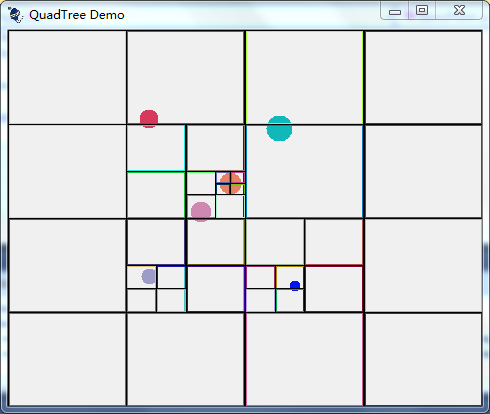
运行结果:
一个四叉树Demo学习的更多相关文章
- [转]一个四叉树Demo学习
程序代码: http://www.codeproject.com/Articles/30535/A-Simple-QuadTree-Implementation-in-C 四叉树: using Sys ...
- Go学习【02】:理解Gin,搭一个web demo
Go Gin 框架 说Gin是一个框架,不如说Gin是一个类库或者工具库,其包含了可以组成框架的组件.这样会更好理解一点. 举个 下面的示例代码在这:github 利用Gin组成最基本的框架.说到框架 ...
- 《IT蓝豹》吹雪花demo,学习android传感器
吹雪花demo,学习android传感器 吹雪花demo,学习android传感器,嘴巴对着手机底部吹一下就会出现飘着雪花效果. 算是学习android传感器效果.本例子主要是通过android.me ...
- [Unity3D]做个小Demo学习Input.touches
[Unity3D]做个小Demo学习Input.touches 学不如做,下面用一个简单的Demo展示的Input.touches各项字段,有图有真相. 本项目已发布到Github,地址在(https ...
- java线程间通信:一个小Demo完全搞懂
版权声明:本文出自汪磊的博客,转载请务必注明出处. Java线程系列文章只是自己知识的总结梳理,都是最基础的玩意,已经掌握熟练的可以绕过. 一.从一个小Demo说起 上篇我们聊到了Java多线程的同步 ...
- 写一个TODO App学习Flutter本地存储工具Moor
写一个TODO App学习Flutter本地存储工具Moor Flutter的数据库存储, 官方文档: https://flutter.dev/docs/cookbook/persistence/sq ...
- 推荐一个算法编程学习中文社区-51NOD【算法分级,支持多语言,可在线编译】
最近偶尔发现一个算法编程学习的论坛,刚开始有点好奇,也只是注册了一下.最近有时间好好研究了一下,的确非常赞,所以推荐给大家.功能和介绍看下面介绍吧.首页的标题很给劲,很纯粹的Coding社区....虽 ...
- LeadTools Android 入门教学——运行第一个Android Demo
LeadTools 有很多Windows平台下的Demo,非常全面,但是目前开发手机应用的趋势也越来越明显,LeadTools也给大家提供了10个Android的Demo,这篇文章将会教你如何运行第一 ...
- ArcGIS API for JavaScript开发环境搭建及第一个实例demo
原文:ArcGIS API for JavaScript开发环境搭建及第一个实例demo ESRI公司截止到目前已经发布了最新的ArcGIS Server for JavaScript API v3. ...
随机推荐
- GridView 下拉搜索
/** * 下拉筛选 * @column string 字段 * @value mix 字段对应的值,不指定则返回字段数组 * @return mix 返回某个值或者数组 */ public stat ...
- ZOJ 2974 矩阵快速幂
题意 给出n个杯子与初始其中有多少水 “同时”进行如下指令 将其中的水同时分入所指定的杯子 进行x次后 输出杯子剩余水量 队友想出应该是一道快速幂 但并不是过去的用初始杯子的水组成的矩阵乘某个矩阵 可 ...
- AC之路开始了~
已经进行了半年ACM的学习啦~虽然实力很弱但是仍然快快乐乐的慢慢学习... 新建了我的博客~ 记录A题经验 感悟学习点滴~ 加油~
- 在 MySQL 中查找含有目标字段的表
要查询数据库中哪些表含有目标字段,可以使用语句: SELECT TABLE_SCHEMA,TABLE_NAME FROM information_schema.`COLUMNS` WHERE COLU ...
- Cent OS 6.6 下安装mysql(5.5.20)和 PHP(5.3.10)
0.准备步骤(没有连接网络的 linux): 挂载光盘.让网络 yum 源失效.修改光盘 yum 文件.安装 c 语言编译器 gcc. 1.MySQL(5.5.20) 下载 mysql 5.5.20 ...
- Linux文件管理命令
cd /home 进入 '/ home' 目录' cd .. 返回上一级目录 cd ../.. 返回上两级目录 cd 进入个人的主目录 cd ~user1 进入个人的主目录 cd - 返回上次所在的目 ...
- 各大网站CSS代码初始化集合
css代码之所以初始化,是因为能尽量减少 各浏览器之间的兼容性问题! 腾讯QQ官网 样式初始化 body,ol,ul,h1,h2,h3,h4,h5,h6,p,th,td,dl,dd,form,fiel ...
- Ubuntu常用200条命令
查看软件xxx安装内容:dpkg -L xxx 查找软件库中的软件:apt-cache search 正则表达式 查找软件库中的软件:aptitude search 软件包 查找文件属于哪个包: ...
- Freemarker的第二次使用~list的元素是数组
在上次初次使用Freemarker作为模版后,我再次使用它.这次的需求是: xml文档的某个节点的属性A和其一个子节点的某个属性B有关联,属性B的值需要随着属性A的值变化.而属性A的值有4个值,现在需 ...
- MyBatis3资料网址
官网: http://mybatis.github.io/mybatis-3/zh/index.html 资料: http://www.open-open.com/doc/list/112?o=d 整 ...