
解析iOS开发中的FirstResponder第一响应对象
1. UIResonder
对于C#里所有的控件(例如TextBox),都继承于Control类。而Control类的继承关系如
下:
代码如下:
System.Object

  System.MarshalByRefObject

    System.ComponentModel.Component

      System.Windows.Forms.Control
对于iOS里的UI类,也有类似的继承关系。
例如对于UITextField,继承于UIControl;UIControl继承于UIView,UIView继承于UIRe
sponder,UIResponder继承于NSObject。
具体架构可以参见:
http://developer.apple.com/library/ios/#documentation/general/conceptual/Devp
edia-CocoaApp/Responder.html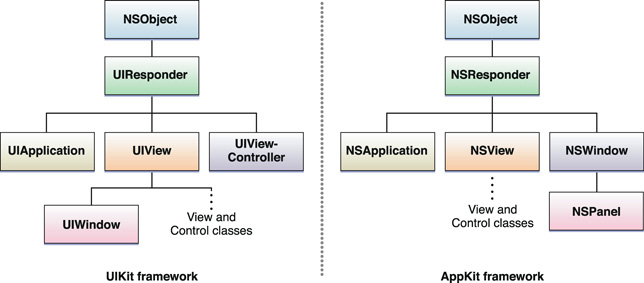
UIResponder是UIKit框架中的类(Mac OS X Cocoa对应的是AppKit框架)。
2. 第一响应对象
在应用的响应对象里,会有一个成为第一响应对象。
第一响应对象和其他响应对象之间有什么区别?对于普通的触摸事件没什么区别。就算
我把一个按钮设置成第一响应对象,当我点击其他按钮时,还是会响应其他按钮,而不
会优先响应第一响应对象。
第一响应对象的区别在于负责处理那些和屏幕位置无关的事件,例如摇动。
苹果官方文档的说法是:第一响应对象是窗口中,应用程序认为最适合处理事件的对象
。
一个班只能有一个班长,应用的响应对象中,只能有一个响应对象成为第一响应对象。
3. 成为与取消第一响应对象。
要当第一响应对象,还需要有View来毛遂自荐:
- (BOOL) canBecomeFirstResponder

{

    returnYES;

}
如果缺少了这段,就算用[view becomeFirstResponder]也不能让一个view成为第一响应
对象。。。强扭的瓜不甜?好吧不是这个原因。大多数视图默认只关心与自己有关联的
事件,并且(几乎)总是有机会来处理这些事件。以UIButton为例,当用户单击某个UIB
utton对象时,无论当前的第一响应对象是哪个视图,该对象都会收到指定的动作消息。
当上第一响应对象吃力不讨好么。。。所以只能由某个UIResponder明确表示自己愿意成
为第一响应对象才行。(我不知道设计上是基于什么考虑。。。安全?)
在当上第一响应对象时,不同对象可能会有一些特殊的表现。例如UITextField当上的时
候,就会调出一块小键盘。
第一响应对象也有可能被辞退。发送一个resignFirstResponder,就可以劝退。
4. 第一响应对象的任务
刚才说了第一响应对象可以处理摇动。就来看个范例吧:
代码如下:
- (void) motionBegan:(UIEventSubtype)motion withEvent:(UIEvent *)event

{

    if(motion == UIEventSubtypeMotionShake)

    {

        NSLog(@"Device is beginning to shake");

        [selfsetCircleColor:[UIColorredColor]];

        [selfsetNeedsDisplay];

    }

}
当摇动开始时触发某些行为。
5. 获取当前第一响应对象
源自这篇讨论:http://stackoverflow.com/questions/1823317/get-the-current-firs
t-responder-without-using-a-private-api
提问的家伙用了如下的方式来获取
UIView   *firstResponder = [keyWindow

performSelector:@selector(firstResponder)];
结果被苹果打回来,说用了非公开的API。。。
于是这家伙只好苦逼地用递归了:
implementationUIView (FindFirstResponder)

- (UIView *)findFirstResponder

{

    if (self.isFirstResponder) {

        return self;

    }

    for (UIView *subView in self.subviews) {

        UIView *firstResponder = [subView findFirstResponder];

        if (firstResponder != nil) {

            return firstResponder;

        }

    }

    return nil;

}

@end
6.View的FirstResponder的释放问题
今天遇到一个问题,当我隐藏掉一个正在接受用户输入的UITextField的时候,键盘并不会消失,而且键盘仍然接受用户输入,再次显示该TextField时候发现在隐藏状态下,所有的输入仍然传输到了该TextField中,于是查下官方资料找到如下解释:
Important If you hide a view that is currently the first responder, the view does not automatically resign its first responder status. Events targeted at the first responder are still delivered to the hidden view. To prevent this from happening, you should force your view to resign the first responder status when you hide it.
意思是如果这个View是当前的第一响应者的时候,隐藏该View并不会自动放弃其第一响应者的身份,而且会继续以第一响应者的身份接受消息。我们可以通过在隐藏View之前,手动调用resignFirstResponder来强制该view放弃第一响应者身份。
下面请看小例子:
SvTestFirstResponder.h

//

//  SvTestFirstResponder.h

//

//  Created by maple on 3/15/12.

//  Copyright (c) 2012 SmileEvday. All rights reserved.

//

//  当一个view时当前响应者时,调用其hidden方法并不会自动放弃第一响应者身份,所有的消息仍然会发送到这个view

//  可以通过在hidden前强制放弃第一响应者,恢复正常的消息传递

//

#import <UIKit/UIKit.h>

@interface SvTestFirstResponder : UIView {

    UITextField *_inputField;

}

@end
SvTestFirstResponder.m

//

//  SvTestFirstResponder.m

//

//  Created by maple on 3/15/12.

//  Copyright (c) 2012 SmileEvday. All rights reserved.

//

#import "SvTestFirstResponder.h"

@interface SvTestFirstResponder()

- (void)hiddenInputView:(id)sender;

- (void)showInputView:(id)sender;

@end

@implementation SvTestFirstResponder

- (id)initWithFrame:(CGRect)frame

{

    self = [super initWithFrame:frame];

    if (self) {

        // Initialization code

        _inputField = [[UITextField alloc] initWithFrame:CGRectMake(, , , )];

        _inputField.center = CGPointMake(, );

        [_inputField setFont:[UIFont systemFontOfSize:]];

        _inputField.text = @"input you text";

        _inputField.clearsOnBeginEditing = YES;

        _inputField.contentVerticalAlignment = UIControlContentVerticalAlignmentCenter;

        _inputField.borderStyle = UITextBorderStyleRoundedRect;

        [self addSubview:_inputField];

        _inputField.autoresizingMask = UIViewAutoresizingFlexibleLeftMargin | UIViewAutoresizingFlexibleRightMargin;

        UIButton *hiddenBtn = [UIButton buttonWithType:UIButtonTypeRoundedRect];

        hiddenBtn.frame = CGRectMake(, , , );

        hiddenBtn.center = CGPointMake(, );

        [hiddenBtn setTitle:@"Hide TextField" forState:UIControlStateNormal];

        [hiddenBtn addTarget:self action:@selector(hiddenInputView:) forControlEvents:UIControlEventTouchUpInside];

        [self addSubview:hiddenBtn];

        hiddenBtn.autoresizingMask = UIViewAutoresizingFlexibleRightMargin;

        hiddenBtn.titleLabel.lineBreakMode = UILineBreakModeTailTruncation;

        UIButton *showBtn = [UIButton buttonWithType:UIButtonTypeRoundedRect];

        showBtn.frame = CGRectMake(, , , );

        showBtn.center = CGPointMake(, );

        [showBtn setTitle:@"Show TextField" forState:UIControlStateNormal];

        [showBtn addTarget:self action:@selector(showInputView:) forControlEvents:UIControlEventTouchUpInside];

        [self addSubview:showBtn];

        showBtn.autoresizingMask = UIViewAutoresizingFlexibleLeftMargin;

        showBtn.titleLabel.lineBreakMode = UILineBreakModeTailTruncation;

    }

    return self;

}

/*

// Only override drawRect: if you perform custom drawing.

// An empty implementation adversely affects performance during animation.

- (void)drawRect:(CGRect)rect

{

    // Drawing code

}

*/

- (void)hiddenInputView:(id)sender

{

    _inputField.hidden = YES;

}

- (void)showInputView:(id)sender

{

    _inputField.hidden = NO;

}

@end
这个简单的例子中,当输入框进入接受用户输入状态的时候,点击hide按钮,键盘并不会消失而且会继续接收用户输入并且将用户输入传到TextField中去,后面再点击Show按钮的时候你会发现所有在隐藏状态下输入的文字都已经成功的被接收。我们可以修改hide方法如下:
- (void)hiddenInputView:(id)sender

{

    if (_inputField.isFirstResponder) {

        [_inputField resignFirstResponder];

    }

    _inputField.hidden = YES;

}
这样就可以在隐藏之前强制释放第一响应者身份,这个问题比较细节,但有时候可能就是这种细节问题导致一些莫名奇妙的问题,在隐藏一些可能成为第一响应者的view之前添加强制释放第一响应者身份,可能会帮我们避免一些奇怪的问题,而且也几乎不会有什么开销,何乐而不为呢。
原文链接:解析iOS开发中的FirstResponder第一响应对象
自己写的一个小例子,给UITableView添加扩展,监听cell的键盘响应事件,对应修改偏移量
.h代码如下
#import <UIKit/UIKit.h>

@interface UITableView (Keyboard)

/**

 *  添加tableview的cell的键盘监听事件,修改对应cell的偏移量

 */

- (void)addResponserKeyboardNotification;

@end
.m代码如下
#import "UITableView+Keyboard.h"

/**

 *  保存当前的偏移y值,便于在键盘隐藏时恢复修改前的偏移量

 */

static CGFloat currY = .f;

@implementation UITableView (Keyboard)

- (void)addResponserKeyboardNotification{

    currY = .f;

    [[NSNotificationCenter defaultCenter] addObserver:self selector:@selector(keyboardWillShow:) name:UIKeyboardWillShowNotification object:nil];

    [[NSNotificationCenter defaultCenter] addObserver:self selector:@selector(keyboardWillHide:) name:UIKeyboardWillHideNotification object:nil];

}

- (void)keyboardWillShow:(NSNotification*)noti{

    //    NSLog(@"----%@\n%@",noti.userInfo,noti.object);

    for (UITableViewCell *infoCell in self.visibleCells) {

        if ([infoCell isKindOfClass:[UITableViewCell class]]) {

            UIView *resView = [self findFirstResponder:infoCell];

            CGRect tvToView = [resView convertRect:resView.frame toView:self];

            CGRect keyboardFrame = [noti.userInfo[UIKeyboardFrameEndUserInfoKey] CGRectValue];

//            NSLog(@"\n--tv:%@\n--kb:%@",NSStringFromCGRect(tvToView),NSStringFromCGRect(keyboardFrame));

            if (CGRectGetMaxY(tvToView) +  >= keyboardFrame.origin.y) {

                currY = self.contentOffset.y;

                CGFloat nowY = currY;

                nowY += CGRectGetMaxY(tvToView) +  - keyboardFrame.origin.y;

                self.contentOffset = CGPointMake(, nowY);

            }

            //                [self showMask];

        }

    }

}

/**

 *  递归找到当前键盘的响应者

 */

- (UIView *)findFirstResponder:(UIView *)superView

{

    if (superView.isFirstResponder) {

        return superView;

    }

    for (UIView *subView in superView.subviews) {

        UIView *firstResponder = [self findFirstResponder:subView];

        if (firstResponder != nil) {

            return firstResponder;

        }

    }

    return nil;

}

/**

 *  恢复键盘出现前的偏移y值

 */

- (void)keyboardWillHide:(NSNotification*)noti{

    self.contentOffset = CGPointMake(, currY);

}

@end
您可能感兴趣的文章:
解析iOS开发中的FirstResponder第一响应对象的更多相关文章
- 【Swift】ios开发中巧用 description 打印对象时,打印对象的属性
ios开发中我们打印对象的时候,会直接输出对象地址,这样不方便我们开发.我们可以 巧用 description 打印对象时,输出对象的属性 在oc中直接重写即可.swift中需要遵守Printable ...
- iOS开发中didSelectRowAtIndexPath tap事件响应延迟
为UITableViewCell添加tapped事件,代码如下: class VideoViewController: UIViewController , UITableViewDataSource ...
- iOS开发中的Html解析方法
iOS开发中的Html解析方法 本文作者为大家介绍了在iOS开发中的Html解析方法,并同时提供了Demo代码的下载链接,Demo 解析了某个网站(具体可在代码中查看)的html网页,提取了图片以及标 ...
- iOS开发中的单元测试(三)——URLManager中的测试用例解析
本文转载至 http://www.cocoachina.com/cms/plus/view.php?aid=8088 此前,我们在<iOS开发中的单元测试(一)&(二)>中介绍 ...
- ios开发中的小技巧
在这里总结一些iOS开发中的小技巧,能大大方便我们的开发,持续更新. UITableView的Group样式下顶部空白处理 //分组列表头部空白处理 UIView *view = [[UIViewal ...
- iOS开发中遇到的一些问题及解决方案【转载】
iOS开发中遇到的一些问题及解决方案[转载] 2015-12-29 [385][scrollView不接受点击事件,是因为事件传递失败] // // MyScrollView.m // Creat ...
- IOS开发中UI编写方式——code vs. xib vs.StoryBoard
最近接触了几个刚入门的iOS学习者,他们之中存在一个普遍和困惑和疑问,就是应该如何制作UI界面.iOS应用是非常重视用户体验的,可以说绝大多数的应用成功与否与交互设计以及UI是否漂亮易用有着非常大的关 ...
- iOS开发中的4种数据持久化方式【二、数据库 SQLite3、Core Data 的运用】
在上文,我们介绍了ios开发中的其中2种数据持久化方式:属性列表.归档解档.本节将继续介绍另外2种iOS持久化数据的方法:数据库 SQLite3.Core Data 的运 ...
- 在这里总结一些iOS开发中的小技巧,能大大方便我们的开发,持续更新。
UITableView的Group样式下顶部空白处理 //分组列表头部空白处理 UIView *view = [[UIView alloc] initWithFrame:CGRectMake(0, 0 ...
随机推荐
- 对抗静态分析——运行时修复dex
对抗静态分析——运行时修复dex 本文来源:i春秋社区-分享你的技术,为安全加点温度 零.写在前面 这个系列本来题目想写对抗反编译,可是想想对抗反编译的这个范围有点大,总结如下 灵魂作图 ...
- 文件快速搜索工具-Everything的使用(转)
首先它是一款基于名称实时定位文件和目录的搜索工具,有以下几个优点: 快速文件索引 快速文件搜索 较低资源占用 轻松分享文件索引 实时跟踪文件更新 通过使用everything小工具,可以提高我们的工作 ...
- 解析XML的几种方法之SAX解析
假期总结不能停,坚持坚持....接下来总结一下XMl和json的解析和生成.. 解析XML的四种方法,即:DOM.SAX.JDOM和DOM4J 下面首先给出这四种方法的jar包下载地址: DOM:在现 ...
- JAVA基础学习day20--IO流二-缓冲流、字节流
一.缓冲流 1.1.字符流的缓冲区 缓冲区的出现是为了提高IO的读写效率 对应类 BufferedReader BufferedWriter 缓冲区要结合流才可以使用 在流的基础上对流的功能进行了增强 ...
- iOS开发之网络编程--使用NSURLConnection实现大文件断点续传下载+使用输出流代替文件句柄
前言:本篇讲解,在前篇iOS开发之网络编程--使用NSURLConnection实现大文件断点续传下载的基础上,使用输出流代替文件句柄实现大文件断点续传. 在实际开发中,输入输出流用的比较少,但 ...
- json深度详解及org.json库
了解json (Javascript Object Notation) 网站:http://json.org/ english JSON (JavaScript Object Notation) i ...
- Android分辨率适配心得
关于Android分辨率适配,这个是Android开发很头疼的一个问题,也需要花费相当一部分开发时间处理的一个问题,往往一个界面怎么适配就得想半天,特别是新手,也经常有人问我是怎么适配分辨率的,我也不 ...
- linux 查看系统版本
博客分类: linux LinuxRedHatDebianSuSE 几种查看linux版本信息的方法: uname -a cat /proc/version cat /etc/issue lsb_r ...
- XMLHttpRequest的跨域请求
缘起 由于浏览器的同源策略,非同源不可请求. 但是,在实践当中,经常会出现需要跨域请求资源的情况,比较典型的例如某个子域名向负责进行用户验证的子域名请求用户信息等应用. 以前要实现跨域访问,可以通过J ...
- nyoj 203 三国志 dijkstra+01背包
题目链接:http://acm.nyist.net/JudgeOnline/problem.php?pid=203 思路:先求点0到每个点的最短距离,dijkstra算法,然后就是01背包了 我奇怪的 ...