
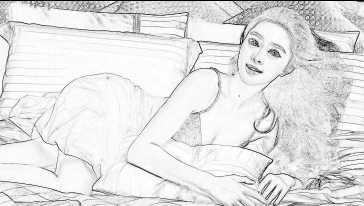
iOS实现图像素描效果
使用GPUImageSketchFilter对象实现图像素描效果
NSString *const kGPUImageSketchFragmentShaderString = SHADER_STRING

(

 precision mediump float;

 varying vec2 textureCoordinate;

 varying vec2 leftTextureCoordinate;

 varying vec2 rightTextureCoordinate;

 varying vec2 topTextureCoordinate;

 varying vec2 topLeftTextureCoordinate;

 varying vec2 topRightTextureCoordinate;

 varying vec2 bottomTextureCoordinate;

 varying vec2 bottomLeftTextureCoordinate;

 varying vec2 bottomRightTextureCoordinate;

 uniform float edgeStrength;

 uniform sampler2D inputImageTexture;

 void main()

 {

     float bottomLeftIntensity = texture2D(inputImageTexture, bottomLeftTextureCoordinate).r;

     float topRightIntensity = texture2D(inputImageTexture, topRightTextureCoordinate).r;

     float topLeftIntensity = texture2D(inputImageTexture, topLeftTextureCoordinate).r;

     float bottomRightIntensity = texture2D(inputImageTexture, bottomRightTextureCoordinate).r;

     float leftIntensity = texture2D(inputImageTexture, leftTextureCoordinate).r;

     float rightIntensity = texture2D(inputImageTexture, rightTextureCoordinate).r;

     float bottomIntensity = texture2D(inputImageTexture, bottomTextureCoordinate).r;

     float topIntensity = texture2D(inputImageTexture, topTextureCoordinate).r;

     float h = -topLeftIntensity - 2.0 * topIntensity - topRightIntensity + bottomLeftIntensity + 2.0 * bottomIntensity + bottomRightIntensity;

     float v = -bottomLeftIntensity - 2.0 * leftIntensity - topLeftIntensity + bottomRightIntensity + 2.0 * rightIntensity + topRightIntensity;

     float mag = 1.0 - (length(vec2(h, v)) * edgeStrength);

     gl_FragColor = vec4(vec3(mag), 1.0);

 }

);
+ (UIImage *)applySketchFilter:(UIImage *)image

{

    GPUImageSketchFilter *filter = [[GPUImageSketchFilter alloc] init];

    [filter forceProcessingAtSize:image.size];

    GPUImagePicture *pic = [[GPUImagePicture alloc] initWithImage:image];

    [pic addTarget:filter];

    [pic processImage];

    [filter useNextFrameForImageCapture];

    return [filter imageFromCurrentFramebuffer];

}

iOS实现图像素描效果的更多相关文章
- iOS实现图像的反色,怀旧,色彩直方图效果
反色是与原色叠加可以变为白色的颜色,即用白色(RGB:1.0,1.0,1.0)减去原色的颜色.比如说红色(RGB:1.0,0,0)的反色是青色(0,1.0,1.0).在OPENGL ES中为1. 通过 ...
- TNN iOS非图像模型入门
注:本文同步发布于微信公众号:stringwu的互联网杂谈TNN iOS 非图像模型入门指南 1 背景 TNN是腾讯优图实验室开源的高性能.轻量级神经网络推理框架TNN,github上也有比较详细的例 ...
- C# 利用AForge.NET开源类库实现 图像素描效果
引入DLL: using AForge.Imaging; using AForge.Imaging.Filters; //using AForge.Video.DirectShow;可以使用摄像头图像 ...
- iOS实现图像指定区域模糊
在大多图像处理中,我们会应用到高斯模糊处理图像,通常用它来减少图像噪声以及降低细节层次.在此文中介绍了高斯模糊的实现和可选区域的模糊[美图秀秀-背景虚化] 高斯模糊的原理中,它是根据高斯曲线调节像素色 ...
- iOS:UIImageView图像视图控件
UIImageView:图像视图控件: 它是UIView的子类,因此也是视图控件,可以用来显示图像.因为它具有帧动画属性和操作方法,因此可以用来制作动画,其实动画就是很短的时间内,执行显示连续的 ...
- iOS:图像选取器控制器控件UIImagePickerController的详解
图像选择控制器:UIImagePickerController 功能:用于选取相册或相机等里面的照片. @interface UIImagePickerController : UINavigatio ...
- iOS 图形图像动画 Core Animation
//Core Animation #define WeakSelf __weak __typeof(self) weakSelf = self #define StrongSelf __strong ...
- IOS的UITextField,UIButton,UIWebView它描述的一些属性和IOS提示图像资源
有时UI要开发的资源与实际frame不符.这一次,我们要绘制图片 UIImage* image = [[UIImage imageNamed:@"text_field_bg.png" ...
- iOS常用第三方开源框架和优秀开发者博客等
博客收藏iOS开发过程好的开源框架.开源项目.Xcode工具插件.Mac软件.文章等,会不断更新维护,希望对你们有帮助.如果有推荐或者建议,请到此处提交推荐或者联系我. 该文档已提交GitHub,点击 ...
随机推荐
- 隐藏nginx 版本号信息
为了安全,想将http请求响应头里的nginx版本号信息隐藏掉: 1. nginx配置文件里增加 server_tokens off; server_tokens作用域是http server loc ...
- Asp.net MVC应用在IIS7上部署后403错误解决方案
1.检查服务器上是否安装了“HTTP重定向”功能和“静态内容压缩”功能(在添加/删除程序或增加角色处安装) 2.应用程序池要被配置为“集成” 3.如果IIS在.Net Framework之后安装的,需 ...
- 源代码安装 MySQL 5.6.28
本文内容 创建 MySQL 用户和组 解压 MySQL 源代码包 生成配置安装文件 编译和安装 MySQL 配置文件 创建 MySQL 授权表 MySQL 目录授权 启动 MySQL 验证 MySQL ...
- Xcode7 使用NSURLSession发送HTTP请求的问题
报错信息: Application Transport Security has blocked a cleartext HTTP (http://) resource load since it i ...
- Swift中的Void类型与空元祖表达式
可能有不少Swift开发者会忽略这么一个细节:在Swift中,Void类型其实是一个别名类型,而其真正的类型为(),即一个空元祖(empty tuple)! 这种语言特性给Swift带来了一些比较方便 ...
- Linux环境的PHP执行
/usr/local/php5/bin/php -c /var/spool/php.ini -q /var/spool/auto.php
- Java对象创建阶段的代码调用顺序
在创建阶段系统通过下面的几个步骤来完成对象的创建过程 为对象分配存储空间 开始构造对象 从超类到子类对static成员进行初始化 超类成员变量按顺序初始化,递归调用超类的构造方法 子类成员变量按顺序初 ...
- CSS3绘制旋转的太极图案(一)
实现步骤: 基础HTML: <div class="box-taiji"> <div class="circle-01">< ...
- 全渠道后端 : RFID在仓储物流中的运用
核心提示 沃尔玛的业务之所以能够迅速增长,并且成为现在非常著名的公司之一,是因为沃尔玛在节省成本以及在物流配送系统与供应链管理方面取得了巨大的成就. 最后为一个业务展望,从B端工厂提货 到C端交付的系 ...
- 提高Java代码质量:使用枚举定义常量(转)
一.分析 常量的声明是每一个项目中不可或缺的,在Java1.5之前,我们只有两种方式的声明:类常量和接口常量.不过,在1.5版之后有了改进,即新增了一种常量声明方式,枚举常量.代码如下: enum ...