
iOS实现图像素描效果
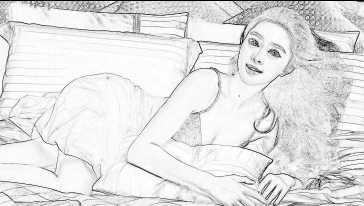
使用GPUImageSketchFilter对象实现图像素描效果
NSString *const kGPUImageSketchFragmentShaderString = SHADER_STRING

(

 precision mediump float;

 varying vec2 textureCoordinate;

 varying vec2 leftTextureCoordinate;

 varying vec2 rightTextureCoordinate;

 varying vec2 topTextureCoordinate;

 varying vec2 topLeftTextureCoordinate;

 varying vec2 topRightTextureCoordinate;

 varying vec2 bottomTextureCoordinate;

 varying vec2 bottomLeftTextureCoordinate;

 varying vec2 bottomRightTextureCoordinate;

 uniform float edgeStrength;

 uniform sampler2D inputImageTexture;

 void main()

 {

     float bottomLeftIntensity = texture2D(inputImageTexture, bottomLeftTextureCoordinate).r;

     float topRightIntensity = texture2D(inputImageTexture, topRightTextureCoordinate).r;

     float topLeftIntensity = texture2D(inputImageTexture, topLeftTextureCoordinate).r;

     float bottomRightIntensity = texture2D(inputImageTexture, bottomRightTextureCoordinate).r;

     float leftIntensity = texture2D(inputImageTexture, leftTextureCoordinate).r;

     float rightIntensity = texture2D(inputImageTexture, rightTextureCoordinate).r;

     float bottomIntensity = texture2D(inputImageTexture, bottomTextureCoordinate).r;

     float topIntensity = texture2D(inputImageTexture, topTextureCoordinate).r;

     float h = -topLeftIntensity - 2.0 * topIntensity - topRightIntensity + bottomLeftIntensity + 2.0 * bottomIntensity + bottomRightIntensity;

     float v = -bottomLeftIntensity - 2.0 * leftIntensity - topLeftIntensity + bottomRightIntensity + 2.0 * rightIntensity + topRightIntensity;

     float mag = 1.0 - (length(vec2(h, v)) * edgeStrength);

     gl_FragColor = vec4(vec3(mag), 1.0);

 }

);
+ (UIImage *)applySketchFilter:(UIImage *)image

{

    GPUImageSketchFilter *filter = [[GPUImageSketchFilter alloc] init];

    [filter forceProcessingAtSize:image.size];

    GPUImagePicture *pic = [[GPUImagePicture alloc] initWithImage:image];

    [pic addTarget:filter];

    [pic processImage];

    [filter useNextFrameForImageCapture];

    return [filter imageFromCurrentFramebuffer];

}

iOS实现图像素描效果的更多相关文章
- iOS实现图像的反色,怀旧,色彩直方图效果
反色是与原色叠加可以变为白色的颜色,即用白色(RGB:1.0,1.0,1.0)减去原色的颜色.比如说红色(RGB:1.0,0,0)的反色是青色(0,1.0,1.0).在OPENGL ES中为1. 通过 ...
- TNN iOS非图像模型入门
注:本文同步发布于微信公众号:stringwu的互联网杂谈TNN iOS 非图像模型入门指南 1 背景 TNN是腾讯优图实验室开源的高性能.轻量级神经网络推理框架TNN,github上也有比较详细的例 ...
- C# 利用AForge.NET开源类库实现 图像素描效果
引入DLL: using AForge.Imaging; using AForge.Imaging.Filters; //using AForge.Video.DirectShow;可以使用摄像头图像 ...
- iOS实现图像指定区域模糊
在大多图像处理中,我们会应用到高斯模糊处理图像,通常用它来减少图像噪声以及降低细节层次.在此文中介绍了高斯模糊的实现和可选区域的模糊[美图秀秀-背景虚化] 高斯模糊的原理中,它是根据高斯曲线调节像素色 ...
- iOS:UIImageView图像视图控件
UIImageView:图像视图控件: 它是UIView的子类,因此也是视图控件,可以用来显示图像.因为它具有帧动画属性和操作方法,因此可以用来制作动画,其实动画就是很短的时间内,执行显示连续的 ...
- iOS:图像选取器控制器控件UIImagePickerController的详解
图像选择控制器:UIImagePickerController 功能:用于选取相册或相机等里面的照片. @interface UIImagePickerController : UINavigatio ...
- iOS 图形图像动画 Core Animation
//Core Animation #define WeakSelf __weak __typeof(self) weakSelf = self #define StrongSelf __strong ...
- IOS的UITextField,UIButton,UIWebView它描述的一些属性和IOS提示图像资源
有时UI要开发的资源与实际frame不符.这一次,我们要绘制图片 UIImage* image = [[UIImage imageNamed:@"text_field_bg.png" ...
- iOS常用第三方开源框架和优秀开发者博客等
博客收藏iOS开发过程好的开源框架.开源项目.Xcode工具插件.Mac软件.文章等,会不断更新维护,希望对你们有帮助.如果有推荐或者建议,请到此处提交推荐或者联系我. 该文档已提交GitHub,点击 ...
随机推荐
- windows7文件共享
工作组模式下: 参考:http://support.microsoft.com/kb/2533010/zh-cn 1.首先区分网络类型配置文件:家庭网络,工作网络还是公用网络 2.每种类型区分两种文件 ...
- LCLFramework框架之开发约束
Entity编写 1:所有的实体类都必须继承DomainEntity 2:所有的表都必须有 ID 3:所有表的关系字段必须是ID [Serializable] public class User: D ...
- BW基于ALE的主数据增量机制分析
1 概述 前段时间在项目中碰到一个问题,地点物料0MAT_PLANT_ATTR属性主数据因为有两个多月没有做增量更新,导致在之后的每次增量抽取活动中因为抽取的数据量过大使得在源系统的进程中发生 ...
- java单例之enum实现方式
传统的两私有一公开(私有构造方法.私有静态实例(懒实例化/直接实例化).公开的静态获取方法)涉及线程安全问题(即使有多重检查锁也可以通过反射破坏单例), 目前最为安全的实现单例的方法是通过内部静态en ...
- 提示Can't load package:dclite70.bpl解决方法
64位系统安装Delphi7提示Can’t load package:dclite70.bpl 2015年04月05日 ⁄ 杂谈 ⁄ 共 392字 ⁄ 字号 小 中 大 ⁄ 暂无评论 ⁄ 阅读 1,7 ...
- Hadoop2.x源码-编译剖析
1.概述 最近,有小伙伴涉及到源码编译.然而,在编译期间也是遇到各种坑,在求助于搜索引擎,技术博客,也是难以解决自身所遇到的问题.笔者在被询问多次的情况下,今天打算为大家来写一篇文章来剖析下编译的细节 ...
- OllyICE 调试的程序无法处理异常 解决方法
问题描述 在用OllyICE打开可执行文件时出现如下图所示错误 解决方法 1. 选项 -> 调试设置 , 打开调试选项 2. 切换到 异常 页签 3. 取消勾选 忽略(传递给程序)以下异常: 单 ...
- Android Studio通过JNI调用NDK程序
NDK开发,其实是为了项目需要调用底层的一些C/C++的一些东西:另外就是为了效率更加高些,安全性更高. 如果你在Eclipse+ADT下开发过NDK就能体会到要么是配置NDK还要下载Cygwin,配 ...
- 在线程池使用Callable和Runnable的区别以及如何关闭线程
一.区别总结: Callable定义的方法是call,而Runnable定义的方法是run. Callable的call方法可以有返回值,而Runnable的run方法不能有返回值,这是核心区别. C ...
- Android中用layer-list编写阴影效果
要实现这种效果当然有多 种方式,比如背景图片直接加阴影效果,或者用代码画一个(onDraw()).这次我们直接用layer-list来实现.在项目 res->drawable中创建一个xml,如 ...