
如何用Apache POI操作Excel文件-----如何对一个单元格加注解?
有的时候,我们需要通过操作Apache POI,在生成Cell数据的同时,能对其生成的Cell,加上注解(comments),类似于下面的。
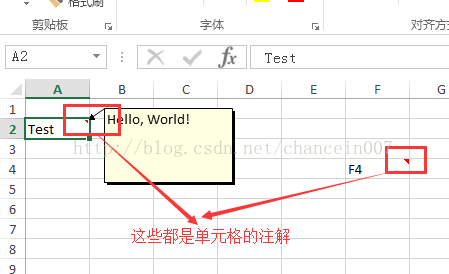
那么对于这种情况,我们的代码应该如何写呢? 借花献佛,我就用Apache POI官方提供的例子,然后加上一些注解,给大家看一下。本例子的测试代码是基于POI-3.12的。
执行完后,将会生成上图所示的Excel工作表单(sheet)
- import org.apache.poi.ss.usermodel.*;
- import org.apache.poi.xssf.usermodel.XSSFSheet;
- import org.apache.poi.xssf.usermodel.XSSFWorkbook;
- import java.io.IOException;
- import java.io.FileOutputStream;
- /**
- * Demonstrates how to work with excel cell comments.
- * <p>
- * Excel comment is a kind of a text shape,
- * so inserting a comment is very similar to placing a text box in a worksheet
- * </p>
- *
- * @author Yegor Kozlov
- */
- public class CellComments {
- public static void main(String[] args) throws IOException {
- //1.创建一个工作簿对象
- XSSFWorkbook wb = new XSSFWorkbook();
- //2.得到一个POI的工具类
- CreationHelper factory = wb.getCreationHelper();
- //3. 创建一个工作表
- XSSFSheet sheet = wb.createSheet();
- //4.得到一个换图的对象
- Drawing drawing = sheet.createDrawingPatriarch();
- //5. ClientAnchor是附属在WorkSheet上的一个对象, 其固定在一个单元格的左上角和右下角.
- ClientAnchor anchor = factory.createClientAnchor();
- //6. 创建一个单元格(2A单元格)
- Cell cell0 = sheet.createRow(1).createCell(0);
- //6.1. 对这个单元格设置值
- cell0.setCellValue("Test");
- //6.2. 对这个单元格加上注解
- Comment comment0 = drawing.createCellComment(anchor);
- RichTextString str0 = factory.createRichTextString("Hello, World!");
- comment0.setString(str0);
- comment0.setAuthor("Apache POI");
- cell0.setCellComment(comment0);
- //7. 创建一个单元格(4F单元格)
- Cell cell1 = sheet.createRow(3).createCell(5);
- //7.1. 对这个单元格设置值
- cell1.setCellValue("F4");
- //7.2. 对这个单元格加上注解
- Comment comment1 = drawing.createCellComment(anchor);
- RichTextString str1 = factory.createRichTextString("Hello, World!");
- comment1.setString(str1);
- comment1.setAuthor("Apache POI");
- cell1.setCellComment(comment1);
- //8. 创建一个单元格(4F单元格)
- Cell cell2 = sheet.createRow(2).createCell(2);
- cell2.setCellValue("C3");
- Comment comment2 = drawing.createCellComment(anchor);
- RichTextString str2 = factory.createRichTextString("XSSF can set cell comments");
- //9。为注解设置字体
- Font font = wb.createFont();
- font.setFontName("Arial");
- font.setFontHeightInPoints((short)14);
- font.setBoldweight(Font.BOLDWEIGHT_BOLD);
- font.setColor(IndexedColors.RED.getIndex());
- str2.applyFont(font);
- comment2.setString(str2);
- comment2.setAuthor("Apache POI");
- comment2.setColumn(2);
- comment2.setRow(2);
- //10. 保存成Excel文件
- String fname = "comments.xlsx";
- FileOutputStream out = new FileOutputStream(fname);
- wb.write(out);
- out.close();
- }
- }
如何用Apache POI操作Excel文件-----如何对一个单元格加注解?的更多相关文章
- 如何用Apache POI操作Excel文件-----如何在已有的Excel文件中插入一行新的数据?
在POI的第一节入门中,我们提供了两个简单的例子,一个是如何用Apache POI新建一个工作薄,另外一个例子是,如果用Apache POI新建一个工作表.那么在这个章节里面,我将会给大家演示一下,如 ...
- 如何用Apache POI操作Excel文件-----如何用Apache POI 画一个离散图
有的时候,我们需要Excel中的数据,通过一个图画,可视化的表现出来. 那么这个时候,应该如何做呢?现在就借花献佛,以Apache POI自己提供的一个例子为例,给大家演示一下POI的API 如何画图 ...
- (6) 如何用Apache POI操作Excel文件-----POI-3.10的一个和注解(comment)相关的另外一个bug
如果POI-3.10往一个工作表(sheet)里面插入数据的话,需要注意了,其有一个不太被容易发现的bug. 被插入的工作表(sheet)里面的单元格没有包含任何的注解(comment)的时候,插入一 ...
- java使用Apache POI操作excel文件
官方介绍 HSSF is the POI Project's pure Java implementation of the Excel '97(-2007) file format. XSSF is ...
- 使用Apache POI操作Excel文件---在已有的Excel文件中插入一行新的数据
package org.test; import java.io.File; import java.io.FileInputStream; import java.io.FileNotFoundEx ...
- 项目一:第四天 1、快递员的条件分页查询-noSession,条件查询 2、快递员删除(逻辑删除) 3、基于Apache POI实现批量导入区域数据 a)Jquery OCUpload上传文件插件使用 b)Apache POI读取excel文件数据
1. 快递员的条件分页查询-noSession,条件查询 2. 快递员删除(逻辑删除) 3. 基于Apache POI实现批量导入区域数据 a) Jquery OCUpload上传文件插件使用 b) ...
- java使用POI操作excel文件,实现批量导出,和导入
一.POI的定义 JAVA中操作Excel的有两种比较主流的工具包: JXL 和 POI .jxl 只能操作Excel 95, 97, 2000也即以.xls为后缀的excel.而poi可以操作Exc ...
- 利用Apache POI操作Excel
最近在做接口,有个功能是利用Excel导入汽车发动机所需零件信息到线上系统中.简单回顾一下之前学过的用java操作Excel. 1.maven配置Apache POI pom.xml中配置POIjar ...
- c#操作Excel模板,替换命名单元格或关键字形成报表
c#操作Excel模板,替换命名单元格或关键字形成报表 http://blog.sina.com.cn/s/blog_45eaa01a0102vqma.html一 建立Excel 模板文件 templ ...
随机推荐
- Ubuntu使用tcpdump工具
Ubuntu默认是安装好了tcpdump工具的,如果没有安装的话使用sudo apt-get install tcpdump即可安装. (如果遇到tcpdump: no suitable devi ...
- C/C++函数参数读取顺序2
#include <stdio.h>int main(){ int a=1,b=3,c=3; printf("%d, %d, %d",(a++,b++,c++),b,c ...
- C++复制构造函数和赋值符的区别
From http://blog.csdn.net/randyjiawenjie/article/details/6666937 非常感谢原作者分享. class CTest{public: CTe ...
- Android拼图游戏
效果如下 游戏的设计 首先我们分析下如何设计这款游戏: 1.我们需要一个容器,可以放这些图片的块块,为了方便,我们准备使用RelativeLayout配合addRule实现 2.每个图片的块块,我们准 ...
- 二、JavaScript语言--JS基础--JavaScript进阶篇--数组
1.什么事数组 我们知道变量用来存储数据,一个变量只能存储一个内容.假设你想存储10个人的姓名或者存储20个人的数学成绩,就需要10个或20个变量来存储,如果需要存储更多数据,那就会变的更麻烦.我们用 ...
- C#正则表达式分组使用
string s = "dfasfdasfdsa*fdasfdsafdsa"; s = "转发:dfasfdasfdsa*fdasfdsafdsa"; //s ...
- oracle 10g 学习之基本 SQL SELECT 语句(4)
本篇文章中,对于有的和MSSQL Server相同的语法我就没有再写了,这里我只写Oracle和MSSQL Server有点不同的 定义空值 l 空值是无效的,未指定的,未知的或不可预知的值 l ...
- hdu 1150 Machine Schedule 最少点覆盖转化为最大匹配
Machine Schedule Time Limit: 1 Sec Memory Limit: 256 MB 题目连接 http://acm.hdu.edu.cn/showproblem.php? ...
- Tomcat安装及配置
用来进行web开发的工具有很多,Tomcat是其中一个开源的且免费的java Web服务器,是Apache软件基金会的项目.电脑上安装配置Tomcat的方法和java有些相同,不过首先需要配置好jav ...
- Android DrawerLayout 高仿QQ5.2双向侧滑菜单
1.概述 之前写了一个Android 高仿 QQ5.0 侧滑菜单效果 自定义控件来袭 ,恰逢QQ5.2又加了一个右侧菜单,刚好看了下DrawerLayout,一方面官方的东西,我都比较感兴趣:另一方面 ...