
Spring示例工程
---------------siwuxie095
创建一个基于
Spring IoC
的小程序的步骤:
- 建立
Spring
工程 - 编写
Java
文件 - 编写配置文件
- 运行示例工程
示例:
一个人,在中国时用中文问候大家;在外国时,用英语问候大家
人的具体位置,由
Spring
的配置环境来决定的:·
当配置为中国时,则问候:"大家好"·
当配置为外国时,则问候:"Hello everybody"
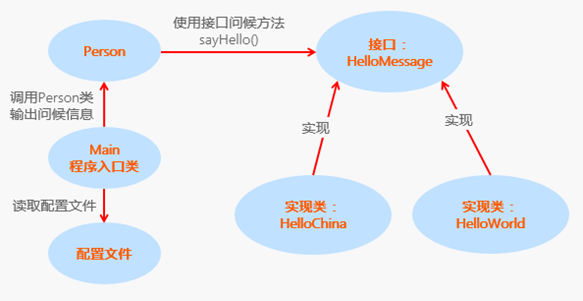
工程名:TestHelloMessage
包名:com.siwuxie095.spring
类名:HelloMessage.java、HelloChina.java、HelloWorld.java、
Person.java、Main.java(主类)
打开资源管理器,在工程 TestHelloMessage 文件夹下,创建一个
文件夹:lib,在其中放入三个必需的 jar 包:
(1)spring-core-4.3.7.RELEASE.jar
(2)spring-beans-4.3.7.RELEASE.jar
(3)commons-logging-1.2.jar
选择三个
jar 包,右键->Build Path->Add to Build Path
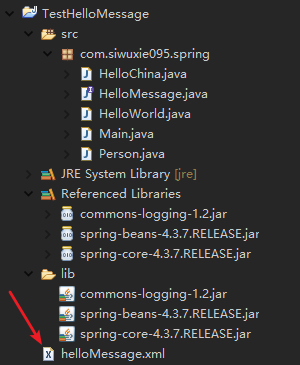
工程结构目录如下:

HelloMessage.java:
|
package com.siwuxie095.spring; //接口 HelloMessage,用于定义输出问候信息 public interface HelloMessage { /** * 方法的简写,因为接口中只允许存在抽象方法和全局常量 * 所以 public 和 abstract 可以省略掉 */ public String sayHello(); } |
HelloChina.java:
|
package com.siwuxie095.spring; // HelloChina 是接口的实现类,用于输出 public class HelloChina implements HelloMessage { @Override public String sayHello() { return } } |
HelloWorld.java:
|
package com.siwuxie095.spring; // HelloWorld 是接口的实现类,用于输出 Hello everybody public class HelloWorld implements HelloMessage { @Override public String sayHello() { return } } |
Person.java:
|
package com.siwuxie095.spring; //Person类,用于调用 HelloMessage 接口,输出问候信息 public class Person {
//将HelloMessage作为一个属性,用于向大家输出问候信息 private HelloMessage helloMessage; public HelloMessage getHelloMessage() { return helloMessage; } public this.helloMessage = helloMessage; }
/** * 用于调用HelloMessage接口向用户输出问候信息, * 具体的问候信息,由Spring的配置文件来分配和决定: * 1.当配置文件中分配给person的是HelloChina的实体时,则输出"大家好"的信息 * 2.当配置文件中分配给person的是HelloWorld的实体时,则输出"Hello everybody"的信息 */ public String sayHello() { return this.helloMessage.sayHello(); }
} |
Main.java(主类):
|
package com.siwuxie095.spring; import org.springframework.beans.factory.support.DefaultListableBeanFactory; import org.springframework.beans.factory.xml.XmlBeanDefinitionReader; import org.springframework.core.io.FileSystemResource; import org.springframework.core.io.Resource; public class Main { /** * 代码段(1)和(2)等效 * 因为 Spring 3.1 之后已经废弃 XmlBeanFactory * 所以这里注释掉(2),使用(1) * 但(2)依然可用,导入相关包和类即可 */ public static
//(1) //使用 FileSystemResource 来读取配置文件 Resource resource=new FileSystemResource("helloMessage.xml"); DefaultListableBeanFactory factory=new DefaultListableBeanFactory(); XmlBeanDefinitionReader reader=new XmlBeanDefinitionReader(factory); reader.loadBeanDefinitions(resource); //从IOC容器中获取Person类的实例 //Person person=(Person)b.getBean("Person"); Person person= (Person) factory.getBean("person"); //使用person类示例来输出问候信息 String str=person.sayHello(); System.out.println("The Person is currently saying:"+str);
// //(2) // //使用 FileSystemResource() 读取配置文件 helloMessage.xml // Resource resource=new FileSystemResource("helloMessage.xml"); // //使用 XmlBeanFactory() 加载配置文件,启动 IoC 容器 // BeanFactory factory=new XmlBeanFactory(resource); // //从 IoC 容器中获取 Person 类的实例 // Person person=(Person) factory.getBean("person"); // String str=person.sayHello(); // System.out.println("The person is currently saying:"+str);
} } |
创建配置文件
helloMessage.xml:
|
<?xml <beans xmlns:xsi="http://www.w3.org/2001/XMLSchema-instance" xsi:schemaLocation="http://www.springframework.org/schema/beans http://www.springframework.org/schema/beans/spring-beans.xsd"> <!-- id 和 class 是 bean 的属性,id 是唯一标识,class 是对应的类名(完全限定名) --> <bean </bean> <bean </bean>
<!-- 为 person 添加属性,该属性引用了bean:helloWorld --> <!-- 此时,person 就和 helloWorld 建立了依赖关系 --> <!-- 也可以引用 helloChina,只需要修改 ref 属性即可 --> <!-- 它们之间的依赖关系,根据配置文件决定,具体配置谁,控制权由原来的对象本身转移到配置文件中 --> <bean <property </bean> </beans> |
此时,工程结构目录一览:
运行一览:

Spring Bean 和 JavaBean 的区别:
【made by siwuxie095】
Spring示例工程的更多相关文章
- 使用方法拦截机制在不修改原逻辑基础上为 spring MVC 工程添加 Redis 缓存
首先,相关文件:链接: https://pan.baidu.com/s/1H-D2M4RfXWnKzNLmsbqiQQ 密码: 5dzk 文件说明: redis-2.4.5-win32-win64.z ...
- Ubuntu下使用VS Code创建Spring Boot工程
目的 我们将在Ubuntu桌面系统下,使用VS Code(Visual Studio Code)编辑器从零开始创建一个Spring Boot工程,并实现一个简单的RESTful风格接口.使用这套流程的 ...
- Spring Boot工程发布到Docker
先聊聊闲话 搞过企业级的application运维的同仁肯定深有感触,每个application的功能交叉错杂,数据交换就让人焦头烂额(当然这和顶层业务设计有关系), 几十个application发布 ...
- 【AT91SAM3S】英倍特串口示例工程05-UART中,串口是怎样初始化的
在这个示例工程的main.c文件中,进入main之后,没有发现串口功能的任何配置.直接使用了printf这个东西进行输出.将软件下载到开发板上之后,在电脑端使用串口软件,可以看板子有数据发来.说明这个 ...
- Springboot(一):使用Intellij中的Spring Initializr来快速构建Spring Boot工程
使用Intellij中的Spring Initializr来快速构建Spring Boot工程 New---Project 可以看到图所示的创建功能窗口.其中Initial Service Url指向 ...
- spring cloud 工程构建
https://blog.csdn.net/zhou199252/article/details/80745151 https://blog.csdn.net/forezp/article/detai ...
- SpringCloud核心教程 | 第一篇: 使用Intellij中的Spring Initializr来快速构建Spring Cloud工程
spring cloud简介 spring cloud 为开发人员提供了快速构建分布式系统的一些工具,包括配置管理.服务发现.断路器.路由.微代理.事件总线.全局锁.决策竞选.分布式会话等等.它运行环 ...
- SpringCloud核心教程 | 第二篇: 使用Intellij中的maven来快速构建Spring Cloud工程
spring cloud简介 spring cloud 为开发人员提供了快速构建分布式系统的一些工具,包括配置管理.服务发现.断路器.路由.微代理.事件总线.全局锁.决策竞选.分布式会话等等.它运行环 ...
- activiti学习2:示例工程activiti-explorer.war的使用
目录 activiti学习2:示例工程activiti-explorer.war的使用 一.搭建开发环境 二.运行示例工程 三.示例工程功能演示 1. 创建流程图 2. 部署流程图 3. 启动流程 4 ...
随机推荐
- error in static/js/xxx.js from UglifyJs Unpected token: punc() [static/js/xxx.js]
出现问题 使用vue+element-ui+webpack开发项目时,Jenkins构建出现报错error in static/js/xxx.js from UglifyJs Unpected tok ...
- 《程序员代码面试指南》第二章 链表问题 删除中间节点和a/b处节点
题目 例如 1-2-3-4 删除2,1-2-3-4-5 删除3 例如 a=1,b =2 java代码 /** * @Description:删除中间节点和a/b处节点 * @Author: lizho ...
- vo类总结
1.Camera类 camera类里面,首先camera有5个变量,fx_,fy_,cx_,cy_,depth_scale_5个变量,由外部传fx,fy,cx,cy,depth_scale给它.定义了 ...
- 剑指offer——翻转单词顺序VS左旋转字符串
字符串的交换等,注意判断字符串的是否为NULL,以及判断边界等. #include <iostream> #include <string> using namespace s ...
- 剪辑的楼天城的ACM之路
楼天城楼教主的acm心路历程(剪辑) 利用假期空闲之时,将这几年GCJ,ACM,TopCoder 参加的一些重要比赛作个回顾.昨天是GCJ2006 的回忆,今天时间上更早一些吧,我现在还清晰记得3 年 ...
- 剑指offer之 二进制中1的个数
问题描述: 请实现一个函数,输入一个整数,输出该数二进制表示中1的个数.例如把9表示成二进制是1001,有2位是1 因此如果输入9,该函数输出2; package Problem10; public ...
- JavaWeb -- Servlet运行过程 和 细节
Servlet的运行过程 lServlet程序是由WEB服务器调用,web服务器收到客户端的Servlet访问请求后: ①Web服务器首先检查是否已经装载并创建了该Servlet的实例对象.如果是,则 ...
- js 格式华货币
/*货币格式化*/ function formatMoney(num) { num = num.toString().replace(/\$|\,/g,''); if(isNaN(num)) { nu ...
- 常用的MySQL语句写法
常用的MySQL语句写法 MySQL的SQL语句写法,除了那些基本的之外,还有一些也算比较常用的,这里记录下来,以便以后查找. 好记性不如烂笔头,这话说的太有道理了,一段时间不写它,还真容易忘 ...
- Java8中聚合操作collect、reduce方法详解
Stream的基本概念 Stream和集合的区别: Stream不会自己存储元素.元素储存在底层集合或者根据需要产生.Stream操作符不会改变源对象.相反,它会返回一个持有结果的新的Stream.3 ...