
ActiveMQ (三) Spring整合JMS入门
Spring整合JMS入门
前提:安装好了ActiveMQ ActiveMQ安装
Demo结构:
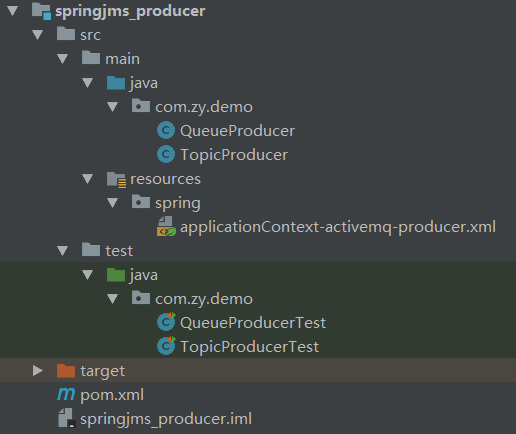
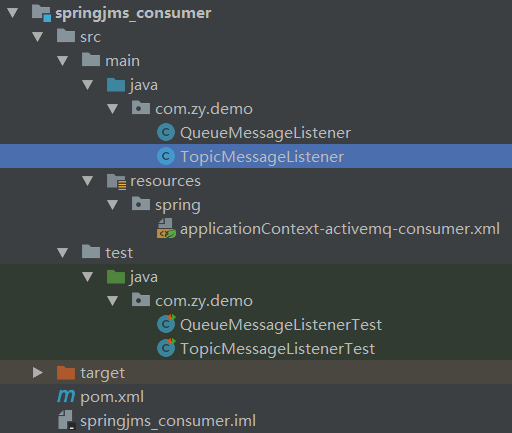
生产者项目springjms_producer:
pom.xml
<?xml version="1.0" encoding="UTF-8"?>

<project xmlns="http://maven.apache.org/POM/4.0.0"

         xmlns:xsi="http://www.w3.org/2001/XMLSchema-instance"

         xsi:schemaLocation="http://maven.apache.org/POM/4.0.0 http://maven.apache.org/xsd/maven-4.0.0.xsd">

    <parent>

        <artifactId>project_demo</artifactId>

        <groupId>com.zy</groupId>

        <version>1.0-SNAPSHOT</version>

    </parent>

    <modelVersion>4.0.0</modelVersion>

    <artifactId>springjms_producer</artifactId>

    <dependencies>

        <dependency>

            <groupId>org.springframework</groupId>

            <artifactId>spring-jms</artifactId>

            <version>4.3.2.RELEASE</version>

        </dependency>

        <dependency>

            <groupId>org.apache.activemq</groupId>

            <artifactId>activemq-client</artifactId>

            <version>5.13.4</version>

        </dependency>

        <dependency>

            <groupId>org.springframework</groupId>

            <artifactId>spring-test</artifactId>

            <version>4.3.2.RELEASE</version>

        </dependency>

        <dependency>

            <groupId>junit</groupId>

            <artifactId>junit</artifactId>

            <version>4.12</version>

        </dependency>

    </dependencies>

    <build>

        <plugins>

            <!-- java编译插件 -->

            <plugin>

                <groupId>org.apache.maven.plugins</groupId>

                <artifactId>maven-compiler-plugin</artifactId>

                <version>3.2</version>

                <configuration>

                    <source>1.8</source>

                    <target>1.8</target>

                    <encoding>UTF-8</encoding>

                </configuration>

            </plugin>

        </plugins>

    </build>

</project>
applicationContext-activemq-producer.xml
<?xml version="1.0" encoding="UTF-8"?>

<beans xmlns="http://www.springframework.org/schema/beans" xmlns:context="http://www.springframework.org/schema/context"

       xmlns:xsi="http://www.w3.org/2001/XMLSchema-instance"

       xsi:schemaLocation="http://www.springframework.org/schema/beans

        http://www.springframework.org/schema/beans/spring-beans.xsd

        http://www.springframework.org/schema/context

        http://www.springframework.org/schema/context/spring-context.xsd">

    <!--扫描提供者类 单元测试需要注入-->

    <context:component-scan base-package="com.zy.demo"></context:component-scan>

    <!-- 真正可以产生Connection的ConnectionFactory,由对应的 JMS服务厂商提供-->

    <bean id="targetConnectionFactory" class="org.apache.activemq.ActiveMQConnectionFactory">

        <property name="brokerURL" value="tcp://192.168.25.128:61616"/>

    </bean>

    <!-- Spring用于管理真正的ConnectionFactory的ConnectionFactory -->

    <bean id="connectionFactory" class="org.springframework.jms.connection.SingleConnectionFactory">

        <!-- 目标ConnectionFactory对应真实的可以产生JMS Connection的ConnectionFactory -->

        <property name="targetConnectionFactory" ref="targetConnectionFactory"/>

    </bean>

    <!-- Spring提供的JMS工具类,它可以进行消息发送、接收等 -->

    <bean id="jmsTemplate" class="org.springframework.jms.core.JmsTemplate">

        <!-- 这个connectionFactory对应的是我们定义的Spring提供的那个ConnectionFactory对象 -->

        <property name="connectionFactory" ref="connectionFactory"/>

    </bean>

    <!--这个是队列目的地,点对点的  文本信息-->

    <bean id="queueTextDestination" class="org.apache.activemq.command.ActiveMQQueue">

        <constructor-arg value="queue_text"/>

    </bean>

    <!--这个是订阅模式  文本信息-->

    <bean id="topicTextDestination" class="org.apache.activemq.command.ActiveMQTopic">

        <constructor-arg value="topic_text"/>

    </bean>

</beans>
点对点生产者QueueProducer:
package com.zy.demo;

import org.springframework.beans.factory.annotation.Autowired;

import org.springframework.jms.core.JmsTemplate;

import org.springframework.jms.core.MessageCreator;

import org.springframework.stereotype.Component;

import javax.jms.Destination;

import javax.jms.JMSException;

import javax.jms.Message;

import javax.jms.Session;

/**

 * 点对点模式 生产者

 */

@Component

public class QueueProducer {

    @Autowired

    private JmsTemplate jmsTemplate;

    @Autowired

    private Destination queueTextDestination;

    /**

     * 发送文本消息

     *

     * @param text

     */

    public void sendTextMessage(final String text) {

        jmsTemplate.send(queueTextDestination, new MessageCreator() {

            public Message createMessage(Session session) throws JMSException {

                return session.createTextMessage(text);

            }

        });

    }

}
发布订阅生产者TopicProducer:
package com.zy.demo;

import org.springframework.beans.factory.annotation.Autowired;

import org.springframework.jms.core.JmsTemplate;

import org.springframework.jms.core.MessageCreator;

import org.springframework.stereotype.Component;

import javax.jms.Destination;

import javax.jms.JMSException;

import javax.jms.Message;

import javax.jms.Session;

/**

 * 发布订阅模式 生产者

 */

@Component

public class TopicProducer {

    @Autowired

    private JmsTemplate jmsTemplate;

    @Autowired

    private Destination topicTextDestination;

    /**

     * 发送文本消息

     */

    public void sendTextMessage(String text) {

        jmsTemplate.send(topicTextDestination, new MessageCreator() {

            public Message createMessage(Session session) throws JMSException {

                return session.createTextMessage(text);

            }

        });

    }

}
点对点生产者单元测试QueueProducerTest:
package com.zy.demo;

import org.junit.Test;

import org.junit.runner.RunWith;

import org.springframework.test.context.ContextConfiguration;

import org.springframework.test.context.junit4.SpringJUnit4ClassRunner;

import java.io.IOException;

import static org.junit.Assert.*;

@RunWith(SpringJUnit4ClassRunner.class)

@ContextConfiguration("classpath:spring/applicationContext-activemq-consumer.xml")

public class QueueMessageListenerTest {

    @Test

    public void onMessage() throws Exception {

        try {

            System.in.read();

        } catch (IOException e) {

            e.printStackTrace();

        }

    }

}
发布订阅生产者单元测试TopicProducerTest:
package com.zy.demo;

import org.junit.Test;

import org.junit.runner.RunWith;

import org.springframework.beans.factory.annotation.Autowired;

import org.springframework.test.context.ContextConfiguration;

import org.springframework.test.context.junit4.SpringJUnit4ClassRunner;

import static org.junit.Assert.*;

@RunWith(SpringJUnit4ClassRunner.class)

@ContextConfiguration("classpath:spring/applicationContext-activemq-producer.xml")

public class TopicProducerTest {

    @Autowired

    private TopicProducer topicProducer;

    @Test

    public void sendTextMessage() throws Exception {

        topicProducer.sendTextMessage("SpringJms发布订阅");

    }

}
消费者项目springjms_consumer:
pom.xml
<?xml version="1.0" encoding="UTF-8"?>

<project xmlns="http://maven.apache.org/POM/4.0.0"

         xmlns:xsi="http://www.w3.org/2001/XMLSchema-instance"

         xsi:schemaLocation="http://maven.apache.org/POM/4.0.0 http://maven.apache.org/xsd/maven-4.0.0.xsd">

    <parent>

        <artifactId>project_demo</artifactId>

        <groupId>com.zy</groupId>

        <version>1.0-SNAPSHOT</version>

    </parent>

    <modelVersion>4.0.0</modelVersion>

    <artifactId>springjms_consumer</artifactId>

    <dependencies>

        <dependency>

            <groupId>org.springframework</groupId>

            <artifactId>spring-jms</artifactId>

            <version>4.3.2.RELEASE</version>

        </dependency>

        <dependency>

            <groupId>org.apache.activemq</groupId>

            <artifactId>activemq-client</artifactId>

            <version>5.13.4</version>

        </dependency>

        <dependency>

            <groupId>org.springframework</groupId>

            <artifactId>spring-test</artifactId>

            <version>4.3.2.RELEASE</version>

        </dependency>

        <dependency>

            <groupId>junit</groupId>

            <artifactId>junit</artifactId>

            <version>4.12</version>

        </dependency>

    </dependencies>

</project>
applicationContext-activemq-consumer.xml
<?xml version="1.0" encoding="UTF-8"?>

<beans xmlns="http://www.springframework.org/schema/beans" xmlns:xsi="http://www.w3.org/2001/XMLSchema-instance"

       xsi:schemaLocation="http://www.springframework.org/schema/beans

        http://www.springframework.org/schema/beans/spring-beans.xsd">

    <!-- 真正可以产生Connection的ConnectionFactory,由对应的 JMS服务厂商提供-->

    <bean id="targetConnectionFactory" class="org.apache.activemq.ActiveMQConnectionFactory">

        <property name="brokerURL" value="tcp://192.168.25.128:61616"/>

    </bean>

    <!-- Spring用于管理真正的ConnectionFactory的ConnectionFactory -->

    <bean id="connectionFactory" class="org.springframework.jms.connection.SingleConnectionFactory">

        <!-- 目标ConnectionFactory对应真实的可以产生JMS Connection的ConnectionFactory -->

        <property name="targetConnectionFactory" ref="targetConnectionFactory"/>

    </bean>

    <!--start-->

    <!--这个是队列目的地,点对点的  文本信息-->

    <bean id="queueTextDestination" class="org.apache.activemq.command.ActiveMQQueue">

        <constructor-arg value="queue_text"/>

    </bean>

    <!-- 我的监听类 -->

    <bean id="queueMessageListener" class="com.zy.demo.QueueMessageListener"></bean>

    <!-- 消息监听容器 -->

    <bean class="org.springframework.jms.listener.DefaultMessageListenerContainer">

        <property name="connectionFactory" ref="connectionFactory"/>

        <property name="destination" ref="queueTextDestination"/>

        <property name="messageListener" ref="queueMessageListener"/>

    </bean>

    <!--end-->

    <!--start-->

    <!--这个是队列目的地,点对点的  文本信息-->

    <bean id="topicTextDestination" class="org.apache.activemq.command.ActiveMQTopic">

        <constructor-arg value="topic_text"/>

    </bean>

    <!-- 我的监听类 -->

    <bean id="topicMessageListener" class="com.zy.demo.TopicMessageListener"></bean>

    <!-- 消息监听容器 -->

    <bean class="org.springframework.jms.listener.DefaultMessageListenerContainer">

        <property name="connectionFactory" ref="connectionFactory"/>

        <property name="destination" ref="topicTextDestination"/>

        <property name="messageListener" ref="topicMessageListener"/>

    </bean>

    <!--end-->

</beans>
点对点消费者QueueMessageListener:
package com.zy.demo;

import org.springframework.stereotype.Component;

import javax.jms.JMSException;

import javax.jms.Message;

import javax.jms.MessageListener;

import javax.jms.TextMessage;

/**

 * 点对点模式 消费者

 */

@Component

public class QueueMessageListener implements MessageListener {

    public void onMessage(Message message) {

        TextMessage textMessage = (TextMessage) message;

        try {

            System.out.println("接收到消息:" + textMessage.getText());

        } catch (JMSException e) {

            e.printStackTrace();

        }

    }

}
发布订阅消费者TopicMessageListener:
package com.zy.demo;

import org.springframework.stereotype.Component;

import javax.jms.JMSException;

import javax.jms.Message;

import javax.jms.MessageListener;

import javax.jms.TextMessage;

/**

 * 发布订阅模式 消费者

 */

@Component

public class TopicMessageListener implements MessageListener {

    public void onMessage(Message message) {

        TextMessage textMessage = (TextMessage) message;

        try {

            System.out.println("接收到消息:" + textMessage.getText());

        } catch (JMSException e) {

            e.printStackTrace();

        }

    }

}
点对点消费者单元测试QueueMessageListenerTest:
package com.zy.demo;

import org.junit.Test;

import org.junit.runner.RunWith;

import org.springframework.test.context.ContextConfiguration;

import org.springframework.test.context.junit4.SpringJUnit4ClassRunner;

import java.io.IOException;

import static org.junit.Assert.*;

@RunWith(SpringJUnit4ClassRunner.class)

@ContextConfiguration("classpath:spring/applicationContext-activemq-consumer.xml")

public class QueueMessageListenerTest {

    @Test

    public void onMessage() throws Exception {

        try {

            System.in.read();

        } catch (IOException e) {

            e.printStackTrace();

        }

    }

}
发布订阅消费者单元测试TopicMessageListenerTest:
package com.zy.demo;

import org.junit.Test;

import org.junit.runner.RunWith;

import org.springframework.test.context.ContextConfiguration;

import org.springframework.test.context.junit4.SpringJUnit4ClassRunner;

import java.io.IOException;

import static org.junit.Assert.*;

@RunWith(SpringJUnit4ClassRunner.class)

@ContextConfiguration("classpath:spring/applicationContext-activemq-consumer.xml")

public class TopicMessageListenerTest {

    @Test

    public void onMessage() throws Exception {

        try {

            System.in.read();

        } catch (IOException e) {

            e.printStackTrace();

        }

    }

}
ActiveMQ (三) Spring整合JMS入门的更多相关文章
- 消息中间件ActiveMQ及Spring整合JMS
一 .消息中间件的基本介绍 1.1 消息中间件 1.1.1 什么是消息中间件 消息中间件利用高效可靠的消息传递机制进行平台无关的数据交流,并基于数据通信来进行分布式系统的集成.通过提供消息传递和消息排 ...
- 消息中间件ActiveMQ及Spring整合JMS的介绍
一 .消息中间件的基本介绍 1.1 消息中间件 1.1.1 什么是消息中间件 消息中间件利用高效可靠的消息传递机制进行平台无关的数据交流,并基于数据通信来进行分布式系统的集成.通过提供消息传递和消息排 ...
- Spring整合JMS(二)——三种消息监听器
原文地址:http://haohaoxuexi.iteye.com/blog/1893676 1.3 消息监听器MessageListener 在Spring整合JMS的应用中我们在定义消息监 ...
- Spring整合JMS(二)——三种消息监听器(转)
*注:别人那复制来的 1.3 消息监听器MessageListener 在Spring整合JMS的应用中我们在定义消息监听器的时候一共可以定义三种类型的消息监听器,分别是MessageList ...
- Spring整合JMS(一)——基于ActiveMQ实现 (转)
*注:别人那复制来的 1.1 JMS简介 JMS的全称是Java Message Service,即Java消 息服务.它主要用于在生产者和消费者之间进行消息传递,生产者负责产生消息,而消费者 ...
- Spring整合JMS(一)——基于ActiveMQ实现
1.1 JMS简介 JMS的全称是Java Message Service,即Java消息服务.它主要用于在生产者和消费者之间进行消息传递,生产者负责产生消息,而消费者负责接收消息.把它应用到 ...
- Spring整合JMS(四)——事务管理
原文链接:http://haohaoxuexi.iteye.com/blog/1983532 Spring提供了一个JmsTransactionManager用于对JMS ConnectionFact ...
- Spring整合JMS——事务管理
Spring提供了一个JmsTransactionManager用于对JMS ConnectionFactory做事务管理.这将允许JMS应用利用Spring的事务管理特性.JmsTransactio ...
- Spring整合JMS(四)——事务管理(转)
*注:别人那复制来的 Spring提供了一个JmsTransactionManager用于对JMS ConnectionFactory做事务管理.这将允许JMS应用利用Spring的事务管理特性.Jm ...
随机推荐
- java常用封装方法
public Map<String,String> getDateByStr(String str,String startDate,String endTime){ Map<Str ...
- CMC 实例管理
有人问我,用户用的BW-QUERY看报表挺快的,用了BO发现很慢. 我心想,不会是什么高级优化吧,我可不会. 发现用WEBI时看报表很慢.那这个还是好解决的. 前面说那种情况,解决方法我只知道一种上H ...
- Unity3D教程:制作与载入AssetBundle
通常我们在游戏程式执行过程,并不希望一次将全部的资源都载入,而比较希望实际上有使用到的才载入,以免占用多余的记忆体,所以我们可能会尽量规划好不同功能的场景,在需要时才载入场景并释放掉前个场景中不需要的 ...
- mysql定时任务备份bat命令-记录一下待日后使用
最近有个任务,需要每日备份数据库到某个磁盘,使用window定时任务调用bat文件实现. %Date:~0,2%获取星期几,这个要根据系统进行尝试, 有 星期几 7/25/2018 有 2018/ ...
- Linux 下如何调试 Python?
一般开发者都是在 IDE 中进行程序的调试,当然,有 IDE 的话,当然首选 IDE 进行调试. 但是,有时我们的业务场景,限制只能在 Linux 命令行模式进行调试. 这时该怎么办呢? 今天,就给大 ...
- GO语言heap剖析及利用heap实现优先级队列
GO语言heap剖析 本节内容 heap使用 heap提供的方法 heap源码剖析 利用heap实现优先级队列 1. heap使用 在go语言的标准库container中,实现了三中数据类型:heap ...
- Sentry入门
指令类型: 创建.删除角色: CREATE ROLE sentry_all; droop role admin_role; 角色授权/撤销权限: 数据库级别角色授权 GRANT ALL ON DA ...
- spark流程跟踪
每个action对应一个job,每个job里面会有很多个阶段(stage),其实每个stage都是一个算子(Operation),可能是transformation,可能是action:但是actio ...
- 使用Azure Site Recovery把VM批量搬迁到Azure
Azure Site Recovery可以提供如下服务: Site Recovery 服务:Site Recovery 可以在站点出现故障时,让应用在其他站点继续可用,从而确保业务连续性. Site ...
- Redis事务和watch
redis的事务 严格意义来讲,redis的事务和我们理解的传统数据库(如mysql)的事务是不一样的. redis中的事务定义 Redis中的事务(transaction)是一组命令的集合. 事务同 ...