
java访问微信接口发送消息
最近在开发activiti流程的时候有个需求:流程到达每个审批节点后,需要向该节点的审批人发送一个消息,提示有审批需要处理。
参考了一下微信的开发者文档和网络上的一些技术博客,现在记录一下。以便后续继续研究微信开发。【微信开发真的很好玩的】
首先,你需要注册一个企业微信账号:https://work.weixin.qq.com/wework_admin/register_wx?from=myhome
然后进入后台管理,创建一个应用
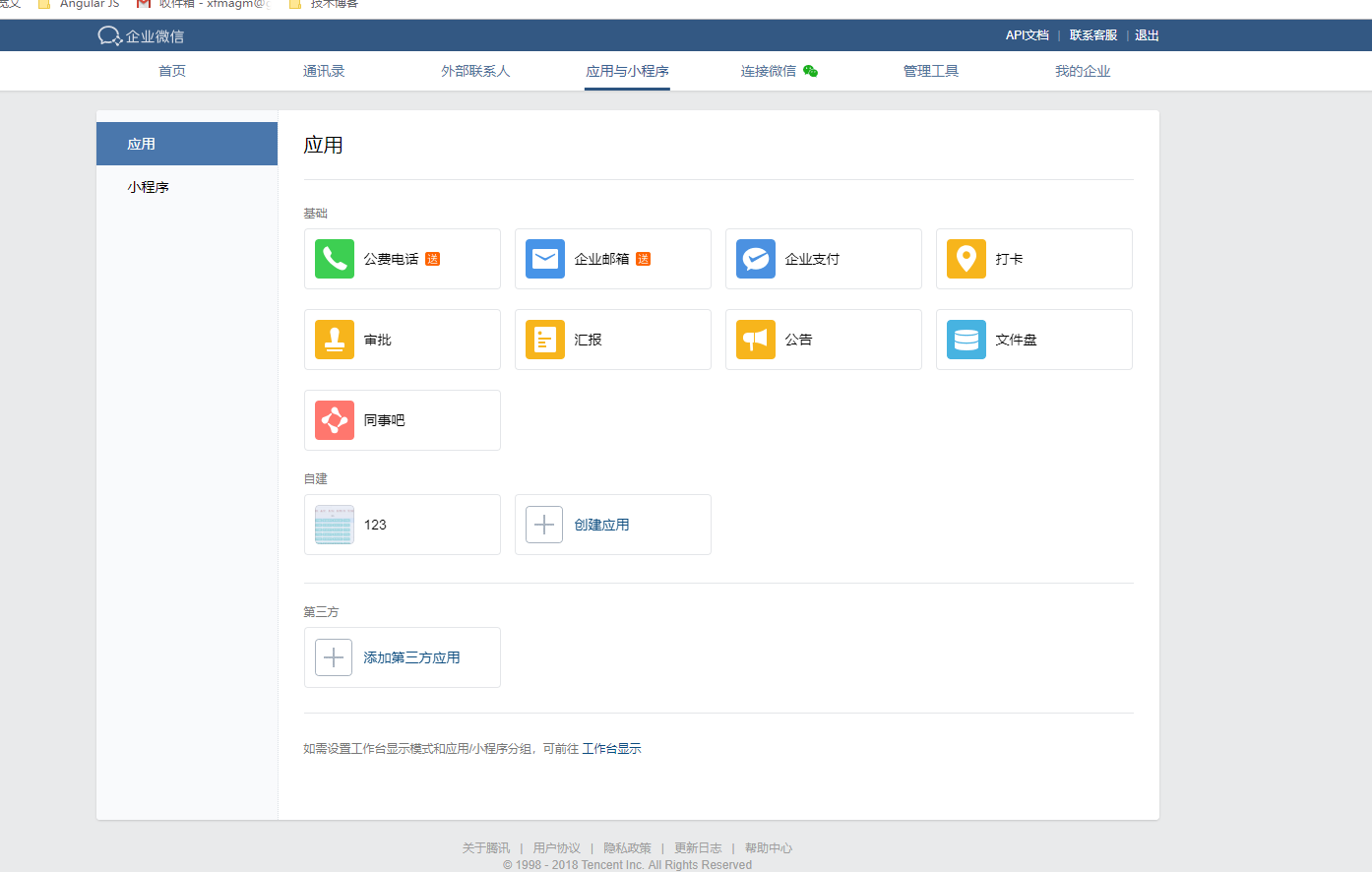
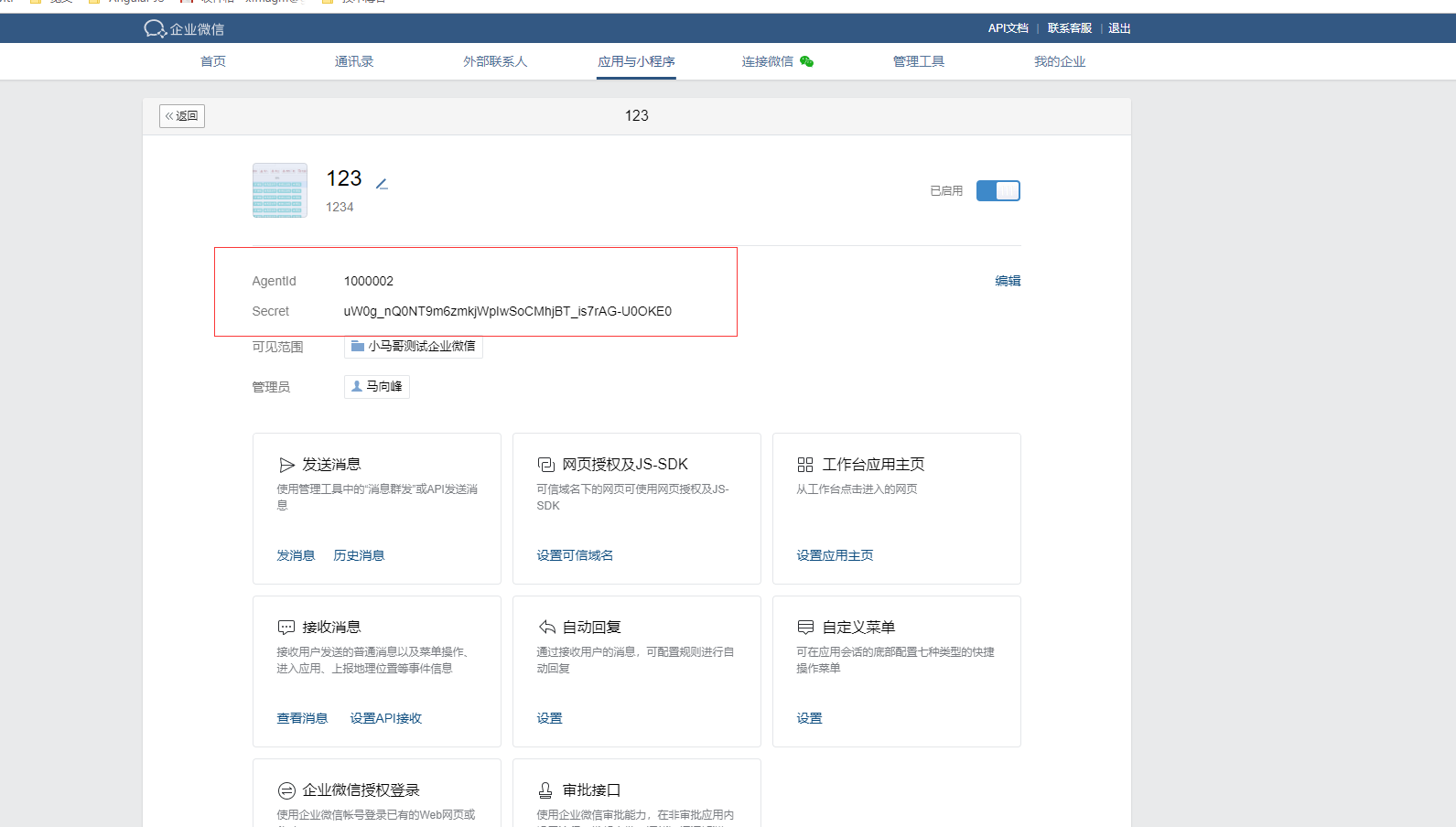
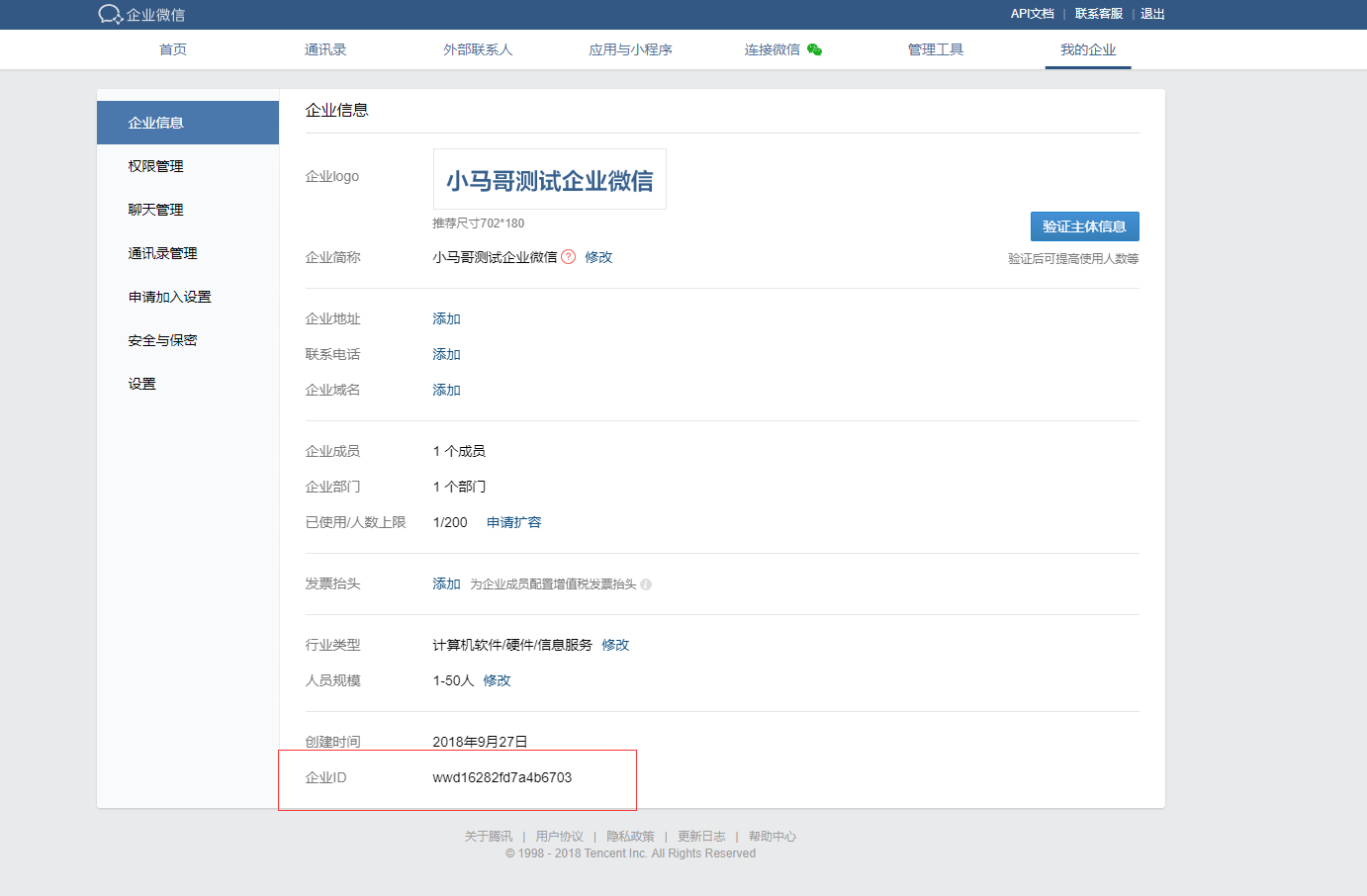
上面标红的信息,都是开发测试需要用到的,需要记录一下。
先贴代码:
WeChatData.java
package com.xfma.wx.test;

/**

 * 微信消息发送实体类

 * @author PC-MXF

 *

 */

public class WeChatData {

	 //发送微信消息的URLString sendMsgUrl="https://qyapi.weixin.qq.com/cgi-bin/message/send?access_token=";

	/**

	 * 成员账号

	 */

	private String touser;

	/**

	 * 消息类型

	 */

	private String msgtype;

	/**

	 * 企业用用的agentid

	 */

	private String agentid;

	/**

	 * 十几接收map类型数据

	 */

	private Object text;

	public String getTouser() {

		return touser;

	}

	public void setTouser(String touser) {

		this.touser = touser;

	}

	public String getMsgtype() {

		return msgtype;

	}

	public void setMsgtype(String msgtype) {

		this.msgtype = msgtype;

	}

	public String getAgentid() {

		return agentid;

	}

	public void setAgentid(String agentid) {

		this.agentid = agentid;

	}

	public Object getText() {

		return text;

	}

	public void setText(Object text) {

		this.text = text;

	}

}
WeChatUrlData.java
package com.xfma.wx.test;

/**

 * 微信授权请求

 * @author PC-MXF

 *

 */

public class WeChatUrlData {

	 /**

	  *  企业Id

     */

	private String corpid;

	 /**

     * secret管理组的凭证密钥

     */

	private String corpsecret;

	 /**

	  * 获取ToKen的请求

     */

	private String Get_Token_Url;

	 /**

	  * 发送消息的请求

     */

	private String SendMessage_Url;

	public String getCorpid() {

		return corpid;

	}

	public void setCorpid(String corpid) {

		this.corpid = corpid;

	}

	public String getCorpsecret() {

		return corpsecret;

	}

	public void setCorpsecret(String corpsecret) {

		this.corpsecret = corpsecret;

	}

	public String getGet_Token_Url() {

		return Get_Token_Url;

	}

	public void setGet_Token_Url(String corpid,String corpsecret) {

		Get_Token_Url = "https://qyapi.weixin.qq.com/cgi-bin/gettoken?corpid="+corpid+"&corpsecret="+corpsecret;

	}

	public String getSendMessage_Url() {

		 SendMessage_Url = "https://qyapi.weixin.qq.com/cgi-bin/message/send?access_token=";

		return SendMessage_Url;

	}

	public void setSendMessage_Url(String sendMessage_Url) {

		SendMessage_Url = sendMessage_Url;

	}

}
WeChatMsgSend.java
package com.xfma.wx.test;

import java.io.IOException;

import java.text.SimpleDateFormat;

import java.util.HashMap;

import java.util.Map;

import org.apache.http.HttpEntity;

import org.apache.http.client.methods.CloseableHttpResponse;

import org.apache.http.client.methods.HttpGet;

import org.apache.http.client.methods.HttpPost;

import org.apache.http.entity.StringEntity;

import org.apache.http.impl.client.CloseableHttpClient;

import org.apache.http.impl.client.HttpClients;

import org.apache.http.util.EntityUtils;

import org.slf4j.LoggerFactory;

import com.google.gson.Gson;

import com.google.gson.reflect.TypeToken;

/**

 * 微信发送消息

 *

 * @author PC-MXF

 *

 */

public class WeChatMsgSend {

	private CloseableHttpClient httpClient;

	/**

	 * 用于提交登录数据

	 */

	private HttpPost httpPost;

	/**

	 * 用于获得登陆后页面

	 */

	private HttpGet httpGet;

	public static final String CONTENT_TYPE = "Content-Type";

	SimpleDateFormat df = new SimpleDateFormat("yyyy-MM-dd HH:mm:ss");

	private static Gson gson = new Gson();

	/**

	 * 微信授权请求,GET类型,获取授权响应,用于其他方法截取token

	 *

	 * @param Get_Token_Url

	 * @return String 授权响应内容

	 * @throws IOException

	 */

	protected String toAuth(String Get_Token_Url) throws IOException {

		httpClient = HttpClients.createDefault();

		httpGet = new HttpGet(Get_Token_Url);

		CloseableHttpResponse response = httpClient.execute(httpGet);

		String resp = "";

		try {

			HttpEntity entity = response.getEntity();

			resp = EntityUtils.toString(entity, "utf-8");

			EntityUtils.consume(entity);

		} catch (Exception e) {

			e.getStackTrace();

		} finally {

			response.close();

		}

		LoggerFactory.getLogger(getClass()).info(" resp:{}", resp);

		return resp;

	}

	/**

	 * corpid应用组织编号 corpsecret应用秘钥 获取toAuth(String

	 * Get_Token_Url)返回结果中键值对中access_token键的值

	 *

	 * @param

	 */

	public String getToken(String corpid, String corpsecret) throws IOException {

		WeChatMsgSend sw = new WeChatMsgSend();

		WeChatUrlData uData = new WeChatUrlData();

		uData.setGet_Token_Url(corpid, corpsecret);

		String resp = sw.toAuth(uData.getGet_Token_Url());

		System.out.println("resp=====:" + resp);

		try {

			Map<String, Object> map = gson.fromJson(resp, new TypeToken<Map<String, Object>>() {

			}.getType());

			return map.get("access_token").toString();

		} catch (Exception e) {

			e.getStackTrace();

			return resp;

		}

	}

	/**

	 * 创建微信发送请求post数据 touser发送消息接收者 ,msgtype消息类型(文本/图片等), application_id应用编号。

	 * 本方法适用于text型微信消息,contentKey和contentValue只能组一对

	 *

	 * @param touser

	 * @param msgtype

	 * @param application_id

	 * @param contentKey

	 * @param contentValue

	 * @return

	 */

	public String createpostdata(String touser, String msgtype, int application_id, String contentKey,

			String contentValue) {

		WeChatData wcd = new WeChatData();

		wcd.setTouser(touser);

		wcd.setAgentid(application_id + "");

		wcd.setMsgtype(msgtype);

		Map<Object, Object> content = new HashMap<Object, Object>();

		content.put(contentKey, contentValue);

		wcd.setText(content);

		return gson.toJson(wcd);

	}

	/**

	 * @Title  创建微信发送请求post实体,charset消息编码    ,contentType消息体内容类型,

	 * url微信消息发送请求地址,data为post数据,token鉴权token

	 * @param charset

	 * @param contentType

	 * @param url

	 * @param data

	 * @param token

	 * @return

	 * @throws IOException

	 */

	public String post(String charset, String contentType, String url, String data, String token) throws IOException {

		CloseableHttpClient httpclient = HttpClients.createDefault();

		httpPost = new HttpPost(url + token);

		httpPost.setHeader(CONTENT_TYPE, contentType);

		httpPost.setEntity(new StringEntity(data, charset));

		CloseableHttpResponse response = httpclient.execute(httpPost);

		String resp;

		try {

			HttpEntity entity = response.getEntity();

			resp = EntityUtils.toString(entity, charset);

			EntityUtils.consume(entity);

		} finally {

			response.close();

		}

		LoggerFactory.getLogger(getClass()).info("call [{}], param:{}, resp:{}", url, data, resp);

		return resp;

	}

}
Test.java
package com.xfma.wx.test;

public class Test {

	public static void main(String[] args) {

		WeChatMsgSend swx = new WeChatMsgSend();

		try {

			String token = swx.getToken("ww44a4ede4d3626a","w6tRMGfN5WSFarMmqdpkwBztPRy-HVXRRs76QXvFU");

			String postdata = swx.createpostdata("jiangpin", "text", 1000009, "content","这是一条测试信息");

			String resp = swx.post("utf-8", WeChatMsgSend.CONTENT_TYPE,(new WeChatUrlData()).getSendMessage_Url(), postdata, token);

			System.out.println("获取到的token======>" + token);

			System.out.println("请求数据======>" + postdata);

			 System.out.println("发送微信的响应数据======>" + resp);

		}catch (Exception e) {

			e.getStackTrace();

		}

	}

}
java访问微信接口发送消息的更多相关文章
- [实例]JAVA调用微信接口发送图文消息,不用跳到详情页
package com.test; import java.io.IOException; import java.io.InputStream; import java.io.OutputStrea ...
- 全网最全的Windows下Python2 / Python3里正确下载安装用来向微信好友发送消息的itchat库(图文详解)
不多说,直接上干货! 建议,你用Anaconda2或Anaconda3. 见 全网最全的Windows下Anaconda2 / Anaconda3里正确下载安装用来向微信好友发送消息的itchat库( ...
- java微信接口之五—消息分组群发
一.微信消息分组群发接口简介 1.请求:该请求是使用post提交地址为: https://api.weixin.qq.com/cgi-bin/message/mass/sendall?access_t ...
- Java企业微信开发_05_消息推送之发送消息(主动)
一.本节要点 1.发送消息与被动回复消息 (1)流程不同:发送消息是第三方服务器主动通知微信服务器向用户发消息.而被动回复消息是 用户发送消息之后,微信服务器将消息传递给 第三方服务器,第三方服务器接 ...
- Java企业微信开发_04_消息推送之发送消息(主动)
源码请见: Java企业微信开发_00_源码及资源汇总贴 一.本节要点 1.发送消息与被动回复消息 (1)流程不同:发送消息是第三方服务器主动通知微信服务器向用户发消息.而被动回复消息是 用户发送消息 ...
- 通过企业微信API接口发送消息
最近给公司测试组内部开发一个记账小工具,当账目出现问题的时候需要发送消息通知大家,前期主要采用的QQ发送通知消息,但是有一天突然无法连接到QQ服务器,运维的同学建议采用微信的方式对接然后进行告警,所以 ...
- Java企业微信开发_05_消息推送之被动回复消息
一.本节要点 1.消息的加解密 微信加解密包 下载地址:http://qydev.weixin.qq.com/java.zip ,此包中封装好了AES加解密方法,直接调用方法即可. 其中,解 ...
- Java实现 微信小程序 + 消息推送
实现效果: 下面要显示五个字段 接下来,参照官方文档,一步步实现: https://developers.weixin.qq.com/miniprogram/dev/api-backend/open- ...
- 使用WeCloud消息推送接口发送消息NodeJs版
WeCloud是一家初创公司的产品,眼下主要在做Android和IOS消息推送这块.他们提供了用于向设备发送消息的协议,详细协议内容见消息推送协议. 这篇文章将使用NodeJs基于这个推送协议完毕向A ...
随机推荐
- TCP应用程序通信协议的处理
TCP应用程序通信协议的处理 flyfish 2015-6-29 一 流式处理 TCP是一种流协议(stream protocol).TCP数据是以字节流的形式传递给接收者的,没有固有的"报 ...
- nginx限速
nginx 要实现限速,完整的实现是要限制客户端请求频率,并发连接和传输速度 1.请求限制 Nginx 请求限制的功能来自于 ngx_http_limit_req_module 模块.使用它需要首先在 ...
- Rabbitmq消息队列(一) centos下安装rabbitmq
1.简介 AMQP,即Advanced Message Queuing Protocol,高级消息队列协议,是应用层协议的一个开放标准,为面向消息的中间件设计.消息中间件主要用于组件之间的解耦,消息的 ...
- Java后台代码调用Spring的@Service Bean的方式
比如:在我的project中有一个类CompassIndexOperation,以: @Service("CompassIndexOperation") @Transactiona ...
- Sql视图创建语句及修改视图
create view [dbo].[AllUsers] as select u.UserId, u.Firstname, u.Lastname, u.ts, am.Email, au.UserNam ...
- 高速上手Unity中最好的补间动画插件DFTween
出处:http://blog.csdn.net/u010019717 author:孙广东 时间:2015.3.17 23:00 DFTween 是一个在 Unity 游戏引擎中高 ...
- python socket编程(socket)
代码如下: server端: import sockets=socket.socket(socket.AF_INET,socket.SOCK_STREAM)host=socket.gethostnam ...
- sparkStreaming的mapWithState函数【案例二】
sparkStreaming是以连续bathinterval为单位,进行bath计算,在流式计算中,如果我们想维护一段数据的状态,就需要持久化上一段的数据,sparkStreaming提供的Mapwi ...
- HTML_<select>
1.设置select只读不可编辑且select的值可传递 (1) <select onfocus="this.defaultIndex=this.selectedIndex;" ...
- Oracle直接路径加载--append的深度解析
㈠ 直接路径加载和buffer cache 直接路径插入的数据不经过buffer cache,从PGA直接把数据格式化成Oracle块 然后由普通的Oracle ...