
asp.net core 2.2 中的过滤器/筛选器(上)
ASP.NET Core中的过滤器/筛选器
通过使用 ASP.NET Core MVC 中的筛选器,可在请求处理管道中的特定阶段之前或之后运行代码。
注意:本主题不适用于 Razor 页面。 ASP.NET Core 2.1 及更高版本支持适用于 Razor 页面的 IPageFilter 和 IAsyncPageFilter。 有关详细信息,请参阅 Razor 页面的筛选方法。
内置筛选器处理一些任务,例如:
- 授权(防止用户访问未获授权的资源)。
- 确保所有请求都使用 HTTPS。
- 响应缓存(对请求管道进行短路出路,以便返回缓存的响应)。
可以创建自定义筛选器,用于处理横切关注点。过滤器可以避免在action中编写一些重复性的代码。比如异常过滤器可以合并处理异常。
筛选器的工作原理
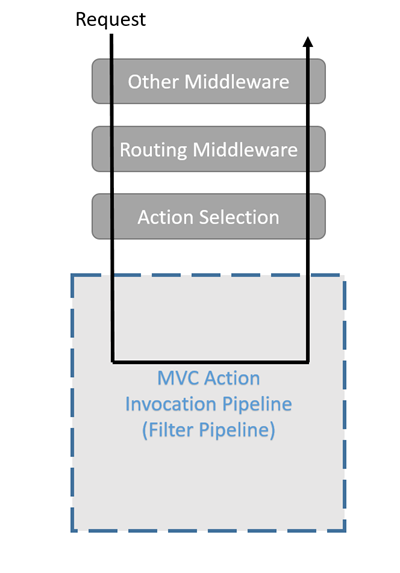
筛选器在 MVC 操作调用管道(有时称为筛选器管道)内运行。 筛选器管道在 MVC 选择了要执行的操作(controller中的action方法)之后运行。
筛选器类型
每种筛选器类型都在筛选器管道中的不同阶段(上图中的mvc action invocation pipeline)执行。
授权筛选器最先运行,用于确定是否已针对当前请求为当前用户授权。 如果请求未获授权,它们可以让管道短路。
//startup:

public void ConfigureServices(IServiceCollection services)

        {

            services.AddMvc(action =>

            {

                action.Filters.Add<AuthorizationFilter>();

            }).SetCompatibilityVersion(CompatibilityVersion.Version_2_1);

}

//authorizationfilter:

 public class AuthorizationFilter : IAsyncAuthorizationFilter

    {

        private readonly ILoggerFactory loggerFactory;

        public AuthorizationFilter(ILoggerFactory loggerFactory)

        {

            this.loggerFactory = loggerFactory;

        }

        public Task OnAuthorizationAsync(AuthorizationFilterContext context)

        {

            var logger = loggerFactory.CreateLogger<AuthorizationFilter>();

            logger.LogWarning($"authorization filter is executing now ,target action is :{context.ActionDescriptor.DisplayName}");

            return Task.CompletedTask;

        }

    }

资源筛选器是授权后最先处理请求的筛选器。 它们可以在筛选器管道的其余阶段运行之前以及管道的其余阶段完成之后运行代码。 出于性能方面的考虑,可以使用它们来实现缓存或以其他方式让筛选器管道短路。 它们在模型绑定之前运行,所以可以影响模型绑定。
//startup:

 public void ConfigureServices(IServiceCollection services)

        {

            services.AddMvc(action =>

            {

                action.Filters.Add<AuthorizationFilter>();

                action.Filters.Add<ResourceFilter>();

            }).SetCompatibilityVersion(CompatibilityVersion.Version_2_1);

        }

//resourcefilter:

 public class ResourceFilter : IAsyncResourceFilter

    {

        private readonly ILoggerFactory loggerFactory;

        public ResourceFilter(ILoggerFactory loggerFactory)

        {

            this.loggerFactory = loggerFactory;

        }

        public async Task OnResourceExecutionAsync(ResourceExecutingContext context, ResourceExecutionDelegate next)

        {

            var logger = loggerFactory.CreateLogger<ResourceFilter>();

            logger.LogWarning($"resource filter is executing now,valueproviderfactories count:{context.ValueProviderFactories.Count}");

            var executedContext = await next();

            logger.LogWarning($"resource filter is executed now ,result's type is {executedContext.Result.GetType().Name}");

        }

    }


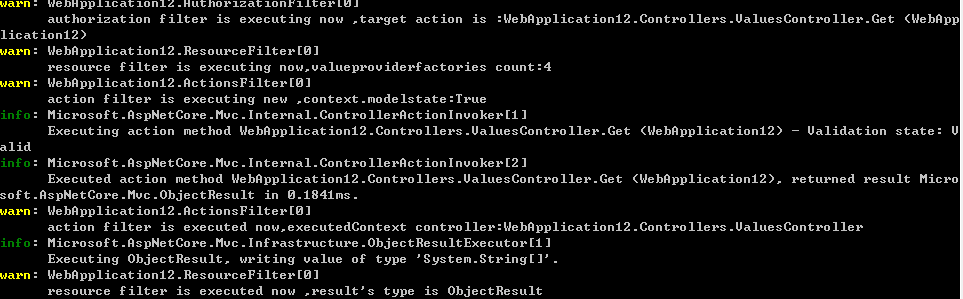
操作筛选器可以在调用单个操作方法之前和之后立即运行代码。 它们可用于处理传入某个操作的参数以及从该操作返回的结果。
//startup:

public void ConfigureServices(IServiceCollection services)

        {

            services.AddMvc(action =>

            {

                action.Filters.Add<ActionsFilter>();

                action.Filters.Add<AuthorizationFilter>();

                action.Filters.Add<ResourceFilter>();

            }).SetCompatibilityVersion(CompatibilityVersion.Version_2_1);

        }

//actionsfilter

public class ActionsFilter : IAsyncActionFilter

    {

        private readonly ILoggerFactory factory;

        public ActionsFilter(ILoggerFactory factory)

        {

            this.factory = factory;

        }

        public async Task OnActionExecutionAsync(ActionExecutingContext context, ActionExecutionDelegate next)

        {

            var logger = factory.CreateLogger<ActionsFilter>();

            logger.LogWarning($"action filter is executing new ,context.modelstate:{context.ModelState.IsValid}");

            var executedContext = await next();

            logger.LogWarning($"action filter is executed now,executedContext controller:{executedContext.Controller.ToString()}");

        }

    }
异常筛选器用于在向响应正文写入任何内容之前,对未经处理的异常应用全局策略。
 //startup:

public void ConfigureServices(IServiceCollection services)

        {

            services.AddMvc(action =>

            {

                action.Filters.Add<ActionsFilter>();

                action.Filters.Add<AuthorizationFilter>();

                action.Filters.Add<ResourceFilter>();

                action.Filters.Add<ExceptionsFilter>();

            }).SetCompatibilityVersion(CompatibilityVersion.Version_2_1);

        }

//exceptionsfilter:

 public class ExceptionsFilter : IAsyncExceptionFilter

    {

        private readonly ILoggerFactory loggerFactory;

        public ExceptionsFilter(ILoggerFactory loggerFactory)

        {

            this.loggerFactory = loggerFactory;

        }

        public Task OnExceptionAsync(ExceptionContext context)

        {

            var logger = loggerFactory.CreateLogger<ExceptionsFilter>();

            logger.LogWarning($"some exception's happened,exception's message:{context.Exception.Message}");
            context.Result=new ObjectResult(context.Exception.Message);//这个异常被处理了一下,以200正常返回。

            return Task.CompletedTask;

        }

    }

上面的日志打印结果可以看出exception filter实在authorization filter和resource filter以及action filter之后执行的它能捕获的异常是在action执行过程中发生的异常。所以,如果在authorization filter或者resource filter中发生异常的话,它是没有办法捕获的,可以做一个测验:将authorization filter中抛出一个异常:
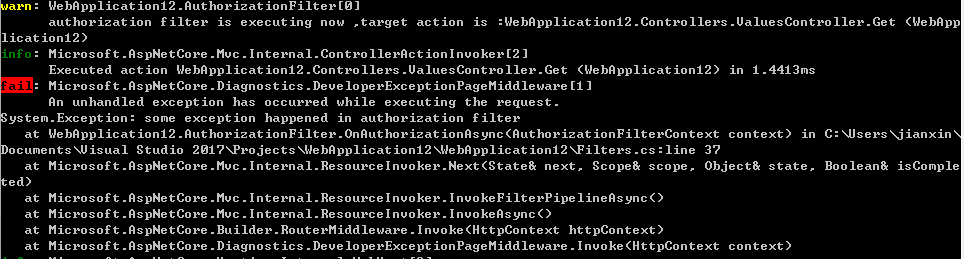
可以看到这个异常是被直接抛出来了,并没有被exception handler中进行处理。接着改在resource filter中抛出一个异常,看看:
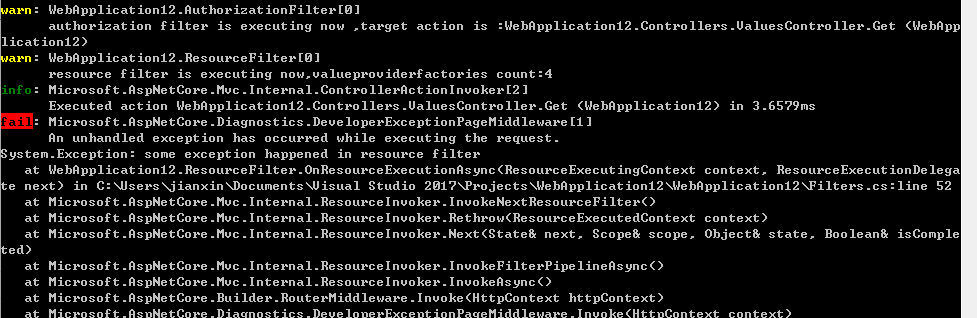
同样,在resource filter中抛出的异常exception filter也是处理不了的。也就是说在筛选器管道中,处于exception筛选器执行之前而执行的代码抛出的异常,exception筛选器是处理不了的。要想捕获程序的全局异常,我觉得应该在中间件中定义对异常的捕获。这个结论还没有进行证实,有时间再讨论。
结果筛选器可以在执行单个操作结果之前和之后立即运行代码。 仅当操作方法成功执行时,它们才会运行。 对于必须围绕视图或格式化程序的执行的逻辑,它们很有用。
//startup:

 public void ConfigureServices(IServiceCollection services)

        {

            services.AddMvc(action =>

            {

                action.Filters.Add<ActionsFilter>();

                action.Filters.Add<AuthorizationFilter>();

                action.Filters.Add<ResourceFilter>();

                action.Filters.Add<ExceptionsFilter>();

                action.Filters.Add<ResultFilter>();

            }).SetCompatibilityVersion(CompatibilityVersion.Version_2_1);

        }

//resultfilter:

 public class ResultFilter : IAsyncResultFilter

    {

        private readonly ILoggerFactory loggerFactory;

        public ResultFilter(ILoggerFactory loggerFactory)

        {

            this.loggerFactory = loggerFactory;

        }

        public async Task OnResultExecutionAsync(ResultExecutingContext context, ResultExecutionDelegate next)

        {

            var logger = loggerFactory.CreateLogger<ResultFilter>();

            logger.LogWarning($"result filter is executing, context.result is :{context.Result.GetType().Name}");

            var executedContext = await next();

            logger.LogWarning($"result filter is executed ,context.result is {executedContext.Result.GetType().Name}");

        }

    }
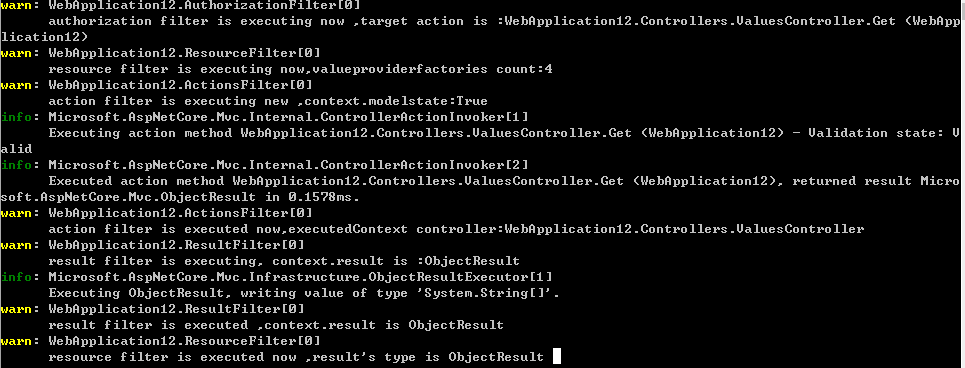
上面的结果是action中没有抛出异常,正常执行的结果,如果在action中抛出异常: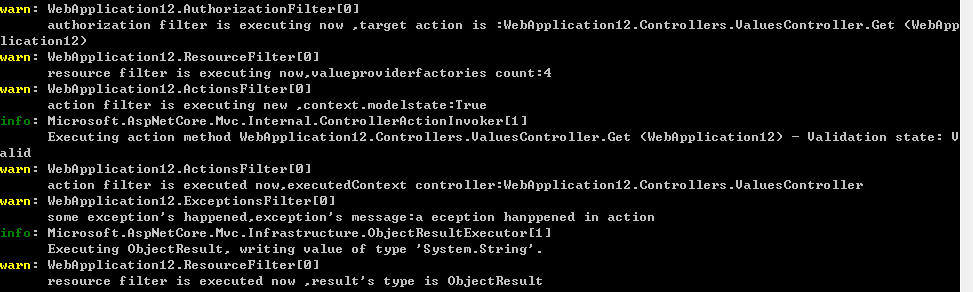
上下对比一下会发现,result filter只会在action正常执行没有抛出异常之后才会执行。exception filter是会捕获action抛出的异常。
下图展示了这些筛选器类型在筛选器管道中的交互方式。

实现
通过不同的接口定义,筛选器同时支持同步和异步实现。例如我上面举的例子全部都是用异步的方式实现的。
可在其管道阶段之前和之后运行代码的同步筛选器定义 OnStageExecuting 方法和 OnStageExecuted 方法。 例如,在调用操作方法之前调用 OnActionExecuting,在操作方法返回之后调用 OnActionExecuted。
using FiltersSample.Helper;

using Microsoft.AspNetCore.Mvc.Filters;

namespace FiltersSample.Filters

{

    public class SampleActionFilter : IActionFilter

    {

        public void OnActionExecuting(ActionExecutingContext context)

        {

            // do something before the action executes

        }

        public void OnActionExecuted(ActionExecutedContext context)

        {

            // do something after the action executes

        }

    }

}
异步筛选器定义单一的 OnStageExecutionAsync 方法。 此方法采用 FilterTypeExecutionDelegate 委托来执行筛选器的管道阶段。 例如,ActionExecutionDelegate 调用该操作方法(如果没有下一个action filter)或下一个操作筛选器(下一个action filter),用户可以在调用它之前和之后执行代码。
可以在单个类中为多个筛选器阶段实现接口。 例如,ActionFilterAttribute 类实现 IActionFilter 和 IResultFilter,以及它们的异步等效接口。
注意:同步和异步的只需要实现一个就行,如果两个都实现了,会优先执行异步版本的。
篇幅太长,再来一片吧。
asp.net core 2.2 中的过滤器/筛选器(上)的更多相关文章
- asp.net core MVC 过滤器之ActionFilter过滤器(二)
本系类将会讲解asp.net core MVC中的内置全局过滤器的使用,将分为以下章节 asp.net core MVC 过滤器之ExceptionFilter过滤器(一) asp.net core ...
- ASP.NET Core HTTP 管道中的那些事儿
前言 马上2016年就要过去了,时间可是真快啊. 上次写完 Identity 系列之后,反响还不错,所以本来打算写一个 ASP.NET Core 中间件系列的,但是中间遇到了很多事情.首先是 NPOI ...
- ASP.NET Core 1.0 中的依赖项管理
var appInsights=window.appInsights||function(config){ function r(config){t[config]=function(){var i= ...
- 在ASP.NET Core 1.0中如何发送邮件
(此文章同时发表在本人微信公众号"dotNET每日精华文章",欢迎右边二维码来关注.) 题记:目前.NET Core 1.0中并没有提供SMTP相关的类库,那么要如何从ASP.NE ...
- ASP.NET Core 1.0 中使用 Swagger 生成文档
github:https://github.com/domaindrivendev/Ahoy 之前文章有介绍在ASP.NET WebAPI 中使用Swagger生成文档,ASP.NET Core 1. ...
- 用ASP.NET Core 1.0中实现邮件发送功能
准备将一些项目迁移到 asp.net core 先从封装类库入手,在遇到邮件发送类时发现在 asp.net core 1.0中并示提供SMTP相关类库,于是网上一搜发现了MailKit 好东西一定要试 ...
- 在ASP.NET Core Web API中为RESTful服务增加对HAL的支持
HAL(Hypertext Application Language,超文本应用语言)是一种RESTful API的数据格式风格,为RESTful API的设计提供了接口规范,同时也降低了客户端与服务 ...
- 在ASP.NET Core 2.0中使用CookieAuthentication
在ASP.NET Core中关于Security有两个容易混淆的概念一个是Authentication(认证),一个是Authorization(授权).而前者是确定用户是谁的过程,后者是围绕着他们允 ...
- 使用Http-Repl工具测试ASP.NET Core 2.2中的Web Api项目
今天,Visual Studio中没有内置工具来测试WEB API.使用浏览器,只能测试http GET请求.您需要使用Postman,SoapUI,Fiddler或Swagger等第三方工具来执行W ...
随机推荐
- Python爬虫入门教程 47-100 mitmproxy安装与安卓模拟器的配合使用-手机APP爬虫部分
1. 准备下载软件 介绍一款爬虫辅助工具mitmproxy ,mitmproxy 就是用于MITM的proxy,MITM中间人攻击.说白了就是服务器和客户机中间通讯多增加了一层.跟Fiddler和Ch ...
- KnockOut绑定之Click绑定
example(click绑定) Click绑定对DOM元素添加一个函数,当DOM元素被点击的时候调用.在button,input 或者a标签中常用,但其实他适用于任何可见的DOM元素. 每当你点击b ...
- 深度链接(DeepLinking)怎样免费实现
深度链接技术(DeepLinking),一般是通过Web页面调用原生App,并把需要的参数通过Uri的形式传递给App,主要使用方式有:两个App之间的广告.App的社交分享.页面跳转App.DSP广 ...
- 前端javascript如何阻止按下退格键页面回退 但 不阻止文本框使用退格键删除文本
这段代码可以: document.onkeydown = function (e) { e.stopPropagation(); // 阻止事件冒泡传递 e.preventDefault(); // ...
- docker run 之后执行多条命令
执行 ls docker run microsoft/dotnet ls && cd /root 执行 多条使用sh -c命令 在run后面加了一个sh -c命令,后面直接加多条语句即 ...
- Java 加密、解密PDF文档
本篇文章将介绍通过Java编程来设置PDF文档保护的方法.我们可以设置仅用于查阅文档的密码,即该通过该密码打开文档仅用于文档阅读,无法编辑:也可以设置文档编辑权限的密码,即通过该密码打开文档时,文档为 ...
- 覆盖ng-zorro样式(非style.scss)
之前发现在模板的样式表里写样式不起作用,然后想起vue里有个/deep/,angular会不会也有一个,果然,发现了一个::ng-deep可以在模板的样式表里覆盖ng-zorro的样式.记录一下(●' ...
- 都 9012了,该选择 Angular、React,还是Vue?
转载请注明出处:葡萄城官网,葡萄城为开发者提供专业的开发工具.解决方案和服务,赋能开发者. 尽管 Web开发的典型应用场景除了将服务器用作平台.浏览器用作客户端之外,几乎很少活跃于其他业务领域,但不可 ...
- typescript类的修饰符
学习过java的小姐姐,小哥哥应该很好理解,但还是啰嗦的写出来! typescript里面定义属性的时候给我们提供了 三种修饰符 public :公有 在当前类里面. 子类 .类外面都可以访问 pro ...
- DVWA 黑客攻防演练(十三)JS 攻击 JavaScript Attacks
新版本的 DVWA 有新东西,其中一个就是这个 JavaScript 模块了. 玩法也挺特别的,如果你能提交 success 这个词,成功是算你赢了.也看得我有点懵逼. 初级 如果你改成 " ...