
Java连接远程Redis
1. 安装redis server
|
################################## NETWORK #####################################
# By default, if no "bind" configuration directive is specified, Redis listens
# for connections from all the network interfaces available on the server.
# It is possible to listen to just one or multiple selected interfaces using
# the "bind" configuration directive, followed by one or more IP addresses.
#
# Examples:
#
# bind 192.168.1.100 10.0.0.1
# bind 127.0.0.1 ::1
#
# ~~~ WARNING ~~~ If the computer running Redis is directly exposed to the
# internet, binding to all the interfaces is dangerous and will expose the
# instance to everybody on the internet. So by default we uncomment the
# following bind directive, that will force Redis to listen only into
# the IPv4 lookback interface address (this means Redis will be able to
# accept connections only from clients running into the same computer it
# is running).
#
# IF YOU ARE SURE YOU WANT YOUR INSTANCE TO LISTEN TO ALL THE INTERFACES
# JUST COMMENT THE FOLLOWING LINE.
# ~~~~~~~~~~~~~~~~~~~~~~~~~~~~~~~~~~~~~~~~~~~~~~~~~~~~~~~~~~~~~~~~~~~~~~~~
bind 127.0.0.1
|
|
# Protected mode is a layer of security protection, in order to avoid that
# Redis instances left open on the internet are accessed and exploited.
#
# When protected mode is on and if:
#
# 1) The server is not binding explicitly to a set of addresses using the
# "bind" directive.
# 2) No password is configured.
#
# The server only accepts connections from clients connecting from the
# IPv4 and IPv6 loopback addresses 127.0.0.1 and ::1, and from Unix domain
# sockets.
#
# By default protected mode is enabled. You should disable it only if
# you are sure you want clients from other hosts to connect to Redis
# even if no authentication is configured, nor a specific set of interfaces
# are explicitly listed using the "bind" directive.
protected-mode yes
|
| (error) DENIED Redis is running in protected mode because protected mode is enabled, no bind address was specified, no authentication password is requested to clients. In this mode connections are only accepted from the loopback interface. If you want to connect from external computers to Redis you may adopt one of the following solutions: 1) Just disable protected mode sending the command 'CONFIG SET protected-mode no' from the loopback interface by connecting to Redis from the same host the server is running, however MAKE SURE Redis is not publicly accessible from internet if you do so. Use CONFIG REWRITE to make this change permanent. 2) Alternatively you can just disable the protected mode by editing the Redis configuration file, and setting the protected mode option to 'no', and then restarting the server. 3) If you started the server manually just for testing, restart it with the '--protected-mode no' option. 4) Setup a bind address or an authentication password. NOTE: You only need to do one of the above things in order for the server to start accepting connections from the outside. |
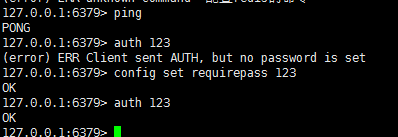
2. Java 连接Redis
现在redis运行了,使用代码连接:
/**

 * Created by bin on 2016/12/12.

 */

import  redis.clients.jedis.Jedis;

public class Main {

    static String constr = "123.206.212.***" ;

    public static Jedis getRedis(){

        Jedis jedis = new Jedis(constr) ;

        jedis.auth("");

        return jedis ;

    }

    public static void main(String[] args){

        Jedis j = Main. getRedis() ;

        String output ;

        j.set( "hello", "world" ) ;

        output = j.get( "hello") ;

        System. out.println(output) ;

    }

}
Redis连接池:
package com.test;

import redis.clients.jedis.Jedis;

import redis.clients.jedis.JedisPool;

import redis.clients.jedis.JedisPoolConfig;

public final class RedisUtil {

    //Redis服务器IP

    private static String ADDR = "192.168.0.100";

    //Redis的端口号

    private static int PORT = 6379;

    //访问密码

    private static String AUTH = "admin";

    //可用连接实例的最大数目,默认值为8;

    //如果赋值为-1,则表示不限制;如果pool已经分配了maxActive个jedis实例,则此时pool的状态为exhausted(耗尽)。

    private static int MAX_ACTIVE = 1024;

    //控制一个pool最多有多少个状态为idle(空闲的)的jedis实例,默认值也是8。

    private static int MAX_IDLE = 200;

    //等待可用连接的最大时间,单位毫秒,默认值为-1,表示永不超时。如果超过等待时间,则直接抛出JedisConnectionException;

    private static int MAX_WAIT = 10000;

    private static int TIMEOUT = 10000;

    //在borrow一个jedis实例时,是否提前进行validate操作;如果为true,则得到的jedis实例均是可用的;

    private static boolean TEST_ON_BORROW = true;

    private static JedisPool jedisPool = null;

    /**

     * 初始化Redis连接池

     */

    static {

        try {

            JedisPoolConfig config = new JedisPoolConfig();

            config.setMaxActive(MAX_ACTIVE);

            config.setMaxIdle(MAX_IDLE);

            config.setMaxWait(MAX_WAIT);

            config.setTestOnBorrow(TEST_ON_BORROW);

            jedisPool = new JedisPool(config, ADDR, PORT, TIMEOUT, AUTH);

        } catch (Exception e) {

            e.printStackTrace();

        }

    }

    /**

     * 获取Jedis实例

     * @return

     */

    public synchronized static Jedis getJedis() {

        try {

            if (jedisPool != null) {

                Jedis resource = jedisPool.getResource();

                return resource;

            } else {

                return null;

            }

        } catch (Exception e) {

            e.printStackTrace();

            return null;

        }

    }

    /**

     * 释放jedis资源

     * @param jedis

     */

    public static void returnResource(final Jedis jedis) {

        if (jedis != null) {

            jedisPool.returnResource(jedis);

        }

    }

}
Java连接远程Redis的更多相关文章
- Java 连接使用 Redis
1. 开始在 Java 中使用 Redis 前, 我们需要确保已经安装了 redis 服务及 Java redis 驱动,且你的机器上能正常使用 Java. 首先你需要下载驱动包,下载 jedis.j ...
- Java 连接操作 Redis 出现错误
Exception in thread "main" redis.clients.jedis.exceptions.JedisConnectionException: java.n ...
- Redis02 Redis客户端之Java、连接远程Redis服务器失败
1 查看支持Java的redis客户端 本博文采用 Jedis 作为redis客户端,采用 commons-pool2 作为连接redis服务器的连接池 2 下载相关依赖与实战 2.1 到 Repos ...
- Java 连接远程Linux 服务器执行 shell 脚本查看 CPU、内存、硬盘信息
pom.xml jar 包支持 <dependency> <groupId>com.jcraft</groupId> <artifactId>jsch& ...
- Java连接远程Mysql过程中遇到的各种问题
2018-11-16 10:46 2018-11-19 21:35 前言 本篇文章记录的是本人在使用Java程序连接另一台电脑(同一局域网)上的Mysql数据库的过程中遇到的各种问题及解决方案.希望能 ...
- java连接远程服务器并执行命令
导入必要的jar包 <dependency> <groupId>ch.ethz.ganymed</groupId> <artifactId>ganym ...
- java 连接远程Linux 服务器
创建闭锁,确保能连接到zk服务器. // 创建闭锁final CountDownLatch countDownLatch = new CountDownLatch(1); String connect ...
- 如何连接远程redis,并且选择某个库进行操作
public static Jedis getJedis(){ Jedis jedis = new Jedis("222.201.145.215"); jedis.select(1 ...
- redis清除缓存和连接远程服务器
直接进入命令行输入 1.连接远程redis: redis-cli -h 127.0.0.1 -p 3008 -a pIctur3 (a后是密码) 2.查看缓存:keys * 3.清除缓存:de ...
随机推荐
- FunDA(2)- Streaming Data Operation:流式数据操作
在上一集的讨论里我们介绍并实现了强类型返回结果行.使用强类型主要的目的是当我们把后端数据库SQL批次操作搬到内存里转变成数据流式按行操作时能更方便.准确.高效地选定数据字段.在上集讨论示范里我们用集合 ...
- Delphi_05_Delphi_Object_Pascal_基本语法_03
继续Delphi的学习之旅, 废话不多说,直接贴代码. { Delphi基本语法 1.对象 2.指针 3.类型别名 和 类型转换 } program DelphiObject; {$APPTYPE C ...
- 兼容javascript和C#的RSA加密解密算法,对web提交的数据进行加密传输
Web应用中往往涉及到敏感的数据,由于HTTP协议以明文的形式与服务器进行交互,因此可以通过截获请求的数据包进行分析来盗取有用的信息.虽然https可以对传输的数据进行加密,但是必须要申请证书(一般都 ...
- angularjs 弹出框 $modal
angularjs 弹出框 $modal 标签: angularjs 2015-11-04 09:50 8664人阅读 评论(1) 收藏 举报 分类: Angularjs(3) $modal只有一 ...
- Android View的绘制流程
写得太好了,本来还想自己写的,奈何肚里墨水有限,直接转吧.正所谓前人种树,后人乘凉.. View的绘制和事件处理是两个重要的主题,上一篇<图解 Android事件分发机制>已经把事件的分发 ...
- redux-devtools 浏览器修改Store值
1. npm install --save-dev redux-devtools 2. npm instal. --redux-devtools-dock-monitor 3. 创建DevTools ...
- 浅谈Android编码规范及命名规范
前言: 目前工作负责两个医疗APP项目的开发,同时使用LeanCloud进行云端配合开发,完全单挑. 现大框架已经完成,正在进行细节模块上的开发 抽空总结一下Android项目的开发规范:1.编码规范 ...
- Java 中的集合接口——List、Set、Map
Java 中的集合接口——List.Set.Map 什么叫集合:集合就是Java API所提供的一系列类的实例,可以用于动态存放多个对象.这跟我们学过的数组差不多,那为什么我们还要学集合,我们看看数组 ...
- 关于iPhone图片的问题。
由于iOS设备的屏幕分辨率不尽相同,有大有小,那么在不同设备中显示同一张图片,可能会造成图片被拉伸.变形,严重影响用户体验.为了让图片在不同设备中都能得到很好的显示效果,同一类图片我们一般会准备几种版 ...
- Unity、c#中的拓展方法讲解
很早以前看过这个东西,但是没有真正的用到过,希望之后会用到上面的方法, 大概的意思是这样的c#中尤其在用Unity的时候,已有的框架提供给我们一些固定的方法,但是有时我们想对这些方法进行修改, 这时我 ...