
SQL Join各种内联外联说明
Visual Representation of SQL Joins



|
Introduction
This is just a simple article visually explaining SQL JOINs.
Background
I'm a pretty visual person. Things seem to make more sense as a picture. I looked all over the Internet for a good graphical representation of SQL JOINs, but I couldn't find any to my liking. Some had good diagrams but lacked completeness (they didn't have all the possible JOINs), and some were just plain terrible. So, I decided to create my own and write an article about it.
Using the code
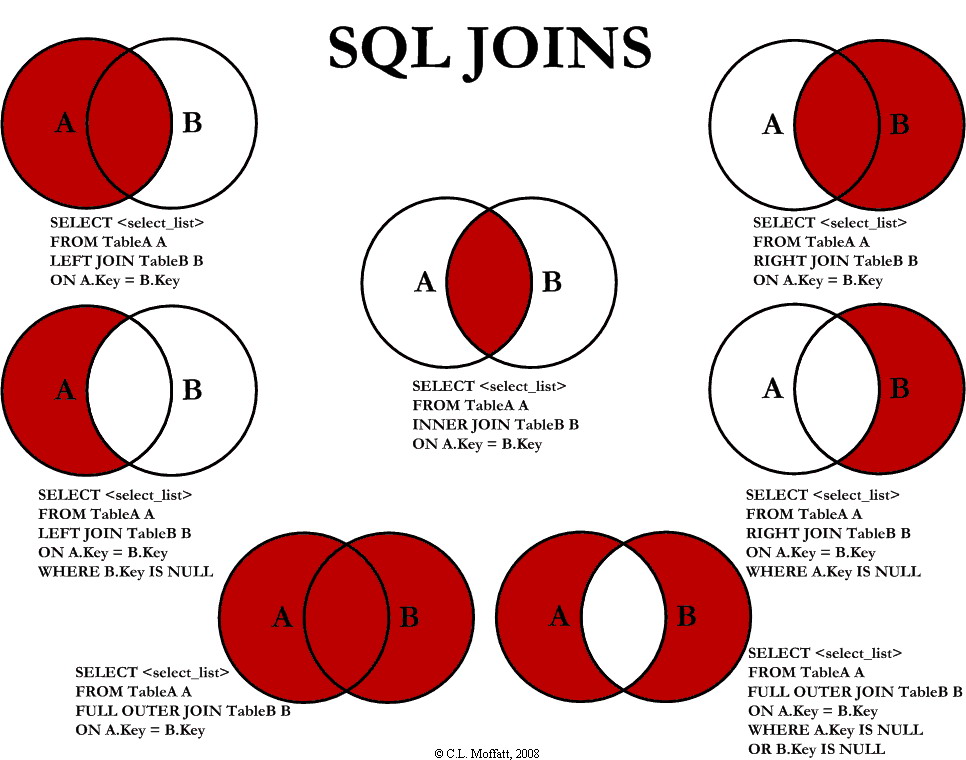
I am going to discuss seven different ways you can return data from two relational tables. I will be excluding cross Joins and self referencing Joins. The seven Joins I will discuss are shown below:
INNER JOINLEFT JOINRIGHT JOINOUTER JOINLEFT JOIN EXCLUDING INNER JOINRIGHT JOIN EXCLUDING INNER JOINOUTER JOIN EXCLUDING INNER JOIN
For the sake of this article, I'll refer to 5, 6, and 7 as LEFT EXCLUDING JOIN, RIGHT EXCLUDING JOIN, andOUTER EXCLUDING JOIN, respectively. Some may argue that 5, 6, and 7 are not really joining the two tables, but for simplicity, I will still refer to these as Joins because you use a SQL Join in each of these queries (but exclude some records with a WHERE clause).
Inner JOIN
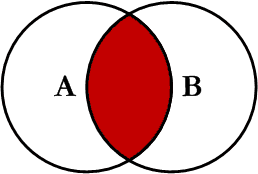
This is the simplest, most understood Join and is the most common. This query will return all of the records in the left table (table A) that have a matching record in the right table (table B). This Join is written as follows:
SELECT <select_list>
FROM Table_A A
INNER JOIN Table_B B
ON A.Key = B.Key
Left JOIN
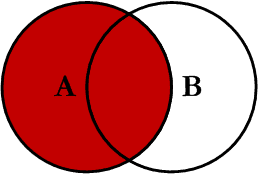
This query will return all of the records in the left table (table A) regardless if any of those records have a match in the right table (table B). It will also return any matching records from the right table. This Join is written as follows:
SELECT <select_list>
FROM Table_A A
LEFT JOIN Table_B B
ON A.Key = B.Key
Right JOIN
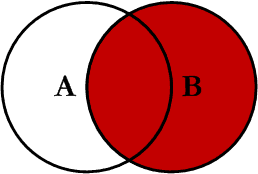
This query will return all of the records in the right table (table B) regardless if any of those records have a match in the left table (table A). It will also return any matching records from the left table. This Join is written as follows:
SELECT <select_list>
FROM Table_A A
RIGHT JOIN Table_B B
ON A.Key = B.Key
Outer JOIN
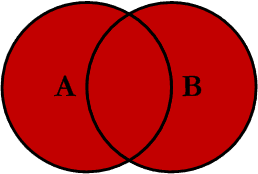
This Join can also be referred to as a FULL OUTER JOIN or a FULL JOIN. This query will return all of the records from both tables, joining records from the left table (table A) that match records from the right table (table B). This Join is written as follows:
SELECT <select_list>
FROM Table_A A
FULL OUTER JOIN Table_B B
ON A.Key = B.Key
Left Excluding JOIN
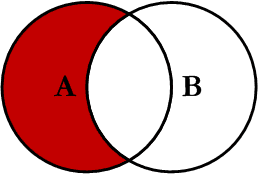
This query will return all of the records in the left table (table A) that do not match any records in the right table (table B). This Join is written as follows:
SELECT <select_list>
FROM Table_A A
LEFT JOIN Table_B B
ON A.Key = B.Key
WHERE B.Key IS NULL
Right Excluding JOIN
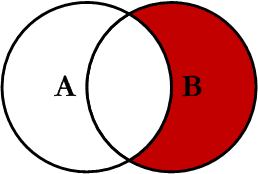
This query will return all of the records in the right table (table B) that do not match any records in the left table (table A). This Join is written as follows:
SELECT <select_list>
FROM Table_A A
RIGHT JOIN Table_B B
ON A.Key = B.Key
WHERE A.Key IS NULL
Outer Excluding JOIN
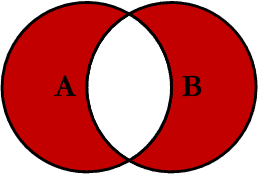
This query will return all of the records in the left table (table A) and all of the records in the right table (table B) that do not match. I have yet to have a need for using this type of Join, but all of the others, I use quite frequently. This Join is written as follows:
SELECT <select_list>
FROM Table_A A
FULL OUTER JOIN Table_B B
ON A.Key = B.Key
WHERE A.Key IS NULL OR B.Key IS NULL
Examples
Suppose we have two tables, Table_A and Table_B. The data in these tables are shown below:
TABLE_A
  PK Value
---- ----------
   1 FOX
   2 COP
   3 TAXI
   6 WASHINGTON
   7 DELL
   5 ARIZONA
   4 LINCOLN
  10 LUCENT

TABLE_B
  PK Value
---- ----------
   1 TROT
   2 CAR
   3 CAB
   6 MONUMENT
   7 PC
   8 MICROSOFT
   9 APPLE
  11 SCOTCH
The results of the seven Joins are shown below:
-- INNER JOIN
SELECT A.PK AS A_PK, A.Value AS A_Value,
       B.Value AS B_Value, B.PK AS B_PK
FROM Table_A A
INNER JOIN Table_B B
ON A.PK = B.PK

A_PK A_Value    B_Value    B_PK
---- ---------- ---------- ----
   1 FOX        TROT          1
   2 COP        CAR           2
   3 TAXI       CAB           3
   6 WASHINGTON MONUMENT      6
   7 DELL       PC            7

(5 row(s) affected)
-- LEFT JOIN
SELECT A.PK AS A_PK, A.Value AS A_Value,
B.Value AS B_Value, B.PK AS B_PK
FROM Table_A A
LEFT JOIN Table_B B
ON A.PK = B.PK

A_PK A_Value    B_Value    B_PK
---- ---------- ---------- ----
   1 FOX        TROT          1
   2 COP        CAR           2
   3 TAXI       CAB           3
   4 LINCOLN    NULL       NULL
   5 ARIZONA    NULL       NULL
   6 WASHINGTON MONUMENT      6
   7 DELL       PC            7
  10 LUCENT     NULL       NULL

(8 row(s) affected)
-- RIGHT JOIN
SELECT A.PK AS A_PK, A.Value AS A_Value,
B.Value AS B_Value, B.PK AS B_PK
FROM Table_A A
RIGHT JOIN Table_B B
ON A.PK = B.PK

A_PK A_Value    B_Value    B_PK
---- ---------- ---------- ----
   1 FOX        TROT          1
   2 COP        CAR           2
   3 TAXI       CAB           3
   6 WASHINGTON MONUMENT      6
   7 DELL       PC            7
NULL NULL       MICROSOFT     8
NULL NULL       APPLE         9
NULL NULL       SCOTCH       11

(8 row(s) affected)
-- OUTER JOIN
SELECT A.PK AS A_PK, A.Value AS A_Value,
B.Value AS B_Value, B.PK AS B_PK
FROM Table_A A
FULL OUTER JOIN Table_B B
ON A.PK = B.PK

A_PK A_Value    B_Value    B_PK
---- ---------- ---------- ----
   1 FOX        TROT          1
   2 COP        CAR           2
   3 TAXI       CAB           3
   6 WASHINGTON MONUMENT      6
   7 DELL       PC            7
NULL NULL       MICROSOFT     8
NULL NULL       APPLE         9
NULL NULL       SCOTCH       11
   5 ARIZONA    NULL       NULL
   4 LINCOLN    NULL       NULL
  10 LUCENT     NULL       NULL

(11 row(s) affected)
-- LEFT EXCLUDING JOIN
SELECT A.PK AS A_PK, A.Value AS A_Value,
B.Value AS B_Value, B.PK AS B_PK
FROM Table_A A
LEFT JOIN Table_B B
ON A.PK = B.PK
WHERE B.PK IS NULL

A_PK A_Value    B_Value    B_PK
---- ---------- ---------- ----
   4 LINCOLN    NULL       NULL
   5 ARIZONA    NULL       NULL
  10 LUCENT     NULL       NULL
(3 row(s) affected)
-- RIGHT EXCLUDING JOIN
SELECT A.PK AS A_PK, A.Value AS A_Value,
B.Value AS B_Value, B.PK AS B_PK
FROM Table_A A
RIGHT JOIN Table_B B
ON A.PK = B.PK
WHERE A.PK IS NULL

A_PK A_Value    B_Value    B_PK
---- ---------- ---------- ----
NULL NULL       MICROSOFT     8
NULL NULL       APPLE         9
NULL NULL       SCOTCH       11

(3 row(s) affected)
-- OUTER EXCLUDING JOIN
SELECT A.PK AS A_PK, A.Value AS A_Value,
B.Value AS B_Value, B.PK AS B_PK
FROM Table_A A
FULL OUTER JOIN Table_B B
ON A.PK = B.PK
WHERE A.PK IS NULL
OR B.PK IS NULL

A_PK A_Value    B_Value    B_PK
---- ---------- ---------- ----
NULL NULL       MICROSOFT     8
NULL NULL       APPLE         9
NULL NULL       SCOTCH       11
   5 ARIZONA    NULL       NULL
   4 LINCOLN    NULL       NULL
  10 LUCENT     NULL       NULL

(6 row(s) affected)
Note on the OUTER JOIN that the inner joined records are returned first, followed by the right joined records, and then finally the left joined records (at least, that's how my Microsoft SQL Server did it; this, of course, is without using any ORDER BY statement).
You can visit the Wikipedia article for more info here (however, the entry is not graphical).
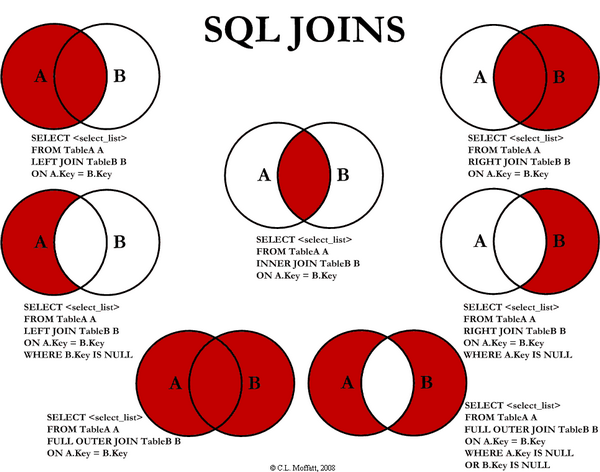
I've also created a cheat sheet that you can print out if needed. If you right click on the image below and select "Save Target As...", you will download the full size image.
History
- Initial release -- 02/03/2009.
- Version 1.0 -- 02/04/2009 -- Fixed cheat sheet and minor typos.
License
This article, along with any associated source code and files, is licensed under The Code Project Open License (CPOL)
Share
About the Author


SQL Join各种内联外联说明的更多相关文章
- sql中的内联和外联(简单用法)
有两张表:user和department User表: CREATE TABLE `user` ( `id` int(11) NOT NULL AUTO_INCREMENT, `name` ...
- js和css内联外联注意事项
简单说:这两个问题其实是同一个问题,但是网上找了好久也找不到方法,外联的js和css文件里不能有任何HTML的标记注释,一旦有,浏览器就疯了!一去掉就好了!!! 问题:起因是网上看到一个css的表格样 ...
- 内联外联CSS和JS
内联CSS 代码示例: <p style="color:red;font-size:18px">这里文字是红色.</p> 内联CSS也可称为行内CSS或者行 ...
- sql server 创建内联表值函数
表值函数就是返回table 的函数使用它可以方便的进行查询的处理 创建的代码如下: create FUNCTION returunclassfirstlist( -- Add the paramet ...
- sql中内联 和外联 区别
sql中内联 和外联 区别 2007-05-15 17:37 这个概念一般看书不好理解.其实夜简单.有例子就简单了. 比如: 表A(主表) cardid username 16 aa 23 bb 25 ...
- SQL Server进阶(六)表表达式--派生表、公用表表达式(CTE)、视图和内联表值函数
概述 表表达式是一种命名的查询表达式,代表一个有效地关系表.可以像其他表一样,在数据处理中使用表表达式. SQL Server支持四种类型的表表达式:派生表,公用表表达式,视图和内联表值函数. 为什么 ...
- SQL Server 表表达式--派生表、公用表表达式(CTE)、视图和内联表值函数
概述 表表达式是一种命名的查询表达式,代表一个有效地关系表.可以像其他表一样,在数据处理中使用表表达式. SQL Server支持四种类型的表表达式:派生表,公用表表达式,视图和内联表值函数. 为什么 ...
- SQL联合查询(内联、左联、右联、全联)的语法(转)
最近在做一个比较复杂的业务,涉及的表较多,于是在网上找了一些sql联合查询的例子进行研究使用. 概述: 联合查询效率较高,举例子来说明联合查询:内联inner join .左联left outer j ...
- SQL联合查询(内联、左联、右联、全联)的语法
联合查询效率较高,举例子来说明联合查询:内联inner join .左联left outer join .右联right outer join .全联full outer join 的好处及用法. 联 ...
随机推荐
- [LeetCode] Dota2 Senate 刀塔二参议院
In the world of Dota2, there are two parties: the Radiant and the Dire. The Dota2 senate consists of ...
- 虚拟机工作站创建虚拟机并安装Linux教程
前言: 今天开始学习一下Linux,之前早就想看,但是一直没时间,最近把其他知识整理完了,终于有时间来看一下Linux了. 本节只是安装虚拟机工作站,虚拟机,和Linux操作系统的过程,详细的记录了我 ...
- [SDOI2017]数字表格
Description Doris刚刚学习了fibonacci数列.用f[i]表示数列的第i项,那么 f[0]=0 f[1]=1 f[n]=f[n-1]+f[n-2],n>=2 Doris用老师 ...
- 51Nod 1482 部落信号
题目描述: 众所周知,如今的波兰在很久以前住着很多部落.他们的首都被n座山所环绕,形成一个圆圈.在每一座山上有一个哨兵,他日夜观察附近的山. 如果有任何危险,哨兵会在山上放一把火.如果在连接两座山的圆 ...
- 修改表单元素中placeholder属性样式、清除IE浏览器中input元素的清除图标和眼睛图标
一.修改input元素placeholder属性样式 在做项目的时候,一般表单元素的placeholder属性样式都是使用浏览器默认的,但有时候为了追求设计上的美感需要修表单元素的placeholde ...
- c语言的第四次作业
(一)改错题 输出三角形的面积和周长,输入三角形的三条边a.b.c,如果能构成一个三角形,输出面积area和周长perimeter(保留2位小数):否则,输出"These sides do ...
- Docker学习笔记【二】
Docker运行容器前需要本地存在对应的镜像,如果本地不存在该镜像,Docker会从镜像仓库下载该镜像. 1.获取镜像,默认从Docker Hub中获取. 命令 docker pull 2.运行容器, ...
- Json数组删除
有一个json数组,{'people':[{'name':'jetty','sex':'男'},{'name':'lily','sex':'女'}]} 有一个json:var aa={'name':' ...
- postgresql 安装使用
www.postgresql.org去下载你需要的版本,我下载的9.6.8 安装过程中会让你输入一次密码,其余的默认就ok 默认超级用户名postgres 打开 pgadmin4,我们将语言改为中文会 ...
- 用js来实现那些数据结构12(散列表)
上一篇写了如何实现简单的Map结构,因为东西太少了不让上首页.好吧... 这一篇文章说一下散列表hashMap的实现.那么为什么要使用hashMap?hashMap又有什么优势呢?hashMap是如何 ...