
SQL Join各种内联外联说明
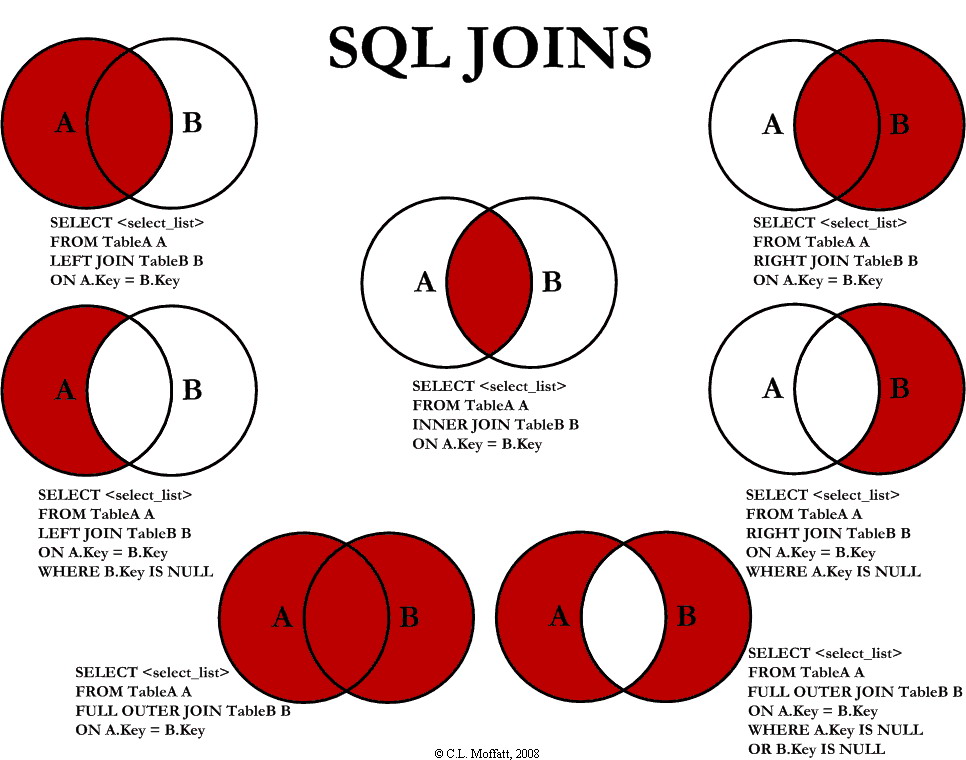
Visual Representation of SQL Joins



|
Introduction
This is just a simple article visually explaining SQL JOINs.
Background
I'm a pretty visual person. Things seem to make more sense as a picture. I looked all over the Internet for a good graphical representation of SQL JOINs, but I couldn't find any to my liking. Some had good diagrams but lacked completeness (they didn't have all the possible JOINs), and some were just plain terrible. So, I decided to create my own and write an article about it.
Using the code
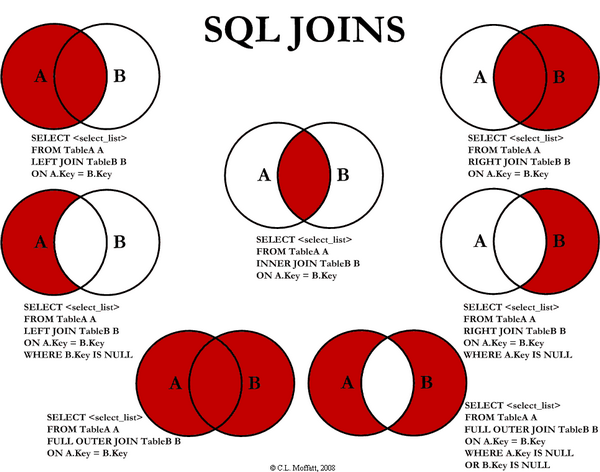
I am going to discuss seven different ways you can return data from two relational tables. I will be excluding cross Joins and self referencing Joins. The seven Joins I will discuss are shown below:
INNER JOINLEFT JOINRIGHT JOINOUTER JOINLEFT JOIN EXCLUDING INNER JOINRIGHT JOIN EXCLUDING INNER JOINOUTER JOIN EXCLUDING INNER JOIN
For the sake of this article, I'll refer to 5, 6, and 7 as LEFT EXCLUDING JOIN, RIGHT EXCLUDING JOIN, andOUTER EXCLUDING JOIN, respectively. Some may argue that 5, 6, and 7 are not really joining the two tables, but for simplicity, I will still refer to these as Joins because you use a SQL Join in each of these queries (but exclude some records with a WHERE clause).
Inner JOIN
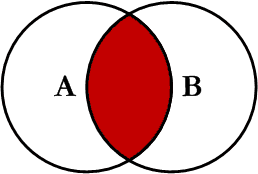
This is the simplest, most understood Join and is the most common. This query will return all of the records in the left table (table A) that have a matching record in the right table (table B). This Join is written as follows:
SELECT <select_list>
FROM Table_A A
INNER JOIN Table_B B
ON A.Key = B.Key
Left JOIN
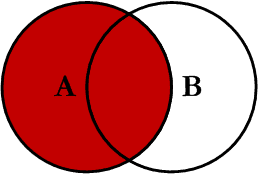
This query will return all of the records in the left table (table A) regardless if any of those records have a match in the right table (table B). It will also return any matching records from the right table. This Join is written as follows:
SELECT <select_list>
FROM Table_A A
LEFT JOIN Table_B B
ON A.Key = B.Key
Right JOIN
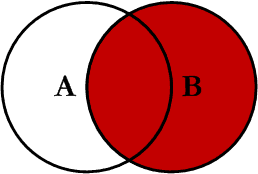
This query will return all of the records in the right table (table B) regardless if any of those records have a match in the left table (table A). It will also return any matching records from the left table. This Join is written as follows:
SELECT <select_list>
FROM Table_A A
RIGHT JOIN Table_B B
ON A.Key = B.Key
Outer JOIN
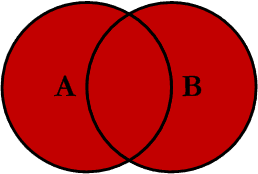
This Join can also be referred to as a FULL OUTER JOIN or a FULL JOIN. This query will return all of the records from both tables, joining records from the left table (table A) that match records from the right table (table B). This Join is written as follows:
SELECT <select_list>
FROM Table_A A
FULL OUTER JOIN Table_B B
ON A.Key = B.Key
Left Excluding JOIN
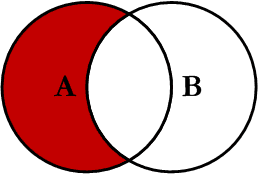
This query will return all of the records in the left table (table A) that do not match any records in the right table (table B). This Join is written as follows:
SELECT <select_list>
FROM Table_A A
LEFT JOIN Table_B B
ON A.Key = B.Key
WHERE B.Key IS NULL
Right Excluding JOIN
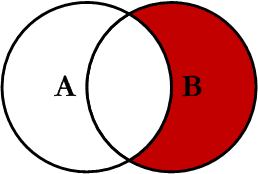
This query will return all of the records in the right table (table B) that do not match any records in the left table (table A). This Join is written as follows:
SELECT <select_list>
FROM Table_A A
RIGHT JOIN Table_B B
ON A.Key = B.Key
WHERE A.Key IS NULL
Outer Excluding JOIN
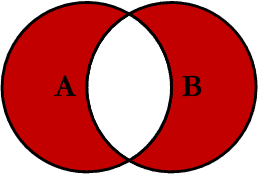
This query will return all of the records in the left table (table A) and all of the records in the right table (table B) that do not match. I have yet to have a need for using this type of Join, but all of the others, I use quite frequently. This Join is written as follows:
SELECT <select_list>
FROM Table_A A
FULL OUTER JOIN Table_B B
ON A.Key = B.Key
WHERE A.Key IS NULL OR B.Key IS NULL
Examples
Suppose we have two tables, Table_A and Table_B. The data in these tables are shown below:
TABLE_A
  PK Value
---- ----------
   1 FOX
   2 COP
   3 TAXI
   6 WASHINGTON
   7 DELL
   5 ARIZONA
   4 LINCOLN
  10 LUCENT

TABLE_B
  PK Value
---- ----------
   1 TROT
   2 CAR
   3 CAB
   6 MONUMENT
   7 PC
   8 MICROSOFT
   9 APPLE
  11 SCOTCH
The results of the seven Joins are shown below:
-- INNER JOIN
SELECT A.PK AS A_PK, A.Value AS A_Value,
       B.Value AS B_Value, B.PK AS B_PK
FROM Table_A A
INNER JOIN Table_B B
ON A.PK = B.PK

A_PK A_Value    B_Value    B_PK
---- ---------- ---------- ----
   1 FOX        TROT          1
   2 COP        CAR           2
   3 TAXI       CAB           3
   6 WASHINGTON MONUMENT      6
   7 DELL       PC            7

(5 row(s) affected)
-- LEFT JOIN
SELECT A.PK AS A_PK, A.Value AS A_Value,
B.Value AS B_Value, B.PK AS B_PK
FROM Table_A A
LEFT JOIN Table_B B
ON A.PK = B.PK

A_PK A_Value    B_Value    B_PK
---- ---------- ---------- ----
   1 FOX        TROT          1
   2 COP        CAR           2
   3 TAXI       CAB           3
   4 LINCOLN    NULL       NULL
   5 ARIZONA    NULL       NULL
   6 WASHINGTON MONUMENT      6
   7 DELL       PC            7
  10 LUCENT     NULL       NULL

(8 row(s) affected)
-- RIGHT JOIN
SELECT A.PK AS A_PK, A.Value AS A_Value,
B.Value AS B_Value, B.PK AS B_PK
FROM Table_A A
RIGHT JOIN Table_B B
ON A.PK = B.PK

A_PK A_Value    B_Value    B_PK
---- ---------- ---------- ----
   1 FOX        TROT          1
   2 COP        CAR           2
   3 TAXI       CAB           3
   6 WASHINGTON MONUMENT      6
   7 DELL       PC            7
NULL NULL       MICROSOFT     8
NULL NULL       APPLE         9
NULL NULL       SCOTCH       11

(8 row(s) affected)
-- OUTER JOIN
SELECT A.PK AS A_PK, A.Value AS A_Value,
B.Value AS B_Value, B.PK AS B_PK
FROM Table_A A
FULL OUTER JOIN Table_B B
ON A.PK = B.PK

A_PK A_Value    B_Value    B_PK
---- ---------- ---------- ----
   1 FOX        TROT          1
   2 COP        CAR           2
   3 TAXI       CAB           3
   6 WASHINGTON MONUMENT      6
   7 DELL       PC            7
NULL NULL       MICROSOFT     8
NULL NULL       APPLE         9
NULL NULL       SCOTCH       11
   5 ARIZONA    NULL       NULL
   4 LINCOLN    NULL       NULL
  10 LUCENT     NULL       NULL

(11 row(s) affected)
-- LEFT EXCLUDING JOIN
SELECT A.PK AS A_PK, A.Value AS A_Value,
B.Value AS B_Value, B.PK AS B_PK
FROM Table_A A
LEFT JOIN Table_B B
ON A.PK = B.PK
WHERE B.PK IS NULL

A_PK A_Value    B_Value    B_PK
---- ---------- ---------- ----
   4 LINCOLN    NULL       NULL
   5 ARIZONA    NULL       NULL
  10 LUCENT     NULL       NULL
(3 row(s) affected)
-- RIGHT EXCLUDING JOIN
SELECT A.PK AS A_PK, A.Value AS A_Value,
B.Value AS B_Value, B.PK AS B_PK
FROM Table_A A
RIGHT JOIN Table_B B
ON A.PK = B.PK
WHERE A.PK IS NULL

A_PK A_Value    B_Value    B_PK
---- ---------- ---------- ----
NULL NULL       MICROSOFT     8
NULL NULL       APPLE         9
NULL NULL       SCOTCH       11

(3 row(s) affected)
-- OUTER EXCLUDING JOIN
SELECT A.PK AS A_PK, A.Value AS A_Value,
B.Value AS B_Value, B.PK AS B_PK
FROM Table_A A
FULL OUTER JOIN Table_B B
ON A.PK = B.PK
WHERE A.PK IS NULL
OR B.PK IS NULL

A_PK A_Value    B_Value    B_PK
---- ---------- ---------- ----
NULL NULL       MICROSOFT     8
NULL NULL       APPLE         9
NULL NULL       SCOTCH       11
   5 ARIZONA    NULL       NULL
   4 LINCOLN    NULL       NULL
  10 LUCENT     NULL       NULL

(6 row(s) affected)
Note on the OUTER JOIN that the inner joined records are returned first, followed by the right joined records, and then finally the left joined records (at least, that's how my Microsoft SQL Server did it; this, of course, is without using any ORDER BY statement).
You can visit the Wikipedia article for more info here (however, the entry is not graphical).
I've also created a cheat sheet that you can print out if needed. If you right click on the image below and select "Save Target As...", you will download the full size image.
History
- Initial release -- 02/03/2009.
- Version 1.0 -- 02/04/2009 -- Fixed cheat sheet and minor typos.
License
This article, along with any associated source code and files, is licensed under The Code Project Open License (CPOL)
Share
About the Author


SQL Join各种内联外联说明的更多相关文章
- sql中的内联和外联(简单用法)
有两张表:user和department User表: CREATE TABLE `user` ( `id` int(11) NOT NULL AUTO_INCREMENT, `name` ...
- js和css内联外联注意事项
简单说:这两个问题其实是同一个问题,但是网上找了好久也找不到方法,外联的js和css文件里不能有任何HTML的标记注释,一旦有,浏览器就疯了!一去掉就好了!!! 问题:起因是网上看到一个css的表格样 ...
- 内联外联CSS和JS
内联CSS 代码示例: <p style="color:red;font-size:18px">这里文字是红色.</p> 内联CSS也可称为行内CSS或者行 ...
- sql server 创建内联表值函数
表值函数就是返回table 的函数使用它可以方便的进行查询的处理 创建的代码如下: create FUNCTION returunclassfirstlist( -- Add the paramet ...
- sql中内联 和外联 区别
sql中内联 和外联 区别 2007-05-15 17:37 这个概念一般看书不好理解.其实夜简单.有例子就简单了. 比如: 表A(主表) cardid username 16 aa 23 bb 25 ...
- SQL Server进阶(六)表表达式--派生表、公用表表达式(CTE)、视图和内联表值函数
概述 表表达式是一种命名的查询表达式,代表一个有效地关系表.可以像其他表一样,在数据处理中使用表表达式. SQL Server支持四种类型的表表达式:派生表,公用表表达式,视图和内联表值函数. 为什么 ...
- SQL Server 表表达式--派生表、公用表表达式(CTE)、视图和内联表值函数
概述 表表达式是一种命名的查询表达式,代表一个有效地关系表.可以像其他表一样,在数据处理中使用表表达式. SQL Server支持四种类型的表表达式:派生表,公用表表达式,视图和内联表值函数. 为什么 ...
- SQL联合查询(内联、左联、右联、全联)的语法(转)
最近在做一个比较复杂的业务,涉及的表较多,于是在网上找了一些sql联合查询的例子进行研究使用. 概述: 联合查询效率较高,举例子来说明联合查询:内联inner join .左联left outer j ...
- SQL联合查询(内联、左联、右联、全联)的语法
联合查询效率较高,举例子来说明联合查询:内联inner join .左联left outer join .右联right outer join .全联full outer join 的好处及用法. 联 ...
随机推荐
- PHP性能优化利器:生成器 yield理解
如果是做Python或者其他语言的小伙伴,对于生成器应该不陌生.但很多PHP开发者或许都不知道生成器这个功能,可能是因为生成器是PHP 5.5.0才引入的功能,也可以是生成器作用不是很明显.但是,生成 ...
- SQL SERVER 索引名前缀代表的意思
PK - Primary Key IX - Non-Unique Index AK - Unique Index (AX should have been AK (Alternate Key)) CK ...
- mysql之子查询作业
#数据准备drop table if exists class;create table class( class_no int(2) unsigned zerofill primary key ...
- 词向量:part 1 WordNet、SoW、BoW、TF-IDF、Hash Trick、共现矩阵、SVD
1.基于知识的表征 如WordNet(图1-1),包含同义词集(synonym sets)和上位词(hypernyms,is a关系). 存在的问题: 作为资源来说是好的,但是它失去了词间的细微差别, ...
- Android Studio安装、配置、第一个程序的那些坑
最近在上Android课,老师布置了量大题难的作业,然而出师未捷身先死,还没看题目,就被Android Studio的安装和环境配置搞得要死要死的,网上的教程也多也杂,良莠不齐,在经历了5小时通过的搜 ...
- no zuo no die
#include <iostream> #include <cstring> #include <cstdio> using namespace std; name ...
- 【USACO】电子游戏 有条件的背包
题目描述 翰的奶牛玩游戏成瘾!本来约翰是想把她们拖去电击治疗的,但是他发现奶牛们在玩游戏后生产 了更多的牛奶,也就支持它们了. 但是,奶牛在选择游戏平台上的分歧很大:有些奶牛想买 Xbox 360 来 ...
- bzoj 1046: [HAOI2007]上升序列
Description 对于一个给定的S={a1,a2,a3,…,an},若有P={ax1,ax2,ax3,…,axm},满足(x1 < x2 < … < xm)且( ax1 < ...
- [BZOJ]1093 最大半连通子图(ZJOI2007)
挺有意思的一道图论. Description 一个有向图G=(V,E)称为半连通的(Semi-Connected),如果满足:∀u,v∈V,满足u→v或v→u,即对于图中任意两点u,v,存在一条u到v ...
- [BZOJ]1095 Hide捉迷藏(ZJOI2007)
一道神题,两种神做法. Description 捉迷藏 Jiajia和Wind是一对恩爱的夫妻,并且他们有很多孩子.某天,Jiajia.Wind和孩子们决定在家里玩捉迷藏游戏.他们的家很大且构造很奇特 ...