
Vue 波纹按钮组件
代码链接:https://github.com/zhangKunUserGit/vue-component
效果图:
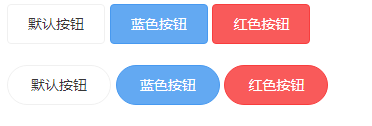
大家可以在线运行: https://zhangkunusergit.github.io/vue-component/dist/btnRipple.html 看看效果(一定要狠狠的点击哦)。
先说一下用法:
<zk-button class="btn btn-default">默认按钮</zk-button>

<zk-button class="btn btn-default btn-round">默认按钮</zk-button>

<zk-button class="btn btn-default btn-round" :speed="" :opacity="0.6">定义速度和初始的波浪透明度</zk-button>
原理:
这里用的是canvas + requestAnimationFrame(兼容性可以网上找一下解决方法) 绘制的波纹,有些用的是css transform + setTimeout做的,我感觉不太好。
模板(template):
<template>

  <button class="zk-btn">

    <canvas class="zk-ripple" @click="ripple"></canvas>

    <slot></slot>

  </button>

</template>
点击代码如下(我已经加入详细的注释)
ripple(event) {

  // 清除上次没有执行的动画

  if (this.timer) {

    window.cancelAnimationFrame(this.timer);

  }

  this.el = event.target;

  // 执行初始化

  if (!this.initialized) {

    this.initialized = true;

    this.init(this.el);

  }

  this.radius = 0;

  // 点击坐标原点

  this.origin.x = event.offsetX;

  this.origin.y = event.offsetY;

  this.context.clearRect(0, 0, this.el.width, this.el.height);

  this.el.style.opacity = this.opacity;

  this.draw();

},
这里主要初始化canvas和获取用户点击的位置坐标,并开始绘制。
循环绘制
draw() {

  this.context.beginPath();

  // 绘制波纹

  this.context.arc(this.origin.x, this.origin.y, this.radius, 0, 2 * Math.PI, false);

  this.context.fillStyle = this.color;

  this.context.fill();

  // 定义下次的绘制半径和透明度

  this.radius += this.speed;

  this.el.style.opacity -= this.speedOpacity;

  // 通过判断半径小于元素宽度或者还有透明度,不断绘制圆形

  if (this.radius < this.el.width || this.el.style.opacity > 0) {

    this.timer = window.requestAnimationFrame(this.draw);

  } else {

    // 清除画布

    this.context.clearRect(0, 0, this.el.width, this.el.height);

    this.el.style.opacity = 0;

  }

}
总结:
上面代码我没有复制完整,大家想看源码可以下载看一下
这是4月最后一天上班了,5.1要好好休息一下。
Vue 波纹按钮组件的更多相关文章
- 自己开发的 vue 滑动按钮组件 vue-better-slider
写在前面的 这个人第一次尝试开发并发布一个 vue 的组件,该组件实现了类似 ios 手机淘宝客户端 -> 消息界面中消息的滑动删除功能等,如下为该组件的文档. 一个 Vue 的滑动按钮组件,有 ...
- 一个 Vue 的滑动按钮组件
git 地址:https://github.com/SyMind/vue-sliding-button vue-better-slider 一个 Vue 的滑动按钮组件,有关滑动方面的处理借鉴 bet ...
- Vue.js说说组件
什么是组件:组件是Vue.js最强大的功能之一.组件可以扩展HTML元素,封装可重用的代码.在较高层面上,组件是自定义的元素,Vue.js的编译器为它添加特殊功能.在有些情况下,组件也可以是原生HTM ...
- 基于Vue封装分页组件
使用Vue做双向绑定的时候,可能经常会用到分页功能 接下来我们来封装一个分页组件 先定义样式文件 pagination.css ul, li { margin: 0px; padding: 0px;} ...
- 【原】vue单文件组件互相通讯
在vue中,我们可以把一个页面各个部分单独封装起来,做成各种小组件,然后加载,这样的好处是代码维护起来比较容易,重复的代码多处调用! 在一个vue项目中,单文件组件以.vue形式文件命名 每个组件之间 ...
- vue.js之组件(上篇)
本文的Demo和源代码已放到GitHub,如果您觉得本篇内容不错,请点个赞,或在GitHub上加个星星! https://github.com/zwl-jasmine95/Vue_test 以下所有知 ...
- 看JQ时代过来的前端,如何转换思路用Vue打造选项卡组件
前言 在Vue还未流行的时候,我们都是用JQuery来封装一个选项卡插件,如今Vue当道,让我们一起来看看从JQ时代过来的前端是如何转换思路,用数据驱动DOM的思想打造一个Vue选项卡组件. 接下来, ...
- vue的常用组件方法应用
项目技术: webpack + vue + element + axois (vue-resource) + less-loader+ ... vue的操作的方法案例: 1.数组数据还未获取到,做出预 ...
- vue.js之组件篇
Vue.js 组件 模块化:是从代码逻辑的角度进行划分的: 组件化:是从UI界面的角度进行划分的. 组件(Component)是 Vue.js 最强大的功能之一,组件可以扩展 HTML 元素,封装可重 ...
随机推荐
- flash上传文件,如何解决跨域问题
今天同事遇到一个问题,我们有两个应用,一个后台应用,主要用于运营人员编辑文章,发布到官网:一个图片服务器应用,其他很多的应用上传的图片也会存放在这,还对外提供一些查询和管理api. 前者部署在back ...
- Ubuntu下发射wifi
iphone要连接的话,mode选Ad-hoc, wifi密码要用WEP 40/128-bit key模式
- issubclass判断前面是不是后面的子类
issubclass(sub,sup) 判断前面是不是后面的子类
- vue.js初识(一)
一 什么是vue? Vue (读音 /vjuː/,类似于 view) 是一套用于构建用户界面的渐进式框架.与其它大型框架不同的是,Vue 被设计为可以自底向上逐层应用.Vue 的核心库只关注视图层,不 ...
- Javascript之Event Loop
先看段代码: console.log(1); setTimeout(function () { console.log(2); new Promise(function (resolve, rejec ...
- 算法题丨Next Permutation
描述 Implement next permutation, which rearranges numbers into the lexicographically next greater perm ...
- MyBatis 框架系列之基础初始
1.什么是 MyBatis MyBatis 本是 apache 的一个开源项目 iBatis,后改名为 MyBatis,它 是一个优秀的持久层框架,对 jdbc 的操作数据库的过程进行封装,使开发者只 ...
- [LeetCode] Delete and Earn 删除与赚取
Given an array nums of integers, you can perform operations on the array. In each operation, you pic ...
- [LeetCode] Remove Comments 移除注释
Given a C++ program, remove comments from it. The program source is an array where source[i] is the ...
- [LeetCode] Longest Word in Dictionary 字典中的最长单词
Given a list of strings words representing an English Dictionary, find the longest word in words tha ...