
asp.net core 四 IOC&DI Autofac
/// <summary>
    /// 动物类
    /// </summary>
    public interface Animal
    {
        string Call();
    }

    /// <summary>
    /// 狗狗类
    /// </summary>
    public class Dog : Animal
    {
        public Dog()
        {
            this.Name = Guid.NewGuid().ToString();
        }
        public string Name { get; set; }

        public string Call()
        {
            return this.Name;
        }
    }
 // This method gets called by the runtime. Use this method to add services to the container.
        public void ConfigureServices(IServiceCollection services)
        {
            services.AddMvc();
            services.AddTransient<Animal, Dog>();
            //services.AddScoped<Animal, Dog>();
            //services.AddSingleton<Animal, Dog>();
        }
using System;
using System.Collections.Generic;
using System.Diagnostics;
using System.Linq;
using System.Threading.Tasks;
using Microsoft.AspNetCore.Mvc;

namespace CM.NetCoreIOC.Controllers
{
    public class HomeController : Controller
    {
        Animal animal1;
        Animal animal2;
        public HomeController(Animal animal1, Animal animal2)
        {
            this.animal1 = animal1;
            this.animal2 = animal2;
        }
        public string Index()
        {
            return $"Animal 1 Name:{animal1.Call()} Animal 2 Name:{animal2.Call()}";
        }
    }
}



services.AddMvc();
            //services.AddTransient<Animal, Dog>();
            services.AddScoped<Animal, Dog>();
            //services.AddSingleton<Animal, Dog>();

  services.AddMvc();
            //services.AddTransient<Animal, Dog>();
            //services.AddScoped<Animal, Dog>();
            services.AddSingleton<Animal, Dog>();



// This method gets called by the runtime. Use this method to add services to the container.
        public IServiceProvider ConfigureServices(IServiceCollection services)
        {
            services.AddMvc();
            var builder = new ContainerBuilder();
            builder.RegisterType(typeof(Dog)).As(typeof(Animal))
                        .InstancePerLifetimeScope()
                        .PropertiesAutowired();
            builder.Populate(services);
            return new AutofacServiceProvider(builder.Build());
        }

// This method gets called by the runtime. Use this method to configure the HTTP request pipeline.
        public void Configure(IApplicationBuilder app, IHostingEnvironment env)
        {
            if (env.IsDevelopment())
            {
                app.UseBrowserLink();
                app.UseDeveloperExceptionPage();
            }
            else
            {
                app.UseExceptionHandler("/Home/Error");
            }

            app.UseStaticFiles();

            app.UseMvc(routes =>
            {
                routes.MapRoute(
                    name: "default",
                    template: "{controller=Home}/{action=Index}/{id?}");
            });
            var animal1 = ActivatorUtilities.GetServiceOrCreateInstance(app.ApplicationServices, typeof(Animal));
            var animal2 = app.ApplicationServices.GetService(typeof(Animal));
        }
调试看看两个对象animal1与animal2

// This method gets called by the runtime. Use this method to add services to the container.
        public IServiceProvider ConfigureServices(IServiceCollection services)
        {
            services.AddMvc();
            var builder = new ContainerBuilder();
            builder.RegisterType(typeof(Dog)).As(typeof(Animal))
                        .InstancePerLifetimeScope()
                        .PropertiesAutowired();
            builder.RegisterType(typeof(HomeController))
                        .InstancePerLifetimeScope()
                        .PropertiesAutowired();
            builder.Populate(services);
            return new AutofacServiceProvider(builder.Build());
        }

// This method gets called by the runtime. Use this method to add services to the container.
        public IServiceProvider ConfigureServices(IServiceCollection services)
        {
            services.Replace(ServiceDescriptor.Transient<IControllerActivator, ServiceBasedControllerActivator>());
            services.AddMvc();
            var builder = new ContainerBuilder();
            builder.RegisterType(typeof(Dog)).As(typeof(Animal))
                        .InstancePerLifetimeScope()
                        .PropertiesAutowired();
            builder.RegisterType(typeof(HomeController))
                        .InstancePerLifetimeScope()
                        .PropertiesAutowired();
            builder.Populate(services);
            return new AutofacServiceProvider(builder.Build());
        }
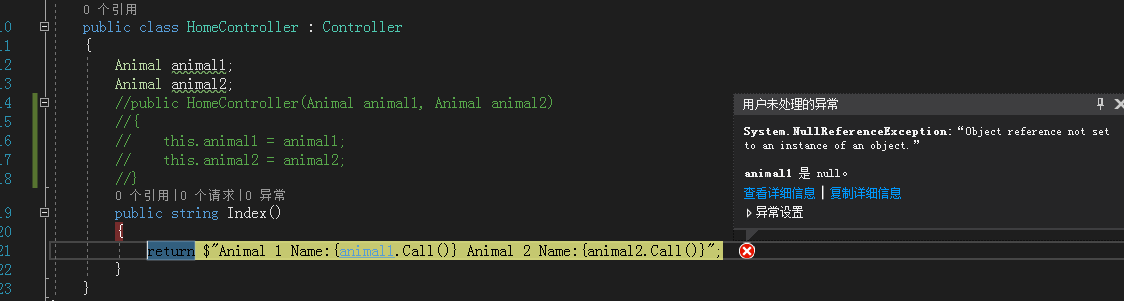
运行效果:

public class HomeController : Controller
    {
        public Animal animal1 { get; set; }
        public Animal animal2 { get; set; }
        //public HomeController(Animal animal1, Animal animal2)
        //{
        //    this.animal1 = animal1;
        //    this.animal2 = animal2;
        //}
        public string Index()
        {
            return $"Animal 1 Name:{animal1.Call()} Animal 2 Name:{animal2.Call()}";
        }
    }
public static IMvcBuilder AddControllersAsServices(this IMvcBuilder builder)
{
    var feature = new ControllerFeature();
    builder.PartManager.PopulateFeature(feature);
    foreach (var controller in feature.Controllers.Select(c => c.AsType()))
    {
        builder.Services.TryAddTransient(controller, controller);
    }
    builder.Services.Replace(ServiceDescriptor.Transient<IControllerActivator, ServiceBasedControllerActivator>());
    return builder;
}
public object Create(ControllerContext actionContext)
{
if (actionContext == null)
{
throw new ArgumentNullException(nameof(actionContext));
}
var controllerType = actionContext.ActionDescriptor.ControllerTypeInfo.AsType();
return actionContext.HttpContext.RequestServices.GetRequiredService(controllerType);
}
asp.net core 四 IOC&DI Autofac的更多相关文章
- ASP.NET Core修改IOC为Autofac
如下是我为了了解如何更换ASP.NET Core中的IOC而查找的文章,如果大家英文OK的,可以直接前往阅读,同时也已经有简单的github例子供大家参考. 参考文章: ASP.NET Core文档: ...
- 浅谈ASP.NET Core中的DI
DI的一些事 传送门马丁大叔的文章 什么是依赖注入(DI: Dependency Injection)? 依赖注入(DI)是一种面向对象的软件设计模式,主要是帮助开发人员开发出松耦合的应用程序 ...
- ASP.Net Core 3.1 With Autofac ConfigureServices returning an System.IServiceProvider isn't supported.
ASP.Net Core 3.1 With Autofac ConfigureServices returning an System.IServiceProvider isn't supported ...
- 浅谈ASP.NET Core中IOC与DI的理解和使用
说起IOC和DI,使用过ASP.NET Core的人对这两个概念一定不陌生,早前,自己也有尝试过去了解这两个东西,但是一直觉得有点很难去理解,总觉得对其还是模糊不清,所以,趁着今天有空,就去把两个概念 ...
- Asp.net Core依赖注入(Autofac替换IOC容器)
ASP.NET Core ASP.NET Core (previously ASP.NET 5) 改变了以前依赖注入框架集成进ASP.NET的方法. 以前, 每个功能 - MVC, Web API, ...
- ASP.NET Core 依赖注入(DI)
ASP.NET Core的底层设计支持和使用依赖注入.ASP.NET Core 应用程序可以利用内置的框架服务将服务注入到启动类的方法中,并且应用程序服务也可以配置注入.由ASP.NET Core 提 ...
- ASP.NET Core依赖注入(DI)
ASP.NET Core允许我们指定注册服务的生存期.服务实例将根据指定的生存时间自动处理.因此,我们无需担心清理此依赖关系,他将由ASP.NET Core框架处理.有如下三种类型的生命周期. 关于依 ...
- ASP.NET Core 四种释放 IDisposable 对象的方法
本文翻译自<Four ways to dispose IDisposables in ASP.NET Core>,由于水平有限,故无法保证翻译完全正确,欢迎指出错误.谢谢! IDispos ...
- ASP.NET Core 四种方式绑定枚举值
前言 本节我们来讲讲在ASP.NET Core MVC又为我们提供了哪些方便,之前我们探讨过在ASP.NET MVC中下拉框绑定方式,这节我们来再来重点看看枚举绑定的方式,充分实现你所能想到的场景,满 ...
随机推荐
- Spring-mvc 静态资源不拦截
在Spring-mvc.xml文件中加入这个就可以了 <!-- 用于对静态文件进行解析 --> <mvc:annotation-driven /> <mvc:resour ...
- Action里面的自带的字段的含义
- Apache服务器安装-apache已经卸载,如何删除注册在系统的服务
cmd进入windows的命令行客户端,执行:sc delete apache 注意:以管理员的身份删除,同理,此方法也可以删除其他类似的服务.例如sc delete MongoDB.
- Docker安装weblogic
Docker容器安装weblogic详细教程 前提:已经安装后Docker,并且能正常使用 (1)获取镜像: docker pull ismaleiva90/weblogic12 docker pu ...
- OPENCV 旋转图像算法-汇总
void ImgRotate(cv::Mat imgIn, float theta, cv::Mat& imgOut) { int oldWidth = imgIn.cols; int o ...
- [Essay] Apache Flink:十分可靠,一分不差
Apache Flink:十分可靠,一分不差 Apache Flink 的提出背景 我们先从较高的抽象层次上总结当前数据处理方面主要遇到的数据集类型(types of datasets)以及在处理数据 ...
- APP性能测试(电量)
#encoding:utf-8 import csv import os import time #控制类 class Controller(object): def __init__(self, c ...
- 什么是 JSX
JSX 即 JavaScript XML--一种在 React 组件内部构建标签的类 xml 语法.React 在不使用 JSX 的情况下一样可以工作,然而使用 JSX 可以提高组件的可读性,因此推荐 ...
- 【前端】Angular2 Ionic2 学习记录
转载请注明出处:http://www.cnblogs.com/shamoyuu/p/angular2_ionic2.html 一.建立项目 ionic start ProductName super ...
- 放大倍数超5万倍的Memcached DDoS反射攻击,怎么破?
欢迎大家前往腾讯云+社区,获取更多腾讯海量技术实践干货哦~ 作者:腾讯游戏云 背景:Memcached攻击创造DDoS攻击流量纪录 近日,利用Memcached服务器实施反射DDoS攻击的事件呈大幅上 ...