
Chromium模块和进程模型
i. Chromium基本模块
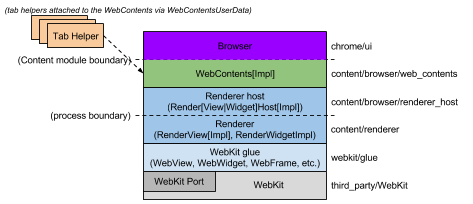
Chromium各模块层级图a)
Chromium主要包括如下模块:
WebKit: Safari和Chromium,以及任何其他基于WebKit内核的浏览器所共享的渲染引擎;
Glue: 用于将WebKit数据类型转换为Chromium数据类型;
Renderer / Render host: Chromium的多进程嵌套层,提供各进程之间的通知和命令代理服务;
WebContents: Content模块的主类,是一个可重用的组件;可以很容易的将多个进程的html渲染到一个页面中;
Browser:表示一个浏览器窗口UI,包含多个WebContent;
Tab Helpers:可附加到WebContent的独立组件,用于增加WebContents的功能,如显示infobars。
ii. browser进程和renderer进程
- The render process
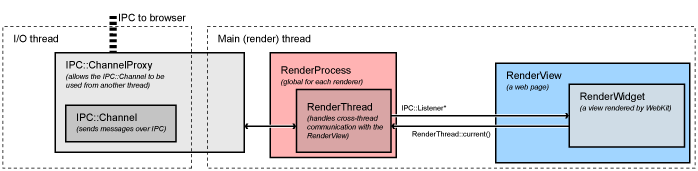
renderer进程模型图a)
renderer中最重要的当为RenderView,位于/content/renderer/render_view_impl.cc,代表一个网页。RederView通过RenderProcess和浏览器进程通信,处理所有与导航(前进,后退等)相关的命令。
render进程中线程包括:render线程和主线程。
RenderView和WebKit中的代码都运行在render线程中,当需要跟浏览器交互时,都是先发消息给主线程,主线程进一步将消息分配给浏览器进程。
- The Browser Process
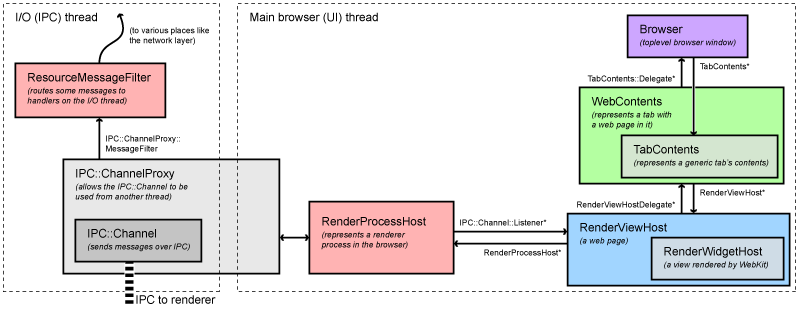
Browser进程模型图a)
1.底层浏览器进程对象
所有与render进程的IPC交互都是在浏览器的I/O线程中处理的。该线程还处理网络通信,避免浏览器直接与用户接口交互。
当RenderProcessHost在主线程中初始化后,主线程会创建一个新的renderer进程以及一个包含指定名称的管道的ChannelProxy IPC对象与之关联。ChannelProxy运行在浏览器的I/O线程,监听与renderer关联的管道,并将所有消息回传给UI线程的RenderProcessHost。channel上的ResourceMessageFilter用于过滤能被运行在I/O线程中的特定消息,如网络请求。过滤过程在函数ResourceMessageFilter::OnMessageReceived中。
UI线程的RenderProcessHost将所有显示有关的消息分配给合适的RenderViewHost,这个分配过程在函数RenderProcessHost::OnMessageReceived中执行。
2.上层浏览器进程对象
大部分显示相关消息在RenderViewHost::OnMessageReceived得到处理,其余部分在RenderWidgetHost基类处理。这个两个类对应renderer的RenderView和RenderWidget。RenderView/Widget是WebContents对象,大部分消息都是在该对象的中以函数调用方式结束的。一个WebContents代表一个网页的内容,是content模块的顶层对象,负责以矩形方式展示网页。
WebContents对象被包含在TabContentsWrapper,在chorme中负责标签页的操作。
iii. Chromium Browser进程和renderer进程通信案例分析
- Life of a "set cursor" message(典型的从renderer发消息到browser的实例)
Setting the cursor is an example of a typical message that is sent from the renderer to the browser. In the renderer, here is what happens.
Set cursor messages are generated by WebKit internally, typically in response to an input event. The set cursor message will start out in RenderWidget::SetCursor in content/renderer/render_widget.cc.
It will call RenderWidget::Send to dispatch the message. This method is also used by RenderView to send messages to the browser. It will call RenderThread::Send.
This will call the IPC::SyncChannel which will internally proxy the message to the main thread of the renderer and post it to the named pipe for sending to the browser.
Then the browser takes control:
The IPC::ChannelProxy in the RenderProcessHost receives all message on the I/O thread of the browser. It first sends them through the ResourceMessageFilter that dispatches network requests and related messages directly on the I/O thread. Since our message is not filtered out, it continues on to the UI thread of the browser (the IPC::ChannelProxy does this internally).
RenderProcessHost::OnMessageReceived in content/browser/renderer_host/render_process_host_impl.cc gets the messages for all views in the corresponding render process. It handles several types of messages directly, and for the rest forwards to the appropriate RenderViewHost corresponding to the source RenderView that sent the message.
The message arrives at RenderViewHost::OnMessageReceived in content/browser/renderer_host/render_view_host_impl.cc. Many messages are handled here, but ours is not because it's a message sent from the RenderWidget and handled by the RenderWidgetHost.
All unhandled messages in RenderViewHost are automatically forwarded to the RenderWidgetHost, including our set cursor message.
The message map in content/browser/renderer_host/render_view_host_impl.cc finally receives the message in RenderWidgetHost::OnMsgSetCursor and calls the appropriate UI function to set the mouse cursor.
- Life of a "mouse click" message(典型的从browser发消息到renderer的实例)
Sending a mouse click is a typical example of a message going from the browser to the renderer.
The Windows message is received on the UI thread of the browser by RenderWidgetHostViewWin::OnMouseEvent which then calls ForwardMouseEventToRenderer in the same class.
The forwarder function packages the input event into a cross-platform WebMouseEvent and ends up sending it to the RenderWidgetHost it is associated with.
RenderWidgetHost::ForwardInputEvent creates an IPC message ViewMsg_HandleInputEvent, serializes the WebInputEvent to it, and calls RenderWidgetHost::Send.
This just forwards to the owning RenderProcessHost::Send function, which in turn gives the message to the IPC::ChannelProxy.
Internally, the IPC::ChannelProxy will proxy the message to the I/O thread of the browser and write it to the named pipe of the corresponding renderer.
Note that many other types of messages are created in the WebContents, especially navigational ones. These follow a similar path from the WebContents to the RenderViewHost.
Then the renderer takes control:
IPC::Channel on the main thread of the renderer reads the message sent by the browser, and IPC::ChannelProxy proxies to the renderer thread.
RenderView::OnMessageReceived gets the message. Many types messages are handled here directly. Since the click message is not, it falls through (with all other unhandled messages) to RenderWidget::OnMessageReceived which in turn forwards it to RenderWidget::OnHandleInputEvent.
The input event is given to WebWidgetImpl::HandleInputEvent where it is converted to a WebKit PlatformMouseEvent class and given to the WebCore::Widget class inside WebKit.
iv. Chromium进程线程模型
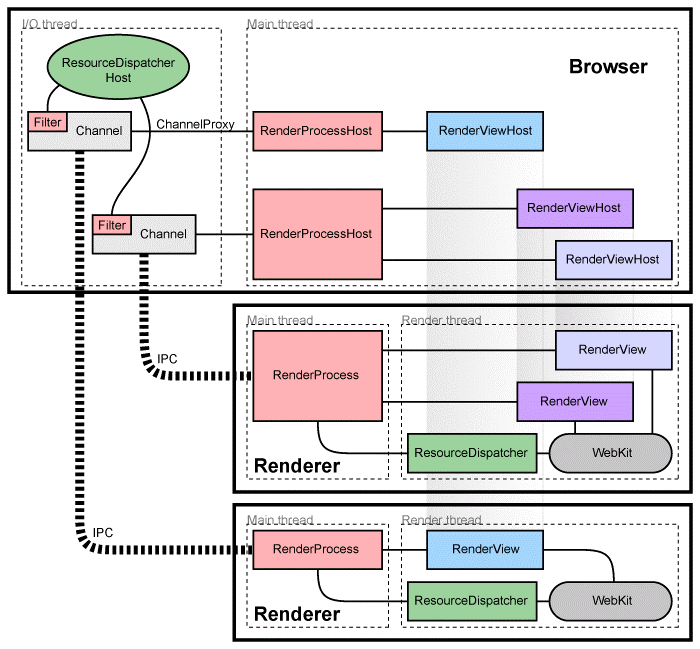
Chromium多进程架构图b)
Chromium将运行UI和控制tab页以及插件等进程称为浏览器进程(browser process)或者浏览器(browser),类似的,将具体的标签页相关的进程称为渲染进程(renderers)或者渲染器(renderers)。渲染器使用Blink开源布局引擎来解释和布局HTML。
- 管理render进程
每个render进程都有一个全局的RenderProcess对象,用于管理与父浏览器进程的通信。而浏览器为每个render进程维护一个对应的RenderProcessHost对象,管理浏览器状态,以及与渲染引擎renderer通信,浏览器与渲染器之间通过Chromium的IPC系统通信。
- 管理视图
每个render进程有一个或者多个RenderView对象,RenderView对象与浏览器标签内容相关,由RenderProcess统一管理。浏览器中的RenderProcessHost对象为渲染器renderer中的每一个页面维护一个RenderProcessHost对象。每一个页面都会分配一个view ID用于区分同一个渲染器中的不同页面。这些ID在渲染器中是唯一的,但在浏览器中不一定唯一,所以定位一个页面需要RenderProcessHost和view ID。
参考资料:
a) http://www.chromium.org/developers/design-documents/displaying-a-web-page-in-chrome
b) http://www.chromium.org/developers/design-documents/multi-process-architecture
Chromium模块和进程模型的更多相关文章
- 【Chromium中文文档】进程模型
进程模型 转载请注明出处:https://ahangchen.gitbooks.io/chromium_doc_zh/content/zh//General_Architecture/Process_ ...
- Nginx的进程模型及高可用方案(OpenResty)
1. Nginx 进程模型简介 Nginx默认采用多进程工作方式,Nginx启动后,会运行一个master进程和多个worker进程.其中master充当整个进程组与用户的交互接口,同时对进程进行监护 ...
- Nginx(十)-- 进程模型及工作原理
1.nginx进程模型 Nginx是一个master和worker的模型.master主要用来管理worker进程,master就比作老板,worker就是打工仔,master指挥worker来做事情 ...
- Nginx学习——进程模型(master 进程)
进程模型 Nginx分为Single和Master两种进程模型.Single模型即为单进程方式工作,具有较差的容错能力,不适合生产之用.Master模型即为一个master进程+N个worker进程的 ...
- 【nginx】【转】Nginx核心进程模型
一.Nginx整体架构 正常执行中的nginx会有多个进程,最基本的有master process(监控进程,也叫做主进程)和woker process(工作进程),还可能有cache相关进程. ...
- 【Nginx】进程模型
转自:网易博客 服务器的并发模型设计是网络编程中很关键的一个部分,服务器的并发量取决于两个因素,一个是提供服务的进程数量,另外一个是每个进程可同时处理的并发连接数量.相应的,服务器的并发模型也由两个部 ...
- nginx源代码分析--框架设计 & master-worker进程模型
Nginx的框架设计-进程模型 在这之前,我们首先澄清几点事实: nginx作为一个高性能server的特点.事实上这也是全部的高性能server的特点,依赖epoll系统调用的高效(高效是相对sel ...
- linux C++ 通讯架构(一)nginx安装、目录、进程模型
nginx是C语言开发的,号称并发处理百万级别的TCP连接,稳定,热部署(运行时升级),高度模块化设计,可以用C++开发. 一.安装和目录 1.1 前提 epoll,linux内核版本为2.6或以上 ...
- .NET桌面程序应用WebView2组件集成网页开发3 WebView2的进程模型
系列目录 [已更新最新开发文章,点击查看详细] WebView2 运行时使用与 Microsoft Edge 浏览器相同的进程模型. WebView2 运行时中的进程 WebView2 进程组 ...
随机推荐
- openjdk8之编译和debug
系统环境为ubuntu 16.04,uname -a: Linux ddy-Aspire-V5-573G 4.4.0-21-generic #37-Ubuntu SMP Mon Apr 18 18:3 ...
- 微信小程序开发 -- 01
微信小程序开发基础 -- 开发前的准备 缘由 1月9日张小龙微信小程序正式上线,因为微信,所以小程序从诞生开始就头戴巨大的光环,很多的团队,公司以及开发的个体都眼巴巴的盯着这个小程序.而那个时候我却在 ...
- 关于dedecms的操作
系统基本参数的配置 如图 上面是设置系统的基本参数 操作是进入系统后台>点击系统>点击系统基本参数 然后右边就是系统参数等等基本参数了 记住修改后要点击确定哟 ☺ 数据库备份 如图: ...
- 用户权限模块之spring security
准备工作:数据库采用mysql(5.6及以上) CREATE TABLE `auth_system` ( `ID` int(11) NOT NULL AUTO_INCREMENT COMMENT 'I ...
- C/C++输入两个任意日期求相隔天数
将两个日期转换成与一个指定日期(例1970-01-01)之间的差然后计算 思路: 两个日期相隔天数的计算,首先可以将两个日期转换成time_t(从指定日期至1970年1月1日0时0分0秒相隔的秒数), ...
- 深入理解PHP对象注入
0x00 背景 php对象注入是一个非常常见的漏洞,这个类型的漏洞虽然有些难以利用,但仍旧非常危险,为了理解这个漏洞,请读者具备基础的php知识. 0x01 漏洞案例 如果你觉得这是个渣渣洞,那么请看 ...
- 【Python3之面向对象进阶】
一.isinstance和issubclass 1.isinstance(obj,cls)检查是否obj是否是类 cls 的对象 class Foo(object): pass obj=Foo() p ...
- C#开发移动应用系列(3.使用照相机扫描二维码+各种基础知识)
前言 上篇文章地址: C#开发移动应用系列(1.环境搭建) C#开发移动应用系列(2.使用WebView搭建WebApp应用) 今天我们来讲一下如何使用Camera来调用照相机扫描二维码. (Tips ...
- Vue 项目实战系列 (三)
我们继续前两节的开发.本节教程实现的效果如下: 效果很简单,但是实现起来却要用到Vue的很多知识,下面我们将一步一步的实现这个效果. 首先这些城市的信息都是从后台的server里面获取的,所以我们需要 ...
- ant使用
摘录于他人精华,原文出处http://www.blogjava.net/hoojo/archive/2013/06/14/400550.html 1.project 节点元素 project 元素是 ...