
JPA + SpringData 操作数据库原来可以这么简单 ---- 深入了解 JPA - 3
原创播客,如需转载请注明出处。原文地址:http://www.cnblogs.com/crawl/p/7718741.html
----------------------------------------------------------------------------------------------------------------------------------------------------
笔记中提供了大量的代码示例,需要说明的是,大部分代码示例都是本人所敲代码并进行测试,不足之处,请大家指正~
本博客中所有言论仅代表博主本人观点,若有疑惑或者需要本系列分享中的资料工具,敬请联系 qingqing_crawl@163.com
-----------------------------------------------------------------------------------------------------------------------------------------------------------
前言:今天是 10.24,传说中的程序员节,先祝大家节日快乐,不知道大家今天有没有加班,哈哈。
经过了前两篇的详细介绍,终于迎来了 JPA 的终结篇,楼主认为如果仅仅了解了 JPA 的话,大家可能感觉与 Hibernate 几乎差不多,没有什么亮点,但是等大家了解了 SpringData 后,JPA 与 SpringData 相结合,便会发挥出它巨大的优势,极大的简化了我们操作数据库的步骤,使我们的代码具有很强的可维护性,楼主随后的博客也将继续介绍。
六、JPA 的二级缓存
1. 大家对一级缓存比较熟悉,即若查询一条同样的记录,因为一级缓存的存在只发送一条 SQL 语句。那么 JPA 的二级缓存又体现在哪呢?楼主给大家解释为:查询一条同样的记录,在第一次查询后关闭 EntityManager、提交事务后,再重新获取 EntityManager 并开启事务再查询同样的记录,因为有二级缓存的存在也会只发送一条记录。如下:
    //测试 JPA 的二级缓存

     @Test

     public void testSecondLevelCache() {

         Customer customer1 = entityManager.find(Customer.class, 1);

         transaction.commit();

         entityManager.close();

         entityManager = entityManagerFactory.createEntityManager();

         transaction = entityManager.getTransaction();

         transaction.begin();

         Customer customer2 = entityManager.find(Customer.class, 1);

     }
大家可以看到,4 行和 13 行的查询语句一样,6 行,7 行 提交了事务关闭了 EntityManager。若不进行二级缓存的配置,这样的操作会发送两次一模一样的 SQL 语句,结果就不贴上了,大家可以试一试。若配置了二级缓存,同样的操作便只会发送一条 SQL ,这样可以减小服务器的压力,减少访问数据库的次数。那么如何来配置二级缓存呢?
2. 如何配置二级缓存:
1)persistence.xml 文件中配置二级缓存相关
<?xml version="1.0" encoding="UTF-8"?>

<persistence version="2.0"

    xmlns="http://java.sun.com/xml/ns/persistence" xmlns:xsi="http://www.w3.org/2001/XMLSchema-instance"

    xsi:schemaLocation="http://java.sun.com/xml/ns/persistence http://java.sun.com/xml/ns/persistence/persistence_2_0.xsd">

    <persistence-unit name="jpa-1" transaction-type="RESOURCE_LOCAL">

        <!-- 配置使用什么 ORM 产品来作为 JPA 的实现 1. 实际上配置的是 javax.persistence.spi.PersistenceProvider

            接口的实现类 2. 若 JPA 项目中只有一个 JPA 的实现产品,则可以不配置该节点 -->

        <provider>org.hibernate.ejb.HibernatePersistence</provider>

        <!-- 添加持久化类 -->

        <class>com.software.jpa.helloworld.Customer</class>

        <class>com.software.jpa.helloworld.Order</class>

        <class>com.software.jpa.helloworld.Manager</class>

        <class>com.software.jpa.helloworld.Department</class>

        <class>com.software.jpa.helloworld.Category</class>

        <class>com.software.jpa.helloworld.Item</class>

        <!-- 配置二级缓存的策略

                ALL:所有的实体类都被缓存

                NONE:所有的实体类都不被缓存.

                ENABLE_SELECTIVE:标识 @Cacheable(true) 注解的实体类将被缓存

                DISABLE_SELECTIVE:缓存除标识 @Cacheable(false) 以外的所有实体类

                UNSPECIFIED:默认值,JPA 产品默认值将被使用 -->

        <shared-cache-mode>ENABLE_SELECTIVE</shared-cache-mode>

        <properties>

            <!-- 连接数据库的基本信息 -->

            <!-- 在 Connection 选项中配置后会自动生成如下信息 -->

            <property name="javax.persistence.jdbc.driver" value="com.mysql.jdbc.Driver" />

            <property name="javax.persistence.jdbc.url" value="jdbc:mysql://localhost:3306/jpa" />

            <property name="javax.persistence.jdbc.user" value="root" />

            <property name="javax.persistence.jdbc.password" value="qiqingqing" />

            <!-- 配置 JPA 实现产品的基本属性,即配置 Hibernate 的基本属性 -->

            <property name="hibernate.format_sql" value="true" />

            <property name="hibernate.show_sql" value="true" />

            <property name="hibernate.hbm2ddl.auto" value="update" />

            <!-- 二级缓存相关 -->

            <property name="hibernate.cache.use_second_level_cache"

                value="true" />

            <property name="hibernate.cache.region.factory_class"

                value="org.hibernate.cache.ehcache.EhCacheRegionFactory" />

            <property name="hibernate.cache.use_query_cache" value="true" />

        </properties>

    </persistence-unit>

</persistence>
2)导入 ehcache 的 jar 包和配置文件 ehcache.xml
jar 包:

配置文件:对二级缓存参数的配置
<ehcache>

    <!-- Sets the path to the directory where cache .data files are created.

         If the path is a Java System Property it is replaced by

         its value in the running VM.

         The following properties are translated:

         user.home - User's home directory

         user.dir - User's current working directory

         java.io.tmpdir - Default temp file path -->

    <diskStore path="java.io.tmpdir"/>

    <!--Default Cache configuration. These will applied to caches programmatically created through

        the CacheManager.

        The following attributes are required for defaultCache:

        maxInMemory       - Sets the maximum number of objects that will be created in memory

        eternal           - Sets whether elements are eternal. If eternal,  timeouts are ignored and the element

                            is never expired.

        timeToIdleSeconds - Sets the time to idle for an element before it expires. Is only used

                            if the element is not eternal. Idle time is now - last accessed time

        timeToLiveSeconds - Sets the time to live for an element before it expires. Is only used

                            if the element is not eternal. TTL is now - creation time

        overflowToDisk    - Sets whether elements can overflow to disk when the in-memory cache

                            has reached the maxInMemory limit.

        -->

    <defaultCache

        maxElementsInMemory="10000"

        eternal="false"

        timeToIdleSeconds="120"

        timeToLiveSeconds="120"

        overflowToDisk="true"

        />

    <!--Predefined caches.  Add your cache configuration settings here.

        If you do not have a configuration for your cache a WARNING will be issued when the

        CacheManager starts

        The following attributes are required for defaultCache:

        name              - Sets the name of the cache. This is used to identify the cache. It must be unique.

        maxInMemory       - Sets the maximum number of objects that will be created in memory

        eternal           - Sets whether elements are eternal. If eternal,  timeouts are ignored and the element

                            is never expired.

        timeToIdleSeconds - Sets the time to idle for an element before it expires. Is only used

                            if the element is not eternal. Idle time is now - last accessed time

        timeToLiveSeconds - Sets the time to live for an element before it expires. Is only used

                            if the element is not eternal. TTL is now - creation time

        overflowToDisk    - Sets whether elements can overflow to disk when the in-memory cache

                            has reached the maxInMemory limit.

        -->

    <!-- Sample cache named sampleCache1

        This cache contains a maximum in memory of 10000 elements, and will expire

        an element if it is idle for more than 5 minutes and lives for more than

        10 minutes.

        If there are more than 10000 elements it will overflow to the

        disk cache, which in this configuration will go to wherever java.io.tmp is

        defined on your system. On a standard Linux system this will be /tmp"

        -->

    <cache name="sampleCache1"

        maxElementsInMemory="10000"

        eternal="false"

        timeToIdleSeconds="300"

        timeToLiveSeconds="600"

        overflowToDisk="true"

        />

    <!-- Sample cache named sampleCache2

        This cache contains 1000 elements. Elements will always be held in memory.

        They are not expired. -->

    <cache name="sampleCache2"

        maxElementsInMemory="1000"

        eternal="true"

        timeToIdleSeconds="0"

        timeToLiveSeconds="0"

        overflowToDisk="false"

        /> -->

    <!-- Place configuration for your caches following -->

</ehcache>
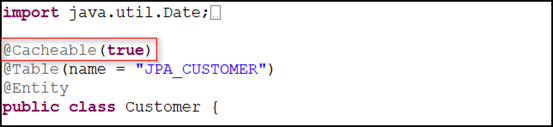
3)给需要缓存的类添加 @Cacheable(true) 注解,有前面的代码可知,楼主获取的是 Customer 对象
二级缓存就给大家介绍到这里。
七、JPQL
1.什么是 JPQL:JPQL语言,即 Java Persistence Query Language 的简称。
2.然后来看一个 JPQL 的 Helloworld:
    //JPQL 的 HelloWorld

     @Test

     public void testHelloJPQL() {

         String jpql = "FROM Customer c WHERE c.age > ?";

 5         Query query = entityManager.createQuery(jpql);

         //占位符的索引是从 1 开始

         query.setParameter(1, 21);

         List<Customer> lists = query.getResultList();

         System.out.println(lists.size());

     }
乍一看,大家可能感觉 JPQL 像极了 Hibernate 的 HQL 查询,没错,这两种查询的相似度极高。需要注意的是,使用 Query 的 setParameter() 的方法填占位符是,索引是从 1
开始的。
3. 查询部分属性:
    @Test

     public void testPartlyProperties() {

         String jpql = "SELECT new Customer(c.lastName, c.age) FROM Customer c WHERE c.id > ?";

         Query query = entityManager.createQuery(jpql);

         query.setParameter(1, 1);

         List lists = query.getResultList();

         System.out.println(lists);

     }
默认情况下若只查询部分属性,则将返回 Object[] 类型的结果或 Object[] 类型的 List,可以在实体类中创建对应的构造器,然后在 jpql 中利用对应的构造器返回实体类对应的对象,这样得到的结果可以很令人满意,也很方便我们来操作。
4.命名查询 NamedQuery:
1)在需要查询的对象类上添加 @NamedQuery 注解:

2)创建测试方法:

5. 本地 SQL 查询使用 EntityManager 的 createNativeQuery() 方法:
    //本地 SQL 查询

     @Test

     public void testNativeQuery() {

         String sql = "SELECT age FROM jpa_customer WHERE id = ?";

         Query query = entityManager.createNativeQuery(sql).setParameter(1, 1);

         Object result = query.getSingleResult();

         System.out.println(result);

     }
6. 可以使用 Order By 字句:
    // jpql 中的 Order By 子句

     @Test

     public void testOrderBy() {

         String jpql = "FROM Customer c WHERE c.age > ? ORDER BY c.age DESC";

         Query query = entityManager.createQuery(jpql);

         //占位符的索引是从 1 开始

         query.setParameter(1, 21);

         List<Customer> lists = query.getResultList();

         System.out.println(lists.size());

     }
7.还可以使用 Group By 子句:
    //查询 order 数量大于 2 的那些 Customer

     @Test

     public void testGroupBy() {

         String jpql = "SELECT o.customer FROM Order o GROUP BY o.customer HAVING count(o.id) >= 2";

         List<Customer> lists = entityManager.createQuery(jpql).getResultList();

         System.out.println(lists);

     }
8.也可以使用子查询
    //子查询

     @Test

     public void testSubQuery() {

         //查询所有 Customer 的 lastName 为 YY 的 Order

         String jpql = "SELECT o FROM Order o"

                 + " WHERE o.customer = (SELECT c FROM Customer c WHERE c.lastName = ?)";

         List<Order> orders = entityManager.createQuery(jpql).setParameter(1, "YY").getResultList();

         System.out.println(orders.size());

     }
八、Spring 整合 JPA
JPA 的一些 API 也可以放到 Spring 的 IOC 容器中,交由 Spring 容器管理,那么如何用 Spring 来整合 JPA 呢?
1.新建 JPA 工程,导入所需的 jar包(Hibernate、JPA、c3p0、Spring、MySQL 驱动)
2.类路径下创建 db.properties 数据库配置文件,配置数据库的链接信息(楼主在这只配置了必须属性)
 jdbc.user=root

 jdbc.password=qiqingqing

 jdbc.driverClass=com.mysql.jdbc.Driver

 jdbc.jdbcUrl=jdbc:mysql://localhost:3306/jpa
3.类路径下创建 Spring 的配置文件 applicationContext.xml,配置自动扫描的包,将 db.propertiest 文件导入,并配置 c3p0 数据源
    <!-- 配置自动扫描的包 -->

     <context:component-scan base-package="com.software.jpa"></context:component-scan>

     <!-- 配置数据源 -->

     <context:property-placeholder location="classpath:db.properties"/>

     <bean id="dataSource" class="com.mchange.v2.c3p0.ComboPooledDataSource">

         <property name="user" value="${jdbc.user}"></property>

         <property name="password" value="${jdbc.password}"></property>

         <property name="driverClass" value="${jdbc.driverClass}"></property>

         <property name="jdbcUrl" value="${jdbc.jdbcUrl}"></property>

     </bean>
4.在 applicationContext.xml 中配置 JPA 的 EntityManagerFactory
    <!-- 配置 EntityManagerFactory -->

     <bean id="entityManagerFactory"

                  class="org.springframework.orm.jpa.LocalContainerEntityManagerFactoryBean">

         <!-- 配置数据源 -->

         <property name="dataSource" ref="dataSource"></property>

         <!-- 配置 JPA 提供商的适配器,可以通过内部 bean 的方式来配置 -->

         <property name="jpaVendorAdapter">

             <bean class="org.springframework.orm.jpa.vendor.HibernateJpaVendorAdapter"></bean>

         </property>

         <!-- 配置实体类所在的包 -->

         <property name="packagesToScan" value="com.software.jpa.spring.entities"></property>

         <!-- 配置 JPA 的基本属性,比如,JPA 实现产品的属性 -->

         <property name="jpaProperties">

             <props>

                 <prop key="hibernate.show_sql">true</prop>

                 <prop key="hibernate.format_sql">true</prop>

                 <prop key="hibernate.hbm2ddl.auto">update</prop>

             </props>

         </property>

     </bean>
5.配置 JPA 使用的事务管理器及配置支持基于注解的事务配置
    <!-- 配置  JPA 使用的事务管理器 -->

     <bean id="transactionManager" class="org.springframework.orm.jpa.JpaTransactionManager">

         <property name="entityManagerFactory" ref="entityManagerFactory"></property>

     </bean>

     <!-- 配置支持基于注解的事务配置 -->

     <tx:annotation-driven transaction-manager="transactionManager"/>
6.为了测试创建实体类 Person,添加相应的 JPA 注解,生成对应的数据表
 package com.software.jpa.spring.entities;

 import javax.persistence.Column;

 import javax.persistence.Entity;

 import javax.persistence.GeneratedValue;

 import javax.persistence.Id;

 import javax.persistence.Table;

 @Table(name="JPA_PERSONS")

 @Entity

 public class Person {

     private Integer id;

     private String lastName;

     private String email;

     private Integer age;

     @GeneratedValue

     @Id

     public Integer getId() {

         return id;

     }

     public void setId(Integer id) {

         this.id = id;

     }

     @Column(name="LAST_NAME")

     public String getLastName() {

         return lastName;

     }

     public void setLastName(String lastName) {

         this.lastName = lastName;

     }

     public String getEmail() {

         return email;

     }

     public void setEmail(String email) {

         this.email = email;

     }

     public Integer getAge() {

         return age;

     }

     public void setAge(Integer age) {

         this.age = age;

     }

 }
7.创建 PersonDao 使用 @PersistenceContext 获取和当前事务关联的 EntityManager 对象
 package com.software.jpa.dao;

 import javax.persistence.EntityManager;

 import javax.persistence.PersistenceContext;

 import org.springframework.stereotype.Repository;

 import com.software.jpa.spring.entities.Person;

 @Repository

 public class PersonDao {

     //使用 @PersistenceContext 获取和当前事务关联的 EntityManager 对象

     @PersistenceContext

     private EntityManager entityManager;

     public void save(Person p) {

         entityManager.persist(p);

     }

 }
8.创建 PersonService ,模拟事务操作,20 行楼主设计了一个算数异常,若整合成功,因为添加了事务操作,所以 18 行和 22 行的两条记录都没有插入进数据库。
 package com.software.jpa.service;

 import org.springframework.beans.factory.annotation.Autowired;

 import org.springframework.stereotype.Service;

 import org.springframework.transaction.annotation.Transactional;

 import com.software.jpa.dao.PersonDao;

 import com.software.jpa.spring.entities.Person;

 @Service

 public class PersonService {

     @Autowired

     private PersonDao dao;

     @Transactional

     public void save(Person p1, Person p2) {

         dao.save(p1);

         int i = 10/0;

         dao.save(p2);

     }

 }
9.创建测试方法,并执行
 package com.software.jpa.spring;

 import javax.sql.DataSource;

 import org.junit.Test;

 import org.springframework.context.ApplicationContext;

 import org.springframework.context.support.ClassPathXmlApplicationContext;

 import com.software.jpa.service.PersonService;

 import com.software.jpa.spring.entities.Person;

 public class JPATest {

     private ApplicationContext ctx = null;

     private PersonService personService = null;

     {

         ctx = new ClassPathXmlApplicationContext("applicationContext.xml");

         personService = ctx.getBean(PersonService.class);

     }

     @Test

     public void testSave() {

         Person p1 = new Person();

         p1.setAge(11);

         p1.setEmail("aa@163.com");

         p1.setLastName("AA");

         Person p2 = new Person();

         p2.setAge(12);

         p2.setEmail("bb@163.com");

         p2.setLastName("BB");

         System.out.println(personService.getClass().getName());

         personService.save(p1, p2);

     }

     @Test

     public void testDataSourct() throws Exception {

         DataSource dataSource = ctx.getBean(DataSource.class);

         System.out.println(dataSource.getConnection());

     }

 }
JPA 的知识介绍到此就完全结束了,楼主整理了不短的时间,希望可以帮助到需要的朋友。
相关链接:
JPA + SpringData 操作数据库原来可以这么简单 ---- 深入了解 JPA - 1
JPA + SpringData 操作数据库原来可以这么简单 ---- 深入了解 JPA - 2
JPA + SpringData 操作数据库 ---- 深入了解 SpringData
JPA + SpringData 操作数据库原来可以这么简单 ---- 深入了解 JPA - 3的更多相关文章
- JPA + SpringData 操作数据库原来可以这么简单 ---- 深入了解 JPA - 1
原创播客,如需转载请注明出处.原文地址:http://www.cnblogs.com/crawl/p/7703679.html ------------------------------------ ...
- JPA + SpringData 操作数据库原来可以这么简单 ---- 深入了解 JPA - 2
原创播客,如需转载请注明出处.原文地址:http://www.cnblogs.com/crawl/p/7704914.html ------------------------------------ ...
- JPA + SpringData 操作数据库 ---- 深入了解 SpringData
原创播客,如需转载请注明出处.原文地址:http://www.cnblogs.com/crawl/p/7735616.html ------------------------------------ ...
- JPA + SpringData 操作数据库--Helloworld实例
前言:谈起操作数据库,大致可以分为几个阶段:首先是 JDBC 阶段,初学 JDBC 可能会使用原生的 JDBC 的 API,再然后可能会使用数据库连接池,比如:c3p0.dbcp,还有一些第三方工具, ...
- 封装类似thinkphp连贯操作数据库的Db类(简单版)。
<?php header("Content-Type:text/html;charset=utf-8"); /** *php操作mysql的工具类 */ class Db{ ...
- (转)JPA + SpringData
jpa + spring data 约定优于配置 convention over configuration http://www.cnblogs.com/crawl/p/7703679.html 原 ...
- JDBC操作数据库的三种方式比较
JDBC(java Database Connectivity)java数据库连接,是一种用于执行上sql语句的javaAPI,可以为多种关系型数据库提供统一访问接口.我们项目中经常用到的MySQL. ...
- 用SpringBoot+MySql+JPA实现对数据库的增删改查和分页
使用SpringBoot+Mysql+JPA实现对数据库的增删改查和分页 JPA是Java Persistence API的简称,中文名Java持久层API,是JDK 5.0注解或XML描述 ...
- Spring_boot简单操作数据库
Spring_boot搭配Spring Data JPA简单操作数据库 spring boot 配置文件可以使用yml文件,默认spring boot 会加载resources目录的下的applica ...
随机推荐
- 201521044091 《Java程序设计》第3周学习总结
1. 本周学习总结 初学面向对象,会学习到很多碎片化的概念与知识.尝试学会使用思维导图将这些碎片化的概念.知识组织起来.请使用纸笔或者下面的工具画出本周学习到的知识点.截图或者拍照上传. 本周学习总结 ...
- 201521123045 《Java程序设计》 第十三周学习总结
201521123045 <Java程序设计> 第十三周学习总结 1. 本周学习总结 2. 书面作业 Q1.网络基础 1.1 比较ping www.baidu.com与ping cec.j ...
- 201521123030 《Java程序设计》 第12周学习总结
1. 本周学习总结 1.1 以你喜欢的方式(思维导图或其他)归纳总结多流与文件相关内容. 2. 书面作业 1.将Student对象(属性:int id, String name,int age,dou ...
- 【干货】教你如何利用fullPage.js以及move.js插件打造高端大气的网站效果!
前言: 如今我们经常能见到全屏网站,尤其是国外网站.这些网站用几幅很大的图片或色块做背景,再添加一些简单的内容,显得格外的高端大气上档次. 在学习过jQuery插件之后,才发现之前的很多网站特效完全可 ...
- Python-老男孩-03_socket
Socket简介: 所谓Socket也称"套接字",用于描述IP和端口,是一个通信链的句柄,应用程序通过"套接字"向网络发出请求或应答网络请求. Socket起 ...
- 教你在Java接口中定义方法
基本上所有的Java教程都会告诉我们Java接口的方法都是public.abstract类型的,没有方法体的. 但是在JDK8里面,你是可以突破这个界限的哦. 假设我们现在有一个接口:TimeClie ...
- 【SQL】- 基础知识梳理(三) - SQL连接查询
一.引言 有时为了得到一张报表的完整数据,需要从两个或更多的表中获取结果,这时就用到了"连接查询". 二.连接查询 连接查询的定义: 数据库中的表通过键将彼此联系起来,从而获取这些 ...
- 庞玉栋:浅谈seo优化对于网站建设的重要性
根据最近做SEO优化经验而写 写的也都是我的方法 大神勿喷 SEO:英文Search Engine Optimization缩写而来, 中文意译为搜索引擎优化 如果你连个网站都没有那就点这里:如何拥 ...
- StringBuffer的添加与删除功能
StringBuffer的添加功能A* public StringBuffer append(String str): * 可以把任意类型数据添加到字符串缓冲区里面,并返回字符串缓冲区本身 B* pu ...
- JDFS:一款分布式文件管理系统,第三篇(流式云存储)
一 前言 看了一下,距离上一篇博客的发表已经过去了4个月,时间过得好快啊.本篇博客是JDFS系列的第三篇博客,JDFS的目的是为了实现一个分布式的文件管理系统,前两篇实现了基本的上传.下载功能,但是那 ...