
Hive安装与配置详解
既然是详解,那么我们就不能只知道怎么安装hive了,下面从hive的基本说起,如果你了解了,那么请直接移步安装与配置
hive是什么
hive安装和配置
hive的测试
hive
这里简单说明一下,好对大家配置hive有点帮助。hive是建立在hadoop上的,当然,你如果只搭建hive也没用什么错。说简单一点,hadoop中的mapreduce调用如果面向DBA的时候,那么问题也就显现了,因为不是每个DBA都能明白mapreduce的工作原理,如果为了管理数据而需要学习一门新的技术,从现实生活中来说,公司又需要花钱请更有技术的人来了。
开个玩笑,hadoop是为了存储数据和计算而推广的技术,而和数据挂钩的也就属于数据库的领域了,所以hadoop和DBA挂钩也就是情理之中的事情,在这个基础之上,我们就需要为了DBA创作适合的技术。
hive正是实现了这个,hive是要类SQL语句(HiveQL)来实现对hadoop下的数据管理。hive属于数据仓库的范畴,那么,数据库和数据仓库到底有什么区别了,这里简单说明一下:数据库侧重于OLTP(在线事务处理),数据仓库侧重OLAP(在线分析处理);也就是说,例如mysql类的数据库更侧重于短时间内的数据处理,反之。
无hive:使用者.....->mapreduce...->hadoop数据(可能需要会mapreduce)
有hive:使用者...->HQL(SQL)->hive...->mapreduce...->hadoop数据(只需要会SQL语句)
hive安装和配置
安装
一:下载hive——地址:http://mirror.bit.edu.cn/apache/hive/
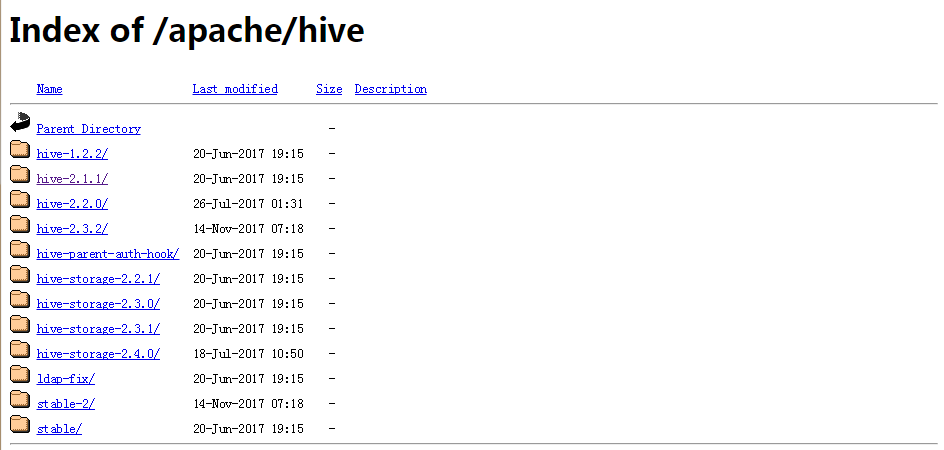
这里以hive-2.1.1为例子,如图:

将hive解压到/usr/local下:
[root@s100 local]# tar -zxvf apache-hive-2.1.1-bin.tar.gz -C /usr/local/

将文件重命名为hive文件:
[root@s100 local]# mv apache-hive-2.1.1-bin hive

修改环境变量/etc/profile:
[root@s100 local]# vim /etc/profile
 #hive

 export HIVE_HOME=/usr/local/hive

 export PATH=$PATH:$HIVE_HOME/bin

执行source /etc.profile:
执行hive --version
[root@s100 local]# hive --version
有hive的版本显现,安装成功!
配置
[root@s100 conf]# cd /usr/local/hive/conf/
修改hive-site.xml:

这里没有,我们就以模板复制一个:
[root@s100 conf]# cp hive-default.xml.template hive-site.xml
[root@s100 conf]# vim hive-site.xml
1.配置hive-site.xml(第5点的后面有一个单独的hive-site.xml配置文件,这个如果有疑问可以用后面的配置文件,更容易明白)
主要是mysql的连接信息(在文本的最开始位置)
<?xml version="1.0" encoding="UTF-8" standalone="no"?>

<?xml-stylesheet type="text/xsl" href="configuration.xsl"?><!--

   Licensed to the Apache Software Foundation (ASF) under one or more

   contributor license agreements.  See the NOTICE file distributed with

   this work for additional information regarding copyright ownership.

   The ASF licenses this file to You under the Apache License, Version 2.0

   (the "License"); you may not use this file except in compliance with

   the License.  You may obtain a copy of the License at

       http://www.apache.org/licenses/LICENSE-2.0

   Unless required by applicable law or agreed to in writing, software

   distributed under the License is distributed on an "AS IS" BASIS,

   WITHOUT WARRANTIES OR CONDITIONS OF ANY KIND, either express or implied.

   See the License for the specific language governing permissions and

   limitations under the License.

--><configuration>

  <!-- WARNING!!! This file is auto generated for documentation purposes ONLY! -->

  <!-- WARNING!!! Any changes you make to this file will be ignored by Hive.   -->

  <!-- WARNING!!! You must make your changes in hive-site.xml instead.         -->

  <!-- Hive Execution Parameters -->

        <!-- 插入一下代码 -->

    <property>

        <name>javax.jdo.option.ConnectionUserName</name>用户名(这4是新添加的,记住删除配置文件原有的哦!)

        <value>root</value>

    </property>

    <property>

        <name>javax.jdo.option.ConnectionPassword</name>密码

        <value>123456</value>

    </property>

   <property>

        <name>javax.jdo.option.ConnectionURL</name>mysql

        <value>jdbc:mysql://192.168.1.68:3306/hive</value>

    </property>

    <property>

        <name>javax.jdo.option.ConnectionDriverName</name>mysql驱动程序

        <value>com.mysql.jdbc.Driver</value>

    </property>

        <!-- 到此结束代码 -->

  <property>

    <name>hive.exec.script.wrapper</name>

    <value/>

    <description/>

  </property>

2.复制mysql的驱动程序到hive/lib下面(这里已经拷贝好了)
[root@s100 lib]# ll mysql-connector-java-5.1.18-bin.jar

-rw-r--r-- 1 root root 789885 1月   4 01:43 mysql-connector-java-5.1.18-bin.jar
3.在mysql中hive的schema(在此之前需要创建mysql下的hive数据库)
 [root@s100 bin]# pwd

 /usr/local/hive/bin

 [root@s100 bin]# schematool -dbType mysql -initSchema
4.执行hive命令
[root@localhost hive]# hive
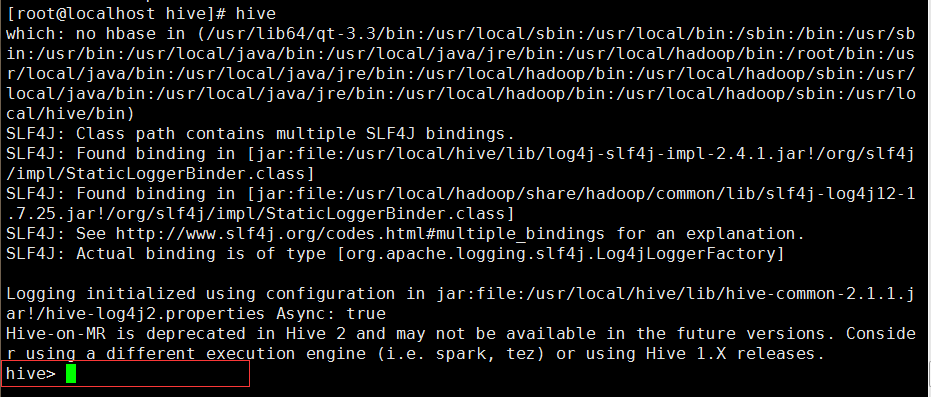
成功进入hive界面,hive配置完成
5.查询mysql(hive这个库是在 schematool -dbType mysql -initSchema 之前创建的!)
 [root@localhost ~]# mysql -uroot -p123456

 Welcome to the MySQL monitor.  Commands end with ; or \g.

 Your MySQL connection id is 10

 Server version: 5.1.73 Source distribution

 Copyright (c) 2000, 2013, Oracle and/or its affiliates. All rights reserved.

 Oracle is a registered trademark of Oracle Corporation and/or its

 affiliates. Other names may be trademarks of their respective

 owners.

 Type 'help;' or '\h' for help. Type '\c' to clear the current input statement.

 mysql> use hive

 Reading table information for completion of table and column names

 You can turn off this feature to get a quicker startup with -A

 Database changed

 mysql> show tables;

 +---------------------------+

 | Tables_in_hive            |

 +---------------------------+

 | AUX_TABLE                 |

 | BUCKETING_COLS            |

 | CDS                       |

 | COLUMNS_V2                |

 | COMPACTION_QUEUE          |

 | COMPLETED_COMPACTIONS     |
备注 (这里不计入正文不要重复配置hive-site.xml)
配置文件hive-site.xml
这里不得不说一下,如果你的 schematool -dbType mysql -initSchema 并没有执行成功怎么办,小博主昨天在这卡了一天,最后根据伟大的百度和hive官方文档,直接写了一个hive-site.xml配置文本:
<?xml version="1.0" encoding="UTF-8" standalone="no"?>

<?xml-stylesheet type="text/xsl" href="configuration.xsl"?>

<configuration>

        <property>

                <name>javax.jdo.option.ConnectionURL</name>

                <value>jdbc:mysql://localhost:3306/hahive</value>(mysql地址localhost)

        </property>

        <property>

                <name>javax.jdo.option.ConnectionDriverName</name>(mysql的驱动)

                <value>com.mysql.jdbc.Driver</value>

        </property>

        <property>

                <name>javax.jdo.option.ConnectionUserName</name>(用户名)

                <value>root</value>

        </property>

        <property>

                <name>javax.jdo.option.ConnectionPassword</name>(密码)

                <value>123456</value>

        </property>

        <property>

                <name>hive.metastore.schema.verification</name>

                <value>false</value>

        </property>

</configuration>
那我们做这些事干什么的呢,下面小段测试大家感受一下
hive测试:
备注:这里是第二个配置文件的演示:所以数据库名称是hahive数据库!
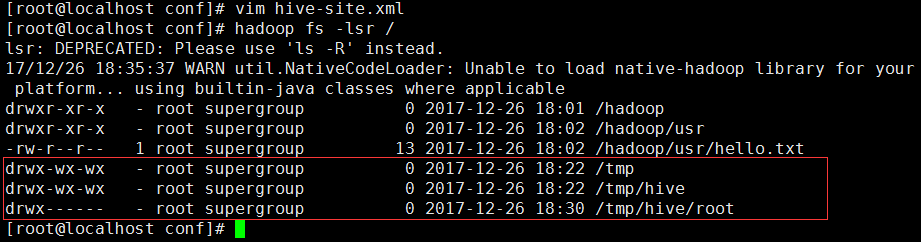
1.需要知道现在的hadoop中的HDFS存了什么
[root@localhost conf]# hadoop fs -lsr /
2.进入hive并创建一个测试库和测试表
[root@localhost conf]# hive
创建库:
 hive> create database hive_1;

 OK

 Time taken: 1.432 seconds
显示库:
 hive> show databases;

 OK

 default

 hive_1

 Time taken: 1.25 seconds, Fetched: 2 row(s)
创建库成功!
3.查询一下HDFS有什么变化

多了一个库hive_1
娜莫喔们的mysql下的hahive库有什么变化
mysql> use hahive;
mysql> select * from DBS;

+-------+-----------------------+------------------------------------------------+---------+------------+------------+

| DB_ID | DESC                  | DB_LOCATION_URI                                | NAME    | OWNER_NAME | OWNER_TYPE |

+-------+-----------------------+------------------------------------------------+---------+------------+------------+

|     1 | Default Hive database | hdfs://localhost/user/hive/warehouse           | default | public     | ROLE       |

|     6 | NULL                  | hdfs://localhost/user/hive/warehouse/hive_1.db | hive_1  | root       | USER       |

+-------+-----------------------+------------------------------------------------+---------+------------+------------+

2 rows in set (0.00 sec)

4.在hive_1下创建一个表hive_01
hive> use hive_1;

OK

Time taken: 0.754 seconds

hive> create table hive_01 (id int,name string);

OK

Time taken: 2.447 seconds

hive> show tables;

OK

hive_01 (表创建成功)

Time taken: 0.31 seconds, Fetched: 2 row(s)

hive>
HDFS下的情况:
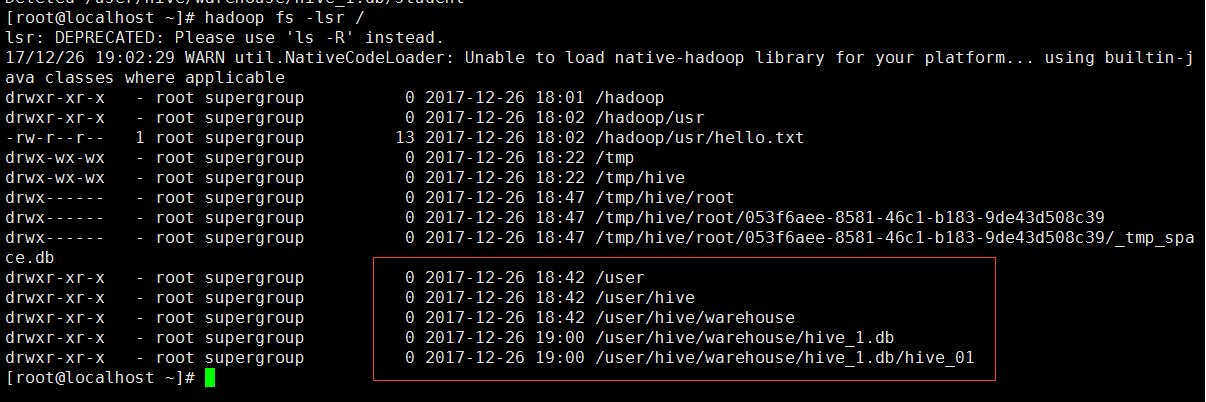
mysql下:
mysql> select * from TBLS;

+--------+-------------+-------+------------------+-------+-----------+-------+----------+---------------+--------------------+--------------------+

| TBL_ID | CREATE_TIME | DB_ID | LAST_ACCESS_TIME | OWNER | RETENTION | SD_ID | TBL_NAME | TBL_TYPE      | VIEW_EXPANDED_TEXT | VIEW_ORIGINAL_TEXT |

+--------+-------------+-------+------------------+-------+-----------+-------+----------+---------------+--------------------+--------------------+

|      6 |  1514286051 |     6 |                0 | root  |         0 |     6 | hive_01  | MANAGED_TABLE | NULL               | NULL               |

+--------+-------------+-------+------------------+-------+-----------+-------+----------+---------------+--------------------+--------------------+

2 rows in set (0.00 sec)
娜莫在web端是什么样子的呢!
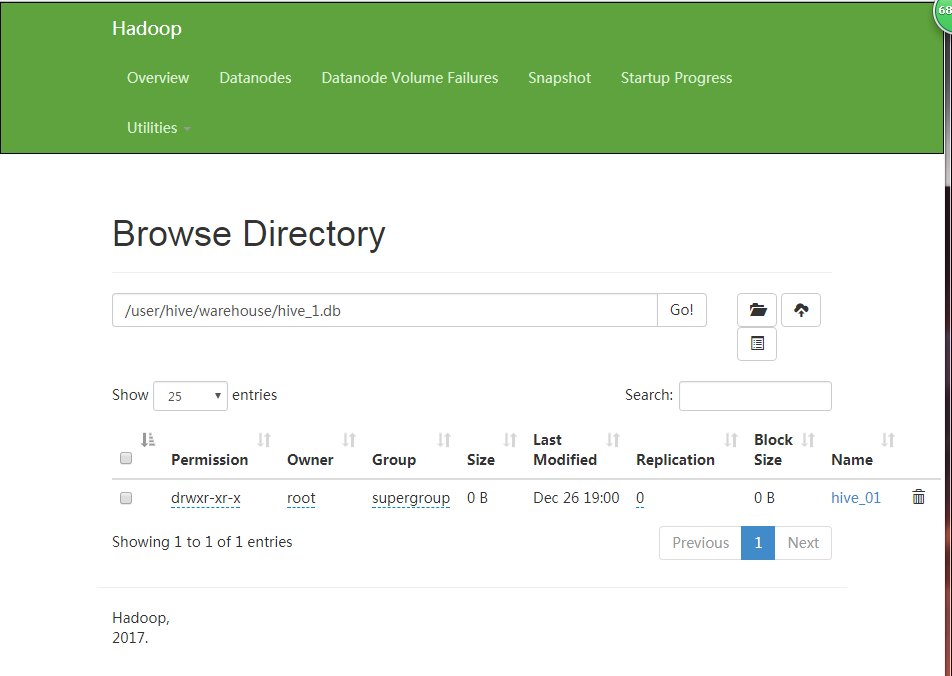
总的来说,hive其实就和mysql差不多呢!那么后面就不说了
最后,浏览别人博客的时候都会有版权声明,感觉好6的样子,小博主以后也写一段╭(╯^╰)╮
版权声明:
本文作者:魁·帝小仙
博文地址:http://www.cnblogs.com/dxxblog/p/8193967.html
欢迎对小博主的博文内容批评指点,如果问题,可评论或邮件联系(2335228250@qq.com)
欢迎转载,转载请在文章页面明显位置给出原文链接,谢谢
Hive安装与配置详解的更多相关文章
- libCURL开源库在VS2010环境下编译安装,配置详解
libCURL开源库在VS2010环境下编译安装,配置详解 转自:http://my.oschina.net/u/1420791/blog/198247 http://blog.csdn.net/su ...
- Nginx安装及配置详解【转】
nginx概述 nginx是一款自由的.开源的.高性能的HTTP服务器和反向代理服务器:同时也是一个IMAP.POP3.SMTP代理服务器:nginx可以作为一个HTTP服务器进行网站的发布处理,另外 ...
- [转帖]Nginx安装及配置详解 From https://www.cnblogs.com/zhouxinfei/p/7862285.html
Nginx安装及配置详解 nginx概述 nginx是一款自由的.开源的.高性能的HTTP服务器和反向代理服务器:同时也是一个IMAP.POP3.SMTP代理服务器:nginx可以作为一个HTTP ...
- nginx在linux上的安装与配置详解(一)
Nginx的安装与配置详解 (1)nginx简介 nginx概念: Nginx是一款轻量级的Web 服务器/反向代理服务器及电子邮件(IMAP/POP3)代理服务器,并在一个BSD-like ...
- Linux中Nginx安装与配置详解
转载自:http://www.linuxidc.com/Linux/2016-08/134110.htm Linux中Nginx安装与配置详解(CentOS-6.5:nginx-1.5.0). 1 N ...
- Tomcat安装及配置详解
Tomcat安装及配置详解 一,Tomcat简介 Tomcat 服务器是一个免费的开放源代码的Web 应用服务器,Tomcat是Apache 软件基金会(Apache Software Found ...
- OpenVPN CentOS7 安装部署配置详解
一 .概念相关 1.vpn 介绍 vpn 虚拟专用网络,是依靠isp和其他的nsp,在公共网络中建立专用的数据通信网络的技术.在vpn中任意两点之间的链接并没有传统的专网所需的端到端的物理链路,而是利 ...
- Linux NFS服务器的安装与配置详解
一.NFS服务简介 NFS是Network File System(网络文件系统).主要功能是通过网络让不同的服务器之间可以共享文件或者目录.NFS客户端一般是应用服务器(比如web,负载均衡等),可 ...
- CentOS 7下Samba服务安装与配置详解
1. Samba简介 Samba是在Linux和UNIX系统上实现SMB协议的一个免费软件,由服务器及客户端程序构成.SMB(Server Messages Block,信息服务块)是一种在局域网上共 ...
随机推荐
- Python_02笔记
数据类型 引子 什么是数据?x=10, 10 是我们要存储的数据 为啥数据要分不同的类型数据是用来表示状态的,不同的状态就应该用不同的类型的数据去表示 数据类型数字(整形,长整型,浮点型,复数)字符串 ...
- Mysql的安装和图形化界面的使用
访问mysql网址:https://dev.mysql.com/ 下面需要登录你的oracle账号进行下载就好~ 下载之后是一解压包形式存在的~ 解压之后的文件 这里我新建了my.ini的文件~将my ...
- 》》QQ-注册
<!doctype html> <html lang="en"> <head> <meta charset="UTF-8&quo ...
- PHP 数据库连接池实现
摘要 xml 读取配置文件 简易方式 常规方式 PHP解析XML 配置文件 解析 数据库连接池 測试 申请过多时拒绝请求 已满后拒绝放入 总结 摘要 之前总是以脚本面向过程的方式写PHP代码,所以非常 ...
- [ACM] POJ 2635 The Embarrassed Cryptographer (同余定理,素数打表)
The Embarrassed Cryptographer Time Limit: 2000MS Memory Limit: 65536K Total Submissions: 11978 A ...
- 深入了解MyBatis返回值
深入了解MyBatis返回值 想了解返回值,我们须要了解resultType,resultMap以及接口方法中定义的返回值. 我们先看resultType和resultMap resultType和r ...
- inline-block解决
一.现象描述 真正意义上的inline-block水平呈现的元素间,换行显示或空格分隔的情况下会有间距 二.方法之移除空格 元素间留白间距出现的原因就是标签段之间的空格,因此,去掉HTML中的空格,自 ...
- scrapy爬虫框架setting模块解析
平时写爬虫的时候并不需要设置setting里所有的参数,今天心血来潮,花了点时间查了一下setting模块创建后自动写入的所有参数的含义,记录一下. 模块相关说明信息 # -*- coding: ut ...
- SSM学习(二)mybatis和spring的集成
上一篇文章大概搭建了一下ssm的框架,其实还是不完整,我们往项目中添加了spring和mybatis的配置文件,还差一个spring mvc的配置文件,在resource中在新建一个Applicati ...
- 自学Zabbix3.5.4-监控项item-History and trends
历史和趋势是在Zabbix中存储收集数据的两种方法.然而,历史保持着每一个收集的价值,趋势保持每小时的平均信息,因此减少了对资源的需求. 1. 保留历史数据 我们可以通过如下方式来设置保留数据的时 ...