
Python系列之文件操作、冒泡算法、装饰器、及递归
文件处理
python对文件进行读写操作的方法与具体步骤,包括打开文件、读取内容、写入文件、文件中的内容定位、及关闭文件释放资源等
open()、file(),这个两函数提供了初始化输入\输出(I\O)操作的通用接口。两函数的功能相同 在3X版本 file()被抛弃。
1、基本用法:
file_object=open(file, mode='r', buffering=None, encoding=None, errors=None, newline=None, closefd=True)
file_object 是定义一个打开文件的对象,file 可以是个文件,也可以是一个路径,mode是打开的模式,默认的为'r',文件模式有一下几种:
- r,只读模式(默认)。
- w,只写模式。【不可读;不存在则创建;存在则删除内容;】
- a,追加模式。【可读; 不存在则创建;存在则只追加内容;】
其中还有'+'表示同时读写文件
- r+,可读写文件。【可读;可写;可追加】
- w+,写读
- a+,追加
"b"表示处理二进制文件(如:FTP发送上传ISO镜像文件,linux可忽略,windows处理二进制文件时需标注)
- rb
- wb
- ab
class file(object)

    def close(self): # real signature unknown; restored from __doc__

        关闭文件

        """

        close() -> None or (perhaps) an integer.  Close the file.

        Sets data attribute .closed to True.  A closed file cannot be used for

        further I/O operations.  close() may be called more than once without

        error.  Some kinds of file objects (for example, opened by popen())

        may return an exit status upon closing.

        """

    def fileno(self): # real signature unknown; restored from __doc__

        文件描述符

         """

        fileno() -> integer "file descriptor".

        This is needed for lower-level file interfaces, such os.read().

        """

        return 0

    def flush(self): # real signature unknown; restored from __doc__

        刷新文件内部缓冲区

        """ flush() -> None.  Flush the internal I/O buffer. """

        pass

    def isatty(self): # real signature unknown; restored from __doc__

        判断文件是否是同意tty设备

        """ isatty() -> true or false.  True if the file is connected to a tty device. """

        return False

    def next(self): # real signature unknown; restored from __doc__

        获取下一行数据,不存在,则报错

        """ x.next() -> the next value, or raise StopIteration """

        pass

    def read(self, size=None): # real signature unknown; restored from __doc__

        读取指定字节数据

        """

        read([size]) -> read at most size bytes, returned as a string.

        If the size argument is negative or omitted, read until EOF is reached.

        Notice that when in non-blocking mode, less data than what was requested

        may be returned, even if no size parameter was given.

        """

        pass

    def readinto(self): # real signature unknown; restored from __doc__

        读取到缓冲区,不要用,将被遗弃

        """ readinto() -> Undocumented.  Don't use this; it may go away. """

        pass

    def readline(self, size=None): # real signature unknown; restored from __doc__

        仅读取一行数据

        """

        readline([size]) -> next line from the file, as a string.

        Retain newline.  A non-negative size argument limits the maximum

        number of bytes to return (an incomplete line may be returned then).

        Return an empty string at EOF.

        """

        pass

    def readlines(self, size=None): # real signature unknown; restored from __doc__

        读取所有数据,并根据换行保存值列表

        """

        readlines([size]) -> list of strings, each a line from the file.

        Call readline() repeatedly and return a list of the lines so read.

        The optional size argument, if given, is an approximate bound on the

        total number of bytes in the lines returned.

        """

        return []

    def seek(self, offset, whence=None): # real signature unknown; restored from __doc__

        指定文件中指针位置

        """

        seek(offset[, whence]) -> None.  Move to new file position.

        Argument offset is a byte count.  Optional argument whence defaults to

(offset from start of file, offset should be >= 0); other values are 1

        (move relative to current position, positive or negative), and 2 (move

        relative to end of file, usually negative, although many platforms allow

        seeking beyond the end of a file).  If the file is opened in text mode,

        only offsets returned by tell() are legal.  Use of other offsets causes

        undefined behavior.

        Note that not all file objects are seekable.

        """

        pass

    def tell(self): # real signature unknown; restored from __doc__

        获取当前指针位置

        """ tell() -> current file position, an integer (may be a long integer). """

        pass

    def truncate(self, size=None): # real signature unknown; restored from __doc__

        截断数据,仅保留指定之前数据

        """

        truncate([size]) -> None.  Truncate the file to at most size bytes.

        Size defaults to the current file position, as returned by tell().

        """

        pass

    def write(self, p_str): # real signature unknown; restored from __doc__

        写内容

        """

        write(str) -> None.  Write string str to file.

        Note that due to buffering, flush() or close() may be needed before

        the file on disk reflects the data written.

        """

        pass

    def writelines(self, sequence_of_strings): # real signature unknown; restored from __doc__

        将一个字符串列表写入文件

        """

        writelines(sequence_of_strings) -> None.  Write the strings to the file.

        Note that newlines are not added.  The sequence can be any iterable object

        producing strings. This is equivalent to calling write() for each string.

        """

        pass

    def xreadlines(self): # real signature unknown; restored from __doc__

        可用于逐行读取文件,非全部

        """

        xreadlines() -> returns self.

        For backward compatibility. File objects now include the performance

        optimizations previously implemented in the xreadlines module.

        """

        pass
2.x
class TextIOWrapper(_TextIOBase):

    """

    Character and line based layer over a BufferedIOBase object, buffer.

    encoding gives the name of the encoding that the stream will be

    decoded or encoded with. It defaults to locale.getpreferredencoding(False).

    errors determines the strictness of encoding and decoding (see

    help(codecs.Codec) or the documentation for codecs.register) and

    defaults to "strict".

    newline controls how line endings are handled. It can be None, '',

    '\n', '\r', and '\r\n'.  It works as follows:

    * On input, if newline is None, universal newlines mode is

      enabled. Lines in the input can end in '\n', '\r', or '\r\n', and

      these are translated into '\n' before being returned to the

      caller. If it is '', universal newline mode is enabled, but line

      endings are returned to the caller untranslated. If it has any of

      the other legal values, input lines are only terminated by the given

      string, and the line ending is returned to the caller untranslated.

    * On output, if newline is None, any '\n' characters written are

      translated to the system default line separator, os.linesep. If

      newline is '' or '\n', no translation takes place. If newline is any

      of the other legal values, any '\n' characters written are translated

      to the given string.

    If line_buffering is True, a call to flush is implied when a call to

    write contains a newline character.

    """

    def close(self, *args, **kwargs): # real signature unknown

        关闭文件

        pass

    def fileno(self, *args, **kwargs): # real signature unknown

        文件描述符

        pass

    def flush(self, *args, **kwargs): # real signature unknown

        刷新文件内部缓冲区

        pass

    def isatty(self, *args, **kwargs): # real signature unknown

        判断文件是否是同意tty设备

        pass

    def read(self, *args, **kwargs): # real signature unknown

        读取指定字节数据

        pass

    def readable(self, *args, **kwargs): # real signature unknown

        是否可读

        pass

    def readline(self, *args, **kwargs): # real signature unknown

        仅读取一行数据

        pass

    def seek(self, *args, **kwargs): # real signature unknown

        指定文件中指针位置

        pass

    def seekable(self, *args, **kwargs): # real signature unknown

        指针是否可操作

        pass

    def tell(self, *args, **kwargs): # real signature unknown

        获取指针位置

        pass

    def truncate(self, *args, **kwargs): # real signature unknown

        截断数据,仅保留指定之前数据

        pass

    def writable(self, *args, **kwargs): # real signature unknown

        是否可写

        pass

    def write(self, *args, **kwargs): # real signature unknown

        写内容

        pass

    def __getstate__(self, *args, **kwargs): # real signature unknown

        pass

    def __init__(self, *args, **kwargs): # real signature unknown

        pass

    @staticmethod # known case of __new__

    def __new__(*args, **kwargs): # real signature unknown

        """ Create and return a new object.  See help(type) for accurate signature. """

        pass

    def __next__(self, *args, **kwargs): # real signature unknown

        """ Implement next(self). """

        pass

    def __repr__(self, *args, **kwargs): # real signature unknown

        """ Return repr(self). """

        pass

    buffer = property(lambda self: object(), lambda self, v: None, lambda self: None)  # default

    closed = property(lambda self: object(), lambda self, v: None, lambda self: None)  # default

    encoding = property(lambda self: object(), lambda self, v: None, lambda self: None)  # default

    errors = property(lambda self: object(), lambda self, v: None, lambda self: None)  # default

    line_buffering = property(lambda self: object(), lambda self, v: None, lambda self: None)  # default

    name = property(lambda self: object(), lambda self, v: None, lambda self: None)  # default

    newlines = property(lambda self: object(), lambda self, v: None, lambda self: None)  # default

    _CHUNK_SIZE = property(lambda self: object(), lambda self, v: None, lambda self: None)  # default

    _finalizing = property(lambda self: object(), lambda self, v: None, lambda self: None)  # default
3.x
2、文件操作常用的方法:
f = open('text.txt','r+')

f.read()                          #读取指定字节数据

f.write('ok')                            #写入指定内容本次写入'ok'

f.writelines()         #将一个字符串列表写入文件

f.flush()            #把缓冲区的刷如到硬盘

f.readline           #读取一行

f.readlines           #读取所有数据,并根据换行保存值列表

f.tell()             #获取当前指针

f.seek()            #指定文件中指针位置

f.truncate()            #截断数据,仅保留指定之前数据

f.close()                                   #关闭文件
3、with
为了避免忘记关闭文件,可以通过管理上下文,即
with open('log','r') as f:
当with代码块执行完毕时,内部会自动关闭并释放文件资源。
在Python2.7后,with支持同时打开多个文件:
with open('text','r') as f1,open('log','w') as f2:

    pass
冒泡算法
冒泡排序是一种简单的排序算法它重复地走访过要排序的数列,一次比较两个元素,如果他们的顺序错误就把他们交换过来如下图:

需求:请按照从小到大对列表 [13, 22, 6, 99, 11] 进行排序,
首先进行排序把列表里面最大的元素换到最后,需要接入第三个元素代码如下:
for  i in range(len(li) - 1):

    if li[i] > li[i +1]:

        temp = li[i]

        li[i]= li[i+1]

        li[i + 1] = temp

    print(li)
通过上面的方法就可以把列表中的99换到最后,既然我们实现了对一个元素的排序下面我们将实现对整个列表的排序:
for j in range(1,len(li)):

    for  i in range(0,len(li) -j ):

        if li[i] > li[i +1]:

            temp = li[i]

            li[i]= li[i+1]

            li[i + 1] = temp

print(li)

####output####

[6, 11, 13, 22, 99]
ok,上面的列表完成排序冒泡排序如此简单实现,下面谈一谈装饰器
装饰器
装饰器是一个可调用的对象(a callable),在python 中函数是对象,当然是可调用的,所以装饰器是一个函数,我们称其为函数装饰器。这个可调用对象以一个函数作为参数,并且返回另一个函数(来替换参数那个函数)比如:
def outer(fun):

    def inner():

        print('hello')

        fun()

    return inner
outer 是一个装饰器,它是一个函数,它可以接受一个函数fun作为参数 返回另一个函数inner。为什么叫装饰器?,在返回函数inner()的内部,调用了fun(),而且做了额外的操作,相当于'装饰'了函数fun()
如何使用装饰器那?
def fun1():

    pass

def fun2():

    pass

fun1 = outer(fun1)

fun2 = outer(fun2)
fun1,fun2的名字都没有变,但是通过调用函数outer(),它们已经指向了另一个函数inner(),即'装饰'了自己。
@操作符
Python提供了@符号,实质上就是上面做的,对一个函数名进行重新赋值,是语法上的技巧,所以上面的代码等价于:
@outer

def fun1():

    pass

@outer

def fun2():

    pass
但是有一个问题,这个装饰器从功能上看,是要应该可以用来装饰任何函数,但是如果我们用它来装饰了一个带参数的函数
@outer

def fun3(x):

    pass
只要不调用fun3,这三行代码不会让python解释器报错, 但是当我们使用fun3时,我们肯定会按照他的定义时的样子去使用它,给它传入一个参数.
>>>fun(3) #这时候就会出错
    fun3(3)

TypeError: inner() takes 0 positional arguments but 1 was given
当然我们已经很容易知道为什么会这样报错,fun3已经不是指向它定义的那个函数了,它指向inner(),而inner是没有参数的当然会报错.那怎么解决那?修改一下inner()的定义,让它可以接收任意个参数就可以.
def outer(func):

    def inner(*args,**kwargs):

        print('hello')

        func(*args,**kwargs)

    return inner
现在给inner传任意个参数都不会出错了,也就是outer可以用来装饰任何一个函数了,不服不行。
但是问题来了,如果给一个函数写两个装饰器会怎么样例如:
@outer1

@outer

def fun1():

    print('fun1')
大家可能有疑虑,它们的执行顺序是什么样的,会先输出什么内容?
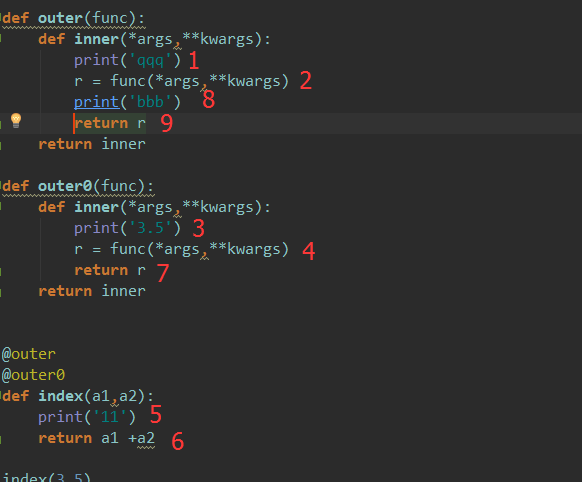
上图为2层装饰器的调用过程
递归
如果函数包含了对其自身的调用,该函数就是递归的!
利用递归编写斐波那契数列第10个数字的值:
0, 1, 1, 2, 3, 5, 8, 13, 21, 34, 55, 89, 144, 233,377,610,987,1597,2584,4181,6765,10946,17711,28657,46368
代码如下:
def fib1(datp,a,b):

    if datp ==10:

        return a

    a3 = a + b

    r = fib1(datp + 1,b,a3)

    return r

c = fib1(1,0,1)

####output####

34
另外一种方法:
def fib3(arg):

    if arg ==1:

        return 0

    elif arg ==2:

        return 1

    else:

        return fib3(int(arg)-1) + fib3(int(arg)-2)

c = fib3('')

print(c)
Python系列之文件操作、冒泡算法、装饰器、及递归的更多相关文章
- python day5 lambda,内置函数,文件操作,冒泡排序以及装饰器
目录 python day 5 1. 匿名函数lambda 2. python的内置函数 3. python文件操作 4. 递归函数 5. 冒泡排序 6. 装饰器 python day 5 2019/ ...
- python os&shutil 文件操作
python os&shutil 文件操作 # os 模块 os.sep 可以取代操作系统特定的路径分隔符.windows下为 '\\' os.name 字符串指示你正在使用的平台.比如对于W ...
- python 历险记(三)— python 的常用文件操作
目录 前言 文件 什么是文件? 如何在 python 中打开文件? python 文件对象有哪些属性? 如何读文件? read() readline() 如何写文件? 如何操作文件和目录? 强大的 o ...
- Python的高级文件操作(shutil模块)
Python的高级文件操作(shutil模块) 作者:尹正杰 版权声明:原创作品,谢绝转载!否则将追究法律责任. 如果让我们用python的文件处理来进行文件拷贝,想必很多小伙伴的思路是:使用打开2个 ...
- Python入门篇-文件操作
Python入门篇-文件操作 作者:尹正杰 版权声明:原创作品,谢绝转载!否则将追究法律责任. 一.文件IO常用操作 open:打开 read:读取 write:写入 close:关闭 readlin ...
- python基础篇(文件操作)
Python基础篇(文件操作) 一.初始文件操作 使用python来读写文件是非常简单的操作. 我们使用open()函数来打开一个文件, 获取到文件句柄. 然后通过文件句柄就可以进行各种各样的操作了. ...
- Python之常用文件操作
Python之常用文件操作
- python is、==区别;with;gil;python中tuple和list的区别;Python 中的迭代器、生成器、装饰器
1. is 比较的是两个实例对象是不是完全相同,它们是不是同一个对象,占用的内存地址是否相同 == 比较的是两个对象的内容是否相等 2. with语句时用于对try except finally 的优 ...
- Python的高级特性7:闭包和装饰器
本节跟第三节关系密切,最好放在一起来看:python的高级特性3:神奇的__call__与返回函数 一.闭包:闭包不好解释,只能先看下面这个例子: In [23]: def outer(part1): ...
随机推荐
- java_eclipse添加DID实现自动提示
便捷无错开发 对于xml 配置没有自动提示是多么恼火就不用说了,eclipse本身很多都是默认关闭了的,如果开发者不知道的话,就不知道怎么去设置,下面介绍几种自动提示设置的方法: XML:获得提示更好 ...
- javaScript数组去重方法
在JAvascript平时项目开发中经常会用到数组去重的操作.这时候就要用到JS数组去重的方法了. demo1: 第一种:JS数组去重操作方法是利用遍历原数组,利用数组的indexOf()方法来来判断 ...
- poj 3177-3352边双联通
买一送一啊 3177和3352的区别在于3177数据有重边!但是我先做3177的 那么就直接ctrl+c+v搞3352了~. 题意:给一个无向图,要令每个点之间至少有两条不重合的路,需要至少加多少 ...
- Beta阶段项目复审
复审人:王李焕 六指神功:http://www.cnblogs.com/teamworkers/ wt.dll:http://www.cnblogs.com/TeamOf/ 六个核桃:http://w ...
- 201521123100 《Java程序设计》 第1周学习总结
1. 本章学习总结 1.简单了解学习了Java及其开发环境,学习使用了Notepad++&eclipse开发软件的使用 2.熟练完成了使用Notepad++运行第一个Java程序"H ...
- 201521123062 《Java程序设计》第14周学习总结
1. 本周学习总结 1.1 以你喜欢的方式(思维导图或其他)归纳总结多数据库相关内容. 2. 书面作业 1. MySQL数据库基本操作 建立数据库,将自己的姓名.学号作为一条记录插入.(截图,需出现自 ...
- 201521123022 《Java程序设计》 第十四周学习总结
1. 本章学习总结 2. 书面作业 Q1. MySQL数据库基本操作 建立数据库,将自己的姓名.学号作为一条记录插入.(截图,需出现自己的学号.姓名),在自己建立的数据库上执行常见SQL语句(截图) ...
- Bootstrap栅格系统用法--Bootstrap基础
1.栅格系统实现布局的原理 1)Bootstrap把屏幕的宽度拆分成12格(列),每一格像素的多少由设备屏幕分辨率决定,我们在开发项目的过程中不需要去指定像素或者百分比. 2)不同范围的分辨率对应不同 ...
- Could not execute JDBC batch update; SQL [delete from role where roleId=?]; constraint [null]; neste
今天在写多个删除功能的时候出现了这么一个错误:意思是删除操作的时候,没有找到对应的外键. Cannot delete or update a parent row: a foreign key con ...
- javaScript【创建对象、创建类、成员变量、方法、公有和私有、静态】
创建对象 方式① 直接使用new Object() var obj = new Object(); 方式② 使用空的{}大括号 var obj2 = {}; 测试 增加属性,访问属性 我们要为创建的对 ...