
VisualSVN 5.1.7破译License Key
前面手敲一些简要的软件说明:visualSVN server大家都不陌生,服务器上的版本控制系统,一般配套Tortoisesvn(小乌龟)使用。本次介绍的这个visualsvn属于VisualStudio的版本控制插件,可以直接在IDE中做版本控制,方便开发人员同步自己的项目。
解压文件中以及附赠好了破解后的.dll文件,安装好后直接覆盖就可以了。当然如果版本靠后也可以自己动手破解一下。本文提供的是5.1.7版本的破解DLL
下面开始附赠破解教程:
1.首先备份当前安装visualSVN文件的bin目录,万一出错还能反个水。一般默认安装路径是C:\Program Files (x86)\VisualSVN\bin
2.然后运行ildasm,Window中有自带的反编译ildasm工具,位于“C:\Program Files\Microsoft SDKs\Windows\v7.0A\bin\”。
3.用ildasm打开刚才备份的bin目录下的VisualSVN.Core.L.dll文件,单击文件菜单点击转储,如图
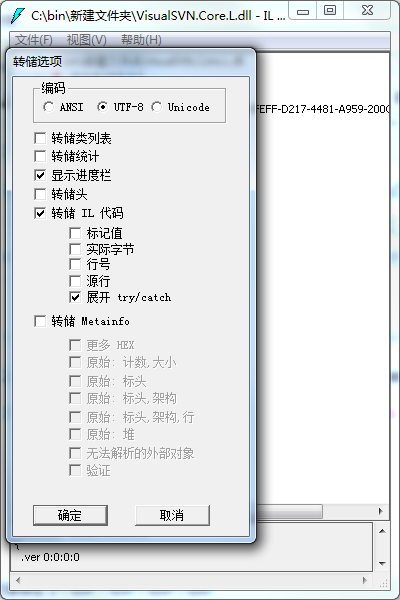
4.得到同名的il文件:VisualSVN.Core.L.il,用记事本打开得到的 VisualSVN.Core.L.il 文件,在其中搜索 “KeyToLicenseUnsafe”,找到KeyToLicenseUnsafe方法,大概在3188行附近。查找并替换成下面的代码,然后保存
.method public hidebysig static class VisualSVN.Core.Licensing.License

          KeyToLicenseUnsafe(class VisualSVN.Core.IDecoder decoder,

                             string key) cil managed

  {

    // 代码大小       69 (0x45)

    .locals init (class VisualSVN.Core.Licensing.License V_0, class VisualSVN.Core.Licensing.License V_1, class VisualSVN.Core.Licensing.License V_2)

    IL_0000: nop

    IL_0001: newobj instance void VisualSVN.Core.Licensing.License::.ctor()

    IL_0006: stloc.

    IL_0007: ldloc.

    IL_0008: ldsfld valuetype [mscorlib]System.DateTime [mscorlib]System.DateTime::MinValue

    IL_000d: stfld valuetype [mscorlib]System.DateTime VisualSVN.Core.Licensing.License::StartTime

    IL_0012: ldloc.

    IL_0013: ldc.i4.

    IL_0014: stfld valuetype VisualSVN.Core.Licensing.LicenseBinding VisualSVN.Core.Licensing.License::Binding

    IL_0019: ldloc.

    IL_001a: ldc.i4 0x7ffffffe

    IL_001f: stfld int32 VisualSVN.Core.Licensing.License::Capacity

    IL_0024: ldloc.

    IL_0025: ldsfld valuetype [mscorlib]System.DateTime [mscorlib]System.DateTime::MaxValue

    IL_002a: stfld valuetype [mscorlib]System.DateTime VisualSVN.Core.Licensing.License::EndTime

    IL_002f: ldloc.

    IL_0030: ldc.i4.

    IL_0031: stfld valuetype VisualSVN.Core.Licensing.LicenseType VisualSVN.Core.Licensing.License::Type

    IL_0036: ldloc.

    IL_0037: ldstr ""

    IL_003c: stfld string VisualSVN.Core.Licensing.License::PurchaseId

    IL_0041: ldloc.

    IL_0042: call string [mscorlib]System.Environment::get_UserName()

    IL_0047: stfld string VisualSVN.Core.Licensing.License::LicensedTo

    IL_004c: ldloc.

    IL_004d: stloc.

    IL_004e: ldloc.

    IL_004f: ldloc.

    IL_0050: ldfld valuetype [mscorlib]System.DateTime VisualSVN.Core.Licensing.License::StartTime

    IL_0055: stfld valuetype [mscorlib]System.DateTime VisualSVN.Core.Licensing.License::PurchaseDate

    IL_005a: ldloc.

    IL_005b: stloc.

    IL_005c: br.s

    IL_005e

    IL_005e:ldloc.

    IL_005f: ret

  } // end of method LicenseConverter::KeyToLicenseUnsafe
5.用管理员权限打开VS命令提示工具,如下图↓,我装的是VS2015

6. 运行下面的代码,看到successfully表示成功了。将重新编译的dll文件覆盖到安装目录中就OK了。
ilasm "备份目录\VisualSVN.Core.L.il" /output="备份目录\VisualSVN.Core.L.dll" /dll
7.然后运行你的VS就可以看到VisualSVN已经没有Lisence时间限制啦!
P.S. 下面是给懒人的福利了,这是5.1.7版本破解好的Dll,直接替换到安装文件的bin目录下就好啦
链接: https://pan.baidu.com/s/1sldixyt 密码: fjjj
VisualSVN 5.1.7破译License Key的更多相关文章
- webstorm license key
JetBrains WebStorm注册码 UserName: William License Key : ===== LICENSE BEGIN ===== 45550-12042010 00001 ...
- Sublime Text 注册码 License Key
Sublime Text (3103版本可用) 注册码 License Key
- phpstorm8 设置及license key
phpstorm8 license key Learn Programming ===== LICENSE BEGIN ===== 63758-12042010 00000Ryqh0NCC73lpRm ...
- powerdesign的license key到期,解决办法
到2013年9月24日为止我把这文件覆盖了都是行的!不行的请留言说明下! 下载地址:powerdesigner license key 15.1 找到安装目录,直接覆盖就行了!
- [LeetCode] License Key Formatting 注册码格式化
Now you are given a string S, which represents a software license key which we would like to format. ...
- [Swift]LeetCode482. 密钥格式化 | License Key Formatting
You are given a license key represented as a string S which consists only alphanumeric character and ...
- 【leetcode】482. License Key Formatting
problem 482. License Key Formatting solution1: 倒着处理,注意第一个字符为分隔符的情况要进行删除,注意字符的顺序是否正序. class Solution ...
- Bitdefender Total Security 2014 Free 6 Months & 12 month License Key
German Only – Bitdefender Total Security 2014 Free 6 Months Serial License Keyhttp://www.bitdefender ...
- charles license key
Download: http://www.charlesproxy.com/ (Official Web-site) Registered name: anthony ortolani License ...
随机推荐
- poj3061尺取法
A sequence of N positive integers (10 < N < 100 000), each of them less than or equal 10000, a ...
- unity静态批处理原理理解
今天主程给我好好讲了一下静态批处理的问题,记下来的笔记心得~ 1.静态批处理的时间点 1)在游戏导出的时候,在player setting中勾选static batching,这样在导出包的时候就进行 ...
- MySQL索引及查询优化总结
欢迎大家关注腾讯云技术社区-博客园官方主页,我们将持续在博客园为大家推荐技术精品文章哦~ 作者:谢庆玲 文章<MySQL查询分析>讲述了使用MySQL慢查询和explain命令来定位mys ...
- ELK logstash 处理MySQL慢查询日志(初步)
写在前面:在做ELK logstash 处理MySQL慢查询日志的时候出现的问题: 1.测试数据库没有慢日志,所以没有日志信息,导致 IP:9200/_plugin/head/界面异常(忽然出现日志数 ...
- 运用三角不等式加速Kmeans聚类算法
运用三角不等式加速Kmeans聚类算法 引言:最近在刷<数据挖掘导论>,第九章, 9.5.1小节有提到,可以用三角不等式,减少不必要的距离计算,从而达到加速聚类算法的目的.这在超大数据量的 ...
- 实现ThreadFactory接口生成自定义的线程给Fork/Join框架
Fork/Join框架是Java7中最有趣的特征之一.它是Executor和ExecutorService接口的一个实现,允许你执行Callable和Runnable任务而不用管理这些执行线程.这个执 ...
- TCP协议简介
1.TCP协议的特点 TCP是面向连接的运输层协议 每一条TCP连接只能有两个端点.TCP只能进行点对点通信 TCP提供可靠交付的服务.通过TCP连接传输的数据,无差错.不丢失.不重复.并且按序到达 ...
- 读《Java并发编程的艺术》(二)
上篇博客开始,我们接触了一些有关Java多线程的基本概念.这篇博客开始,我们就正式的进入了Java多线程的实战演练了.实战演练不仅仅是贴代码,也会涉及到相关概念和术语的讲解. 线程的状态 程的状态分为 ...
- Java 多线程详解(二)------如何创建进程和线程
Java 多线程详解(一)------概念的引入:http://www.cnblogs.com/ysocean/p/6882988.html 在上一篇博客中,我们已经介绍了并发和并行的区别,以及进程和 ...
- 微信小程序大全(上)(最新整理 建议收藏)