
NSAttributedString用法
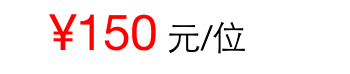
以前看到这种字号和颜色不一样的字符串,想出个讨巧的办法就是“¥150”一个UILabel,“元/位”一个UILabel。今天翻看以前的工程,command点进UITextField中看到[attributedText]这个关键字,以前都没注意过UITextField还有这个属性,其实UITextView、UILable也有这个属性,iOS6就已经有了,说来惭愧,对此罚站1秒钟。
NSAttributedString叫做富文本,是一种带有属性的字符串,通过它可以轻松的在一个字符串中表现出多种字体、字号、字体大小等各不相同的风格,还可以对段落进行格式化。
通过以下代码即可实现上面图示效果,十分方便,从此再也不用设置两个UILable,并且处心积虑的处理它们的长度了。
     UILabel * aLable = [[UILabel alloc] initWithFrame:CGRectMake(, , , )];

     aLable.textAlignment = NSTextAlignmentCenter;

     [self.view addSubview:aLable];

     NSString * aString = @"¥150 元/位";

     //富文本对象

     NSMutableAttributedString * aAttributedString = [[NSMutableAttributedString alloc] initWithString:aString];

     //富文本样式

     [aAttributedString addAttribute:NSForegroundColorAttributeName  //文字颜色

                               value:[UIColor redColor]

                               range:NSMakeRange(, )];

     [aAttributedString addAttribute:NSFontAttributeName             //文字字体

                               value:[UIFont systemFontOfSize:]

                               range:NSMakeRange(, )];

     aLable.attributedText = aAttributedString;
常用属性:
NSFontAttributeName 文字字体
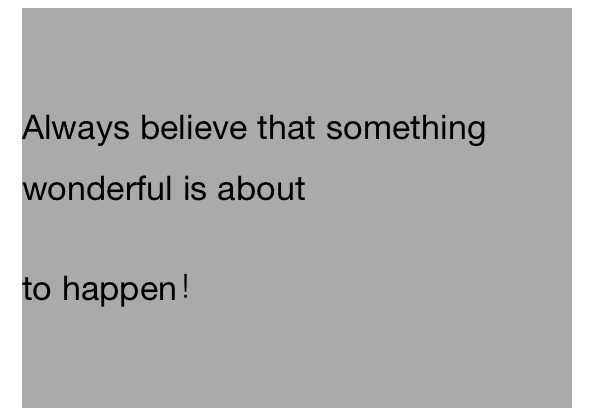
NSParagraphStyleAttributeName 段落样式(字符串通过“\n”进行分段,此设置必须在lable.numberOfLines = 0时有效,value通过NSMutableParagraphStyle设置,它有以下属性)
 [段落样式-插曲]
 1 @property(readwrite) CGFloat lineSpacing;              //行间距

 @property(readwrite) CGFloat paragraphSpacing;           //段间距

 @property(readwrite) NSTextAlignment alignment;           //对齐方式

 @property(readwrite) CGFloat firstLineHeadIndent;          //首行缩进

 @property(readwrite) CGFloat headIndent;               //除首行之外其他行缩进

 @property(readwrite) CGFloat tailIndent;               //每行容纳字符的宽度

 @property(readwrite) NSLineBreakMode lineBreakMode;         //换行方式

 @property(readwrite) CGFloat minimumLineHeight;           //最小行高

 @property(readwrite) CGFloat maximumLineHeight;           //最大行高

 @property(readwrite) NSWritingDirection baseWritingDirection;  //书写方式(NSWritingDirectionNatural,NSWritingDirectionLeftToRight,NSWritingDirectionRightToLeft)
 @property(readwrite) CGFloat lineHeightMultiple;
 @property(readwrite) CGFloat paragraphSpacingBefore;
 @property(readwrite) float hyphenationFactor;
 @property(readwrite,copy,NS_NONATOMIC_IOSONLY) NSArray *tabStops NS_AVAILABLE_IOS(7_0);
 @property(readwrite,NS_NONATOMIC_IOSONLY) CGFloat defaultTabInterval NS_AVAILABLE_IOS(7_0);
 [段落样式demo]
 1     UILabel * lable = [[UILabel alloc] initWithFrame:CGRectMake(, , self.view.frame.size.width-, )];

     lable.backgroundColor = [UIColor lightGrayColor];

     lable.numberOfLines = ;

     [self.view addSubview:lable];

     NSString * string = @"Always believe that something wonderful is about \nto happen!";

     //富文本

     NSMutableAttributedString * attributedString = [[NSMutableAttributedString alloc] initWithString:string];

     //段落样式

     NSMutableParagraphStyle * paragraphStyle = [[NSMutableParagraphStyle alloc] init];

 #warning  lable.numberOfLines必须为0,段落样式才生效

     //行间距

     paragraphStyle.lineSpacing = 10.0;

     //段落间距

     paragraphStyle.paragraphSpacing = 20.0;

 //    paragraphStyle.baseWritingDirection = NSWritingDirectionLeftToRight;

 //    paragraphStyle.firstLineHeadIndent = 10.0;

 //    paragraphStyle.headIndent = 50.0;

 //    paragraphStyle.tailIndent = 200.0;

     [attributedString addAttribute:NSParagraphStyleAttributeName

                              value:paragraphStyle

                              range:NSMakeRange(, string.length)];

     lable.attributedText = attributedString;
NSForegroundColorAttributeName 文字前景色
NSBackgroundColorAttributeName 文字背景色
NSLigatureAttributeName 连体字(NSNumber @0:无连体,@1:默认连体,系统字体不包含对连体的支持)
NSUnderlineStyleAttributeName 下划线
NSStrokeColorAttributeName 只有在NSStrokeWidthAttributeName设置了值之后才有效(默认字体颜色和前景色一致,如果设置的颜色和前景色不一致则前景色无效)
NSStrokeWidthAttributeName 设置该属性之后字体变成空心字体,字体边线宽度为value设定的值
NSBaselineOffsetAttributeName 值为NSNumber类型,表明文字相对于其他文字基准线向上的偏移量
NSUnderlineColorAttributeName 值为UIColor类型,下划线颜色(只有在NSUnderlineStyleAttributeName的value为@1时有效)
NSUnderlineStyleAttributeName 值为NSNumber类型,下划线宽度(默认值为@0:下划线宽度为0——不现实下划线,@1:字符串有下划线)
属性挺多的,有其他需要的话command点进去看一下就ok,如果对他们的功能不了解三根指头点一下关键词,或者按住option点一下看看官方文档的Description相信就会有所了解了,其他的暂时就不介绍了。
如有问题,欢迎指正,小弟在此拜谢。
这里有篇讲解富文本的文章:http://www.2cto.com/kf/201409/334308.html
本文参考源码:https://github.com/NSSONGMENG/Practice/tree/master/LessonAttributedString
饿死了,吃饭去嘞~
NSAttributedString用法的更多相关文章
- NSAttributedString的用法
标签: 以前看到这种字号和颜色不一样的字符串,想出个讨巧的办法就是“¥150”一个UILable,“元/位”一个UILable.今天翻看以前的工程,command点进UITextField中看到[at ...
- 富文本常用封装(NSAttributedString浅析)
最近经常遇到关于富文本的一些需求,特此封装了几个最常用的API分享给大家,但授之以鱼不如授之以渔,接下来会顺便谈谈NSAttributedString,确保你读了本篇文章能够自己封装关于富文本的API ...
- NSAttributedString富文本简单介绍和常用方法浅析
NSAttributedString基本知识点介绍 1.初始化方法 - (instancetype)initWithString:(NSString *)str; - (instancetype)in ...
- iOS属性文字NSAttributedString
它本身是一个Foundation框架的类, 但如果要使用它主要用到了UIKit框架中的NSAttributedString中的一些常量字符串 ----------------------------- ...
- UI各种小控件的用法
今天给大家列举出来UI中的一些小控件的用法.方便大的学习与使用 一些方法和属性我们能够查看API文档.不必将每一个控件的功能都记住, 由于在使用的过程中,我们能够查看API文档.方便使用,我们仅仅要记 ...
- EditText 基本用法
title: EditText 基本用法 tags: EditText,编辑框,输入框 --- EditText介绍: EditText 在开发中也是经常用到的控件,也是一个比较必要的组件,可以说它是 ...
- jquery插件的用法之cookie 插件
一.使用cookie 插件 插件官方网站下载地址:http://plugins.jquery.com/cookie/ cookie 插件的用法比较简单,直接粘贴下面代码示例: //生成一个cookie ...
- Java中的Socket的用法
Java中的Socket的用法 Java中的Socket分为普通的Socket和NioSocket. 普通Socket的用法 Java中的 ...
- [转载]C#中MessageBox.Show用法以及VB.NET中MsgBox用法
一.C#中MessageBox.Show用法 MessageBox.Show (String) 显示具有指定文本的消息框. 由 .NET Compact Framework 支持. MessageBo ...
随机推荐
- Delphi TcxTreeList 节点添加图片
需要给TcxTreelist的列添加图片,操作如下 1.设置列, 设置Properties为ImageComboBox , 2. 设置Properties -> Items 添加内容 对应的增加 ...
- ORA-00368 ORA-00353 ORA-00312
在昨天客户突然打电话过来,说系统进不去了,经过咨询发现是Oracle数据库没启动起来,经过一番折腾,最终弄好了. 解决方法还是在网络上的一般方法,最磨人的是Oracle的一个redo日志文件出现问题, ...
- python多进程的理解 multiprocessing Process join run
最近看了下多进程. 一种接近底层的实现方法是使用 os.fork()方法,fork出子进程.但是这样做事有局限性的.比如windows的os模块里面没有 fork() 方法. windows:.lin ...
- .net常見面試題(三)
1, 请你说说.NET中类和结构的区别? 答:结构和类具有大体的语法,但是结构受到的限制比类要多.结构不能申明有默认的构造函数,为结构的副本是又编译器创建和销毁的,所以不需要默认的构造函数和析构函数. ...
- OpenCL memory object 之 传输优化
转载自:http://www.cnblogs.com/mikewolf2002/archive/2011/12/18/2291741.html 首先我们了解一些优化时候的术语及其定义: 1.defer ...
- Codeblocks + opencv + Cmake + minGW 环境搭建(一劳永逸版)
应工作开发需要,今天搭建一个codeblocks的C++开发环境,需要配置opencv2.4.4的API协同开发. 1.为了避免不必要的配置编译器,下载codeblocks16.1带mingw编译器版 ...
- 实用的Android代码片段集合(精)
1.精确获取屏幕尺寸(例如:3.5.4.0.5.0寸屏幕) public static double getScreenPhysicalSize(Activity ctx) { DisplayMetr ...
- VS扩展CodeMaid代码整理插件
本文章转载:http://www.cnblogs.com/wintersun/p/3577039.html 官方地址:http://www.codemaid.net/ 开源VS扩展CodeMaid介绍 ...
- TreeView中节点勾选设置
本文转载:http://www.cnblogs.com/luxiaoxun/p/3288003.html 很不错的文章:http://www.cnblogs.com/allen0118/archive ...
- mysql触发器的作用及语法
触发器是一种特殊的存储过程,它在插入,删除或改动特定表中的数据时触发运行,它比数据库本身标准的功能有更精细和更复杂的数据控制能力. 数据库触发器有下面的作用: 1.安全性.能够基于数据库的值使用户具有 ...