
pthread_cond_wait学习笔记
pthread_cond_wait学习笔记
近期学习了线程等待和激活的相关知识。
先介绍几个api:
pthread_cond_t表示多线程的条件变量,用于控制线程等待和就绪的条件。
一:条件变量的初始化:
条件变量和互斥锁一样,都有静态动态两种创建方式,
静态方式使用PTHREAD_COND_INITIALIZER常量初始化。
pthread_cond_t cond = PTHREAD_COND_INITIALIZER;
动态方式初始化:
1 首先要new或者malloc一个pthread_cond_t类型变量,
用完后记得delete或者free掉。
2
使用pthread_cond_wait方式如下:
pthread _mutex_lock(&mutex)
while或if(线程执行的条件是否成立)
pthread_cond_wait(&cond, &mutex);
线程执行
pthread_mutex_unlock(&mutex);
对于这点apue给出的解释:The mutex passed to pthread_cond_wait protects the condition.The caller passes it locked to
the function, which then atomically places the calling thread on the list of threads waiting for the condition and unlocks
the mutex. This closes the window between the time that the condition is checked and the time that the
thread goes to sleep waiting for the condition to change, so that the thread doesn't miss a change in the condition.
When pthread_cond_wait returns, the mutex is again locked.
1,线程放在等待队列上,解锁
2,等待 pthread_cond_signal或者pthread_cond_broadcast信号之后去竞争锁
3,若竞争到互斥索则加锁。
使用流程
等待线程:
pthread_mutex_lock(&mutex);
if(条件不满足)
pthread_cond_wait(&cond, &mutex);
//处理共享资源
pthread_mutex_unlock(&mutex);
激活线程:
pthread_mutex_lock(&mutex);
pthread_cond_signal(&cond);
pthread_mutex_unlock(&mutex);
下面写了一个例子

#include <pthread.h>
#include <unistd.h>
#include <stdio.h>
#include <stdlib.h>
#include <sys/types.h>
#include <iostream>
using namespace std;

int count = 0;
pthread_mutex_t mutex = PTHREAD_MUTEX_INITIALIZER;
pthread_cond_t cond = PTHREAD_COND_INITIALIZER;
//该函数增加count数值
void * creator(void * arg)
{
    cout << "creator add lock" << endl;
    pthread_mutex_lock(&mutex);

    count ++;

    cout << "in creator count is : " << count << endl;
    //条件满足时发送信号
    if(count > 0)
    {

        pthread_cond_signal(&cond);
    }

    cout << "creator release lock" << endl;

    pthread_mutex_unlock(&mutex);

    return NULL;

}

//该函数减少count数值
void * consumer(void * arg)
{
    cout << "consumer add lock" << endl;

    pthread_mutex_lock(&mutex);
    //当条件不满足时等待
    if(count <= 0)
    {
        cout << "begin wait" << endl;
        pthread_cond_wait(&cond,&mutex);
        cout << "end wait" << endl;
    }

    count --;

    cout << "in consumer count is " << count << endl;

    pthread_mutex_unlock(&mutex);

    cout << "consumer release lock" << endl;

    return NULL;

}

int main()
{
    //两个线程,一个生产者线程一个消费者线程
    pthread_t createthread,consumethread;

     pthread_create(&consumethread, NULL, consumer, NULL);   sleep(2);
    pthread_create(&createthread, NULL, creator, NULL);

    //主进程等待两个线程结束
    pthread_join(createthread, NULL);
    pthread_join(consumethread, NULL);
    return 0;
}
void * creator(void * arg)
{
    int i = 0;
    while(i<300)
    {

        i++;
        cout << "creator add lock" << endl;
        pthread_mutex_lock(&mutex);

        count ++;

        cout << "in creator count is : " << count << endl;

        if(count > 0)
        {

            pthread_cond_signal(&cond);
        }

        cout << "creator release lock" << endl;

        pthread_mutex_unlock(&mutex);

    }

    return NULL;

}

void * consumer(void * arg)
{
    int i = 0;
    while(i < 100)
    {

        i++;
        cout << "consumer add lock" << endl;

        pthread_mutex_lock(&mutex);

        if(count <= 0)
        {
            cout << "begin wait" << endl;
            pthread_cond_wait(&cond,&mutex);
            cout << "end wait" << endl;
        }

        count --;

        cout << "in consumer count is " << count << endl;

        pthread_mutex_unlock(&mutex);

        cout << "consumer release lock" << endl;
    }

    return NULL;

}

int main()
{
     pthread_t createthread[2],consumethread[3];

     for(int i = 0; i < 3; i++)
     {
        pthread_create(&consumethread[i], NULL, consumer, NULL);
     }

     for(int i = 0; i < 2; i++)
     {
        pthread_create(&createthread[i], NULL, creator, NULL);
         }

     for(int i = 0; i < 2; i++)
      {
        pthread_join(createthread[i], NULL);
         }

     for(int i = 0; i < 3; i++)
     {
         pthread_join(consumethread[i], NULL);
     }

    return 0;

}
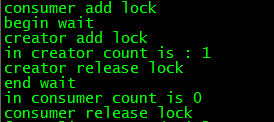
截取一部分结果截图,可以看出数字是连续变动的,而且
加锁解锁内数字才变动,说明我们对锁和条件变量使用合理
pthread_cond_wait学习笔记的更多相关文章
- js学习笔记:webpack基础入门(一)
之前听说过webpack,今天想正式的接触一下,先跟着webpack的官方用户指南走: 在这里有: 如何安装webpack 如何使用webpack 如何使用loader 如何使用webpack的开发者 ...
- PHP-自定义模板-学习笔记
1. 开始 这几天,看了李炎恢老师的<PHP第二季度视频>中的“章节7:创建TPL自定义模板”,做一个学习笔记,通过绘制架构图.UML类图和思维导图,来对加深理解. 2. 整体架构图 ...
- PHP-会员登录与注册例子解析-学习笔记
1.开始 最近开始学习李炎恢老师的<PHP第二季度视频>中的“章节5:使用OOP注册会员”,做一个学习笔记,通过绘制基本页面流程和UML类图,来对加深理解. 2.基本页面流程 3.通过UM ...
- 2014年暑假c#学习笔记目录
2014年暑假c#学习笔记 一.C#编程基础 1. c#编程基础之枚举 2. c#编程基础之函数可变参数 3. c#编程基础之字符串基础 4. c#编程基础之字符串函数 5.c#编程基础之ref.ou ...
- JAVA GUI编程学习笔记目录
2014年暑假JAVA GUI编程学习笔记目录 1.JAVA之GUI编程概述 2.JAVA之GUI编程布局 3.JAVA之GUI编程Frame窗口 4.JAVA之GUI编程事件监听机制 5.JAVA之 ...
- seaJs学习笔记2 – seaJs组建库的使用
原文地址:seaJs学习笔记2 – seaJs组建库的使用 我觉得学习新东西并不是会使用它就够了的,会使用仅仅代表你看懂了,理解了,二不代表你深入了,彻悟了它的精髓. 所以不断的学习将是源源不断. 最 ...
- CSS学习笔记
CSS学习笔记 2016年12月15日整理 CSS基础 Chapter1 在console输入escape("宋体") ENTER 就会出现unicode编码 显示"%u ...
- HTML学习笔记
HTML学习笔记 2016年12月15日整理 Chapter1 URL(scheme://host.domain:port/path/filename) scheme: 定义因特网服务的类型,常见的为 ...
- DirectX Graphics Infrastructure(DXGI):最佳范例 学习笔记
今天要学习的这篇文章写的算是比较早的了,大概在DX11时代就写好了,当时龙书11版看得很潦草,并没有注意这篇文章,现在看12,觉得是跳不过去的一篇文章,地址如下: https://msdn.micro ...
随机推荐
- ASP.NET Zero--后端应用程序
后端应用程序 这是用户名和密码输入的实际应用程序.您将主要在此应用程序上添加您的业务需求. 应用文件夹 后端应用程序默认内置在专用区域,名为“ App ”,但可以在创建解决方案时确定.因此,所有控制器 ...
- 多维数据库 Oracle Essbase 和 IBM Cogons 底层原理
多维数据库(Multi Dimensional Database,MDD)使用Dimension(维度)和Cube(数据立方体.数据集市)模型描述数据. 多维数据模型 关系型数据库(Relationa ...
- navicat 将自增长字段重置(重新从1开始)的方法
先说明,此语句会将你的表中数据全部删除. 很简单,运行如下sql语句: TRUNCATE TABLE 表名;
- 微信小程序自动化测试--接口测试
偷得一篇文章: postman测试微信小程序接口---postman https://www.sunzhongwei.com/using-the-postman-test-wechat-mini-ap ...
- Redis可视化工具 Redis Desktop Manager
1.前言 从接触Redis也有两年,平时就使用它来做缓存层,它给我的印象就是很强大,内置的数据结构很齐全,加上Redis5.0的到来,新增了很多特色功能.而Redis5.0最大的新特性就是多出了一个数 ...
- spark-2.4.0-hadoop2.7-高可用(HA)安装部署
1. 主机规划 主机名称 IP地址 操作系统 部署软件 运行进程 备注 mini01 172.16.1.11[内网] 10.0.0.11 [外网] CentOS 7.5 Jdk-8.zookeepe ...
- python import详解
1.import作用 引入模块 2.import的特点 一个程序中,import的模块不会重复被引用,如: # test1.py import test2 print test2.attr # tes ...
- koa 路由配置
Koa 路由 路由(Routing)是由一个 URI(或者叫路径)和一个特定的 HTTP 方法(GET.POST 等) 组成的,涉及到应用如何响应客户端对某个网站节点的访问. 通俗的讲:路由就是根据不 ...
- ServerSocketChannel、SocketChannel、Selector等概念04
java.nio包中的主要类ServerSocketChannel:ServerSocket的替代类,支持阻塞通信与非阻塞通信.SocketChannel:Socket的替代类,支持阻塞通信与非阻塞通 ...
- 【区块链】【一】Hash 算法【转】
问题导读1.哈希算法在区块链的作用是什么?2.什么是哈希算法?3.哈希算法是否可逆?4.比特币采用的是什么哈希算法? 作用在学习哈希算法前,我们需要知道哈希在区块链的作用哈希算法的作用如下:区块链通过 ...