
springcloud 新增微服务
个人记录
记录公司微服务项目,模块添加的步骤
一 创建Module
选择maven
groupid和artifactid 参考 pom文件
<project xmlns="http://maven.apache.org/POM/4.0.0"

         xmlns:xsi="http://www.w3.org/2001/XMLSchema-instance"

         xsi:schemaLocation="http://maven.apache.org/POM/4.0.0 http://maven.apache.org/xsd/maven-4.0.0.xsd">

    <parent>

        <!-- 父项目 -->

        <artifactId>kps.parent</artifactId>

        <!-- 父项目id -->

        <groupId>com.kps</groupId>

        <version>1.0</version>

    </parent>

    <modelVersion>4.0.0</modelVersion>

    <!-- 项目id -->

    <artifactId>kps.appAPIScan</artifactId>

    <!-- 项目名 -->

    <name>kps.appAPIScan</name>

    <url>http://maven.apache.org</url>

    <properties>

        <imageName>apiscan:${project.version}</imageName>

    </properties>

    <dependencies>

        <dependency>

            <groupId>com.kps</groupId>

            <artifactId>kps.web</artifactId>

        </dependency>

        <dependency>

            <groupId>org.springframework.cloud</groupId>

            <artifactId>spring-cloud-starter-eureka</artifactId>

        </dependency>

        <!--

        <dependency>

            <groupId>org.springframework.cloud</groupId>

            <artifactId>spring-cloud-netflix-eureka-client</artifactId>

        </dependency>

        -->

        <dependency>

            <groupId>org.springframework.cloud</groupId>

            <artifactId>spring-cloud-config-client</artifactId>

        </dependency>

        <dependency>

            <groupId>org.springframework.boot</groupId>

            <artifactId>spring-boot-starter-actuator</artifactId>

        </dependency>

    </dependencies>

    <!-- 打boot结构jar插件  -->

    <build>

        <plugins>

            <plugin>

                <groupId>org.springframework.boot</groupId>

                <artifactId>spring-boot-maven-plugin</artifactId>

            </plugin>

            <plugin>

                <groupId>com.spotify</groupId>

                <artifactId>docker-maven-plugin</artifactId>

                <configuration>

                    <imageName>${imageName}</imageName>

                </configuration>

            </plugin>

        </plugins>

    </build>

</project>
二 增加启动应用
这里注意,要和controller文件夹同级
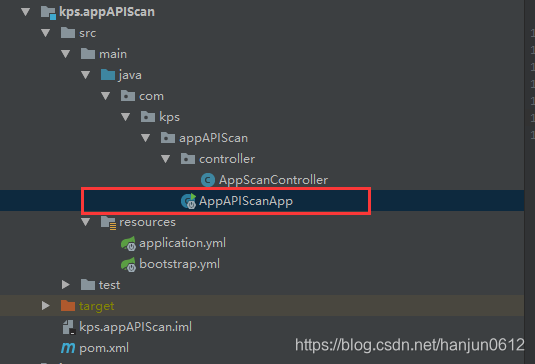
代码:
import org.springframework.boot.SpringApplication;

import org.springframework.boot.autoconfigure.SpringBootApplication;

import org.springframework.boot.web.servlet.ServletComponentScan;

import org.springframework.cloud.netflix.eureka.EnableEurekaClient;

import org.springframework.context.annotation.ComponentScan;

@EnableEurekaClient // 配置本应用将使用服务注册和服务发现

@SpringBootApplication

@ComponentScan(basePackages={"com.kps"},lazyInit=true)

@ServletComponentScan(basePackages={"com.kps"})

public class AppAPIScanApp {

    public static void main( String[] args )

    {

        SpringApplication.run(AppAPIScanApp.class, args);

    }

}
PS:如果SpringApplication报错:cannot access org.springframework.core.env
那么把Module重新导入一下就好了。

三 增加配置文件

application.yml
spring:

   application:

       name: kps.appAPIScan

server:

   port: 9100

#Security authentication is enabled by default above springboot 1.5.x

management:

   security:

      enabled: false

eureka:

    client:

        serviceUrl:

           defaultZone: ${registry.url}

    instance:

          lease-expiration-duration-in-seconds: 60

          lease-renewal-interval-in-seconds: 30

          preferIpAddress: true

          instanceId: ${spring.cloud.client.ipAddress}:${server.port}
bootstrap.yml
spring:

    http:

        encoding:

            charset: UTF-8

            enabled: true

            force: true

    cloud:

        config:

            uri: http://${host:localhost}:9089

            name: config

            profile: ${active:dev}
四 修改zuul网管配置
application.yml
spring:

   profiles:

      active: ${active:dev}

   application:

      name: springCloud.zuul

   thymeleaf:

           prefix: classpath:/templates/

           suffix: .html

           mode: LEGACYHTML5

           encoding: UTF-8

           content-type: text/html

           cache: false

server:

   port: 9090

#   context-path: /zuul

#Security authentication is enabled by default above springboot 1.5.x

management:

   security:

      enabled: false

eureka:

   client:

      serviceUrl:

            defaultZone: ${registry.url}

      registry-fetch-interval-seconds: 5 # 拉取服务注册信息间隔时间 (默认为30秒)

   instance:

          lease-expiration-duration-in-seconds: 60  # 注册中心超过这个时间没收到心跳,会视为无效节点(默认为90秒)

          lease-renewal-interval-in-seconds: 30  # 发送心跳间隔时间(默认30秒)

          preferIpAddress: true

          instanceId: ${spring.cloud.client.ipAddress}:${server.port}

zuul:

  add-host-header: true #webui重定向  请求头host显示为网关的(eg:localhost:9090)而非webui的

  ignoredServices: '*' #禁用服务名路游

  sensitive-headers:   #传递头信息

  retryable: true  #负载均衡时,路游的服务重启时,可通过重试到其他相同服务

#  host:

#     socket-timeout-millis: 60000

#     connect-timeout-millis: 60000

  routes:

      sys:

         path: /sys/**

         serviceId: kps.webAPISYS

      common:

         path: /common/**

         serviceId: kps.webAPICommon

      po:

         path: /po/**

         serviceId: kps.webAPIPO

      wms:

         path: /wms/**

         serviceId: kps.webAPIWMS

      eq:

         path: /eq/**

         serviceId: kps.webAPIEQ

      kps:

         path: /kps/**

         serviceId: kps.webUI

      helka:

         path: /helka/**

         serviceId: kps.helka

      abc:

         path: /abc/**

         serviceId: kps.abc

      app:

        path: /app/**

        serviceId: kps.appAPIScan
其实只增加了
    app:

        path: /app/**

        serviceId: kps.appAPIScan
五 看一下config中心
如果需要feign接口,那么就需要配置config,
(这里我没有配置,因为不需要)
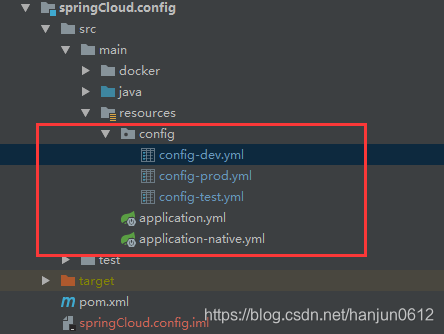
看一下 config-dev
 #registry url

registry:

   url: http://${host:localhost}:9088/eureka/

## DataSource

spring:

    datasource:

        url: ***

        username: ***

        password: ***

    jpa:

       generate-ddl: false

       hibernate:

          ddl-auto: none

       database: mysql

       show-sql: false

    resources:

       chain:

          strategy:

             content:

                enabled: true

                paths: /**

    redis:

       host: ***

       database: 1

       pool:

          max-active: 20

          min-idle: 1

          max-idle: 1

          max-wait: 1

#druid connect pool

db:

  druid:

     url: ${spring.datasource.url}

     username: ${spring.datasource.username}

     password: ${spring.datasource.password}

     filters: stat,wall

     max-active: 60

     initial-size: 10

     max-wait: 60000

     min-idle: 10

     time-between-eviction-runs-millis: 600000

     min-evictable-idle-time-millis: 300000

     test-while-idle: true

     test-on-borrow: false

     test-on-return: false

     pool-prepared-statements: false

     max-open-prepared-statements: 20

#file

file:

   accessPath: /file/**  #访问文件前缀

   uploadFolder: d://uploadFiles/  #上传文件存放路径

isDebug: false

#app scan

appSign: ***

feign:

    sysService: kps.webAPISYS

    poService: kps.webAPIPO

    wmsService: kps.webAPIWMS

    commonService: kps.webAPICommon

    eqService: kps.webAPIEQ

kintechWebAPIURL: http://localhost:9004/kps/api/
application.yml
spring:

   profiles:

      active: native

   application:

          name: springCloud.config

server:

    port: 9089

endpoints:

   health:

     enabled: true

#Security authentication is enabled by default above springboot 1.5.x

management:

    security:

       enabled: false

info:

  author: cjh

  fileName: config
springcloud 新增微服务的更多相关文章
- 用SpringCloud进行微服务架构演进
在<架构师必须要知道的阿里的中台战略与微服务> 中已经阐明选择SpringCloud进行微服务架构实现中台战略,因此下面介绍SpringCloud的一些内容,SpringCloud已经出来 ...
- 基于Spring-Cloud的微服务框架设计
基于Spring-Cloud的微服务框架设计 先进行大的整体的框架整理,然后在针对每一项进行具体的详细介绍
- SpringCloud学习--微服务架构
目录 微服务架构快速指南 SOA Dubbo Spring Cloud Dubbo与SpringCloud对比 微服务(Microservice)架构快速指南 什么是软件架构? 软件架构是一个包含各种 ...
- springCloud搭建微服务集群+Zuul服务器端负载均衡
概述 最近研究了一下springCloud的微服务集群,主要用到了SpringCloud的服务发现和服务器端负载均衡,所有的项目都是用的springboot,可以和springCloud无缝对接. 技 ...
- SpringCloud与微服务系列专栏
一. 前置知识 学习SpringCloud之前需要具备和掌握如下框架和工具的使用:SpringMVC,Spring,Spring Boot,Mybatis,Maven,Git. SpringCloud ...
- springCloud进阶(微服务架构&Eureka)
springCloud进阶(微服务架构&Eureka) 1. 微服务集群 1.1 为什么要集群 为了提供并发量,有时同一个服务提供者可以部署多个(商品服务).这个客户端在调用时要根据一定的负责 ...
- 一个C#开发者学习SpringCloud搭建微服务的心路历程
前言 Spring Cloud很火,很多文章都有介绍如何使用,但对于我这种初学者,我需要从创建项目开始学起,所以这些文章对于我的启蒙,帮助不大,所以只好自己写一篇文章,用于备忘. SpringClou ...
- SpringCloud与微服务Ⅴ --- Eureka服务注册与发现
一.Eureka是什么 Eureka是Netflix的一个子模块,也是核心模块之一.Eureka是一个基于REST的服务,用于定位服务,以实现云端中间层服务发现和故障转移.服务注册与发现对于微服务架构 ...
- SpringCloud与微服务Ⅶ --- Feign负载均衡
官方文档:https://projects.spring.io/spring-cloud/spring-cloud.html#spring-cloud-feign 一.Feign是什么 Feign是一 ...
随机推荐
- Python开发爬虫之静态网页抓取篇:爬取“豆瓣电影 Top 250”电影数据
所谓静态页面是指纯粹的HTML格式的页面,这样的页面在浏览器中展示的内容都在HTML源码中. 目标:爬取豆瓣电影TOP250的所有电影名称,网址为:https://movie.douban.com/t ...
- OpenCL的buffer以及sub-buffer
buffer,sub-buffer和image对比 相同点:都是OCL memory对象 维度 特性关键词 buffer 一维 array of bytes sub-buffer 一维 views i ...
- 浅析Springboot自动配置
首先我们先来看springboot的主程序类,主程序类中使用@SpringBootApplication注解来标记说明这是一个springboot应用,查看该注解源码如下图: 图中的@EnableAu ...
- Linux系统下virtuoso数据库安装与使用
最近在调研关联数据的一些东西,需要用到rdf数据库,所以接触了virtuoso数据库.安装的坑其实并不多,之前在windows 10上安过一次.这次在ubuntu 18.04上安装一下,其他的linu ...
- SQL语句更新时间字段的年份、月份、天数、时、分、秒
SQL语句更新时间字段的年份.月份.天数.时.分.秒 --修改d表日期字段的年份update dset birth=STUFF(convert(nvarchar(23),birth,120),1,4, ...
- c/c++ 网络编程 单纯http客户端,服务器端
网络编程 单纯http客户端,服务器端 1,http客户端 2,http服务器端 http客户端: #include <stdio.h> #include <sys/types.h& ...
- iOS 常用三方(持续更新)
iOS 常用三方 1.ZWMSegmentController 分页控制器 https://github.com/weiming4219/ZWMSegmentController
- AnyDesk远程连接及异常处理
远程协助工具,用得最普遍的非QQ莫属,毕竟用户量在这里摆着的.不过,用户体验效果还不太理想,你懂得.接下来分享两个工具,一个是TeamViewer,另一个是AnyDesk.你更倾向于哪一款呢? 一.T ...
- 在Visual Studio 2017上配置并使用OpenGL
在Visual Studio 2017上配置并使用OpenGL 作者:凯鲁嘎吉 - 博客园 http://www.cnblogs.com/kailugaji/ 首先在Windows下安装Visual ...
- elasticsearch系列一:elasticsearch(ES简介、安装&配置、集成Ikanalyzer)
一.ES简介 1. ES是什么? Elasticsearch 是一个开源的搜索引擎,建立在全文搜索引擎库 Apache Lucene 基础之上 用 Java 编写的,它的内部使用 Lucene 做索引 ...