
.Net Core使用视图组件(ViewComponent)封装表单文本框控件
实例程序的界面效果如下图所示:
在表单中的搜索条件有姓名,学号,成绩。他们在一行中按照水平三等分排列。

在cshtml中用html实现上述表单效果的的代码如下:
 <form class="form-horizontal" role="form">

     <div class="row">

         <div class="form-group col-md-4">

             <label for="name" class="col-md-2 control-label">姓名</label>

             <div class="col-md-10">

                 <input type="text" class="form-control" id="name" placeholder="请输姓名">

             </div>

         </div>

         <div class="form-group col-md-4">

             <label for="name" class="col-md-2 control-label">学号</label>

             <div class="col-md-10">

                 <input type="text" class="form-control" id="name" placeholder="请输学号">

             </div>

         </div>

         <div class="form-group col-md-4">

             <label for="name" class="col-md-2 control-label">成绩</label>

             <div class="col-md-10">

                 <input type="text" class="form-control" id="name" placeholder="请输成绩">

             </div>

         </div>

     </div>

     <button type="submit" class="btn btn-default">搜索</button>

 </form>
通过观察上述代码发现,搜索条件按照水平三等分排列会产生如下图红线标记的冗余代码:
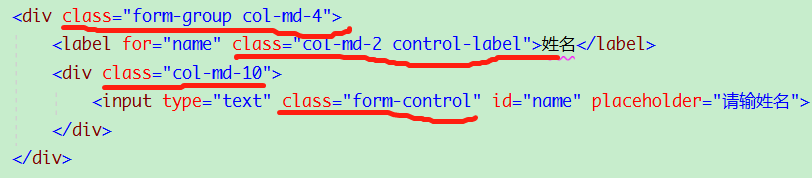
通过截图可以看出,是否可以把这个div块封装成一个控件,这样就不用重复写样式属性,在使用时就只给lable,input控件根据实际情况赋予其相应的属性。
在.Net Core中视图组件(ViewComponent)可以完成这一功能。视图组件类似于部分视图,但是它们更强大。视图组件不使用模型绑定,只依赖于调用时提供的数据。
微软的官方帮助文档地址为:https://docs.microsoft.com/en-us/aspnet/core/mvc/views/view-components?view=aspnetcore-2.2
创建视图组件(ViewComponent)
1.在解决方案根目录下创建ViewComponents文件夹,
在ViewComponents文件夹下在添加子文件夹InputLabelTextBox,
InputLabelTextBox文件夹下分别添加l类InputLabelTextBoxViewComponent.cs和InputLabelTextBoxViewModel.cs 结果如下图所示:
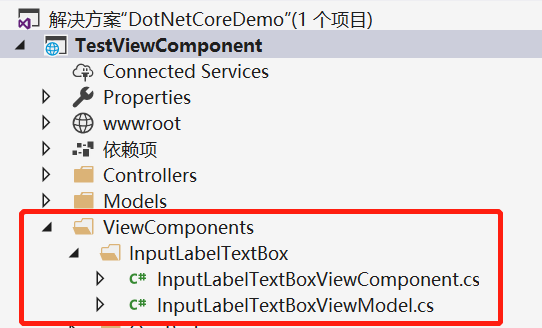
InputLabelTextBoxViewComponent.cs为视图组件类
     public class InputLabelTextBoxViewComponent : ViewComponent

     {

         public IViewComponentResult Invoke(string labelText, string inputId,

             string placehodler, string viewName)

         {

             //没有指定视图名称,默认使用Default.cshtml

             if (string.IsNullOrEmpty(viewName))

             {

                 viewName = "Default";

             }

             var fortmatDataViewModel = new InputLabelTextBoxViewModel(labelText, inputId, placehodler, viewName);

             return View(viewName, fortmatDataViewModel);

         }

     }
InputLabelTextBoxViewModel.cs为视图组件中所用到的属性类,
     public class InputLabelTextBoxViewModel

     {

         /// <summary>

         /// Label控件的文本

         /// </summary>

         public string LabelText { get; set; }

         /// <summary>

         /// Input控件的Id

         /// </summary>

         public string InputId { get; set; }

         /// <summary>

         /// Input控件的水印

         /// </summary>

         public string Placeholder { get; set; }

         /// <summary>

         /// 视图名称

         /// </summary>

         public string ViewName { get; set; }

         public InputLabelTextBoxViewModel(string labelText, string inputId, string placeholder, string viewName)

         {

             LabelText = string.IsNullOrEmpty(labelText) ? "" : labelText;

             InputId = string.IsNullOrEmpty(inputId) ? "" : inputId;

             Placeholder = string.IsNullOrEmpty(placeholder) ? "" : placeholder;

             ViewName = string.IsNullOrEmpty(viewName) ? "" : viewName;

         }

     }
2.在解决方案的Views文件夹下的Shared文件夹中添加Components子文件夹,
在Components文件夹下在添加其子文件夹InputLabelTextBox,
在文件夹中添加Default.cshtml视图,结果如下图所示:
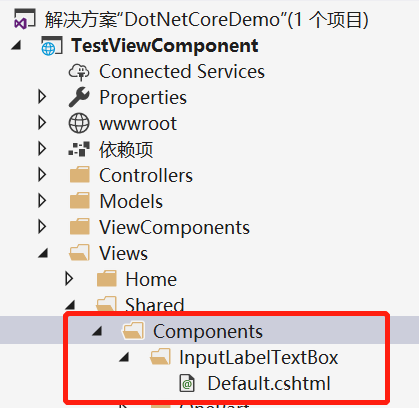
Default.cshtml就是InputLabelTextBoxViewComponent.cs在界面上默认对应的视图。
 @using TestViewComponent.ViewComponents

 @model InputLabelTextBoxViewModel

 <div class="form-group col-md-4">

     <label for="name" class="col-md-2 control-label">@Model.LabelText</label>

     <div class="col-md-10">

         <input type="text" class="form-control" id="@Model.InputId" placeholder="@Model.Placeholder">

     </div>

 </div>
在About.cshtml页面中引用控件。
 @{

     ViewData["Title"] = "About";

 }

 <!--引入命名空间-->

 @using TestViewComponent.ViewComponents

 <h2>分布视图实例:</h2>

 <form class="form-horizontal" role="form">

     <div class="row">

         <!--使用类型创建-->

         @await Component.InvokeAsync(typeof(InputLabelTextBoxViewComponent), new {

            LabelText = "姓名",

            InputId = "InputName",

            Placeholder = "请输入姓名...",

        })

         <!--InputLabelTextBox为InputLabelTextBoxViewComponent.cs去掉ViewComponent后的名字-->

         @await Component.InvokeAsync("InputLabelTextBox", new

        {

            LabelText = "姓名1",

            InputId = "InputName1",

            Placeholder = "请输入姓名...",

        })

     </div>

 </form>
运行后的效果如图所示:
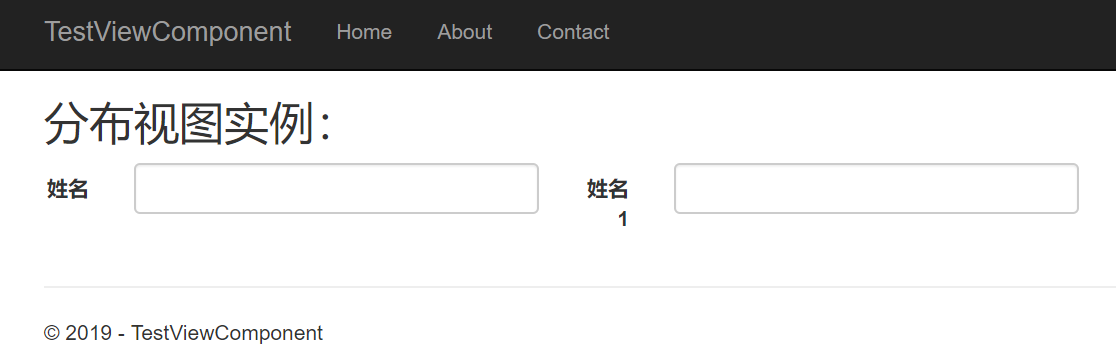
微软官方文档提供了调用视图组建两个方法,已经在上述代码中加以注释说明。

3.InputLabelTextBoxViewComponent对应多个cshtml页面
在上述例子中,InputLabelTextBoxViewComponent默认对应于Default.cshtml,现在又想创建第二个视图对应于InputLabelTextBoxViewComponent该怎么处理?
首先在InputLabelTextBox文件夹下创建DefaultOne.cshtml页面。
然后在调用视图组建时,把InputLabelTextBoxViewModel的ViewName属性的值赋成DefaultOne,这样在页面用引用的控件就对应于DefaultOne.cshtml。
源代码下载地址 : https://files-cdn.cnblogs.com/files/fengye310/DotNetCoreDemo.zip
.Net Core使用视图组件(ViewComponent)封装表单文本框控件的更多相关文章
- SNF快速开发平台MVC-各种级联绑定方式,演示样例程序(包含表单和表格控件)
做了这么多项目,经常会使用到级联.联动的情况. 如:省.市.县.区.一级分类.二级分类.三级分类.仓库.货位. 方式:有表单需要做级联的,还是表格行上需要做级联操作的. 实现:实现方法也有很多种方式. ...
- 深入浅出ExtJS 第四章 表单与输入控件
4.1 制作表单 var form = new Ext.form.FormPanel({ title:'form', defaultType:'textfield', buttonAlign:'cen ...
- 『Asp.Net 组件』第一个 Asp.Net 服务器组件:自己的文本框控件
代码: using System.Web; using System.Web.UI; using System.Web.UI.WebControls; namespace DemoWebControl ...
- [转]html5表单上传控件Files API
表单上传控件:<input type="file" />(IE9及以下不支持下面这些功能,其它浏览器最新版本均已支持.) 1.允许上传文件数量 允许选择多个文件:< ...
- 响应式的账号登录界面模板完整代码,内置form表单和js控件
响应式的账号登录界面模板,内置form表单和js控件 <!DOCTYPE html> <html lang="en"><head><met ...
- 表单元素(控件)不可见,你用visibility还是display?(转)
属性大比拼:visibility和display的介绍 今天在做一个表单时涉及到这方面,当选中相应的选项后设置相应的几个元素(控件可见或不可见),后来还是用了visibility来实现.我们先来看下v ...
- ASP.NET CORE 自定义视图组件(ViewComponent)注意事项
*红色字体为固定命名,蓝色为一般命名规则,黄色为ASP.NET CORE 默认查找文件名 概要:1.简单ViewComponent的用法 2.ViewComponent控制器返回值 3.注意事项 1 ...
- [Swift通天遁地]二、表格表单-(15)自定义表单文本框内容的格式
★★★★★★★★★★★★★★★★★★★★★★★★★★★★★★★★★★★★★★★★➤微信公众号:山青咏芝(shanqingyongzhi)➤博客园地址:山青咏芝(https://www.cnblogs. ...
- 微信小程序实战:表单与选择控件的结合
先上代码. login.wxml <mp-toptips msg="{{error}}" type="error" show="{{error} ...
随机推荐
- Fiddler抓包【2】_捕获设置
1.Fiddler抓web网站请求 手动设置方法一:Tools--->WinINET Options--->连接--->局域网设置--->代理服务器勾选后“高级”---> ...
- Git 教程(二):提交和回退
我们已经成功地添加并提交了一个readme.txt文件,现在,是时候继续工作了,于是,我们继续修改readme.txt文件,改成如下内容: Git is a distributed version c ...
- redis知识点汇总
1. redis是什么 2. 为什么用redis 3. redis 数据结构 4. redis中的对象类型 5. redis都能做什么?怎么实现的的? 6. redis使用过程中需要注意什么 7. 数 ...
- IP通信基础学习第三周(下)
TTL的最值是255. 数据部分不参与检验和的计算. 接收端的结果若为0,则保留:否则,会丢弃该数据报. IP数据报选项字段是可选的,主要用于网络测试和调试. IP辅助协议ICMP的消息类型有错误消息 ...
- 数据库session立即生效(64---8192) SCOPE参数
SCOPE=MEMORY|SPFILE|BOTH 指示了修改参数时的“作用域”: SCOPE=MEMORY :只在实例中修改,重启数据库后此次修改失效. SCOPE=SPFILE :只修改SPFILE ...
- Jmeter上传附件EXCEL
1.通过对上传附件接口进行抓包,获取的信息如下: 2.在jmeter脚本中添加http请求,并添加http请求头信息如下: 3.在http请求中添加上传附件的内容如下,由于我上传的是excel,所以M ...
- scrapy的splash 的简单使用
安装Splash(拉取镜像下来)docker pull scrapinghub/splash安装scrapy-splashpip install scrapy-splash启动容器docker run ...
- 【js】了解前端缓存,收获不止于此!
了解前端缓存,收获不止于此! 这次我们来讲一下关于前端缓存的问题.感谢赵欢同学提供doc素材. 首先,开局我画了一张图,你会对文章有一个大局了解. 今天讲的是前端缓存. 前端缓存有3大种:如图,分为H ...
- bash 和sed 和gawk
bash内建命令 命令描述 : 扩展参数列表,执行重定向操作 . 读取并执行指定文件中的命令(在当前shell环境中) alias 为指定命令定义一个别名 bg 将作业以后台模式运行 bind 将键盘 ...
- PreparedStatement传进null值报错
最近在测试jdbc数据导入大量数据的性能,发现PreparedStatement传进null值会报错. 解决方法: setObject(int parameterIndex, Object x, in ...