
angular6、7 兼容ie9、10、11
1. 找到
polyfill.ts 并打开注释
/**

 * This file includes polyfills needed by Angular and is loaded before the app.

 * You can add your own extra polyfills to this file.

 *

 * This file is divided into 2 sections:

 *   1. Browser polyfills. These are applied before loading ZoneJS and are sorted by browsers.

 *   2. Application imports. Files imported after ZoneJS that should be loaded before your main

 *      file.

 *

 * The current setup is for so-called "evergreen" browsers; the last versions of browsers that

 * automatically update themselves. This includes Safari >= 10, Chrome >= 55 (including Opera),

 * Edge >= 13 on the desktop, and iOS 10 and Chrome on mobile.

 *

 * Learn more in https://angular.io/docs/ts/latest/guide/browser-support.html

 */

/***************************************************************************************************

 * BROWSER POLYFILLS

 */

// 兼容ie10

(function() {

  Object.setPrototypeOf = Object.setPrototypeOf || ({__proto__: []} instanceof Array ? setProtoOf : mixinProperties);

  function setProtoOf(obj, proto) {

    obj.__proto__ = proto;

    return obj;

  }

  function mixinProperties(obj, proto) {

    for (const prop in proto) {

      if (!obj.hasOwnProperty(prop)) {

        obj[prop] = proto[prop];

      }

    }

    return obj;

  }

})();

/** IE9, IE10 and IE11 requires all of the following polyfills. **/
// 打开这里的注释

import 'core-js/es6/symbol';

import 'core-js/es6/object';

import 'core-js/es6/function';

import 'core-js/es6/parse-int';

import 'core-js/es6/parse-float';

import 'core-js/es6/number';

import 'core-js/es6/math';

import 'core-js/es6/string';

import 'core-js/es6/date';

import 'core-js/es6/array';

import 'core-js/es6/regexp';

import 'core-js/es6/map';

import 'core-js/es6/weak-map';

import 'core-js/es6/set';

/** IE10 and IE11 requires the following for NgClass support on SVG elements */

// import 'classlist.js';  // Run `npm install --save classlist.js`.

/** IE10 and IE11 requires the following for the Reflect API. */

// import 'core-js/es6/reflect';

/** Evergreen browsers require these. **/

// Used for reflect-metadata in JIT. If you use AOT (and only Angular decorators), you can remove.

import 'core-js/es7/reflect';

/**

 * Web Animations `@angular/platform-browser/animations`

 * Only required if AnimationBuilder is used within the application and using IE/Edge or Safari.

 * Standard animation support in Angular DOES NOT require any polyfills (as of Angular 6.0).

 **/

// import 'web-animations-js';  // Run `npm install --save web-animations-js`.

/**

 * By default, zone.js will patch all possible macroTask and DomEvents

 * user can disable parts of macroTask/DomEvents patch by setting following flags

 */

 // (window as any).__Zone_disable_requestAnimationFrame = true; // disable patch requestAnimationFrame

 // (window as any).__Zone_disable_on_property = true; // disable patch onProperty such as onclick

 // (window as any).__zone_symbol__BLACK_LISTED_EVENTS = ['scroll', 'mousemove']; // disable patch specified eventNames

 /*

 * in IE/Edge developer tools, the addEventListener will also be wrapped by zone.js

 * with the following flag, it will bypass `zone.js` patch for IE/Edge

 */

// (window as any).__Zone_enable_cross_context_check = true;

/***************************************************************************************************

 * Zone JS is required by default for Angular itself.

 */

import 'zone.js/dist/zone';  // Included with Angular CLI.

import 'babel-polyfill';

/***************************************************************************************************

 * APPLICATION IMPORTS

 */
1.如果IE10报错
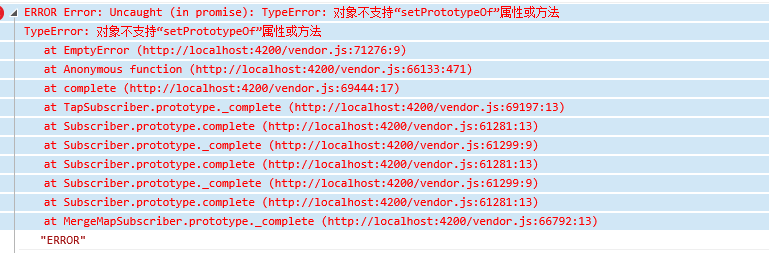
ERROR Error: Uncaught (in promise): TypeError: 对象不支持“setPrototypeOf”属性或方法

TypeError: 对象不支持“setPrototypeOf”属性或方法

   at EmptyError (http://localhost:4200/vendor.js:71276:9)

   at Anonymous function (http://localhost:4200/vendor.js:66133:471)

   at complete (http://localhost:4200/vendor.js:69444:17)

   at TapSubscriber.prototype._complete (http://localhost:4200/vendor.js:69197:13)

   at Subscriber.prototype.complete (http://localhost:4200/vendor.js:61281:13)

   at Subscriber.prototype._complete (http://localhost:4200/vendor.js:61299:9)

   at Subscriber.prototype.complete (http://localhost:4200/vendor.js:61281:13)

   at Subscriber.prototype._complete (http://localhost:4200/vendor.js:61299:9)

   at Subscriber.prototype.complete (http://localhost:4200/vendor.js:61281:13)

   at MergeMapSubscriber.prototype._complete (http://localhost:4200/vendor.js:66792:13)

   at resolvePromise (http://localhost:4200/polyfills.js:12176:25)

   at resolvePromise (http://localhost:4200/polyfills.js:12133:17)

   at Anonymous function (http:/",

      Symbol(rxSubscriber)_m.kuj7accbtog: undefined,

      task: { },

      zone: { }

   }
则引入一下代码到 polyfills.ts 顶部
(function() {

  Object.setPrototypeOf = Object.setPrototypeOf || ({__proto__: []} instanceof Array ? setProtoOf : mixinProperties);

  function setProtoOf(obj, proto) {

    obj.__proto__ = proto;

    return obj;

  }

  function mixinProperties(obj, proto) {

    for (const prop in proto) {

      if (!obj.hasOwnProperty(prop)) {

        obj[prop] = proto[prop];

      }

    }

    return obj;

  }

})();
如果ie9报错
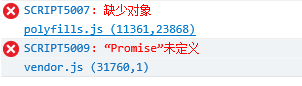
SCRIPT5007: 缺少对象

polyfills.js (11361,23868)

SCRIPT5009: “Promise”未定义

vendor.js (31760,1)
则注销掉 此段 代码
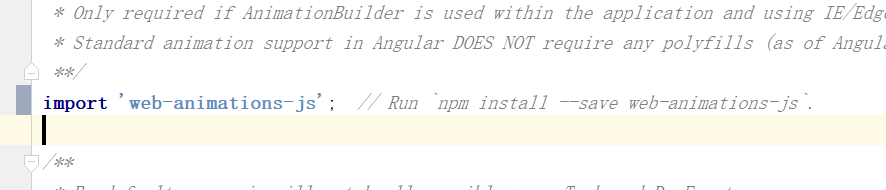
// import 'web-animations-js'; // Run `npm install --save web-animations-js`.
最后在index.html中添加 如下两个插件
<script src="https://cdn.bootcss.com/es5-shim/4.5.12/es5-sham.min.js"></script>
<script src="https://cdn.bootcss.com/classlist/2014.01.31/classList.min.js"></script>
ps:
如果项目中有上传文件 浏览文件的操作,需要对ie进行单独兼容 ie 不支持File对象
并且ie9 不支持FormData 对象
angular6、7 兼容ie9、10、11的更多相关文章
- firefox chrome ie9,10,11 不支持selectSingleNode和selectNodes的解决方法
firefox并不支持selectSingleNode和selectNodes的解决方法 function test(){ var perid = document.thisForm.PerID.va ...
- Qt 5.11的QChar、QString、QTextBoundaryFinder和双向文本算法现在完全兼容Unicode 10
本文翻译自:Qt 5.11 released 原文作者: Qt公司CTO兼Qt开源项目维护官Lars Knoll翻译校审:Richard.Hongfei.Haipeng 5月22日,我们提发布了Qt ...
- ES6兼容ie9, flex兼容ie9
vue兼容ES6 在 ie9 的环境上,es6 的部分新对象.表达式,并不支持,解决方案是使用 babel-polyfill 组件,它可以将 es6 的代码翻译成低版本浏览器可以识别的 es5 代码 ...
- 兼容iOS 10 资料整理笔记
原文链接:http://www.jianshu.com/p/0cc7aad638d9 1.Notification(通知) 自从Notification被引入之后,苹果就不断的更新优化,但这些更新优化 ...
- mac 10.11.6,Xcode8下,ruby2.3安装,Cocoapods安装~
适用环境 mac: 10.11.6 Xcode:8.1 命令执行步骤(安装ruby2.3前准备工作) 查看ruby更新源 gem sources -L 删除默认官方或者淘宝,新增 https://g ...
- iOS开发 - 兼容iOS 10
1.Notification(通知) 自从Notification被引入之后,苹果就不断的更新优化,但这些更新优化只是小打小闹,直至现在iOS 10开始真正的进行大改重构,这让开发者也体会到UserN ...
- 【转】兼容iOS 10 资料整理
1.Notification(通知) 自从Notification被引入之后,苹果就不断的更新优化,但这些更新优化只是小打小闹,直至现在iOS 10开始真正的进行大改重构,这让开发者也体会到UserN ...
- 兼容iOS 10 资料整理
1.Notification(通知) 自从Notification被引入之后,苹果就不断的更新优化,但这些更新优化只是小打小闹,直至现在iOS 10开始真正的进行大改重构,这让开发者也体会到UserN ...
- 兼容iOS 10 资料整理笔记-b
原文链接:http://www.jianshu.com/p/0cc7aad638d9 1.Notification(通知) 自从Notification被引入之后,苹果就不断的更新优化,但这些更新优化 ...
- Setup Tensorflow with GPU on Mac OSX 10.11
Setup Tensorflow with GPU on OSX 10.11 环境描述 电脑:MacBook Pro 15.6 CPU: 2.7GHz 显卡: GT 650m 系统:OSX 10.11 ...
随机推荐
- Golang 介绍与安装
1.介绍与安装 Golang 是什么 Go 亦称为 Golang(按照 Rob Pike 说法,语言叫做 Go,Golang 只是官方网站的网址),是由谷歌开发的一个开源的编译型的静态语言. Gola ...
- commons-httpclient 实现get和post请求
引入的jar包为: <!-- https://mvnrepository.com/artifact/commons-httpclient/commons-httpclient --> &l ...
- 「洛谷4197」「BZOJ3545」peak【线段树合并】
题目链接 [洛谷] [BZOJ]没有权限号嘤嘤嘤.题号:3545 题解 窝不会克鲁斯卡尔重构树怎么办??? 可以离线乱搞. 我们将所有的操作全都存下来. 为了解决小于等于\(x\)的操作,那么我们按照 ...
- Codeforces 1108F MST Unification(最小生成树性质)
题目链接:MST Unification 题意:给定一张连通的无向带权图.存在给边权加一的操作,求最少操作数,使得最小生成树唯一. 题解:最小生成树在算法导论中有这个性质: 把一个连通无向图的生成树边 ...
- content-type 组件
content-type初识 什么是content-type ContentType是Django的内置的一个应用,可以追踪项目中所有的APP和model的对应关系,并记录在ContentType表中 ...
- 清理Windows Serer Backup备份数据生成的卷影副本(DiskShadow命令)
DiskShadow基本命令: 1.进入DiskShadow命令行: C:\>diskshadow 2.列出所有的卷影副本: DISKSHADOW> list shadows all 3. ...
- ASP.NET and ADO.NET
1.ASP.NET ASP.NET是一个使用HTML.Css.JacaScript 和服务器脚本创建网页和网站的开发框架 ASP.NET支持 WebPages.MVC.WebForms三种开发模式 ...
- selenium自动化测试python
一.环境部署 1.selenium安装 pip3 install selenium 1.安装浏览器驱动 WebDriver 需要通过浏览器驱动来与浏览器交互,以下列出几种常用的浏览器驱动下载地址: C ...
- Hexo next主题下添加天气插件
最近在优化hexo 新搭建的博客,想给博客添加一个天气插件,奈何找了很久也没发现,好不容易发现一个天气插件 心知天气:https://www.seniverse.com/widget/get 运气不好 ...
- LDM与STM指令详解
title: LDM与STM指令详解 date: 2019/2/26 17:58:00 toc: true --- LDM与STM指令详解 指令形式如下,这里的存储方向是针对寄存器的 Load Mul ...