
angular6、7 兼容ie9、10、11
1. 找到
polyfill.ts 并打开注释
/**

 * This file includes polyfills needed by Angular and is loaded before the app.

 * You can add your own extra polyfills to this file.

 *

 * This file is divided into 2 sections:

 *   1. Browser polyfills. These are applied before loading ZoneJS and are sorted by browsers.

 *   2. Application imports. Files imported after ZoneJS that should be loaded before your main

 *      file.

 *

 * The current setup is for so-called "evergreen" browsers; the last versions of browsers that

 * automatically update themselves. This includes Safari >= 10, Chrome >= 55 (including Opera),

 * Edge >= 13 on the desktop, and iOS 10 and Chrome on mobile.

 *

 * Learn more in https://angular.io/docs/ts/latest/guide/browser-support.html

 */

/***************************************************************************************************

 * BROWSER POLYFILLS

 */

// 兼容ie10

(function() {

  Object.setPrototypeOf = Object.setPrototypeOf || ({__proto__: []} instanceof Array ? setProtoOf : mixinProperties);

  function setProtoOf(obj, proto) {

    obj.__proto__ = proto;

    return obj;

  }

  function mixinProperties(obj, proto) {

    for (const prop in proto) {

      if (!obj.hasOwnProperty(prop)) {

        obj[prop] = proto[prop];

      }

    }

    return obj;

  }

})();

/** IE9, IE10 and IE11 requires all of the following polyfills. **/
// 打开这里的注释

import 'core-js/es6/symbol';

import 'core-js/es6/object';

import 'core-js/es6/function';

import 'core-js/es6/parse-int';

import 'core-js/es6/parse-float';

import 'core-js/es6/number';

import 'core-js/es6/math';

import 'core-js/es6/string';

import 'core-js/es6/date';

import 'core-js/es6/array';

import 'core-js/es6/regexp';

import 'core-js/es6/map';

import 'core-js/es6/weak-map';

import 'core-js/es6/set';

/** IE10 and IE11 requires the following for NgClass support on SVG elements */

// import 'classlist.js';  // Run `npm install --save classlist.js`.

/** IE10 and IE11 requires the following for the Reflect API. */

// import 'core-js/es6/reflect';

/** Evergreen browsers require these. **/

// Used for reflect-metadata in JIT. If you use AOT (and only Angular decorators), you can remove.

import 'core-js/es7/reflect';

/**

 * Web Animations `@angular/platform-browser/animations`

 * Only required if AnimationBuilder is used within the application and using IE/Edge or Safari.

 * Standard animation support in Angular DOES NOT require any polyfills (as of Angular 6.0).

 **/

// import 'web-animations-js';  // Run `npm install --save web-animations-js`.

/**

 * By default, zone.js will patch all possible macroTask and DomEvents

 * user can disable parts of macroTask/DomEvents patch by setting following flags

 */

 // (window as any).__Zone_disable_requestAnimationFrame = true; // disable patch requestAnimationFrame

 // (window as any).__Zone_disable_on_property = true; // disable patch onProperty such as onclick

 // (window as any).__zone_symbol__BLACK_LISTED_EVENTS = ['scroll', 'mousemove']; // disable patch specified eventNames

 /*

 * in IE/Edge developer tools, the addEventListener will also be wrapped by zone.js

 * with the following flag, it will bypass `zone.js` patch for IE/Edge

 */

// (window as any).__Zone_enable_cross_context_check = true;

/***************************************************************************************************

 * Zone JS is required by default for Angular itself.

 */

import 'zone.js/dist/zone';  // Included with Angular CLI.

import 'babel-polyfill';

/***************************************************************************************************

 * APPLICATION IMPORTS

 */
1.如果IE10报错
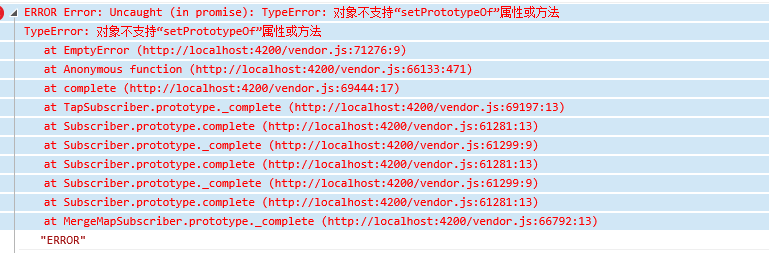
ERROR Error: Uncaught (in promise): TypeError: 对象不支持“setPrototypeOf”属性或方法

TypeError: 对象不支持“setPrototypeOf”属性或方法

   at EmptyError (http://localhost:4200/vendor.js:71276:9)

   at Anonymous function (http://localhost:4200/vendor.js:66133:471)

   at complete (http://localhost:4200/vendor.js:69444:17)

   at TapSubscriber.prototype._complete (http://localhost:4200/vendor.js:69197:13)

   at Subscriber.prototype.complete (http://localhost:4200/vendor.js:61281:13)

   at Subscriber.prototype._complete (http://localhost:4200/vendor.js:61299:9)

   at Subscriber.prototype.complete (http://localhost:4200/vendor.js:61281:13)

   at Subscriber.prototype._complete (http://localhost:4200/vendor.js:61299:9)

   at Subscriber.prototype.complete (http://localhost:4200/vendor.js:61281:13)

   at MergeMapSubscriber.prototype._complete (http://localhost:4200/vendor.js:66792:13)

   at resolvePromise (http://localhost:4200/polyfills.js:12176:25)

   at resolvePromise (http://localhost:4200/polyfills.js:12133:17)

   at Anonymous function (http:/",

      Symbol(rxSubscriber)_m.kuj7accbtog: undefined,

      task: { },

      zone: { }

   }
则引入一下代码到 polyfills.ts 顶部
(function() {

  Object.setPrototypeOf = Object.setPrototypeOf || ({__proto__: []} instanceof Array ? setProtoOf : mixinProperties);

  function setProtoOf(obj, proto) {

    obj.__proto__ = proto;

    return obj;

  }

  function mixinProperties(obj, proto) {

    for (const prop in proto) {

      if (!obj.hasOwnProperty(prop)) {

        obj[prop] = proto[prop];

      }

    }

    return obj;

  }

})();
如果ie9报错
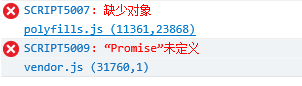
SCRIPT5007: 缺少对象

polyfills.js (11361,23868)

SCRIPT5009: “Promise”未定义

vendor.js (31760,1)
则注销掉 此段 代码
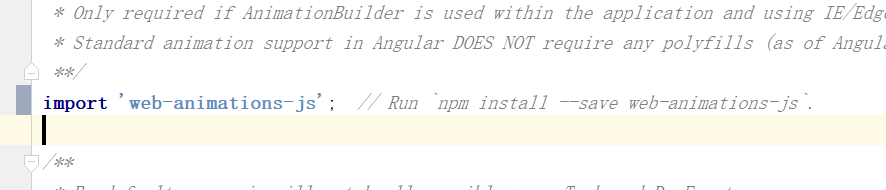
// import 'web-animations-js'; // Run `npm install --save web-animations-js`.
最后在index.html中添加 如下两个插件
<script src="https://cdn.bootcss.com/es5-shim/4.5.12/es5-sham.min.js"></script>
<script src="https://cdn.bootcss.com/classlist/2014.01.31/classList.min.js"></script>
ps:
如果项目中有上传文件 浏览文件的操作,需要对ie进行单独兼容 ie 不支持File对象
并且ie9 不支持FormData 对象
angular6、7 兼容ie9、10、11的更多相关文章
- firefox chrome ie9,10,11 不支持selectSingleNode和selectNodes的解决方法
firefox并不支持selectSingleNode和selectNodes的解决方法 function test(){ var perid = document.thisForm.PerID.va ...
- Qt 5.11的QChar、QString、QTextBoundaryFinder和双向文本算法现在完全兼容Unicode 10
本文翻译自:Qt 5.11 released 原文作者: Qt公司CTO兼Qt开源项目维护官Lars Knoll翻译校审:Richard.Hongfei.Haipeng 5月22日,我们提发布了Qt ...
- ES6兼容ie9, flex兼容ie9
vue兼容ES6 在 ie9 的环境上,es6 的部分新对象.表达式,并不支持,解决方案是使用 babel-polyfill 组件,它可以将 es6 的代码翻译成低版本浏览器可以识别的 es5 代码 ...
- 兼容iOS 10 资料整理笔记
原文链接:http://www.jianshu.com/p/0cc7aad638d9 1.Notification(通知) 自从Notification被引入之后,苹果就不断的更新优化,但这些更新优化 ...
- mac 10.11.6,Xcode8下,ruby2.3安装,Cocoapods安装~
适用环境 mac: 10.11.6 Xcode:8.1 命令执行步骤(安装ruby2.3前准备工作) 查看ruby更新源 gem sources -L 删除默认官方或者淘宝,新增 https://g ...
- iOS开发 - 兼容iOS 10
1.Notification(通知) 自从Notification被引入之后,苹果就不断的更新优化,但这些更新优化只是小打小闹,直至现在iOS 10开始真正的进行大改重构,这让开发者也体会到UserN ...
- 【转】兼容iOS 10 资料整理
1.Notification(通知) 自从Notification被引入之后,苹果就不断的更新优化,但这些更新优化只是小打小闹,直至现在iOS 10开始真正的进行大改重构,这让开发者也体会到UserN ...
- 兼容iOS 10 资料整理
1.Notification(通知) 自从Notification被引入之后,苹果就不断的更新优化,但这些更新优化只是小打小闹,直至现在iOS 10开始真正的进行大改重构,这让开发者也体会到UserN ...
- 兼容iOS 10 资料整理笔记-b
原文链接:http://www.jianshu.com/p/0cc7aad638d9 1.Notification(通知) 自从Notification被引入之后,苹果就不断的更新优化,但这些更新优化 ...
- Setup Tensorflow with GPU on Mac OSX 10.11
Setup Tensorflow with GPU on OSX 10.11 环境描述 电脑:MacBook Pro 15.6 CPU: 2.7GHz 显卡: GT 650m 系统:OSX 10.11 ...
随机推荐
- Django异步任务之Celery
Celery celery 是一个用于实现异步任务的库, 在很多项目中都使用它, 它和 django 融合使用很完美. 使用 celery 可以在实现 http request请求返回 view 前做 ...
- 制作OSGB数据索引
[干货]教你用.S3C文件制作OSGB数据索引 [干货]教你用.S3C文件制作OSGB数据索引_搜狐汽车_搜狐网 S3C是ContextCapture(原Smart 3D)的一种数据格式,.S3C格式 ...
- Nginx从入门到实践(三)
动静分离 动静分离是将网站静态资源(JavaScript,CSS,img等文件)与后台应用分开部署,提高用户访问静态代码的速度,降低对后台应用访问. 动静分离的一种做法是将静态资源部署在nginx上, ...
- Shell 简单构建 Node web服务器
.git bash 执行代码生成: ./makeJs.sh 生成文件如下: 访问:http://127.0.0.1:3030/index.html makeJs.sh 代码如下: #create m ...
- v-for 循环element-ui菜单
vue 使用了element-ui的菜单组件, 这个组件的el-menu-item项上,有一个属性index,值是字符串类型, 在使用v-for的index时,它是一个数值型,所以如果直接写index ...
- MongoDB配置简明文档
1.下载MongoDB程序包(RHEL 7 Linux 64-bit x64) [root@mongodb /]# wget -P/usr/local/src/ https://fastdl.mong ...
- TensorFlow 辨异 —— tf.placeholder 与 tf.Variable
https://blog.csdn.net/lanchunhui/article/details/61712830 https://www.cnblogs.com/silence-tommy/p/70 ...
- Servlet生命周期 和 继承关系
三 servlet的生命周期 (一个servlet类的对象 创建---->销毁) 第一次访问 某个servlet的时候 首先调用其 构造函数 public StudentServlet(){ S ...
- Springboot集成ECharts
ECharts 是中国的,也是世界的! ECharts官网: ECharts,一个使用 JavaScript 实现的开源可视化库,可以流畅的运行在 PC 和移动设备上,兼容当前 绝大部分浏览器(IE8 ...
- [面试]StringBuilder StringBuffer源码粘贴(并非源码分析, 请绕道)
StringBuilder StringBuffer 源码 这里只是我个人笔记, 并没有在这篇文章里做任何技术分享, 请同学们绕道- -.如果需要我会后期补上的..... 本来是想分析源码来着, 但是 ...