
饮冰三年-人工智能-Python-20 Python线程、进程、线程
进程:最小的数据单元
线程:最小的执行单元
一:
1:线程1
import threading #线程

import time

def Music():

    print("Listen Music Begin %s" %time.ctime())

    time.sleep()

    print("Listen Music End %s" %time.ctime())

def Game():

    print("Play Game Begin %s" %time.ctime())

    time.sleep()

    print("Play Game End %s" %time.ctime())

if __name__ == '__main__':

    t1 = threading.Thread(target=Music)

    t1.start()

    t2 = threading.Thread(target=Game)

    t2.start()

    print("ending......")
实例1
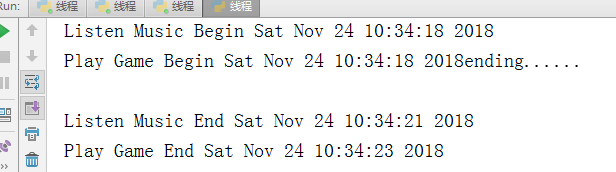
import threading #线程

import time

def Music():

    print("Listen Music Begin %s" %time.ctime())

    time.sleep(3)

    print("Listen Music End %s" %time.ctime())

def Game():

    print("Play Game Begin %s" %time.ctime())

    time.sleep(5)

    print("Play Game End %s" %time.ctime())

if __name__ == '__main__':

    t1 = threading.Thread(target=Music)

    t1.start()

    t2 = threading.Thread(target=Game)

    t2.start()

    t1.join()

    t2.join()

    print("ending......")
线程join
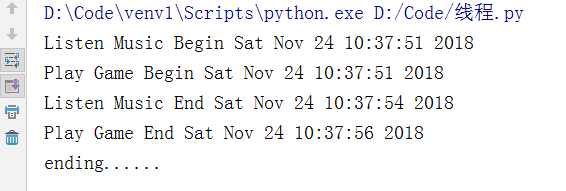
import threading #线程

import time

def Music(musicName):

    print("Listen Music【%s】 Begin %s" %(musicName,time.ctime()))

    time.sleep(3)

    print("Listen Music【%s】 End %s" %(musicName,time.ctime()))

def Game(playName):

    print("Play Game【%s】 Begin %s" %(playName,time.ctime()))

    time.sleep(5)

    print("Play Game【%s】 End %s" %(playName,time.ctime()))

if __name__ == '__main__':

    t1 = threading.Thread(target=Music,args=("My Heart Will Go On",))

    t2 = threading.Thread(target=Game,args=("植物大战僵尸",))

    threads=[]

    threads.append(t1)

    threads.append(t2)

    for t in threads:

        t.start();

    print("ending......")
线程参数
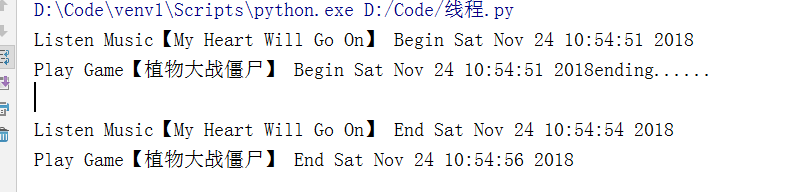
import threading #线程

import time

def Music(musicName):

    print("Listen Music【%s】 Begin %s" %(musicName,time.ctime()))

    time.sleep(3)

    print("Listen Music【%s】 End %s" %(musicName,time.ctime()))

def Game(playName):

    print("Play Game【%s】 Begin %s" %(playName,time.ctime()))

    time.sleep(5)

    print("Play Game【%s】 End %s" %(playName,time.ctime()))

t1 = threading.Thread(target=Music,args=("My Heart Will Go On",))

t2 = threading.Thread(target=Game,args=("植物大战僵尸",))

threads=[]

threads.append(t1)

threads.append(t2)

if __name__ == '__main__':

    t2.setDaemon(True)

    for t in threads:

        t.start();

    print("ending......")
守护线程
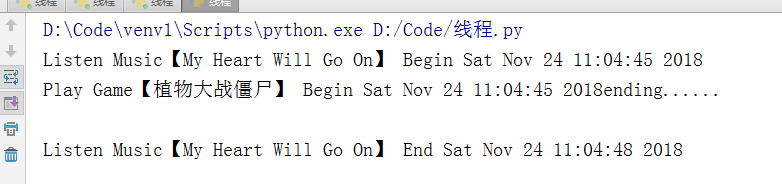
# 多线程为什么要使用锁?

# 多线程共用一个数据集,不使用可能会造成数据不准确

#1:引入多线程模块

import threading

import time

# 2:定义一个变量(数据集)

num=100

# 3:定义一个方法,操作全局变量

def sub():

    global num

    temp = num

    time.sleep(0.001)

    num=temp-1

# 4:创建多个线程

ts=[]

for i in range(0,100):

    t=threading.Thread(target=sub)

    t.start()

    ts.append(t)

for t in  ts:

    t.join()

print(num)
未加锁,数据结果有误

# 多线程为什么要使用锁?

# 多线程共用一个数据集,不使用可能会造成数据不准确

#1:引入多线程模块

import threading

import time

# 2:定义一个变量(数据集)

num=100

# 3:定义一个方法,操作全局变量

# 5:创建锁

lock=threading.Lock()

def sub():

    global num

    # 5.1 加锁

    lock.acquire()

    temp = num

    time.sleep(0.001)

    num=temp-1

    # 5.2 释放锁

    lock.release()

# 4:创建多个线程

ts=[]

for i in range(0,100):

    t=threading.Thread(target=sub)

    t.start()

    ts.append(t)

for t in  ts:

    t.join()

print(num)
同步锁

#当两个锁之间出现递归调用,彼此之间相互等待,就会出现死锁

#线程的另一种实现方式(通过自定义类)

#1:引入threading、time

import threading

import time

# 定义两个锁

lockA=threading.Lock()

lockB=threading.Lock()

#3:定义一个线程(线程中存在两个方法,存在递归调用)

class MyThread(threading.Thread):

    #定义两个方法

    def actionA(self):

        # 获取A锁

        lockA.acquire()

        print(self.name,"gotA",time.ctime())

        time.sleep(1)

        #然后再获取B锁

        lockB.acquire()

        print(self.name,"gotB",time.ctime())

        time.sleep(2)

        # 先释放B锁,

        lockB.release()

        # 后释放A锁

        lockA.release()

    def actionB(self):

        # 获取B锁

        lockB.acquire()

        print(self.name, "gotB", time.ctime())

        time.sleep(1)

        # 然后再获取A锁

        lockA.acquire()

        print(self.name, "gotA", time.ctime())

        time.sleep(2)

        # 先释放A锁,

        lockA.release()

        # 后释放B锁

        lockB.release()

    #实现run方法

    def run(self):

        self.actionA()

        self.actionB()

# 4:创建多个线程

for i in range(0,5):

    t=MyThread()

    t.start()
死锁现象
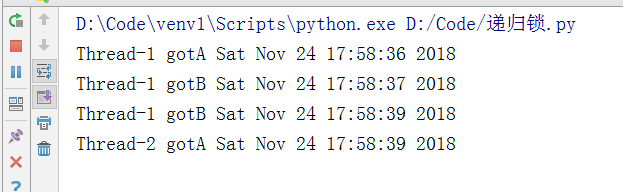
#当两个锁之间出现递归调用,彼此之间相互等待,就会出现死锁

#线程的另一种实现方式(通过自定义类)

#1:引入threading、time

import threading

import time

# 定义两个锁

lockA=threading.Lock()

lockB=threading.Lock()

lockR=threading.RLock() #把两个锁替换成一个RLock,内部通过计数器实现

#3:定义一个线程(线程中存在两个方法,存在递归调用)

class MyThread(threading.Thread):

    #定义两个方法

    def actionA(self):

        # 获取A锁

        # lockA.acquire()

        lockR.acquire()

        print(self.name,"gotA",time.ctime())

        time.sleep(1)

        #然后再获取B锁

        # lockB.acquire()

        lockR.acquire()

        print(self.name,"gotB",time.ctime())

        time.sleep(2)

        # 先释放B锁,

        # lockB.release()

        lockR.release()

        # 后释放A锁

        # lockA.release()

        lockR.release()

    def actionB(self):

        # 获取B锁

        # lockB.acquire()

        lockR.acquire()

        print(self.name, "gotB", time.ctime())

        time.sleep(1)

        # 然后再获取A锁

        # lockA.acquire()

        lockR.acquire()

        print(self.name, "gotA", time.ctime())

        time.sleep(2)

        # 先释放A锁,

        # lockA.release()

        lockR.release()

        # 后释放B锁

        lockR.release()

        # lockB.release()

    #实现run方法

    def run(self):

        self.actionA()

        self.actionB()

# 4:创建多个线程

for i in range(0,5):

    t=MyThread()

    t.start()
递归锁,解决死锁

# 1:引入包

import threading

import time

# 2:创建同步锁

event = threading.Event()

#3:创建线程对象

class Boss(threading.Thread):

    def run(self):

        print("大家加班")

        event.set()

        time.sleep(5)

        print("下班了")

        event.set()

class Worker(threading.Thread):

    def run(self):

        event.wait()

        print("不加班,不加班")

        time.sleep(1)

        event.clear()

        event.wait()

        print("Oh Yeah")

# 4:创建线程对象,并放入到线程集合中

ts=[]

t=Boss()

ts.append(t)

for i in range(0,5):

    ts.append(Worker())

for t in ts:

    t.start()
同步锁
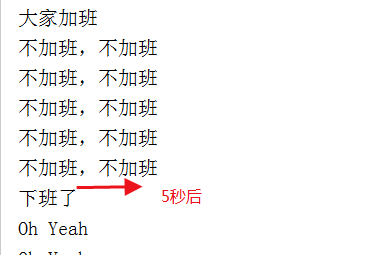
# 信号量类似于停车场,一次只能处理n个线程

# 1:导包

import threading,time

# 2:设置信号量

semaphore = threading.Semaphore(5)

# 3:创建线程对象

class MyThread(threading.Thread):

    def run(self):

        if semaphore.acquire():

           print(self.name)

           time.sleep(3)

           semaphore.release()

# 4:创建线程对象

for i in range(0,20):

    t=MyThread()

    t.start()
信号量
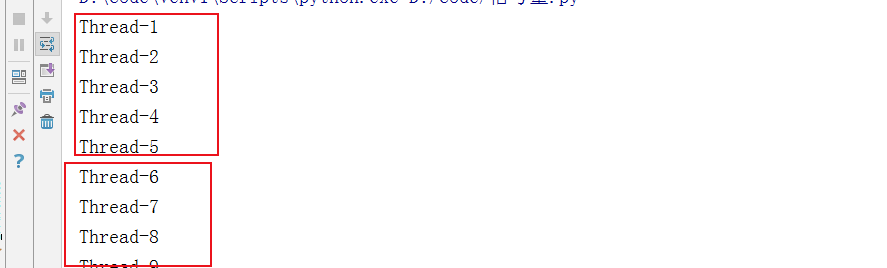
# 队列:多线程,线程安全

# 1:引包

import queue,time

# 2:创建对象

q=queue.Queue(3)  #3表示队列的总容量为3、默认为先进先出类型

# 3:常用的方法

q.put("#3333")          #添加数据

q.put({"ab":"cd"})

print(q.get())          #获取数据

print(q.qsize())         #获取队列的长度

print(q.empty())        #判断是否为空

print(q.full())         #判断是否已满

print(q.task_done())    #每对队列进行一次操作以后就会返回True

print(q.join())         #task_done 对应的就是join
队列的常见属性
# 通过队列,设置一个生产者消费者的开发模型

# 1:引包

import threading,queue,time,random

# 2:定义队列

que=queue.Queue()

# 3:定义两个生产者、消费者的类

def Producer(name):

    countBaoZi=1;

    while countBaoZi <= 10:

        # print("包子数量小于10,开始生产包子")

        time.sleep(random.randrange(1,3))

        que.put(countBaoZi)

        print("生产者:%s,生产了【包子%s】" % (name, countBaoZi))

        countBaoZi = countBaoZi + 1

def Consumer(name):

    countBaoZi=1

    while countBaoZi<=10:

        time.sleep(random.randrange(1,4))

        if que.empty():

            print("老板没包子了")

        else:

            print("现在还有%s个包子" % que.qsize())

            curBaoZi = que.get()

            print("消费者:%s,吃了包子【%s】" % (name, curBaoZi))

# 4:创建多个线程

producerA = threading.Thread(target=Producer,args=("A大厨",))

consumerA = threading.Thread(target=Consumer,args=("A君",))

consumerB = threading.Thread(target=Consumer,args=("B君",))

producerA.start()

consumerA.start()

consumerB.start()
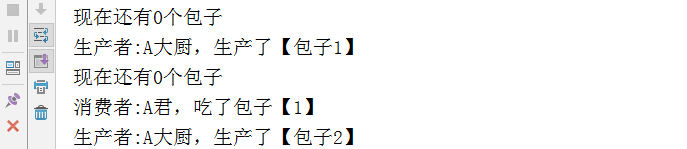
队列-线程 生产者、消费者模式
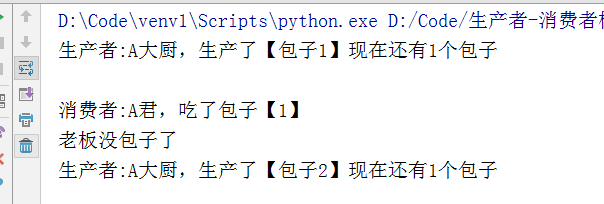
# 通过队列,设置一个生产者消费者的开发模型

# 升级版,包子吃了以后,还需要再去检查一下,有没有包子if que.empty() 这样浪费时间,

# 应该是:吃完就告诉老板直接生产,生产好了再通知客户去吃

# 1:引包

import threading,queue,time,random

# 2:定义队列

que=queue.Queue()

# 3:定义两个生产者、消费者的类

def Producer(name):

    countBaoZi=1;

    while countBaoZi <= 10:

        time.sleep(random.randrange(1,3))

        que.put(countBaoZi)

        print("生产者:%s,生产了【包子%s】" % (name, countBaoZi))

        countBaoZi = countBaoZi + 1

        que.join()

def Consumer(name):

    countBaoZi=1

    while countBaoZi<=10:

        time.sleep(random.randrange(1,4))

        print("现在还有%s个包子" % que.qsize())

        curBaoZi = que.get()

        time.sleep(1)

        print("消费者:%s,吃了包子【%s】" % (name, curBaoZi))

        que.task_done()

# 4:创建多个线程

producerA = threading.Thread(target=Producer,args=("A大厨",))

consumerA = threading.Thread(target=Consumer,args=("A君",))

consumerB = threading.Thread(target=Consumer,args=("B君",))

producerA.start()

consumerA.start()

consumerB.start()
队列-线程 生产消费2
二 进程
# 1:导包

import time

from multiprocessing import Process

# 2:创建进程对象集合

pros=[]

# 3:定义方法

def music(musicName):

    print("开始播放:%s.%s" %(musicName,time.ctime()))

    time.sleep(2)

    print("播放结束:%s.%s" %(musicName,time.ctime()))

def play(gameName):

    print("开始打:%s.%s" %(gameName,time.ctime()))

    time.sleep(5)

    print("游戏结束:%s.%s" %(gameName,time.ctime()))

if __name__ == '__main__':

    # 4:创建进行对象

    mu=Process(target=music,args=("My Heart Will Go On",))

    mu.start()

    mg=Process(target=play,args=("植物大战僵尸",))

    mg.start()
进程

# 1:导包

import time

from multiprocessing import Process

# 2:创建进程对象集合

pros=[]

# 3:定义方法

def music(musicName):

    print("开始播放:%s.%s" %(musicName,time.ctime()))

    time.sleep(2)

    print("播放结束:%s.%s" %(musicName,time.ctime()))

def play(gameName):

    print("开始打:%s.%s" %(gameName,time.ctime()))

    time.sleep(5)

    print("游戏结束:%s.%s" %(gameName,time.ctime()))

if __name__ == '__main__':

    # 4:创建进行对象

    mu=Process(target=music,args=("My Heart Will Go On",))

    # 4.2:进程常用的属性和方法

    #mu.join() #进程阻塞

    mu.start() #开启进程

    time.sleep(1)

    mu.terminate() #结束进程

    print(" 进程名称 %s, 进程编码 %s,"%(mu.name,mu.pid))
常用的属性和方法

进程之间的三种通讯方法
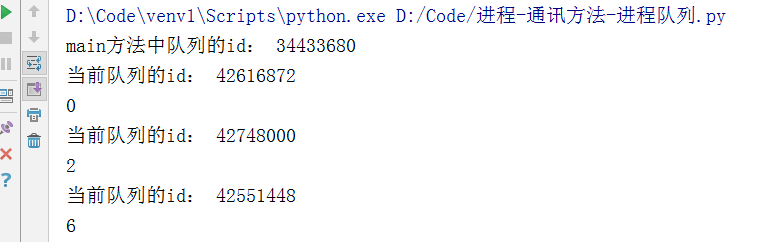
进程队列
# 1:导包

from multiprocessing import Process,Queue

import time

#2:定义一个方法,用于向队列中赋值

def putAction(q,n):

    q.put(n*(n+1))

    print("当前队列的id:",id(q))

if __name__ == '__main__':

    # 3:创建一个队列

    que=Queue()

    print("main方法中队列的id:", id(que))

    # 4:通过循环创建多个进程

    for i in range(0,3):

        p=Process(target=putAction,args=(que,i,))

        p.start()

    print(que.get())

    print(que.get())

    print(que.get())
通过进程队列实现数据通信
# 管道相当于生成两个连接对象,一个主进程使用,另外一个传递给子进程使用

# 1:导包

from multiprocessing import Process,Pipe

import time

# 2:定义函数

def ConnAction(conn):

    # 获取传递过来的conn连接对象

    print("准备发送消息,时间%s"%(time.ctime()))

    conn.send("土豆土豆,我是地瓜,收到请回答")

    time.sleep(2)

    print("准备接收消息,时间%s"%(time.ctime()))

    responInfo = conn.recv()

    print(responInfo,time.ctime())

if __name__ == '__main__':

    # 创建管道对象

    par_conn,child_conn=Pipe()

    # 创建进程

    p=Process(target=ConnAction,args=(child_conn,))

    p.start()

    print("主进程,准备接收消息,%s"%(time.ctime()))

    respons=par_conn.recv()

    print(respons,time.ctime())

    time.sleep(2)

    print("主进程,准备发送消息,%s"%(time.ctime()))

    par_conn.send("地瓜地瓜,我是土豆");
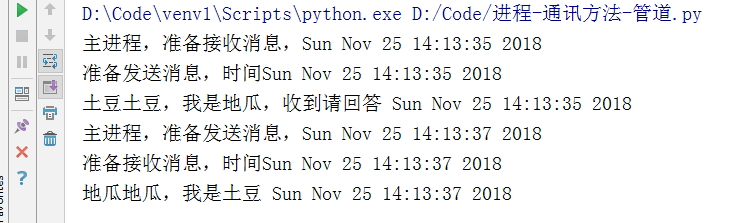
通过管道实现数据通信
# 1:导包

from multiprocessing import Process,Manager

#2:定义方法

def manaAction(d,l,n):

    # 对字典进行操作

    d[n]=""

    d[""]=2

    # 对列表进行操作

    l.append(n)

if __name__ == '__main__':

    # 创建Manager对象中的数据类型

    with Manager() as  manager:

        d=manager.dict()

        l=manager.list(range(5))

        p_list=[]

        # 创建进程

        for i in range(0,5):

            p=Process(target=manaAction,args=(d,l,i))

            p.start()

            p_list.append(p)

        for res in p_list:

            res.join()

        print(d)

        print(l)
通过Manager实现数据通信

# 1:导入包

from multiprocessing import Process,Lock

import time

#定义方法

def printPro(l,n):

    with l:

        print("Hello,World %s,%s"%(n,time.ctime()))

        time.sleep(1)

if __name__ == '__main__':

    l=Lock()

    for i in range(0, 5):

        p = Process(target=printPro, args=(l,i,))

        p.start()
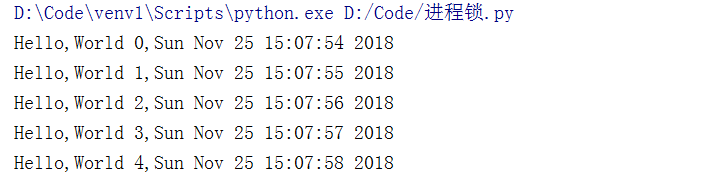
进程锁
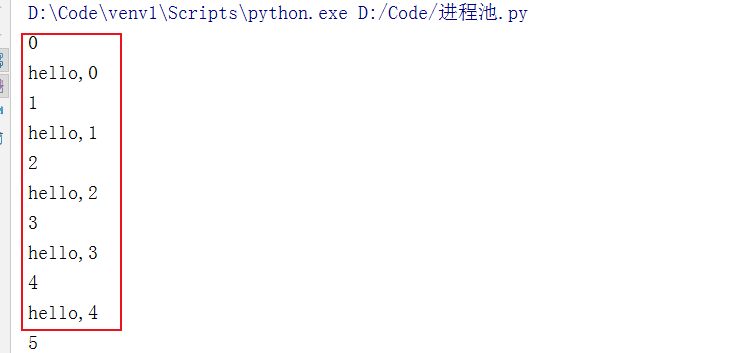
# 1:导包

from multiprocessing import Process,Pool

import time

# 3:创建方法

def foo(i):

    time.sleep(1)

    print(i)

    return i

# 4:创建回调方法

def bar(arg):

    #回调方法在主函数中执行

    print("hello,%s"%arg)

if __name__ == '__main__':

    # 2:创建进程池对象

    pool = Pool(5)

    for i in range(0,30):

        pool.apply_async(func=foo,args=(i,),callback=bar)

    pool.close()

    pool.join()
进程池
三 协程
协程是一种非抢占式程序,其本质是一个线程。
优点:1:灭有切换消耗;2:没有锁的概念
缺点:无法使用多核,但是可以通过多进程+协程弥补
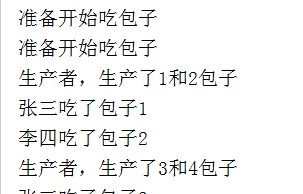
# 通过yield来实现

# 1:导包

import time

#2:消费者

def Consumer(name):

    print("准备开始吃包子")

    while True:

        newbaozi=yield

        print("%s吃了包子%s"%(name,newbaozi))

#3:生产者

def Product():

    r=con.__next__()

    r2=con2.__next__()

    baoziName=1

    while True:

        time.sleep(1)

        print("生产者,生产了%s和%s包子"%(baoziName,baoziName+1))

        con.send(baoziName)

        con2.send(baoziName+1)

        baoziName+=2

#主方法

if __name__ == '__main__':

    #创建两个用户

    con=Consumer("张三")

    con2=Consumer("李四")

    Product()
协程-yield
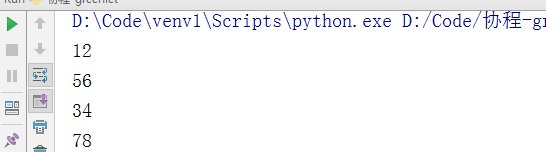
from greenlet import greenlet

def test1():

    print(12)

    gr2.switch()

    print(34)

    gr2.switch()

def test2():

    print(56)

    gr1.switch()

    print(78)

gr1 = greenlet(test1)

gr2 = greenlet(test2)

gr1.switch()
协程-greenlet
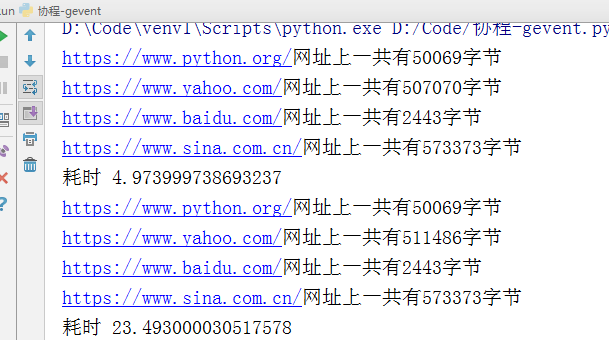
# 1:导包

import gevent

import requests,time

# 记录开始时间

start = time.time()

def f(url):

    # print("Get:%s" %url)

    reap=requests.get(url)

    data=reap.text

    print("%s网址上一共有%s字节"%(url,len(data)))

gevent.joinall([

        gevent.spawn(f, 'https://www.python.org/'),

        gevent.spawn(f, 'https://www.yahoo.com/'),

        gevent.spawn(f, 'https://www.baidu.com/'),

        gevent.spawn(f, 'https://www.sina.com.cn/'),

])

print("耗时",time.time()-start)

f('https://www.python.org/')

f('https://www.yahoo.com/')

f('https://www.baidu.com/')

f('https://www.sina.com.cn/')

print("耗时",time.time()-start)
协程-gevent
饮冰三年-人工智能-Python-20 Python线程、进程、线程的更多相关文章
- 饮冰三年-人工智能-Python-22 Python初识Django
1:一个简单的web框架 # 导包 from wsgiref.simple_server import make_server #自定义个处理函数 def application(environ,st ...
- 饮冰三年-人工智能-Python-21 Python数据库MySql
一:下载与安装 1:下载地址:https://dev.mysql.com/downloads/mysql/ 2:安装MySql 打开下载文件解压到指定文件目录.(我这里解压目录为D:\MySql\my ...
- 饮冰三年-人工智能-Python-19 Python网络编程
Socket:套接字.作用:我们只需要安照socket的规定去编程,就不需要深入理解tcp/udp协议也可以实现 1:TCP协议 1.1 客户端服务端循环收发消息 # 1:引入stock模块(导包) ...
- 饮冰三年-人工智能-Python-10之C#与Python的对比
1:注释 C# 中 单行注释:// 多行注释:/**/ python 中 单行注释:# 多行注释:“““内容””” 2:字符串 C#中 "" 用双引号如("我是字符串&q ...
- 饮冰三年-人工智能-linux-08 软件包管理(Python的安装)
1:软件包存放的位置 media/CentOS_6.9_Final/Packages文件夹下 2.RPM就是Red Hat Package Manger(红帽软件包管理工具)的缩写. 2.1 常用的命 ...
- 饮冰三年-人工智能-Python-30 python开发中常见的错误
1:触发条件:创建的实体类生成到数据库表时报错 报错信息:TypeError: __init__() missing 1 required positional argument: 'on_delet ...
- 饮冰三年-人工智能-Python-23 Python PyCharm 使用中常见的问题
一:软件工具使用中遇到的问题 1:AttributeError: module 'pip' has no attribute 'main'问题 处理方法: a:找到JetBrains\PyCharm ...
- 饮冰三年-人工智能-Python-18Python面向对象
1 类与实例对方法和属性的修改 class Chinese: # 这是一个Chinese的类 #定义一个类属性,又称为静态数据或者静态变量,相当于C#中的static country="Ch ...
- 饮冰三年-人工智能-Python-25 Django admin
简介:一个关于后台数据库管理的工具 1:创建一个新的项目 2:设置models,并通过命令生成数据库表 from django.db import models class Book(models.M ...
随机推荐
- OpenCV__elemSize
elemSize 矩阵一个元素占用的字节数,例如:type是CV_16SC3,那么elemSize = 3 * 16 / 8 = 6 bytes elemSize1 矩阵元素一个通道占用的字节数,例如 ...
- Unit 6.标准文档流,浮动,清除浮动以及margin塌陷问题
一. 什么是标准文档流 文本流其实就是文档的读取和输出顺序,也就是我们通常看到的由左到右.由上而下的读取和输出形式,在网页中每个元素都是按照这个顺序进行排序和显示的,而float和position两个 ...
- python提取浏览器Cookie
在用浏览器进行网页访问时,会向网页所在的服务器发送http协议的GET或者POST等请求,在请求中除了指定所请求的方法以及URI之外,后面还跟随着一段Request Header.Request He ...
- 根据字段获取DataTable包含某个值的数据
dt.Select("身份证号='" + list[i].PersonalId + "' and 培训完成日期 like '" + year + "% ...
- go/node/python 多进程与多核cpu
node node单线程,没有并发,但是可以利用cluster进行多cpu的利用.cluster是基于child_process的封装,帮你做了创建子进程,负载均衡,IPC的封装. const clu ...
- 第七篇--ubuntu18.04下面特殊符号
按住键盘win键,在搜索框输入“字符”,弹出来的工具点进去 需要什么符号就找什么符号,然后点击它复制就好.
- maven转gradle ,windows错误重定向
gradle init --type pom --stacktrace > g.log 2>&1
- 查找命令which、whereis、locate
1.find 最常用和最强大的查找命令.它能做到实时查找,精确查找,但速度慢. find的使用格式如下: $ find [指定目录] [指定条件] [指定动作] 指定目录:是指所要搜索的目录和其子 ...
- JavaScript数据类型 String字符串类型
前言 javascript没有表示单个字符的字符型,只有字符串String类型,字符型相当于仅包含一个字符的字符串 字符串String是javascript基本数据类型,同时javascript也支持 ...
- 《Java》第三周学习总结 20175301
Java第三周学习总结 首先视频学习了第四章的内容,第四章整体内容较多较复杂,但是整体脉络清晰理解起来很容易,学习 类,方法,对象,组合与复用,实例成员与类成员,包,访问权限,类封装,对象数组等内容 ...