
KHFlatButton
KHFlatButton

https://github.com/kylehorn/KHFlatButton
效果:
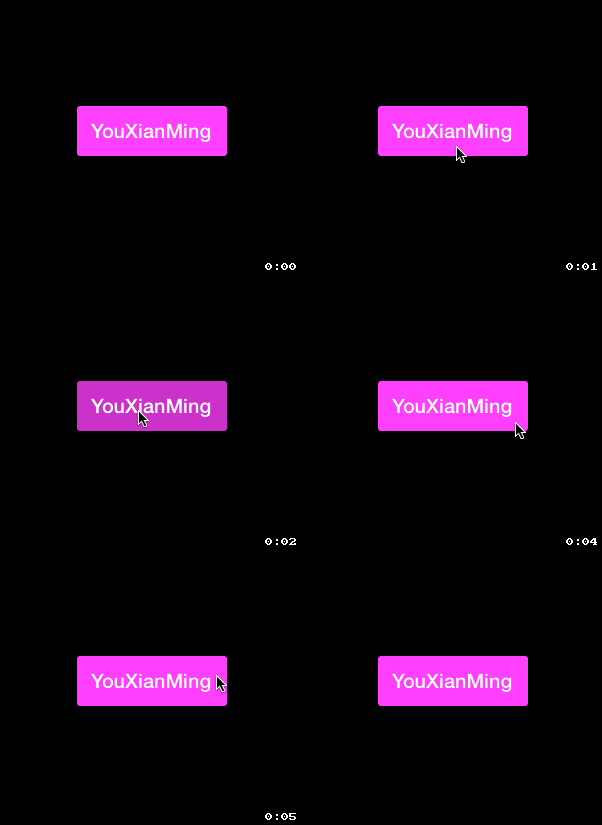
对于自己做demo来说,每次设置button就不用这么折腾了,几句话就行了,非常爽:)
其实可以改进的地方非常多的.
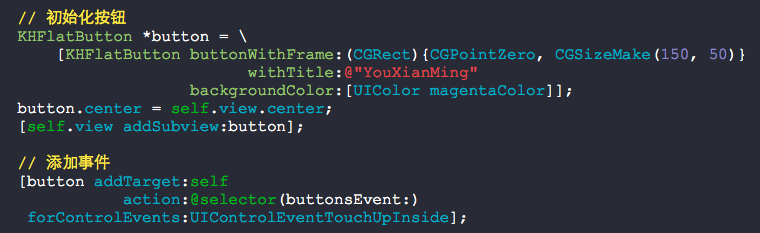
源码:
KHFlatButton.h + KHFlatButton.m
//

//  KHFlatButton.h

//

//  Created by Kyle Horn on 10/7/13.

//  Copyright (c) 2013 Kyle Horn. All rights reserved.

//

#import <UIKit/UIKit.h>

@interface KHFlatButton : UIButton

+ (KHFlatButton *)buttonWithFrame:(CGRect)frame

                        withTitle:(NSString *)title

                  backgroundColor:(UIColor *)backgroundColor

                     cornerRadius:(CGFloat)radius;

// Factory method that returns a button with default corner radius of 3.0

+ (KHFlatButton *)buttonWithFrame:(CGRect)frame

                        withTitle:(NSString *)title

                  backgroundColor:(UIColor *)backgroundColor;

+ (UIBarButtonItem *)barButtonWithTitle:(NSString *)title

                        backgroundColor:(UIColor *)backgroundColor;

@property (nonatomic) CGFloat cornerRadius;

@end
//

//  KHFlatButton.m

//

//  Created by Kyle Horn on 10/7/13.

//  Copyright (c) 2013 Kyle Horn. All rights reserved.

//

#import "KHFlatButton.h"

#import <QuartzCore/QuartzCore.h>

static CGFloat const kDefaultCornerRadius = 3.0;

static CGFloat const kMinimumFontSize = 14.0;

static CGFloat const kHighlightDelta = 0.2;

@interface KHFlatButton()

@property (strong, nonatomic) UIColor *originalBackgroundColor;

@end

@implementation KHFlatButton

@dynamic cornerRadius;

- (void)awakeFromNib

{

    [super awakeFromNib];

    self.cornerRadius = kDefaultCornerRadius;

    [self addTarget:self

             action:@selector(wasPressed)

   forControlEvents:(UIControlEventTouchDown       |

                     UIControlEventTouchDownRepeat |

                     UIControlEventTouchDragInside |

                     UIControlEventTouchDragEnter)];

    [self addTarget:self

             action:@selector(endedPress)

   forControlEvents:(UIControlEventTouchCancel      |

                     UIControlEventTouchDragOutside |

                     UIControlEventTouchDragExit    |

                     UIControlEventTouchUpInside    |

                     UIControlEventTouchUpOutside)];

}

- (id)initWithFrame:(CGRect)frame withBackgroundColor:(UIColor*)backgroundColor

{

    return [self initWithFrame:frame

                     withTitle:nil

               backgroundColor:backgroundColor

                  cornerRadius:kDefaultCornerRadius];

}

- (id)initWithFrame:(CGRect)frame withTitle:(NSString *)title backgroundColor:(UIColor*)backgroundColor cornerRadius:(CGFloat)radius;

{

    self = [super initWithFrame:frame];

    if (self)

    {

        self.backgroundColor = backgroundColor;

        self.cornerRadius    = radius;

        [self setTitle:title

              forState:UIControlStateNormal];

        CGFloat fontSize = floorf(CGRectGetHeight(self.bounds) / 2.5);

        self.titleLabel.font = [UIFont boldSystemFontOfSize:MAX(kMinimumFontSize, fontSize)];

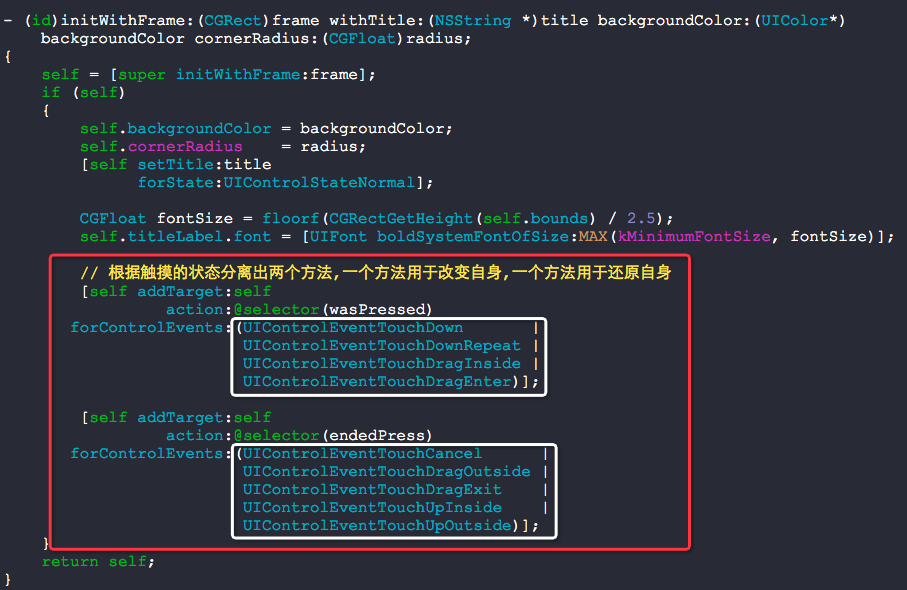
        // 根据触摸的状态分离出两个方法,一个方法用于改变自身,一个方法用于还原自身

        [self addTarget:self

                 action:@selector(wasPressed)

       forControlEvents:(UIControlEventTouchDown       |

                         UIControlEventTouchDownRepeat |

                         UIControlEventTouchDragInside |

                         UIControlEventTouchDragEnter)];

        [self addTarget:self

                 action:@selector(endedPress)

       forControlEvents:(UIControlEventTouchCancel      |

                         UIControlEventTouchDragOutside |

                         UIControlEventTouchDragExit    |

                         UIControlEventTouchUpInside    |

                         UIControlEventTouchUpOutside)];

    }

    return self;

}

+ (KHFlatButton *)buttonWithFrame:(CGRect)frame withTitle:(NSString *)title backgroundColor:(UIColor *)backgroundColor cornerRadius:(CGFloat)radius

{

    KHFlatButton *btn = [[KHFlatButton alloc] initWithFrame:frame

                                                  withTitle:title

                                            backgroundColor:backgroundColor

                                               cornerRadius:radius];

    return btn;

}

+ (KHFlatButton *)buttonWithFrame:(CGRect)frame withTitle:(NSString *)title backgroundColor:(UIColor *)backgroundColor

{

    KHFlatButton *btn = [[KHFlatButton alloc] initWithFrame:frame

                                                  withTitle:title

                                            backgroundColor:backgroundColor

                                               cornerRadius:kDefaultCornerRadius];

    return btn;

}

+ (UIBarButtonItem *)barButtonWithTitle:(NSString *)title backgroundColor:(UIColor *)backgroundColor

{

    KHFlatButton *btn = [[KHFlatButton alloc]initWithFrame:CGRectZero withTitle:title backgroundColor:backgroundColor cornerRadius:kDefaultCornerRadius];

    // Add padding to button label

    btn.titleLabel.textAlignment = NSTextAlignmentCenter;

    [btn sizeToFit];

    CGRect frame = btn.frame;

    frame.size.width += ;

    btn.frame = frame;

    btn.titleLabel.font = [UIFont boldSystemFontOfSize:13.0];

    UIBarButtonItem *barBtn = [[UIBarButtonItem alloc] initWithCustomView:btn];

    return barBtn;

}

- (void)setBackgroundColor:(UIColor *)backgroundColor

{

    super.backgroundColor = backgroundColor;

    self.originalBackgroundColor = backgroundColor;

}

- (void)wasPressed

{

    CGFloat red, grn, blu, white, alpha = 0.0;

    [self.originalBackgroundColor getRed:&red

                                   green:&grn

                                    blue:&blu

                                   alpha:&alpha];

    [self.originalBackgroundColor getWhite:&white

                                     alpha:&alpha];

    super.backgroundColor = [UIColor colorWithRed:red - kHighlightDelta

                                            green:grn - kHighlightDelta

                                             blue:blu - kHighlightDelta

                                            alpha:alpha];

}

- (void)endedPress

{

    super.backgroundColor = self.originalBackgroundColor;

}

- (void)setCornerRadius:(CGFloat)cornerRadius

{

    self.layer.cornerRadius = cornerRadius;

}

- (CGFloat)cornerRadius

{

    return self.layer.cornerRadius;

}

@end
//

//  RootViewController.m

//

//  Copyright (c) 2014年 Y.X. All rights reserved.

//

#import "RootViewController.h"

#import "KHFlatButton.h"

@interface RootViewController ()

@end

@implementation RootViewController

- (void)viewDidLoad

{

    [super viewDidLoad];

    self.view.backgroundColor = [UIColor blackColor];

    // 初始化按钮

    KHFlatButton *button = \

        [KHFlatButton buttonWithFrame:(CGRect){CGPointZero, CGSizeMake(, )}

                            withTitle:@"YouXianMing"

                      backgroundColor:[UIColor magentaColor]];

    button.center = self.view.center;

    [self.view addSubview:button];

    // 添加事件

    [button addTarget:self

               action:@selector(buttonsEvent:)

     forControlEvents:UIControlEventTouchUpInside];

}

- (void)buttonsEvent:(KHFlatButton *)button

{

    NSLog(@"%@", button);

}

@end
这个地方才是我们需要学习的地方:
KHFlatButton的更多相关文章
随机推荐
- Linux-(top,free)
top命令 1.命令格式: top [参数] 2.命令功能: 显示当前系统正在执行的进程的相关信息,包括进程ID.内存占用率.CPU占用率等. top命令是Linux下常用的性能分析工具,能够实时显示 ...
- Web 后端--PHP 与数据库的交互
网页要处理数据,数据置于数据库之中.今天看了书,不能让知识遗忘,遂及时记下. 用 PHP 操作 MySQL ,实现数据的交换,还要多练练.... PS: 以下 mysql 字段与mysqli 字段皆 ...
- Mysql开启远程服务
开启远程服务: 登录mysql: //赋予root用户所有权限,远程登录密码是123456 grant all privileges on *.* to '; flush privileges; 设置 ...
- 从 Hadoop 1.0 到 Hadoop 2.0 ,你需要了解这些
学习大数据,刚开始接触的是 Hadoop 1.0,然后过度到 Hadoop 2.0 ,这里为了书写方便,本文中 Hadoop 1.0 采用 HV1 的缩写方式,Hadoop 2.0 采用 HV2 的缩 ...
- Java基础——JDBC
今天学习的内容是:JDBC 通常jdbc连接分6步: 1)注册驱动: 2)建立连接: 3)创建Statement: 4)执行sql 语句: 5)处理结果集(若sql 语句为查询语句): 6)关闭连接. ...
- 扩充巴科斯-瑙尔范式 ABNF简介
扩充巴科斯-瑙尔范式(ABNF)是一种基于巴科斯-瑙尔范式(BNF)的元语言,但它有自己的语法和派生规则.ABNF的原动原则是描述一种作为双向通信协议的语言. ABNF是由第68号互联网标准(&quo ...
- Exam E05-001 Information Storage and Management Version 3 Exam
Emc 考试 e05-001信息存储和管理版本3考试 [总问题:171] 哪种 emc 产品提供软件定义的存储基础架构的自动监视和报告? A. viprSrmB. 斯纳普内C. 阿瓦马尔D. 快速副总 ...
- WinForm中使用CrystalReport水晶报表——基础,分组统计,自定义数据源
开篇 本篇文章主要是帮助刚开始接触CrystalReport报表的新手提供一个循序渐进的教程.该教程主要分为三个部分1)CrystalReport的基本使用方法:2)使用CrystalReport对数 ...
- JavaScript对象遍历属性和值
原文链接:http://caibaojian.com/javascript-object-3.html 加入你输出来一个对象,但是苦于不知道里面有哪些属性和值,这个时候,你可以通过下面的代码来遍历这个 ...
- 使用WebDAV实现Office文档在线编辑
Office的文档处理能力是非常强大的,但是它是本地资源,在Office Web App尚未成熟前,仍需要使用本地能力来进行文档编辑,可是现代的系统的主流却是B/S,所以在B/S中调用本地的Offic ...