
KHFlatButton
KHFlatButton

https://github.com/kylehorn/KHFlatButton
效果:
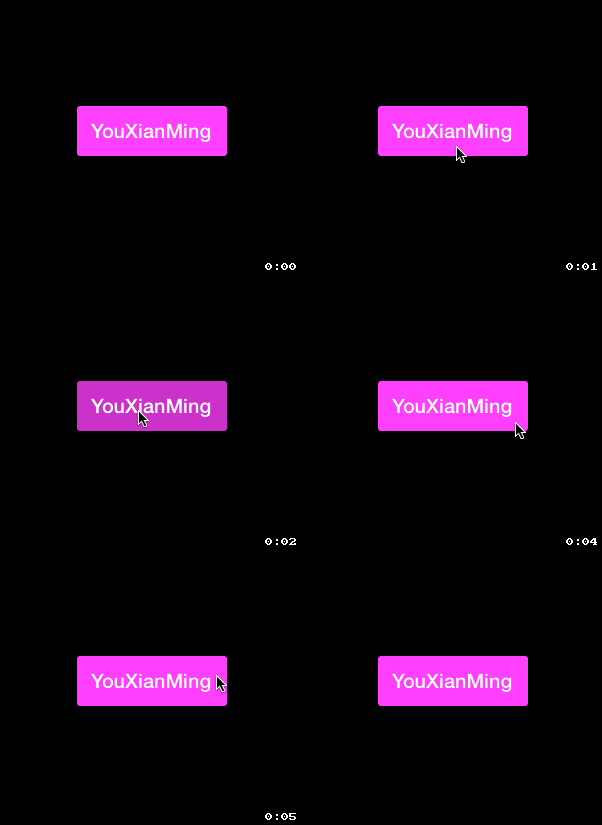
对于自己做demo来说,每次设置button就不用这么折腾了,几句话就行了,非常爽:)
其实可以改进的地方非常多的.
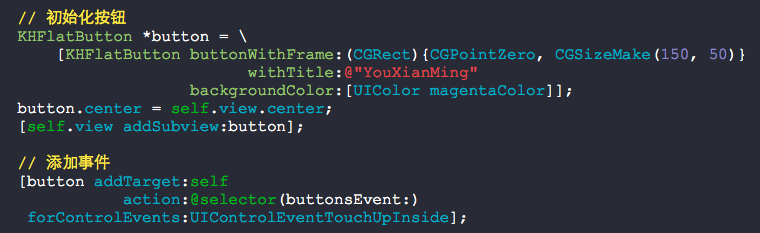
源码:
KHFlatButton.h + KHFlatButton.m
//

//  KHFlatButton.h

//

//  Created by Kyle Horn on 10/7/13.

//  Copyright (c) 2013 Kyle Horn. All rights reserved.

//

#import <UIKit/UIKit.h>

@interface KHFlatButton : UIButton

+ (KHFlatButton *)buttonWithFrame:(CGRect)frame

                        withTitle:(NSString *)title

                  backgroundColor:(UIColor *)backgroundColor

                     cornerRadius:(CGFloat)radius;

// Factory method that returns a button with default corner radius of 3.0

+ (KHFlatButton *)buttonWithFrame:(CGRect)frame

                        withTitle:(NSString *)title

                  backgroundColor:(UIColor *)backgroundColor;

+ (UIBarButtonItem *)barButtonWithTitle:(NSString *)title

                        backgroundColor:(UIColor *)backgroundColor;

@property (nonatomic) CGFloat cornerRadius;

@end
//

//  KHFlatButton.m

//

//  Created by Kyle Horn on 10/7/13.

//  Copyright (c) 2013 Kyle Horn. All rights reserved.

//

#import "KHFlatButton.h"

#import <QuartzCore/QuartzCore.h>

static CGFloat const kDefaultCornerRadius = 3.0;

static CGFloat const kMinimumFontSize = 14.0;

static CGFloat const kHighlightDelta = 0.2;

@interface KHFlatButton()

@property (strong, nonatomic) UIColor *originalBackgroundColor;

@end

@implementation KHFlatButton

@dynamic cornerRadius;

- (void)awakeFromNib

{

    [super awakeFromNib];

    self.cornerRadius = kDefaultCornerRadius;

    [self addTarget:self

             action:@selector(wasPressed)

   forControlEvents:(UIControlEventTouchDown       |

                     UIControlEventTouchDownRepeat |

                     UIControlEventTouchDragInside |

                     UIControlEventTouchDragEnter)];

    [self addTarget:self

             action:@selector(endedPress)

   forControlEvents:(UIControlEventTouchCancel      |

                     UIControlEventTouchDragOutside |

                     UIControlEventTouchDragExit    |

                     UIControlEventTouchUpInside    |

                     UIControlEventTouchUpOutside)];

}

- (id)initWithFrame:(CGRect)frame withBackgroundColor:(UIColor*)backgroundColor

{

    return [self initWithFrame:frame

                     withTitle:nil

               backgroundColor:backgroundColor

                  cornerRadius:kDefaultCornerRadius];

}

- (id)initWithFrame:(CGRect)frame withTitle:(NSString *)title backgroundColor:(UIColor*)backgroundColor cornerRadius:(CGFloat)radius;

{

    self = [super initWithFrame:frame];

    if (self)

    {

        self.backgroundColor = backgroundColor;

        self.cornerRadius    = radius;

        [self setTitle:title

              forState:UIControlStateNormal];

        CGFloat fontSize = floorf(CGRectGetHeight(self.bounds) / 2.5);

        self.titleLabel.font = [UIFont boldSystemFontOfSize:MAX(kMinimumFontSize, fontSize)];

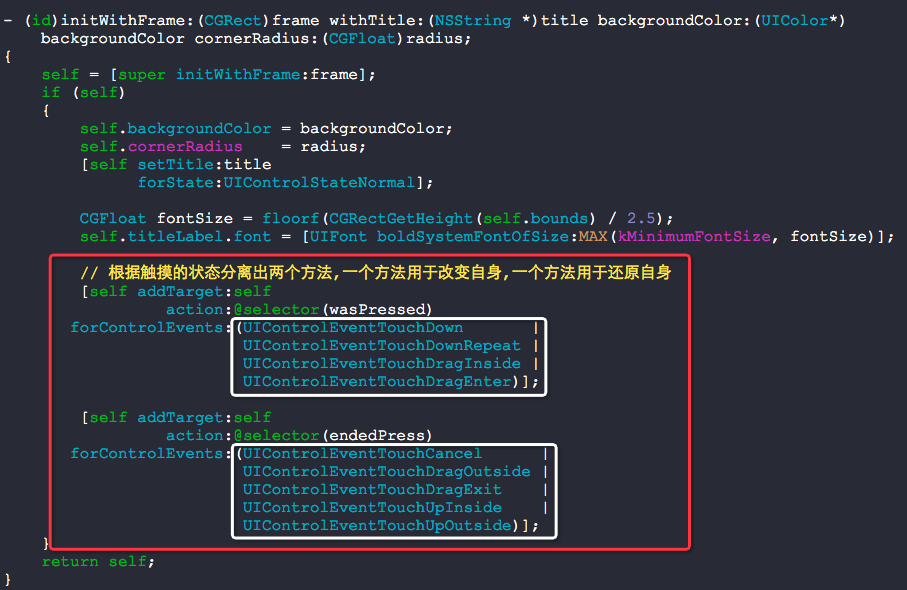
        // 根据触摸的状态分离出两个方法,一个方法用于改变自身,一个方法用于还原自身

        [self addTarget:self

                 action:@selector(wasPressed)

       forControlEvents:(UIControlEventTouchDown       |

                         UIControlEventTouchDownRepeat |

                         UIControlEventTouchDragInside |

                         UIControlEventTouchDragEnter)];

        [self addTarget:self

                 action:@selector(endedPress)

       forControlEvents:(UIControlEventTouchCancel      |

                         UIControlEventTouchDragOutside |

                         UIControlEventTouchDragExit    |

                         UIControlEventTouchUpInside    |

                         UIControlEventTouchUpOutside)];

    }

    return self;

}

+ (KHFlatButton *)buttonWithFrame:(CGRect)frame withTitle:(NSString *)title backgroundColor:(UIColor *)backgroundColor cornerRadius:(CGFloat)radius

{

    KHFlatButton *btn = [[KHFlatButton alloc] initWithFrame:frame

                                                  withTitle:title

                                            backgroundColor:backgroundColor

                                               cornerRadius:radius];

    return btn;

}

+ (KHFlatButton *)buttonWithFrame:(CGRect)frame withTitle:(NSString *)title backgroundColor:(UIColor *)backgroundColor

{

    KHFlatButton *btn = [[KHFlatButton alloc] initWithFrame:frame

                                                  withTitle:title

                                            backgroundColor:backgroundColor

                                               cornerRadius:kDefaultCornerRadius];

    return btn;

}

+ (UIBarButtonItem *)barButtonWithTitle:(NSString *)title backgroundColor:(UIColor *)backgroundColor

{

    KHFlatButton *btn = [[KHFlatButton alloc]initWithFrame:CGRectZero withTitle:title backgroundColor:backgroundColor cornerRadius:kDefaultCornerRadius];

    // Add padding to button label

    btn.titleLabel.textAlignment = NSTextAlignmentCenter;

    [btn sizeToFit];

    CGRect frame = btn.frame;

    frame.size.width += ;

    btn.frame = frame;

    btn.titleLabel.font = [UIFont boldSystemFontOfSize:13.0];

    UIBarButtonItem *barBtn = [[UIBarButtonItem alloc] initWithCustomView:btn];

    return barBtn;

}

- (void)setBackgroundColor:(UIColor *)backgroundColor

{

    super.backgroundColor = backgroundColor;

    self.originalBackgroundColor = backgroundColor;

}

- (void)wasPressed

{

    CGFloat red, grn, blu, white, alpha = 0.0;

    [self.originalBackgroundColor getRed:&red

                                   green:&grn

                                    blue:&blu

                                   alpha:&alpha];

    [self.originalBackgroundColor getWhite:&white

                                     alpha:&alpha];

    super.backgroundColor = [UIColor colorWithRed:red - kHighlightDelta

                                            green:grn - kHighlightDelta

                                             blue:blu - kHighlightDelta

                                            alpha:alpha];

}

- (void)endedPress

{

    super.backgroundColor = self.originalBackgroundColor;

}

- (void)setCornerRadius:(CGFloat)cornerRadius

{

    self.layer.cornerRadius = cornerRadius;

}

- (CGFloat)cornerRadius

{

    return self.layer.cornerRadius;

}

@end
//

//  RootViewController.m

//

//  Copyright (c) 2014年 Y.X. All rights reserved.

//

#import "RootViewController.h"

#import "KHFlatButton.h"

@interface RootViewController ()

@end

@implementation RootViewController

- (void)viewDidLoad

{

    [super viewDidLoad];

    self.view.backgroundColor = [UIColor blackColor];

    // 初始化按钮

    KHFlatButton *button = \

        [KHFlatButton buttonWithFrame:(CGRect){CGPointZero, CGSizeMake(, )}

                            withTitle:@"YouXianMing"

                      backgroundColor:[UIColor magentaColor]];

    button.center = self.view.center;

    [self.view addSubview:button];

    // 添加事件

    [button addTarget:self

               action:@selector(buttonsEvent:)

     forControlEvents:UIControlEventTouchUpInside];

}

- (void)buttonsEvent:(KHFlatButton *)button

{

    NSLog(@"%@", button);

}

@end
这个地方才是我们需要学习的地方:
KHFlatButton的更多相关文章
随机推荐
- go语言的unsafe包(转)
The unsafe Package in Golang Golang的unsafe包是一个很特殊的包. 为什么这样说呢? 本文将详细解释. 来自go语言官方文档的警告 unsafe包的文档是这么说的 ...
- mysql数据库数据监测
#!/bin/bash MYSQL="mysql -h10.10.10.10 -P8036 -uusername -ppassword --default-character-set=utf ...
- Date类学习总结(Calendar Date 字符串 相互转换 格式化)
Date类学习总结 1.计算某一月份的最大天数 Calendar time=Calendar.getInstance();time.clear();time.set(Calendar.YEAR,yea ...
- shell:syntax error:unexpected end of file/Starting proxy www-balancer: cannot bind socket--转载
src:http://www.2cto.com/os/201308/238962.html 执行某bash脚本是发生: syntax error: unexpected end of file 主 ...
- 小程序之底部tabBar
用法简介: 1.app.json中配置下tabBar即可,注意tabBar至少需要两个最多五个Item选项 这里简单列举一些属性值:对于tabBar整体属性设置: 对于tabBar中每个Item属性设 ...
- EventProxy流程控制
EventProxy流程控制 EventProxy是一个通过控制事件触发顺序来控制业务流程的工具. 1. 利用事件机制解耦复杂业务逻辑2. 移除被广为诟病的深度callback嵌套问题3. 将串行等待 ...
- 测试使用highlight.js的代码效果
---恢复内容开始--- C#代码 private void NextDateUpdate(DateTime dtt) { dtt.AddDays(); Response.Write("dt ...
- 深入理解MyBatis的原理:整个体系
前言:工作中虽然用到了 MyBatis,可完全不知道为什么,再不学习就晚了,这里将记录我的学习笔记,整个 MyBatis 的体系. 一.简介 1.传统的JDBC JDBC 是一种典型的桥接模式. 使用 ...
- 用python实现一个简单的聊天功能,tcp,udp,socketserver版本
基于tcp协议版本 服务器端 import socket server = socket.socket() server.bind(('127.0.0.1', 8001)) server.listen ...
- Git 学习之git 分支(三)
Git 分支 几乎每一种版本控制系统都以某种形式支持分支.使用分支意味着你可以从开发主线上分离开来,然后在不影响主线的同时继续工作.在很多版本控制系统中,这是个昂贵的过程,常常需要创建一个源代码目录的 ...