
asp.net core 使用identityServer4的密码模式来进行身份认证(一)
IdentityServer4是ASP.NET Core的一个包含OpenID和OAuth 2.0协议的框架。具体Oauth 2.0和openId请百度。
前言本博文适用于前后端分离或者为移动产品来后端api的身份认证功能。
一 首先第一步使用Nuge包管理器下载IdentityServer4的包。
第二部,添加一个名叫Config的类。
这个类的作用是对一些api和client进行配置的。
  public static IEnumerable<IdentityResource> GetIdentityResource()

        {

            return new List<IdentityResource>

             {

                 new IdentityResources.OpenId(),

                 new IdentityResources.Profile(),

                 new IdentityResources.Email()

             };

        }

        public static IEnumerable<ApiResource> GetApiResource()

        {

            return new List<ApiResource>

            {

                new ApiResource("gateway_api","gateway service"),

                new ApiResource("user_api","user_api service"),

                //并且要把contactapi加入到apiResource,并加入到 client的allowedScopes中

               // new ApiResource("contact_api","contact_api service")

            };

        }

        public static IEnumerable<Client> GetClients()

        {

            return new List<Client>()

          {

              new Client

              {

                    ClientId="pc",

                    AllowedGrantTypes = GrantTypes.ResourceOwnerPassword, //这里是指定授权的模式,选择密码模式,

                    ClientSecrets = { new Secret("yemobai".Sha256()) },

                     RefreshTokenUsage=TokenUsage.ReUse,

                     AlwaysIncludeUserClaimsInIdToken = true,

                     AllowOfflineAccess = true,

                    AllowedScopes=new List<string>

                    {

                        "user_api",

                    IdentityServerConstants.StandardScopes.Profile,

                    IdentityServerConstants.StandardScopes.OpenId,

                    IdentityServerConstants.StandardScopes.OfflineAccess

                    }

              }

          };

        }
第三步 添加start up的配置
  services.AddIdentityServer()

                 .AddDeveloperSigningCredential()

                .AddInMemoryApiResources(Config.GetApiResource())

                .AddInMemoryIdentityResources(Config.GetIdentityResource())

                .AddInMemoryClients(Config.GetClients())

                .AddResourceOwnerValidator<ResourceOwnerPasswordValidator>()

                .AddProfileService<ProfileService>()

                .AddCorsPolicyService<CorsPolicyService>() //这是IdentityServer跨域的,我尝试开启asp.net core 的跨域,但是identityServer不接受请求。

                ;
 public void Configure(IApplicationBuilder app, IHostingEnvironment env,ILoggerFactory loggerFactory)

        {

            if (env.IsDevelopment())

            {

                app.UseDeveloperExceptionPage();

            }

            loggerFactory.AddConsole(Configuration.GetSection("Logging"));

            loggerFactory.AddDebug();

            app.UseIdentityServer(); //启用identityServer中间件

            app.UseCors(buider =>

            {

                buider.WithOrigins("http://localhost:8080")

                .AllowAnyHeader();

            });

            app.UseMvc();

        }
第四步 用户验证
其实identityServier4也提供了一些测试用户来进行身份认证的实验,这些东西都在identityServer4的官网上都有介绍。
新建一个类ResourceOwnerPasswordValidator继承与IResourceOwnerPasswordValidator接口(IResourceOwnerPasswordValidator是Identityserver4提供的一个接口其主要工作就是验证我们的用户名和密码)。
这个接口只有一个方法
public async Task ValidateAsync(ResourceOwnerPasswordValidationContext context)
怎么获取我们传过来的用户名和密码呢?
答:在方法的参数context中,按F12进入到ResourceOwnerPasswordValidationContext这个类的定义中,具体定义的属性如下
    //

    // 摘要:

    //     Class describing the resource owner password validation context

    public class ResourceOwnerPasswordValidationContext

    {

        public ResourceOwnerPasswordValidationContext();

        //

        // 摘要:

        //     Gets or sets the name of the user.

        public string UserName { get; set; }

        //

        // 摘要:

        //     Gets or sets the password.

        public string Password { get; set; }

        //

        // 摘要:

        //     Gets or sets the request.

        public ValidatedTokenRequest Request { get; set; }

        //

        // 摘要:

        //     Gets or sets the result.

        public GrantValidationResult Result { get; set; }

    }
可以看到 userName和passWord都已经定义好了,我们只管用就行了。
context.UserName, context.Password
就算用户名和密码和我的数据库的数据对上了,该怎么返回我对用户名和密码的认证结果呢?
答:
如果你是一个细心的人,你会发现上面 ValidateAsync这个方法返回一个Task,可以基本上认为无返回值了。不要着急,看看ResourceOwnerPasswordValidationContext这个类的定义。
GrantValidationResult Result { get; set; }
里面有这么一个属性。看名字都知道是验证结果了。不出意外,我们对用户名和密码的验证接口应该放在这个里面。
那下面就很简单了。
 if (accountResult.Status=="登陆成功")

            {

                context.Result= new GrantValidationResult(accountResult.User.Id.ToString(), "admin", GetUserClaim(accountResult.User));

            }

            else

            {

                //验证失败

                context.Result = new GrantValidationResult(TokenRequestErrors.InvalidGrant, "密码错误");

            }
具体的构造函数重载,请自己看。如果有需求的不要忘了,把claim给加上。怎么 加claim呢,
最简单的方式你数据库验证用户名和密码完后,把一些claim给带上。
向我这样
 public Claim[] GetUserClaim(UserInfo userInfo)

        {

            var claims = new Claim[] { new Claim("USERID", userInfo.UserId), new Claim("USERNAME", userInfo.UserName) };

            return claims;

        }
完整代码
 public class ResourceOwnerPasswordValidator: IResourceOwnerPasswordValidator

    {

         private readonly IAccountService accountService;

         public ResourceOwnerPasswordValidator(IAccountService _accountService)

        {

            accountService = _accountService;

        }

        public async Task ValidateAsync(ResourceOwnerPasswordValidationContext context)

        {

            var accountResult = await accountService.SignInAsync(context.UserName, context.Password);

            if (accountResult.Status=="登陆成功")

            {

                context.Result= new GrantValidationResult(accountResult.User.Id.ToString(), "admin", GetUserClaim(accountResult.User));

            }

            else

            {

                //验证失败

                context.Result = new GrantValidationResult(TokenRequestErrors.InvalidGrant, "密码错误");

            }

        }

        public Claim[] GetUserClaim(UserInfo userInfo)

        {

            var claims = new Claim[] { new Claim("USERID", userInfo.UserId), new Claim("USERNAME", userInfo.UserName) };

            return claims;

        }
测试结果。
是用postmen来进行测试。没有的话请自行下载。
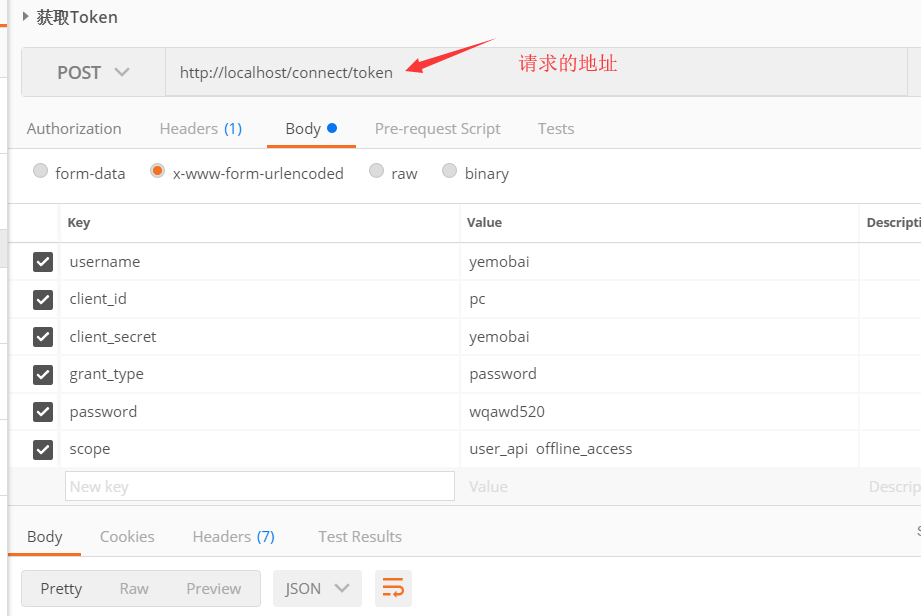
忘了说了,把IdentityServer4的包下载下来后 ,运行项目浏览器输入http://localhost:5000/.well-known/openid-configuration
看看identiyServer4一些接口地址。
然后在在postMen中输入一下Key和value(不要把我的给抄了上去)
scope写不写无所谓,如果你写的了话必须在config类中
   public static IEnumerable<ApiResource> GetApiResource()

        {

            return new List<ApiResource>

            {

                new ApiResource("gateway_api","gateway service"),

                new ApiResource("user_api","user_api service"),

                //并且要把contactapi加入到apiResource,并加入到 client的allowedScopes中

               // new ApiResource("contact_api","contact_api service")

            };

        }
在这个方法中添加上。而且也要在
  public static IEnumerable<Client> GetClients()

        {

            return new List<Client>()

          {

              new Client

              {

                    ClientId="pc",

                    AllowedGrantTypes = GrantTypes.ResourceOwnerPassword,

                    ClientSecrets = { new Secret("yemobai".Sha256()) },

                     RefreshTokenUsage=TokenUsage.ReUse,

                     AlwaysIncludeUserClaimsInIdToken = true,

                     AllowOfflineAccess = true,

                    AllowedScopes=new List<string>

                    {

                        "user_api",

                    IdentityServerConstants.StandardScopes.Profile,

                    IdentityServerConstants.StandardScopes.OpenId,

                    IdentityServerConstants.StandardScopes.OfflineAccess

                    }

              }

          };
而且也要在 AllowedScopes里面给加上。
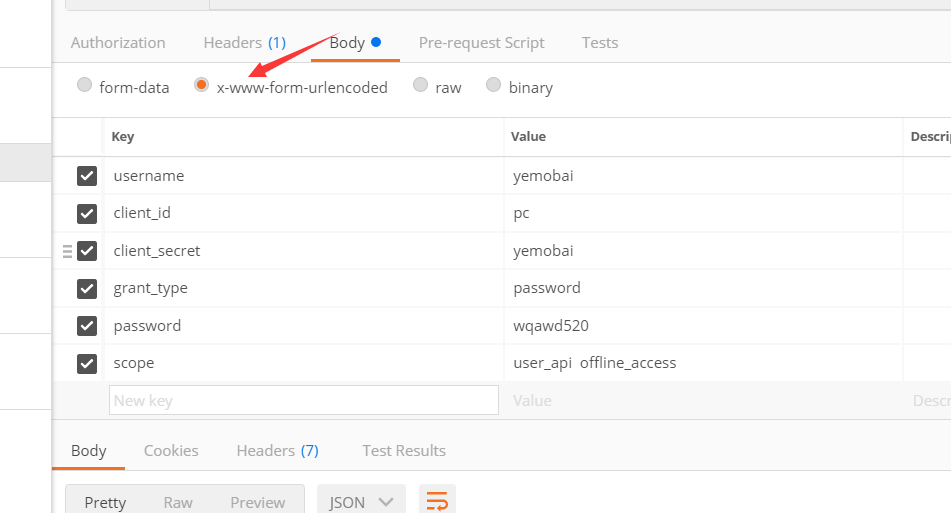
结果

这个时候我们就拿到了access_token和过期时间和refresh_token,
就用了IdentityServer4搞了一个access_token出来。算什么身份认证?
答:下一节解释。
asp.net core 使用identityServer4的密码模式来进行身份认证(一)的更多相关文章
- asp.net core 使用identityServer4的密码模式来进行身份认证(2) 认证授权原理
前言:本文将会结合asp.net core 认证源码来分析起认证的原理与流程.asp.net core版本2.2 对于大部分使用asp.net core开发的人来说. 下面这几行代码应该很熟悉了. s ...
- Asp.Net Core 中IdentityServer4 授权中心之自定义授权模式
一.前言 上一篇我分享了一篇关于 Asp.Net Core 中IdentityServer4 授权中心之应用实战 的文章,其中有不少博友给我提了问题,其中有一个博友问我的一个场景,我给他解答的还不够完 ...
- Asp.Net Core 中IdentityServer4 授权中心之应用实战
一.前言 查阅了大多数相关资料,查阅到的IdentityServer4 的相关文章大多是比较简单并且多是翻译官网的文档编写的,我这里在 Asp.Net Core 中IdentityServer4 的应 ...
- Asp.Net Core 中IdentityServer4 授权原理及刷新Token的应用
一.前言 上面分享了IdentityServer4 两篇系列文章,核心主题主要是密码授权模式及自定义授权模式,但是仅仅是分享了这两种模式的使用,这篇文章进一步来分享IdentityServer4的授权 ...
- Asp.Net Core 中IdentityServer4 实战之 Claim详解
一.前言 由于疫情原因,让我开始了以博客的方式来学习和分享技术(持续分享的过程也是自己学习成长的过程),同时也让更多的初学者学习到相关知识,如果我的文章中有分析不到位的地方,还请大家多多指教:以后我会 ...
- Asp.Net Core 中IdentityServer4 实战之角色授权详解
一.前言 前几篇文章分享了IdentityServer4密码模式的基本授权及自定义授权等方式,最近由于改造一个网关服务,用到了IdentityServer4的授权,改造过程中发现比较适合基于Role角 ...
- ASP.NET Core路由中间件[2]: 路由模式
一个Web应用本质上体现为一组终结点的集合.终结点则体现为一个暴露在网络中可供外界采用HTTP协议调用的服务,路由的作用就是建立一个请求URL模式与对应终结点之间的映射关系.借助这个映射关系,客户端可 ...
- 【.NET Core】ASP.NET Core之IdentityServer4(1):快速入门
[.NET Core]ASP.NET Core之IdentityServer4 本文中的IdentityServer4基于上节的jenkins 进行docker自动化部署. 使用了MariaDB,EF ...
- 避免在ASP.NET Core中使用服务定位器模式
(此文章同时发表在本人微信公众号"dotNET每日精华文章",欢迎右边二维码来关注.) 题记:服务定位器(Service Locator)作为一种反模式,一般情况下应该避免使用,在 ...
随机推荐
- 调用父类构造器:super
import static java.lang.System.*; class Base{ public String name; public double weight; public Base( ...
- 用递归方法求 n!
#include <iostream> using namespace std; #define LL long long LL fac(int n) { LL f; || n == ) ...
- Java数据结构和算法(三)顺序存储的树结构
Java数据结构和算法(三)顺序存储的树结构 二叉树也可以用数组存储,可以和完全二叉树的节点一一对应. 一.树的遍历 // 二叉树保存在数组中 int[] data; public void preO ...
- WebService安全加密
众所周知,WebService访问API是公开的,知道其URL者均可以研究与调用.那么,在只允许注册用户的WebService应用中,如何确保API访问和通信的安全性呢?本文所指的访问与通信安全性包括 ...
- 第二章:冠词(Les articles)
★定冠词(Les articles définis ): 阳性单数:le(l') 阴性单数:la(l') 阴阳性复数:les ()表示前面已经提到的人或事物: ()有关的名词已被其它的成分(补语,关系 ...
- 《Linux多线程服务端编程——使用muduo C++网络库》读书笔记
第一章 线程安全的对象生命期管理 第二章 线程同步精要 第三章 多线程服务器的适用场合与常用编程模型 第四章 C++多线程系统编程精要 1.(P84)11个常用的最基本Pthreads函数: 2个:线 ...
- IP之NCO仿真
NCO仿真要用.vo仿真模型,不能用.v文件 /**************************************************************************** ...
- MongoDB操作数据库的几个命令(自己用)
本文以配置百度的Clouda为源头:http://cloudajs.org/docs 继而安装node.js:http://nodejs.org/download/(直接安装,简单) 和MongoDB ...
- (转)Entity Framework Extended Library (EF扩展类库,支持批量更新、删除、合并多个查询等)
转自:http://www.cnblogs.com/jinzhao/archive/2013/05/31/3108755.html 今天乍一看,园子里居然没有关于这个类库的文章,实在是意外毕竟已经有很 ...
- loadrunner提高篇 - 关联技术的经典使用
关联函数是一个查找函数,即是从HTML文件内容中查找需要的值,并将其保存在一个变量或数组中.换一个角度看,关联函数不单单可以匹配一些变化的值,同样可以匹配一些固定的内容,并将其保存到一个数据组,供后续 ...