
IOS UITableView拖动排序功能
UITbableView作为列表展示信息,除了展示的功能,有时还会用到删除,排序等功能,下面就来讲解一下如何实现排序。
排序是当表格进入编辑状态后,在单元格的右侧会出现一个按钮,点击按钮,就可以拖动单元格,移动位置,进行手动排序。
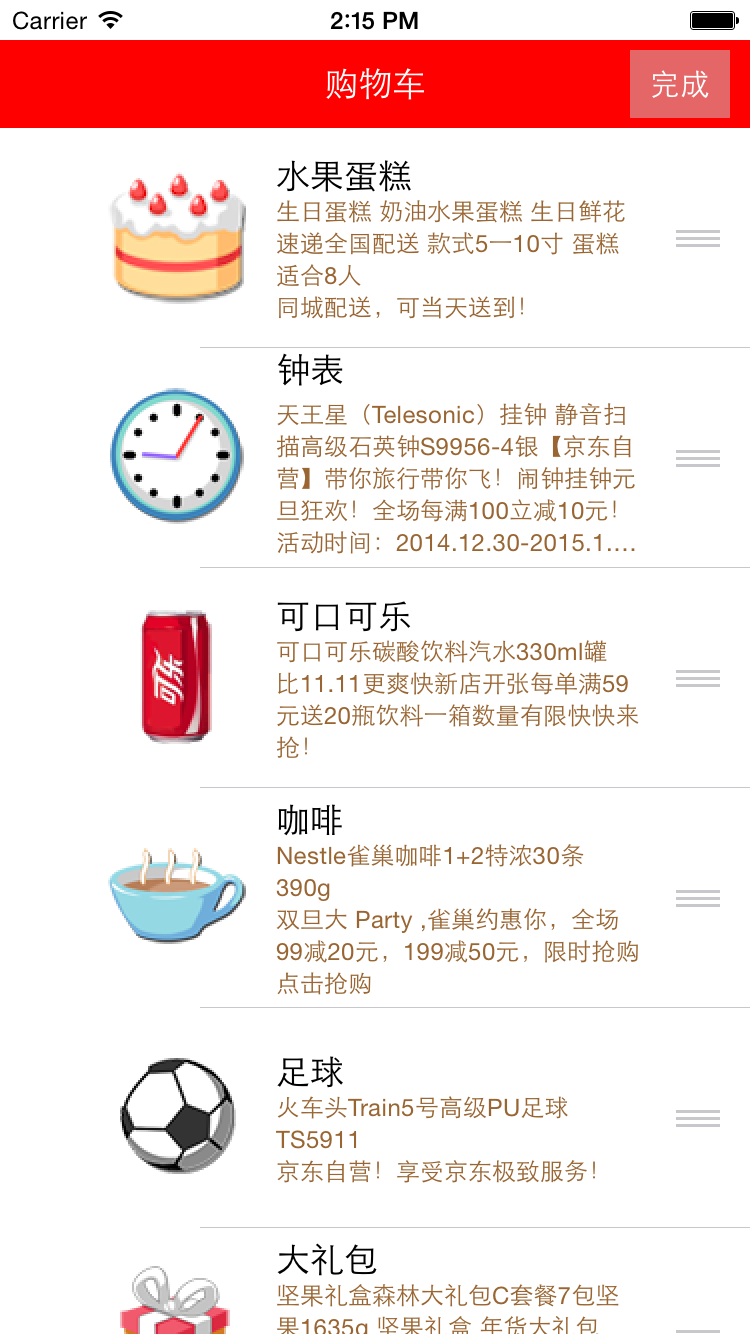
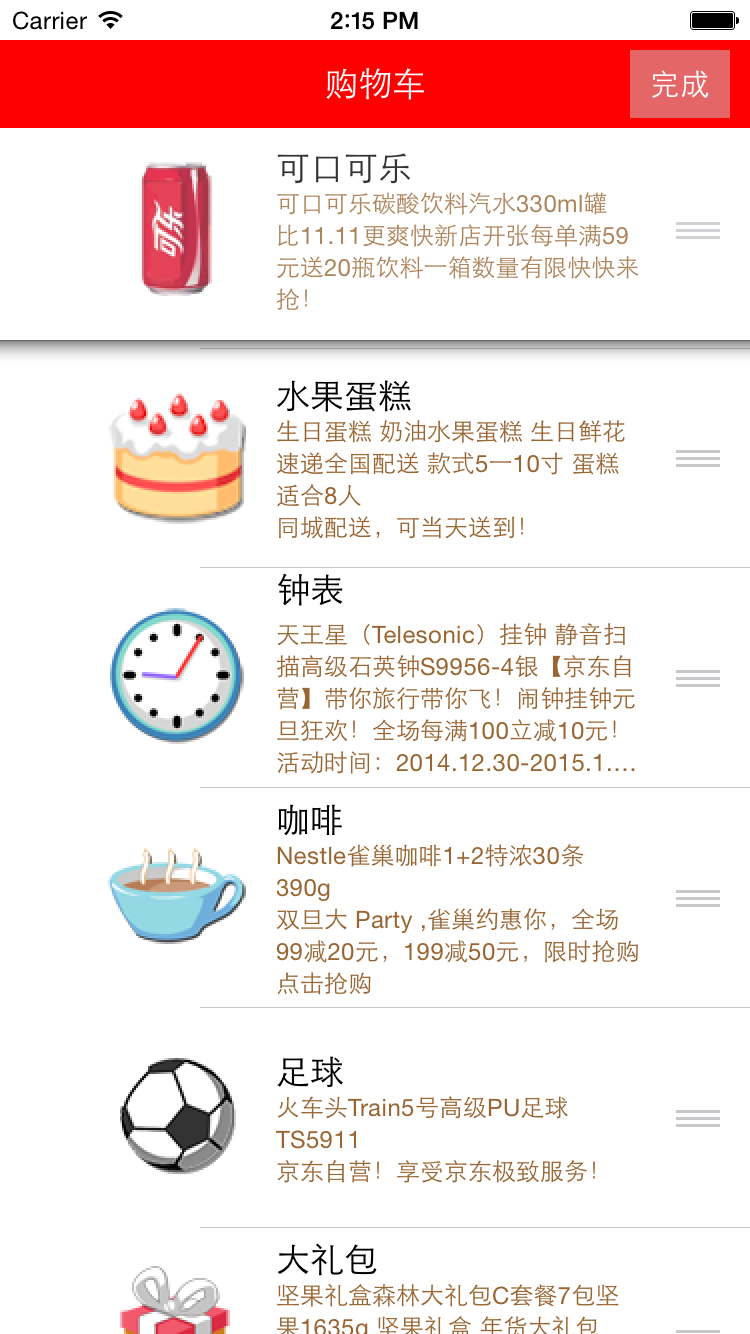
使用系统自带拖动排序功能的步骤:
1、让tableView进入编辑状态,也就是设置它的editing为YES
2、返回编辑模式,也就是实现UITableViewDelegate中的tableview:editingStyleForRowAtIndexPath:方法,在里面返回UITableViewCellEditingStyleNone模式。如果不实现,默认返回的就是删除模式
3、实现tableView:moveRowAtIndexPath:toIndexPath方法,只要实现该方法,就能实现单元格的拖动排序,但只是实现了表面的排序,并没有修改真实地数据
4、在方法中完成数据模型的更新
代码:
//  ViewController.m

//  JRTableView删除

//

//  Created by jerehedu on 15/6/11.

//  Copyright (c) 2015年 jerehedu. All rights reserved.

//

#import "ViewController.h"

#import "Goods.h"

@interface ViewController ()<UITableViewDataSource, UITableViewDelegate>

{

    UITableView *_tableView; //列表

    NSMutableArray *_goodsAry; //商品数组

    UIButton *_editBtn; //编辑按钮

}

@end

@implementation ViewController

- (void)viewDidLoad {

    [super viewDidLoad];

    //添加标题

    UILabel *titleLabel = [[UILabel alloc] initWithFrame:CGRectMake(, , self.view.frame.size.width, )];

    titleLabel.text = @"购物车";

    titleLabel.textAlignment = NSTextAlignmentCenter;

    titleLabel.backgroundColor = [UIColor redColor];

    titleLabel.textColor = [UIColor whiteColor];

    [self.view addSubview:titleLabel];

    //添加编辑按钮

    _editBtn = [UIButton buttonWithType:UIButtonTypeCustom];

    _editBtn.frame = CGRectMake(self.view.frame.size.width-, , , );

    [_editBtn setTitle:@"编辑" forState:UIControlStateNormal];

    [_editBtn setTitle:@"完成" forState:UIControlStateSelected];

    _editBtn.titleLabel.font = [UIFont systemFontOfSize:];

    _editBtn.backgroundColor = [UIColor colorWithRed:0.8 green:0.8 blue:0.8 alpha:0.5];

    [self.view addSubview:_editBtn];

    [_editBtn addTarget:self action:@selector(clickEditBtn:) forControlEvents:UIControlEventTouchUpInside];

    //添加tableview

    _tableView = [[UITableView alloc] initWithFrame:CGRectMake(, , self.view.frame.size.width, self.view.frame.size.height-)];

    _tableView.dataSource = self;

    _tableView.delegate = self;

    [self.view addSubview:_tableView];

    //取数据

    NSArray *ary = [NSArray arrayWithContentsOfFile:[[NSBundle mainBundle] pathForResource:@"ShoppingGoodsList" ofType:@"plist"]];

    //把数据存到模型对象中,然后把对象存到数组中

    _goodsAry = [NSMutableArray array];

    for (int i=; i<ary.count; i++) {

        Goods *good = [Goods goodsWithDic:ary[i]];

        [_goodsAry addObject:good];

    }

}

#pragma mark 数据源  返回有几行

-(NSInteger)tableView:(UITableView *)tableView numberOfRowsInSection:(NSInteger)section

{

    return _goodsAry.count;

}

#pragma mark 每行显示内容

-(UITableViewCell*)tableView:(UITableView *)tableView cellForRowAtIndexPath:(NSIndexPath *)indexPath

{

    static NSString *idGood = @"goods";

    UITableViewCell *cell = [tableView dequeueReusableCellWithIdentifier:idGood];

    if (cell==nil) {

        cell = [[UITableViewCell alloc] initWithStyle:UITableViewCellStyleSubtitle reuseIdentifier:idGood];

    }

    Goods *good = _goodsAry[indexPath.row];

    cell.imageView.image = [UIImage imageNamed:good.icon];

    cell.textLabel.text = good.name;

    cell.detailTextLabel.text = good.details;

    cell.detailTextLabel.numberOfLines = ;

    cell.detailTextLabel.textColor = [UIColor brownColor];

    return cell;

}

#pragma mark 选中行

-(void)tableView:(UITableView *)tableView didSelectRowAtIndexPath:(NSIndexPath *)indexPath

{

    // 取消选中状态

    [tableView deselectRowAtIndexPath:indexPath animated:YES];

}

#pragma mark 设置行高

-(CGFloat)tableView:(UITableView *)tableView heightForRowAtIndexPath:(NSIndexPath *)indexPath

{

    return ;

}

#pragma mark 点击编辑按钮

- (IBAction)clickEditBtn:(UIButton *)sender {

    //设置tableview编辑状态

    BOOL flag = !_tableView.editing;

    [_tableView setEditing:flag animated:YES];

    _editBtn.selected = flag;

}

#pragma mark 选择编辑模式,添加模式很少用,默认是删除

-(UITableViewCellEditingStyle)tableView:(UITableView *)tableView editingStyleForRowAtIndexPath:(NSIndexPath *)indexPath

{

    return UITableViewCellEditingStyleNone;

}

#pragma mark 排序 当移动了某一行时候会调用

//编辑状态下,只要实现这个方法,就能实现拖动排序

-(void)tableView:(UITableView *)tableView moveRowAtIndexPath:(NSIndexPath *)sourceIndexPath toIndexPath:(NSIndexPath *)destinationIndexPath

{

    // 取出要拖动的模型数据

    Goods *goods = _goodsAry[sourceIndexPath.row];

    //删除之前行的数据

    [_goodsAry removeObject:goods];

    // 插入数据到新的位置

    [_goodsAry insertObject:goods atIndex:destinationIndexPath.row];

}

@end
想要了解更多内容的小伙伴,可以点击查看源码,亲自运行测试。
疑问咨询或技术交流,请加入官方QQ群: (452379712)
出处:http://www.cnblogs.com/jerehedu/
本文版权归烟台杰瑞教育科技有限公司和博客园共有,欢迎转载,但未经作者同意必须保留此段声明,且在文章页面明显位置给出原文连接,否则保留追究法律责任的权利。
IOS UITableView拖动排序功能的更多相关文章
- IOS UITableView索引排序功能
UITbableView分组展示信息时,有时在右侧会带索引,右侧的索引一般为分组的首字母,比如城市列表的展示.当点击右侧索引的字母,列表会快速跳到索引对应的分组,方便我们快速查找.下面,就介绍一下索引 ...
- vue+element拖动排序功能
项目中老大心血来潮设计了一可以拖动达到排序的功能,感觉没什么用,但是没办法,实现吧! 这功能肯定不会手撸了,直接上插件 使用Sortable.js,对vue不友好,拖拽有时候乱跳;改用vuedragg ...
- iOS - UITableView 多选功能实现
:自定义Cell中的代码 #import <UIKit/UIKit.h> @interface TestCell : UITableViewCell @property(nonatomic ...
- RecyclerView实现拖动排序和滑动删除功能
RecyclerView 的拖动排序需要借助一下 ItemTouchHelper 这个类,ItemTouchHelper 类是 Google 提供的一个支持 RecyclerView 滑动和拖动的一个 ...
- 基于Metronic的Bootstrap开发框架经验总结(13)--页面链接收藏夹功能的实现2(利用Sortable进行拖动排序)
在上篇随笔<基于Metronic的Bootstrap开发框架经验总结(12)--页面链接收藏夹功能的实现>上,我介绍了链接收藏夹功能的实现,以及对收藏记录的排序处理.该篇随笔主要使用功能按 ...
- iOS开发——UI_swift篇&UITableView实现索引功能
UITableView实现索引功能 关于UItableView的索引在平时项目中所见不多,最多的就是跟联系人有关的界面,虽然如此,但是作为一个swift开发的程序必须知道的一个技术点,所以今天 ...
- IOS tableView 滑动删除与排序功能
// // ViewController.m // 0429 // // Created by apple on 15/4/29. // Copyright (c) 2015年 gense. All ...
- IOS UITableView NSIndexPath属性讲解
IOS UITableView NSIndexPath属性讲解 查看UITableView的帮助文档我们会注意到UITableView有两个Delegate分别为:dataSource和deleg ...
- RecyclerViewItemTouchHelperDemo【使用ItemTouchHelper进行拖拽排序功能】
版权声明:本文为HaiyuKing原创文章,转载请注明出处! 前言 记录使用ItemTouchHelper对Recyclerview进行拖拽排序功能的实现. 效果图 代码分析 ItemTouchHel ...
随机推荐
- beeshell —— 开源的 React Native 组件库
介绍 beeshell 是一个 React Native 应用的基础组件库,基于 0.53.3 版本,提供一整套开箱即用的高质量组件,包含 JavaScript(以下简称 JS)组件和复合组件(包含 ...
- NetCore控制台实现自定义CommandLine功能
命令行科普: 例如输入: trans 123 456 789 -r 123 -r 789上面例子中:trans是Command,123 456 789是CommandArgument,-r之后的都是C ...
- windows下thrift的使用(C++)
thrift cpp环境搭建: 1. 安装boost_1_53_0,注意,使用vs2010版本时,使用二进制的boost安装版本,生成的lib有可能是,在后续操作会出问题.在源码目录中,运行boot ...
- Struts2的概念
Struts2的概念 Struts2是一个基于MVC设计模式的Web应用框架,它本质上相当于一个servlet,在MVC设计模式中,Struts2作为控制器(Controller)来建立模型与视图的数 ...
- Vue-router浅析(二)
一.导航守卫 经常在项目中,会对页面做一些权限控制,所以需要对路由变化做出处理,跳转或取消相应的路由. 导航:即路由发生变化.导航守卫即对路由变化做出处理.当然也分几种情况:对全局变化做处理.对&qu ...
- PYQT窗口居中
#UI.py,通过UI设计师制作后直接转换为UI.py脚本 # -*- coding: utf-8 -*-from PyQt4 import QtCore, QtGui try: _fromUt ...
- 华为S5300系列交换机V100R005SPH008热补丁
S23_33_53-V100R005SPH008.pat 附件: 链接:https://pan.baidu.com/s/1XfIQ55g5pWI9aqmM7LHUew 密码:f2mu
- 【scrapy】使用方法概要(四)(转)
[请初学者作为参考,不建议高手看这个浪费时间] 上一篇文章,我们抓取到了一大批代理ip,本篇文章介绍如何实现downloaderMiddleware,达到随即使用代理ip对目标网站进行抓取的. 抓取的 ...
- DHT(Distributed Hash Table,分布式哈希表)
DHT(Distributed Hash Table,分布式哈希表)类似Tracker的根据种子特征码返回种子信息的网络. DHT全称叫分布式哈希表(Distributed Hash Table),是 ...
- C#各种异常处理方式
.NET的异常处理机制用来发现.处理运行时错误.如果开发人员没有提供异常的处理机制,就默认采用.NET的机制. 通常使用try...catch...finally捕获异常. try { //有可能发生 ...