
mysql查询语句 和 多表关联查询 以及 子查询
原文地址: http://blog.csdn.net/github_37767025/article/details/67636061
1.查询一张表:     select * from 表名;

2.查询指定字段:select 字段1,字段2,字段3….from 表名;

3.where条件查询:select 字段1,字段2,字段3 frome 表名 where 条件表达式;

例:select * from t_studect where id=1;

       select * from t_student where age>22;

4.带in关键字查询:select 字段1,字段2 frome 表名 where 字段 [not]in(元素1,元素2);

例:select * from t_student where age in (21,23);

       select * from t_student where age not in (21,23);

5.带between and的范围查询:select 字段1,字段2 frome 表名 where 字段 [not]between 取值1 and 取值2;

例:select * frome t_student where age between 21 and 29;

       select * frome t_student where age not between 21 and 29;

6.带like的模糊查询:select 字段1,字段2… frome 表名 where 字段 [not] like ‘字符串’;

    “%”代表任意字符;

    “_”代表单个字符;

例:select * frome t_student where stuName like ‘张三”;

       select * frome t_student where stuName like ‘张三%”;

       select * frome t_student where stuName like ‘%张三%”;//含有张三的任意字符

       select * frome t_student where stuName like ‘张三_”

7.空值查询:select 字段1,字段2…frome 表名 where 字段  is[not] null;

8.带and的多条件查询:

select 字段1,字段2…frome 表名 where 条件表达式1 and 条件表达式2 [and 条件表达式n]

例:select * frome t_student where gradeName=’一年级’ and age=23;

9.带or的多条件查询

select 字段1,字段2…frome 表名 where 条件表达式1 or 条件表达式2 [or 条件表达式n]

例:select * frome t_student where gradeName=’一年级’ or age=23;//或者,条件只要满足一个

10.distinct去重复查询:select distinct 字段名 from 表名;

11.对查询结果排序order by:select 字段1,字段2…from 表名 order by 属性名 [asc|desc]

例:select * frome t_student order by age desc;//降序,从大到小

       select * frome t_student order by age asc;//升序,asc默认可以不写

12.分组查询group by

group by 属性名 [having 条件表达式][with rollup]

1.单独使用(毫无意义,不能单独使用);

2.与group_concat()函数一起使用;

例:select gradeName,group_concat(stuName) from t_student group by gradeName;

3.与聚合函数一起使用;

例:select gradeName,count(stuName) from t_student group by gradeName;

4.与having一起使用(显示输出的结果);

例:select gradeName,count(stuName) from t_student group by gradeName having count(stuName)>3;
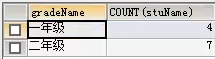
5.与with rollup 一起使用(最后加入一个总和行);

例:select gradeName,group_concat(stuName) from t_student group by gradeName with rollup;

13.limit 分页查询:select 字段1,字段2,…from 表名 limit 初始位置,记录数;

例子:select * from t_student limit 0,5;
多表连接查询
表一:t_book

表二:t_bookType
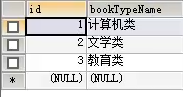
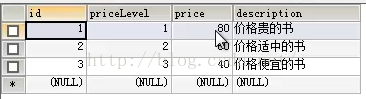
表三:t_priceLevel
select * from t_book,t_bookType;
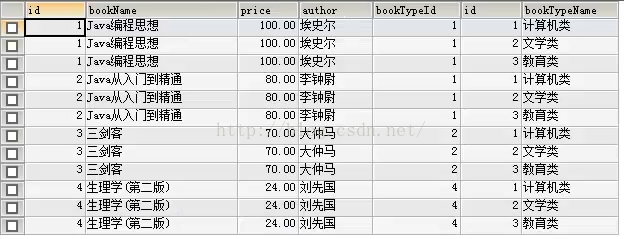
1.内连接查询(两张或以上的表连接起来查询需要的数据)

根据表一的bookTypeId查询出所有bookTypeName

select * from t_book,t_bookType where t_book.bookTypeId=t_bookType.id;

查询某几个字段:

select bookNme,author from t_book,t_bookType where t_book.bookTypeId=t_bookType.id;

2.外连接查询(两张或以上的表连接起来查询某张表的信息)

3.左连接查询

select * from t_book left join t_bookType on t_book.bookTypeId=t_bookType.id;

如下图:表一(左边表)t_book的数据全部查出 表二没有的字段用null代替

4.右连接查询

select * from t_book right join t_bookType on t_book.bookTypeId=t_bookType.id;

查出表二(右边表)的所有信息,表一没有的用null代替

5.多条件连接查询

select * from t_book,t_bookType where t_book.bookTypeId=t_bookType.id and t_book.price>70;

子查询

1.带in关键字的子查询(一个查询语句的条件可能落在另一个select语句的查询结果中)

select * from t_book where bookType in(select id from t_bookType);

select * from t_book where bookType not in(select id from t_bookType);

2.带比较运算符的子查询(子查询可以使用比较运算符)

select * from t_book where price>=(select price from t_priceLevel where priceLevel=1);

3.带exists关键字的子查询(加入子查询查询到记录,则进行外层查询,否则,不执行外层查询)

select * from t_book where exists(select * from t_booktype);

select * from t_book where not exists(select * from t_booktype);

4.带any关键字的子查询(any关键字表示满足其中任一条件)

select * from t_book where price>= any(select price from t_priceLevel);

5.带all关键字的子查询(all关键字表示满足所有条件)

select * from t_book where price>= all(select price from t_priceLevel);

合并查询

1.union

使用union关键字是,数据库系统会将所有的查询结果合并到一起,然后去掉相同的记录;

select id from t_book union select id from t_bookType;

2.union all

使用union all,不会去除掉重复的记录;

select id from t_book union all select id from t_bookType;
mysql查询语句 和 多表关联查询 以及 子查询的更多相关文章
- spring-data-jpa 介绍 复杂查询,包括多表关联,分页,排序等
本篇进行Spring-data-jpa的介绍,几乎涵盖该框架的所有方面,在日常的开发当中,基本上能满足所有需求.这里不讲解JPA和Spring-data-jpa单独使用,所有的内容都是在和Spring ...
- 警惕 MySql 更新 sql 的 WHERE 从句中的 IN() 子查询时出现的性能陷阱
警惕 MySql 更新 sql 的 WHERE 从句中的 IN() 子查询时出现的性能陷阱 以下文章来源:https://blog.csdn.net/defonds/article/details/4 ...
- mysql 外键约束及表关联
一.MYSQL中的约束 1.主键:primary key 唯一非空的特性并且可以优化查询速度 2.外键:foreign key 外键的作用保证2个或2个以上的数据表的数据一致性和完整性 3.唯一:un ...
- MySQL高级查询与编程笔记 • 【第3章 子查询】
全部章节 >>>> 本章目录 3.1 子查询定义和单行子查询 3.1.1 子查询定义 3.1.2 单行子查询应用 3.1.4 实践练习 3.2 多行子查询应用 3.2.1 ...
- SQL Fundamentals: 子查询 || WHERE,HAVING,FROM,SELECT子句中使用子查询,WITH子句
SQL Fundamentals || Oracle SQL语言 子查询(基础) 1.认识子查询 2.WHERE子句中使用子查询 3.在HAVING子句中使用子查询 4.在FROM子句中使用子查询 5 ...
- Sql Server的艺术(六) SQL 子查询,创建使用返回多行的子查询,子查询创建视图
子查询或内部查询或嵌套查询在另一个SQL查询的查询和嵌入式WHERE子句中. 子查询用于返回将被用于在主查询作为条件的数据,以进一步限制要检索的数据. 子查询可以在SELECT,INSERT,UPDA ...
- “子查询返回的值不止一个。当子查询跟随在 =、!=、<、<=、>、>= 之后,或子查询用作表达式时,这种情况是不允许的。”SQL查询错误解析
为了实现下述代码,首先得有数据库和相应的表格,本文用的是https://blog.csdn.net/qaz13177_58_/article/details/5575711/中的案例,即先用链接中那些 ...
- insert into select 引起的 "子查询返回的值不止一个。当子查询跟随在**之后,或子查询用作表达式时,这种情况是不允许的"
目录 1.事故现场 1.1 在使用 Insert into Table2 select * from Table1 将表1的数据插入到表2时,报错如下: 1.2 sql 语句 2.推测 3.解决方案 ...
- SQL server 查询出现:---“子查询返回的值不止一个。当子查询跟随在 =、!=、<、<=、>、>= 之后,或子查询用作表达式时,这种情况是不允许的。”SQL查询错误解析---
最近用select进行数据筛选,碰到下面的这个错误: ---子查询返回的值不止一个.当子查询跟随在 =.!=.<.<=.>.>= 之后,或子查询用作表达式时,这种情况是不允许的 ...
随机推荐
- Tetrahedron(Codeforces Round #113 (Div. 2) + 打表找规律 + dp计数)
题目链接: https://codeforces.com/contest/166/problem/E 题目: 题意: 给你一个三菱锥,初始时你在D点,然后你每次可以往相邻的顶点移动,问你第n步回到D点 ...
- cdn_一些常用的cdn地址
https://code.jquery.com/jquery-3.3.1.jshttps://cdn.bootcss.com/jquery/2.1.4/jquery.min.js https://cd ...
- 微信小程序实战--开发一个简单的快递单号查询
功能如图: 虽然工作中只负责小程序后台开发,但是还是小程序开发产生了浓厚的兴趣,官方文档也是超级详细了 这里就简单做一个快递单号的查询: 新建一个page: 接着就可以写wxml了.这里用一个简单的i ...
- 移动端Touch事件
案例1: <!doctype html> <html lang="en"> <head> <meta charset="UTF- ...
- HTML语义化(2016/3/16更新)
目录 什么是HTML语义化? 为什么要语义化 常用标签的语义 HTML5新元素 一.什么是HTML语义化? 简单来讲就是:每个标签做自己的事,使得能够被机器直接读懂. 二.为什么要语义化? 1.更容易 ...
- iconfont-矢量图标字体
二.矢量图标使用 1.进入:http://www.iconfont.cn/ 搜索你图标的关键字,然后将需要的图标字体加入购物车 加入购物车之后,添加到项目 2.点击查看在线连接,生成css代码,把代 ...
- 简单的UDP接受程序
//功能:客服端发送UDP包,服务器接受到并打印出来//2015.9.13成功 #include <stdio.h>#include <sys/socket.h>#includ ...
- 使用html+css+js实现日历与定时器,看看今天的日期和今天剩余的时间。
使用html+css+js实现日历与定时器,看看今天的日期和今天剩余的时间. 效果图: 哎,今天就又这么过去了,过的可真快 . 代码如下,复制即可使用: <!DOCTYPE html> & ...
- Nt函数原型头文件
//转自看雪,可以作为一个头文件使用,方便快捷 1 NTSTATUS NTAPI NtAcceptConnectPort( OUT PHANDLE PortHandle, IN PVOID PortI ...
- JavaScript中构造函数
构造函数:函数的另一种执行方法,执行后创建对象,并创建原型对象. 原型链:对象访问构造函数的指针. Function函数:函数对象. Object函数:所有创建对象的祖辈对象,也是由Function对 ...