
Cordova - Windows版本图形界面管理工具,告别命令行输入方式!
Cordova本身提供的是命令行管理工具,并没有提供图形界面管理工具,虽然命令行管理工具可以完成所有Cordova管理,但是对于我这种懒蛋,可真不希望每次都输入命令,而且我更担心一旦输错一个字符,命令执行失败,再次重新输入,反复执行这种无意义的事情!于是,我就用Delphi编写了这个Windows下的管理工具,用于执行大多数Cordova命令,能够满足我开发Cordova的需求!
由于目前工作紧张,所以暂时未能提供教程,近期完成项目后,会补上详细使用教程!
全部源码和编译好的工具下载:https://download.csdn.net/download/sunylat/10782003
此工具目前还有很少一点点功能需要完善,但不影响正常使用,只是锦上添花!
功能描述:
1,Cordova环境检查:对Cordova依赖的各种工具进行检查,看是否满足Cordova工作需要。
2,Cordova工程管理:新建、删除、加入已建立工程、在任意工程之间切换。
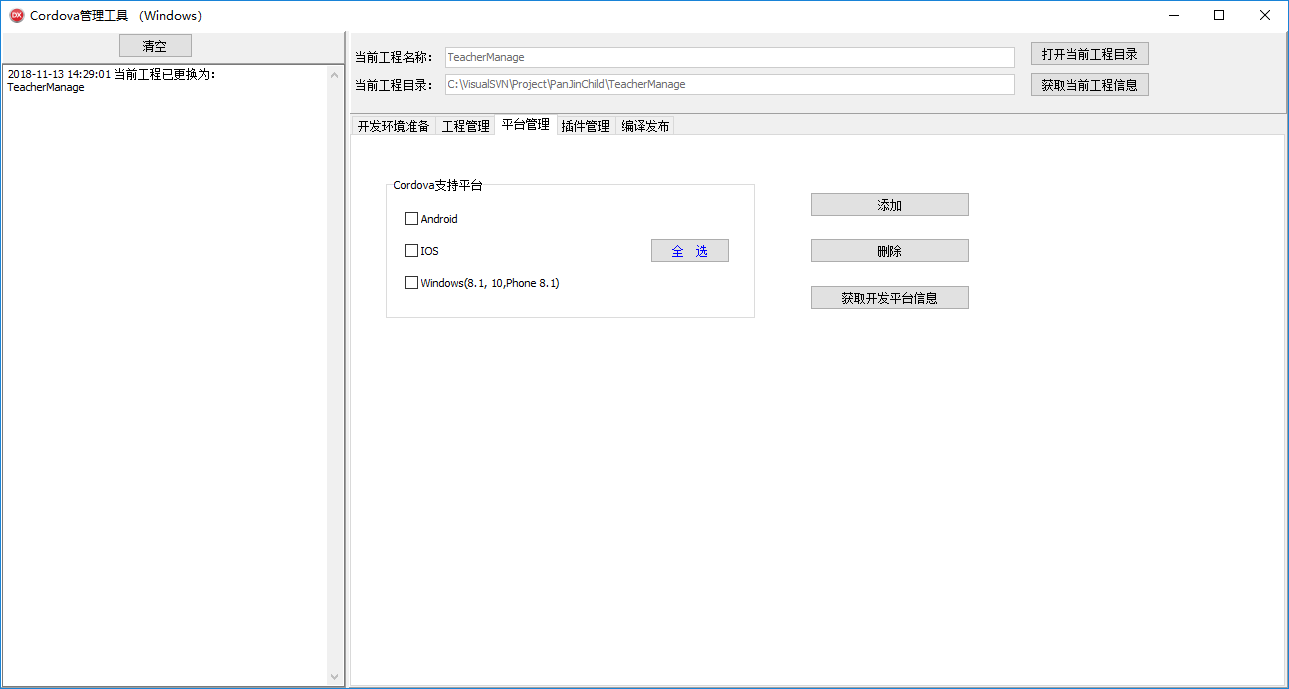
3,Cordova平台管理:添加、删除Cordova平台,Windows版,支持Android、IOS、Windows平台,其余平台未在本工具中加入,其实可以随时加入!
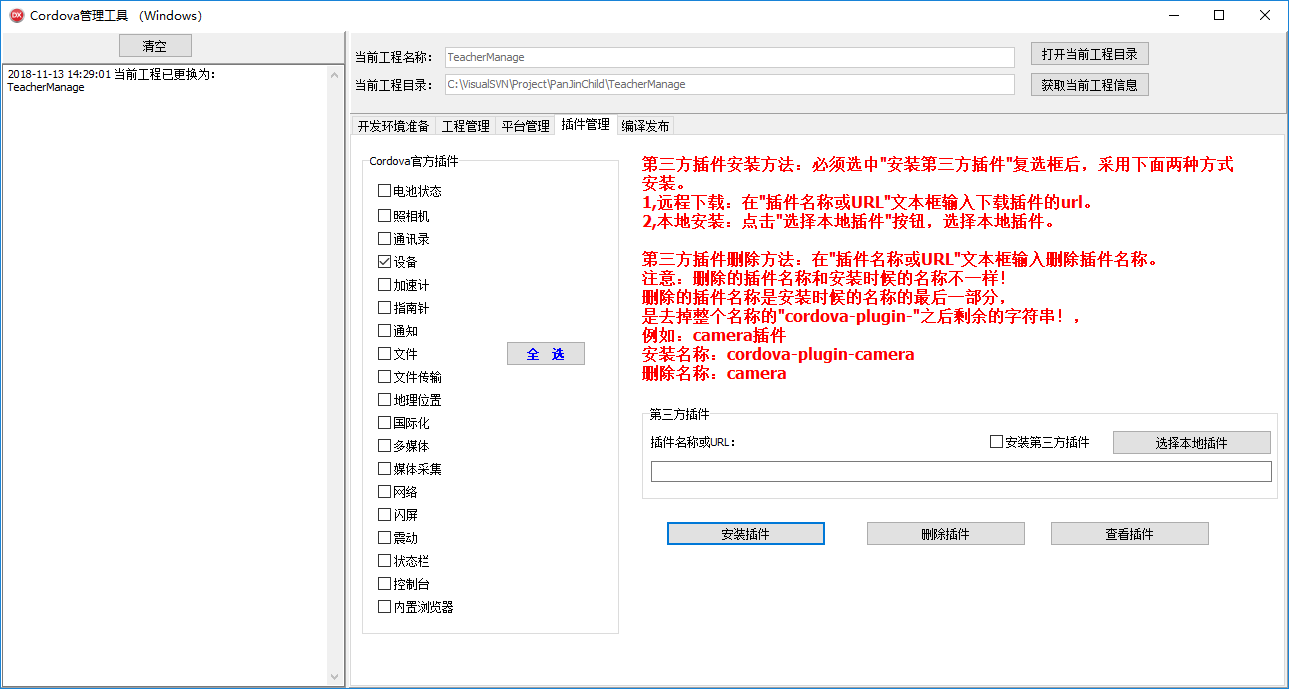
4,Cordova插件管理:添加、删除所有Cordova官方插件;支持第三方插件安装、删除。
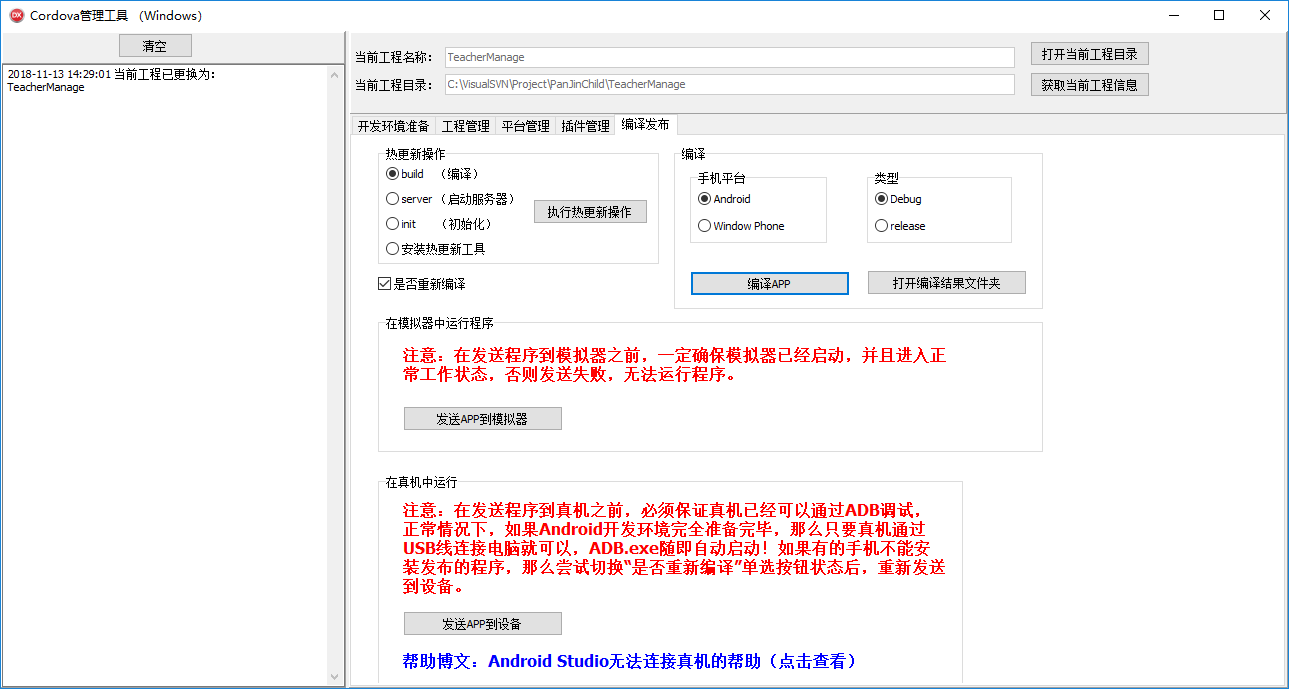
5,编译、发布:支持Android平台APP的编译、发布,可以发布到模拟器或真机。
工具截图:
1,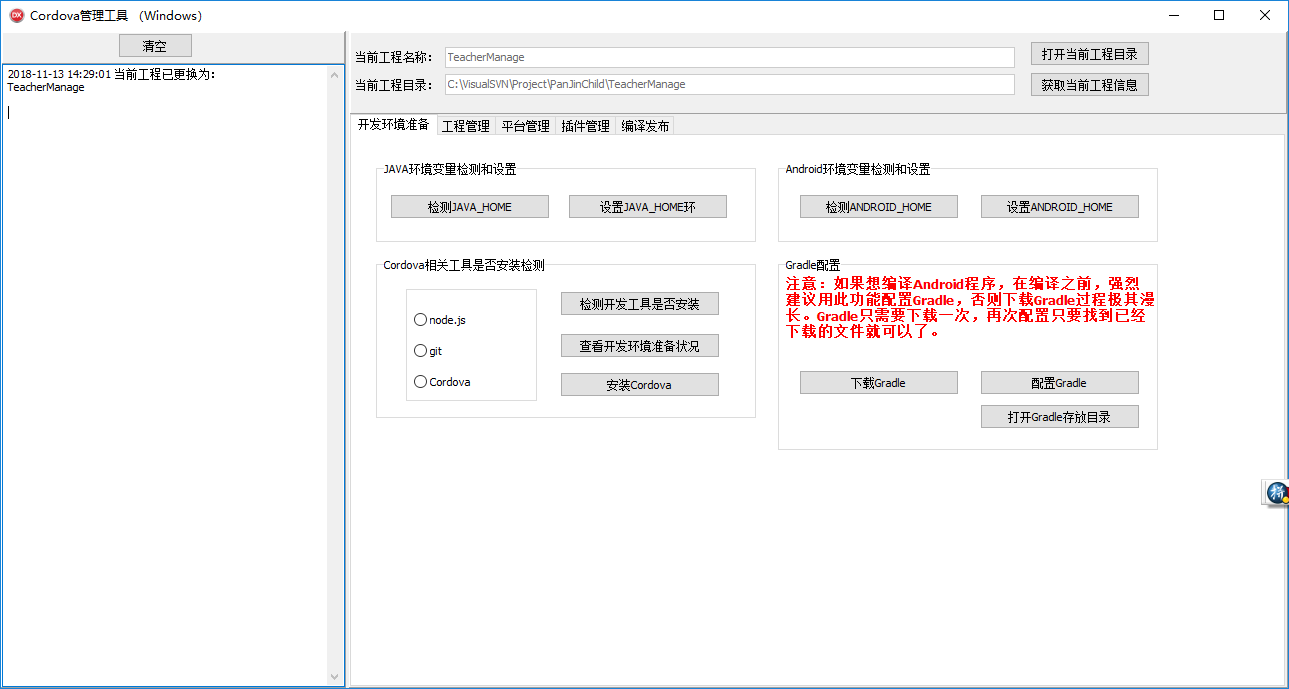
2,

3,
4,
5,
全部源码:
unit Unit1; interface uses
Winapi.Windows, Winapi.Messages, System.SysUtils, System.Variants,
System.Classes, Vcl.Graphics,
Vcl.Controls, Vcl.Forms, Vcl.Dialogs, Vcl.StdCtrls, Vcl.ExtCtrls,
Vcl.ComCtrls, Vcl.Buttons, System.Generics.collections; type
TForm2 = class(TForm)
Panel1: TPanel;
Panel2: TPanel;
clearLogBtn: TButton;
logMemo: TMemo;
Splitter1: TSplitter;
Panel3: TPanel;
PageControl1: TPageControl;
TabSheet1: TTabSheet;
Panel4: TPanel;
projectPathEdt: TEdit;
Label1: TLabel;
TabSheet2: TTabSheet;
TabSheet3: TTabSheet;
TabSheet4: TTabSheet;
TabSheet5: TTabSheet;
GroupBox1: TGroupBox;
Label2: TLabel;
projectNameEdt: TEdit;
Label3: TLabel;
projectIdEdt: TEdit;
openProjectPathBtn: TButton;
GroupBox2: TGroupBox;
androidCBox: TCheckBox;
IOSCBox: TCheckBox;
addPlatformBtn: TButton;
removePlatformBtn: TButton;
windowsCBox: TCheckBox;
getPlatformBtn: TButton;
installPluginBtn: TButton;
Button5: TButton;
Button6: TButton;
GroupBox3: TGroupBox;
checkToolRGroup: TRadioGroup;
installCordovaBtn: TButton;
checkToolBtn: TButton;
GroupBox4: TGroupBox;
checkJavaHomeBtn: TButton;
setJavaHomeBtn: TButton;
GroupBox5: TGroupBox;
checkAndroidHomeBtn: TButton;
setAndroidHomeBtn: TButton;
GroupBox6: TGroupBox;
batteryStatusCBox: TCheckBox;
cameraCBox: TCheckBox;
contactsCBox: TCheckBox;
deviceCBox: TCheckBox;
deviceMotionCBox: TCheckBox;
compassCBox: TCheckBox;
dialogsCBox: TCheckBox;
fileCBox: TCheckBox;
fileTransferCBox: TCheckBox;
geolocationCBox: TCheckBox;
globalizationCBox: TCheckBox;
mediaCBox: TCheckBox;
mediaCaptureCBox: TCheckBox;
networkCBox: TCheckBox;
splashScreenCBox: TCheckBox;
vibrationCBox: TCheckBox;
statusbarCBox: TCheckBox;
consoleCBox: TCheckBox;
inappbrowserCBox: TCheckBox;
selectPluginBitBtn: TBitBtn;
GroupBox7: TGroupBox;
downloadGradleBtn: TButton;
configGradleBtn: TButton;
Label7: TLabel;
OpenDialog1: TOpenDialog;
GroupBox8: TGroupBox;
Label8: TLabel;
pluginNameEdt: TEdit;
selectLocalPluginBtn: TButton;
isInstallThirdCBox: TCheckBox;
GroupBox9: TGroupBox;
buildBtn: TButton;
GroupBox10: TGroupBox;
sendToEmulatorBtn: TButton;
Label10: TLabel;
GroupBox11: TGroupBox;
Label11: TLabel;
sendToDeviceBtn: TButton;
Label12: TLabel;
isRebuildCBox: TCheckBox;
selectPlatformBitBtn: TBitBtn;
delPluginInfoLab: TLabel;
pluginInfoLab: TLabel;
projectListBox: TListBox;
deleteProjectBtn: TButton;
addOldProjectBtn: TButton;
getProjectInfoBtn: TButton;
Button8: TButton;
createProjectBtn: TButton;
curProjectNameEdt: TEdit;
Label4: TLabel;
openAndroidBuildPathBtn: TButton;
openGradleDirBtn: TButton;
chcpRGroup: TRadioGroup;
doChcpBtn: TButton;
buildPlatformRGroup: TRadioGroup;
buildTypeRGroup: TRadioGroup;
procedure clearLogBtnClick(Sender: TObject);
procedure FormCreate(Sender: TObject);
procedure createProjectBtnClick(Sender: TObject);
procedure openProjectPathBtnClick(Sender: TObject);
procedure checkToolBtnClick(Sender: TObject);
procedure installCordovaBtnClick(Sender: TObject);
procedure getProjectInfoBtnClick(Sender: TObject);
procedure getPlatformBtnClick(Sender: TObject);
procedure addPlatformBtnClick(Sender: TObject);
procedure removePlatformBtnClick(Sender: TObject);
procedure installPluginBtnClick(Sender: TObject);
procedure Button5Click(Sender: TObject);
procedure Button6Click(Sender: TObject);
procedure buildBtnClick(Sender: TObject);
procedure Button8Click(Sender: TObject);
procedure checkJavaHomeBtnClick(Sender: TObject);
procedure checkAndroidHomeBtnClick(Sender: TObject);
procedure selectPluginBitBtnClick(Sender: TObject);
procedure downloadGradleBtnClick(Sender: TObject);
procedure configGradleBtnClick(Sender: TObject);
procedure sendToEmulatorBtnClick(Sender: TObject);
procedure sendToDeviceBtnClick(Sender: TObject);
procedure Label12Click(Sender: TObject);
procedure FormClose(Sender: TObject; var Action: TCloseAction);
procedure selectPlatformBitBtnClick(Sender: TObject);
procedure TabSheet4Show(Sender: TObject);
procedure deleteProjectBtnClick(Sender: TObject);
procedure addOldProjectBtnClick(Sender: TObject);
procedure projectListBoxDblClick(Sender: TObject);
procedure selectLocalPluginBtnClick(Sender: TObject);
procedure openAndroidBuildPathBtnClick(Sender: TObject);
procedure openGradleDirBtnClick(Sender: TObject);
procedure doChcpBtnClick(Sender: TObject);
private
{ Private declarations } // 是否程序正在运行
function isExeRunning(exeName: string): boolean;
// 终止进程
procedure KillProc(procname: string);
// 得到特殊目录
function GetSpecialDir(SpecialDirID: Integer): string;
// 得到用户目录
function GetAppDir: string; public
{ Public declarations }
procedure MyLog(tempLog: string); // log方法 // 关闭DOS窗口
procedure KillDosWindow; // 执行单条DOS命令
procedure RunDosCommand(commandStr: string; isPause: boolean); Overload; {
// 同时执行多条DOS命令
stringList:包含要执行DOS命令的TStringList。
isPause:是否执行完毕暂停当前窗口,不关闭
}
procedure RunDosCommand(var stringList: TStringList;
isPause: boolean); Overload; // 判断是否Cordova工程目录
function IsCordovaDir(projectDir: string): boolean; // 进入Cordova工程目录的DOS命令字符串
function CdCordovaDirCommandStr(CordovaDir: string): string; {
得到选中的插件
isAdd:是否添加插件操作(tru,添加;false,删除)
}
function GetSelectedPlugin(isAdd: boolean): string; // 选择插件
procedure SelectPlugin(isSelectAll: boolean); {
得到选中的平台
isAdd:是否添加插件平台(tru,添加;false,删除)
}
function GetSelectedPlatform: string; // 选择平台
procedure SelectPlatform(isSelectAll: boolean); // 显示被管理工程信息
procedure ShowProjectInfo(var projectDic: TDictionary<string, string>;
var projectListBox: TListBox); // 通过工程全路径名称得到工程路径和名称
procedure GetProjectPathAndName(projectDir: string; var projectPath: string;
var projectName: string); // 对ini文件内容操作(添加和删除)
procedure OperateIniFile(iniFileName, section, key, value: string;
isAdd: boolean); // 同步数据
procedure SyncProjectes(var projectDic: TDictionary<string, string>;
var projectListBox: TListBox; iniFileName: string; isDicToIni: boolean); // 延时方法
procedure Delay(msecs: Integer); end; const
{
Gradle工具在用户目录中存放的路径名称 注意:当前cordova版本:8.0.0,如果cordova版本不同,需要注意正在使用的cordova存放Gradle工具目录还是不是这个名称,
如果不是,则直接把下面常量修改成正在使用的Gradle存放目录名称就可以了 我当前版本cordova存放Gradle全路径:
C:\Users\sunylat\.gradle\wrapper\dists\gradle-4.1-all\bzyivzo6n839fup2jbap0tjew
}
GradleDirInUserHome
: string = '.gradle\wrapper\dists\gradle-4.1-all\bzyivzo6n839fup2jbap0tjew'; // cordova命令使用的常量
Cordova: String = 'cordova '; // ini配置文件名称
configFile: string = 'config.ini'; // 默认的工程ID
defaultProjectID: string = 'io.cordova.hellocordova';
// 默认的工程名称
defaultProjectName: string = 'HelloCordova '; // DOS连接命令符合(前面命令必须成功执行,才能执行后面命令)
DosJoinCode: string = '&';
// DOS空白行命令
DosBlankLine: string = 'echo.'; var
Form2: TForm2; logInfo: string; // log信息 // ----------------------------------------- curProjectPath: string; // 当前工程路径(不包括cordova工程目录)
curProjectName: string; // 当前cordova工程名称
curProjectDir: string; // cordova工程全路径名称(curProjectPath + curProjectName) DosCommand: string; // Dos命令 iniFileName: string; // ini文件 isSelectPlugin: boolean; // 是否选中插件 isSelectPlatfom: boolean; // 是否选中平台 // 被管理全部工程的Dictionary
projectDictionary: TDictionary<string, string>; implementation {$R *.dfm} uses
FileCtrl, System.IOUtils, inifiles, ShellAPI, TLHelp32, ShlObj,
System.StrUtils; procedure TForm2.addOldProjectBtnClick(Sender: TObject);
var
tempStr: string;
tempProjectPath, tempProjectName: string; // 临时用的工程路径和工程名称
begin
// 选择工程目录
if SelectDirectory('请选择已有工程的目录!', '', tempStr) = true then
begin
// 通过选择的工程全路径名称得到工程路径和工程名称
self.GetProjectPathAndName(tempStr, tempProjectPath, tempProjectName); // 把选中的工程信息加入到ni文件中
self.OperateIniFile(iniFileName, 'projectes', tempProjectName,
tempProjectPath, true); // 同步数据
self.SyncProjectes(projectDictionary, projectListBox, iniFileName, false); end;
end; procedure TForm2.addPlatformBtnClick(Sender: TObject);
var
tempList: TStringList;
tempCommand: string;
platformStr: string; // 要添加平台命令字符串
begin // 得到选中平台
platformStr := trim(self.GetSelectedPlatform); if platformStr <> '' then
begin
try
tempList := TStringList.Create; // 加入进入工程目录的DOS命令
tempCommand := self.CdCordovaDirCommandStr(curProjectDir);
tempList.Add(tempCommand); // 加入添加平台的cordova命令
tempCommand := 'cordova platform add ' + platformStr + ' --save';
tempList.Add(tempCommand); // 执行所有命令
self.RunDosCommand(tempList, true); finally
tempList.Free;
end;
end
else
begin
showmessage('请选择要添加的平台,随后执行添加平台操作!');
end; end; procedure TForm2.checkJavaHomeBtnClick(Sender: TObject);
begin
// 查看JAVA_HOME环境变量
DosCommand := 'echo %JAVA_HOME%'; // 执行DOS命令
self.RunDosCommand(DosCommand, true);
end; procedure TForm2.checkAndroidHomeBtnClick(Sender: TObject);
begin
// 查看ANDROID_HOME环境变量
DosCommand := 'echo %ANDROID_HOME%'; // 执行DOS命令
self.RunDosCommand(DosCommand, true);
end; procedure TForm2.openAndroidBuildPathBtnClick(Sender: TObject);
const // android debug程序编译输出目录
androidDebugOutputPath = 'platforms\android\app\build\outputs\apk\debug'; // windows phone debug程序编译输出目录
windowsDebugOutputPath = 'platforms\windows\build\windows\debug\anycpu'; var
projectDir, openDir: string;
begin projectDir := trim(projectPathEdt.Text); if projectDir <> '' then
begin if buildPlatformRGroup.ItemIndex = then
begin
openDir := projectDir + '\' + androidDebugOutputPath;
end
else if buildPlatformRGroup.ItemIndex = then
begin
openDir := projectDir + '\' + windowsDebugOutputPath;
end; ShellExecute(Handle, 'open', 'Explorer.exe', PChar(openDir), nil,
SW_SHOWNORMAL);
end; end; procedure TForm2.openProjectPathBtnClick(Sender: TObject); begin if (trim(curProjectPath) <> '') and (trim(curProjectName) <> '') then
begin
ShellExecute(Handle, 'open', 'Explorer.exe', PChar(curProjectDir), nil,
SW_SHOWNORMAL);
end
else
begin
showmessage('请确认是否已经创建过工程?');
end; end; procedure TForm2.createProjectBtnClick(Sender: TObject);
var
projectID: string; // 工程ID tempIniFile: TInifile; // ini配置文件 // 创建工程
procedure CreateProject;
begin
DosCommand := 'cordova create '; {
A,执行添加工程命令
} // 1,在执行命令中加入工程路径
DosCommand := DosCommand + curProjectPath + '\' + curProjectName + ' '; // 工程ID
projectID := trim(projectIdEdt.Text);
if projectID = '' then
begin
projectID := defaultProjectID;
end; // 2,在执行命令中加入工程ID
DosCommand := DosCommand + projectID + ' '; // 3,在执行命令中加入工程名称
DosCommand := DosCommand + curProjectName; // 执行创建工程命令
self.RunDosCommand(DosCommand, true); {
B,把刚创建工程写入ini文件
}
try
tempIniFile := TInifile.Create(iniFileName); // 当前工程名称
tempIniFile.WriteString('curProject', 'name', curProjectName);
// 当前工程目录(不包括cordova工程目录的全路径名称)
tempIniFile.WriteString('curProject', 'path', curProjectPath); finally
tempIniFile.Free;
end; {
C,把刚创建工程加入工程管理Dictionary中
}
projectDictionary.Add(curProjectName, curProjectPath); {
D,重新显示全部工程信息
}
self.ShowProjectInfo(projectDictionary, projectListBox); end; begin // 选择工程目录
if SelectDirectory('请选择保存当前工程的上级文件夹,系统自动创建工程文件夹!', '', curProjectPath) then
begin // 工程名称
if trim(projectNameEdt.Text) <> '' then
begin
curProjectName := trim(projectNameEdt.Text);
end
else
begin
curProjectName := defaultProjectName;
end; if rightStr(curProjectPath, ) = '\' then
begin
// 工程全路径名称
curProjectDir := curProjectPath + curProjectName;
end
else
begin
// 工程全路径名称
curProjectDir := curProjectPath + '\' + curProjectName;
end; if TDirectory.Exists(curProjectDir) = true then
begin
// 2,创建cordova工程
if TDirectory.IsEmpty(curProjectDir) = false then
begin
if MessageBox(,
'执行创建工程操作,如果当前选中工程存放目录已经存在同名工程名称文件夹,则此文件夹将被彻底删除,确定创建吗?', '提醒',
MB_YESNO + MB_ICONWARNING) = IDYES then
begin // 删除已有文件夹(包括所有子文件夹和文件)
TDirectory.Delete(curProjectDir, true); self.Delay(); // 重新创建工程目录
TDirectory.CreateDirectory(curProjectDir); // 执行创建工程
CreateProject; end;
end
else
begin
// 创建工程目录
TDirectory.CreateDirectory(curProjectDir); // 执行创建工程
CreateProject;
end;
end
else
begin
// 创建工程目录
TDirectory.CreateDirectory(curProjectDir); // 执行创建工程
CreateProject;
end; // 显示当前工程名称
curProjectNameEdt.Text := curProjectName;
// 显示创建工程的全路径名称
projectPathEdt.Text := curProjectDir; // 同步工程信息
SyncProjectes(projectDictionary, projectListBox, iniFileName, true); end;
end; procedure TForm2.sendToEmulatorBtnClick(Sender: TObject);
var
tempList: TStringList;
tempCommand: string;
runCommand: string; // 运行安卓程序命令
begin try
tempList := TStringList.Create; tempCommand := self.CdCordovaDirCommandStr(curProjectDir); tempList.Add(tempCommand); // 组装把安卓程序发送到模拟器运行的命令
if isRebuildCBox.Checked = true then
begin
runCommand := 'cordova run android --emulator';
end
else
begin
runCommand := 'cordova run android --nobuild --emulator';
end; // 加入把安卓程序发送到模拟器运行的命令
tempList.Add(runCommand); self.RunDosCommand(tempList, true); finally
tempList.Free; // 窗口最小化到任务栏
Application.Minimize;
end;
end; procedure TForm2.TabSheet4Show(Sender: TObject);
var
tempStr: string;
begin {
1,第三方插件安装方法
}
tempStr := '第三方插件安装方法:必须选中"安装第三方插件"复选框后,采用下面两种方式安装。' + #;
tempStr := tempStr + '1,远程下载:在"插件名称或URL"文本框输入下载插件的url。' + #;
tempStr := tempStr + '2,本地安装:点击"选择本地插件"按钮,选择本地插件。'; // 显示设置第三方插件安装方法
pluginInfoLab.Caption := tempStr; {
2,第三方插件删除方法
}
tempStr := '第三方插件删除方法:在"插件名称或URL"文本框输入删除插件名称。' + #;
tempStr := tempStr + '注意:删除的插件名称和安装时候的名称不一样!' + #;
tempStr := tempStr + '删除的插件名称是安装时候的名称的最后一部分,' + #;
tempStr := tempStr + '是去掉整个名称的"cordova-plugin-"之后剩余的字符串!,' + #;
tempStr := tempStr + '例如:camera插件' + #;
tempStr := tempStr + '安装名称:cordova-plugin-camera' + #;
tempStr := tempStr + '删除名称:camera'; delPluginInfoLab.Caption := tempStr; end; procedure TForm2.sendToDeviceBtnClick(Sender: TObject);
var
tempList: TStringList;
tempCommand: string;
runCommand: string; // 运行安卓程序命令
begin try
tempList := TStringList.Create; tempCommand := self.CdCordovaDirCommandStr(curProjectDir); tempList.Add(tempCommand); // 组装把安卓程序发送到模拟器运行的命令
if isRebuildCBox.Checked = true then
begin
runCommand := 'cordova run android --device';
end
else
begin
runCommand := 'cordova run android --nobuild --device';
end; // 加入把安卓程序发送到模拟器运行的命令
tempList.Add(runCommand); self.RunDosCommand(tempList, true); finally
tempList.Free; // 窗口最小化到任务栏
Application.Minimize;
end;
end; procedure TForm2.installPluginBtnClick(Sender: TObject); var
tempList: TStringList;
tempCommand: string;
pluginStr: string; // 插件列表 {
删除摄像头插件配置文件,如果不删除,则再次安装时候报错,这可能是一个BUG
}
procedure DeleteCameraXml(tempProjectDir: string);
const
// 摄像头插件的配置文件
cameraXml: string =
'platforms\android\app\src\main\res\xml\camera_provider_paths.xml';
var
tempFile: string; // 临时变量
begin // 摄像头插件的配置文件的全路径名称
tempFile := tempProjectDir + '\' + cameraXml;
if TFile.Exists(tempFile) = true then
begin
TFile.Delete(tempFile);
end;
end; begin // 安装第三方插件
if isInstallThirdCBox.Checked = true then
begin
// 得到要安装插件名称或者url
pluginStr := trim(pluginNameEdt.Text); // 可以安装,则直接安装
if pluginStr = '' then
begin
showmessage('要安装的第三方插件名称或者Url不能为空!');
pluginNameEdt.SetFocus;
end; end
else // 安装Cordova官方插件
begin // 得到要安装的插件列表
pluginStr := self.GetSelectedPlugin(true); end; // 如果有要安装的插件,则执行安装
if trim(pluginStr) <> '' then
begin
// 1,删除摄像头插件配置文件
DeleteCameraXml(curProjectDir); // 2,安装指定的插件
try
tempList := TStringList.Create; // 1,加入进入Cordova工程目录命令
tempCommand := self.CdCordovaDirCommandStr(curProjectDir);
tempList.Add(tempCommand); // 2,加入执行安装插件命令
tempCommand := 'cordova plugin add ' + pluginStr +
' --save --searchpath ../plugins';
tempList.Add(tempCommand); // 3,执行安装插件命令
self.RunDosCommand(tempList, true); finally
tempList.Free;
end;
end
else
begin
showmessage('请选择要安装的插件后,在执行安装插件操作!');
end; end; procedure TForm2.openGradleDirBtnClick(Sender: TObject);
var
GradleSaveDir: string; // Gradle最终保持目录名称
userHome: string; // 用户目录
begin // 得到用户目录
userHome := StringReplace(self.GetAppDir, 'AppData\Roaming', '',
[rfReplaceAll]); // Gradle最终保持目录名称
GradleSaveDir := userHome + GradleDirInUserHome; ShellExecute(Handle, 'open', 'Explorer.exe', PChar(GradleSaveDir), nil,
SW_SHOWNORMAL);
end; procedure TForm2.Button5Click(Sender: TObject);
var
tempList: TStringList;
tempCommand: string;
pluginStr: string; // 插件列表
begin // 安装Cordova官方插件
if isInstallThirdCBox.Checked = false then
begin
// 得到要删除的插件列表
pluginStr := self.GetSelectedPlugin(false); end
else // 安装第三方插件
begin // 得到要安装插件名称或者url
pluginStr := trim(pluginNameEdt.Text); // 可以安装,则直接安装
if pluginStr = '' then
begin
showmessage('要安装的第三方插件名称或者Url不能为空!');
pluginNameEdt.SetFocus;
end; end; // 执行删除插件命令
if trim(pluginStr) <> '' then
begin try
tempList := TStringList.Create; // 1,加入进入Cordova工程目录命令
tempCommand := self.CdCordovaDirCommandStr(curProjectDir);
tempList.Add(tempCommand); // 2,加入执行删除插件命令
tempCommand := 'cordova plugin rm ' + pluginStr + ' --save';
tempList.Add(tempCommand); // 3,执行删除插件命令
self.RunDosCommand(tempList, true); finally
tempList.Free;
end;
end
else
begin
showmessage('请选择要删除的插件后,在执行删除插件操作!');
end; end; procedure TForm2.Button6Click(Sender: TObject);
var
tempList: TStringList;
tempCommand: string;
begin try
tempList := TStringList.Create; tempCommand := self.CdCordovaDirCommandStr(curProjectDir); tempList.Add(tempCommand);
tempList.Add('cordova plugin ls'); self.RunDosCommand(tempList, true); finally
tempList.Free;
end; end; procedure TForm2.buildBtnClick(Sender: TObject);
var
tempList: TStringList;
tempCommand: string;
begin try
tempList := TStringList.Create; // 1, 加入进入当前工程目录命令
tempCommand := self.CdCordovaDirCommandStr(curProjectDir);
tempList.Add(tempCommand); if buildPlatformRGroup.ItemIndex = then
begin
// 2,加入编译cordova在安卓平台的程序 if buildTypeRGroup.ItemIndex = then
begin
tempList.Add('cordova build android --debug');
end
else if buildTypeRGroup.ItemIndex = then
begin
// tempList.Add('cordova build android --release -- --keystore="..\android.keystore" --storePassword=android --alias=mykey');
end; end
else if buildPlatformRGroup.ItemIndex = then
begin
// 2,加入编译cordova在windows平台的程序 if buildTypeRGroup.ItemIndex = then
begin
tempList.Add('cordova build windows --debug');
end
else if buildTypeRGroup.ItemIndex = then
begin
// tempList.Add('cordova build android --release -- --keystore="..\android.keystore" --storePassword=android --alias=mykey');
end;
end; // 执行命令
self.RunDosCommand(tempList, true); finally
tempList.Free;
end;
end; procedure TForm2.Button8Click(Sender: TObject);
var
tempList: TStringList;
tempCommand: string;
begin try
tempList := TStringList.Create; tempCommand := self.CdCordovaDirCommandStr(curProjectDir); // browser ~5.0.1
// osx ~4.0.1
// windows ~5.0.0
// www ^3.12.0 tempList.Add(tempCommand);
tempList.Add('cordova requirements '); self.RunDosCommand(tempList, true); finally
tempList.Free;
end;
end; procedure TForm2.getProjectInfoBtnClick(Sender: TObject); var
stringList: TStringList;
tempStr: string;
projectDisk: string; // 工程目录存放磁盘的盘符
tempProjectPath: string;
begin // 通过工程全路径名称得到所在磁盘盘符
projectDisk := ExtractFileDrive(curProjectDir); // 得到去除盘符之后的路径名称
tempProjectPath := rightStr(curProjectDir, length(curProjectDir) - );
// 命令例子:cd cordovaTest\test\HelloCordova
if projectDisk = 'C:' then
begin
tempStr := 'cd ' + curProjectDir;
end
else
begin
tempStr := 'cd ' + tempProjectPath;
end; // 创建并执行查看工程信息命令
try
stringList := TStringList.Create; stringList.Add(projectDisk);
stringList.Add(tempStr);
stringList.Add('echo 工程信息:');
stringList.Add(DosBlankLine);
stringList.Add('cordova info'); // 测试信息
stringList.Add(DosBlankLine);
stringList.Add('cordova platform ls'); self.RunDosCommand(stringList, true); finally
stringList.Free;
end; end; procedure TForm2.getPlatformBtnClick(Sender: TObject);
var
tempList: TStringList;
tempCommand: string;
begin try
tempList := TStringList.Create; tempCommand := self.CdCordovaDirCommandStr(curProjectDir); tempList.Add(tempCommand);
tempList.Add('cordova platform ls'); self.RunDosCommand(tempList, true); finally
tempList.Free;
end; end; procedure TForm2.checkToolBtnClick(Sender: TObject);
var
ItemIndex: Integer; // 工具选中ID
begin ItemIndex := checkToolRGroup.ItemIndex; if ItemIndex = - then
begin
showmessage('请选择要检测的工具!');
end
else
begin // 如果没有项目选中,则提示用户选择
if ItemIndex = then
begin
// 查看node.js版本
DosCommand := 'node -v'; // 执行DOS命令
self.RunDosCommand(DosCommand, true);
end
else if ItemIndex = then
begin
// 查看phonegap版本
DosCommand := 'git --version'; // 执行DOS命令
self.RunDosCommand(DosCommand, true);
end
else if ItemIndex = then
begin
// 查看cordova版本
DosCommand := 'cordova -v'; // 执行DOS命令
self.RunDosCommand(DosCommand, true);
end; end; end; procedure TForm2.clearLogBtnClick(Sender: TObject);
begin
logMemo.Clear; // projectDictionary.Add('ccc', 'e:\abc\def');
// projectDictionary.Add('dddd', 'f:\uio\wer');
// self.SyncProjectes(projectDictionary, projectListBox, iniFileName, true); // self.SyncProjectes(projectDictionary, projectListBox, iniFileName, false);
// MyLog(projectDictionary.ToString);
// MyLog(IntToStr(projectDictionary.Count));
end; procedure TForm2.configGradleBtnClick(Sender: TObject);
var
GradleZipFileName: string; // gradle下载文件名
GradleSaveDir: string; // Gradle最终保持目录名称
destFile: string; // 存放gradle的文件名
userHome: string; // 用户目录
begin
if OpenDialog1.Execute then
begin // 得到用户目录
userHome := StringReplace(self.GetAppDir, 'AppData\Roaming', '',
[rfReplaceAll]); // Gradle最终保持目录名称
GradleSaveDir := userHome + GradleDirInUserHome; {
1,准备gradle存放目录
} // 删除非空的gradle存放目录
if TDirectory.Exists(GradleSaveDir) = true then
begin
TDirectory.Delete(GradleSaveDir, true);
end;
// 创建gradle存放
TDirectory.CreateDirectory(GradleSaveDir); // 2,拷贝下载文件到gradle存放目录
GradleZipFileName := ExtractFileName(OpenDialog1.FileName);
destFile := GradleSaveDir + '\' + GradleZipFileName;
TFile.Copy(trim(OpenDialog1.FileName), destFile); MyLog('gradle配置完毕!'); end;
end; procedure TForm2.deleteProjectBtnClick(Sender: TObject);
var
delProjectName: string; // 要删除工程名称
iniFile: TInifile;
begin
if projectListBox.ItemIndex <> - then
begin
// 得到要删除工程名称
delProjectName := trim(projectListBox.Items[projectListBox.ItemIndex]); try
iniFile := TInifile.Create(iniFileName); // 1,从全部被管理工程里面删除当前要删除的工程
iniFile.DeleteKey('projectes', delProjectName); // 同步数据
self.SyncProjectes(projectDictionary, projectListBox, iniFileName, false); {
如果删除工程是当前管理工程,则进一步处理,
A,清理当前工程全局变量
B,从程序界面上消除显示信息
c,删除ini配置信息
}
if delProjectName = curProjectName then
begin
// A,清理当前工程全局变量
curProjectPath := '';
curProjectName := '';
curProjectDir := ''; // B,从程序界面上消除显示信息
curProjectNameEdt.Clear;
projectPathEdt.Clear; // c,删除ini配置信息
iniFile.WriteString('curProject', 'name', '');
iniFile.WriteString('curProject', 'path', ''); end; finally
iniFile.Free;
end; end;
end; procedure TForm2.doChcpBtnClick(Sender: TObject);
var
tempList: TStringList;
tempCommand: string;
ItemIndex: Integer; // 选中项目ID
begin // 得到选中项目ID
ItemIndex := chcpRGroup.ItemIndex; // 有项目选中,则执行具体操作
if ItemIndex <> - then
begin
try
tempList := TStringList.Create; if ItemIndex = then
begin
tempList.Add('npm install -g cordova-hot-code-push-cli');
end
else
begin
// 1, 加入进入当前工程目录命令
tempCommand := self.CdCordovaDirCommandStr(curProjectDir);
tempList.Add(tempCommand); case ItemIndex of
:
begin
tempList.Add('cordova-hcp build');
end;
:
begin
tempList.Add('cordova-hcp server');
end;
:
begin
tempList.Add('cordova-hcp init');
end;
end; end; // 执行命令
self.RunDosCommand(tempList, true); finally
tempList.Free;
end;
end; end; procedure TForm2.downloadGradleBtnClick(Sender: TObject);
const
// Gradle配置文件名称
GradleWapperFile
: string = '\platforms\android\gradle\wrapper\gradle-wrapper.properties';
GradleUrlKey: string = 'distributionUrl'; // 下载Gradle的网址key
var
WapperFile: string; // Gradle配置文件权路径名称
tempList: TStringList;
tempUrl: string;
begin
WapperFile := curProjectDir + GradleWapperFile; // 如果Gradle配置文件存在,则获取下载url,并且下载对应版本的Gradle
if TFile.Exists(WapperFile) = true then
begin
try
tempList := TStringList.Create;
tempList.LoadFromFile(WapperFile); // 得到配置文件中当前版本的gradle下载地址
tempUrl := tempList.Values[GradleUrlKey]; // 去掉"\"
tempUrl := StringReplace(tempUrl, '\', '', [rfReplaceAll]); // 打开浏览器下载gradle
ShellExecute(, nil, PChar(tempUrl), nil, nil, ); finally
tempList.Free;
end;
end
else
begin
showmessage('Gradle配置文件不存在,请确认是否添加了Android平台,如果未添加,请添加后执行此操作!');
end;
end; procedure TForm2.FormClose(Sender: TObject; var Action: TCloseAction);
begin
// 关闭打开的DOS窗口
self.KillDosWindow; // 释放被管理工程Dictionary
projectDictionary.Free;
end; procedure TForm2.FormCreate(Sender: TObject);
var
iniFile: TInifile;
tempList: TStringList;
i: Integer;
begin // 是否选中插件默认值为false
isSelectPlugin := false; // 是否选中平台默认值为false
isSelectPlatfom := false; // --------------------------------------------
// 从ini文件获取被管理的工程 // 被管理全部工程的Dictionary
projectDictionary := TDictionary<string, string>.Create; try
// ini配置文件
iniFileName := ExtractFilePath(ParamStr()) + configFile; // 实例化inifile类
iniFile := TInifile.Create(iniFileName); {
A,得到当前正在管理工程信息
} // 1,得到cordova工程目录
curProjectPath := iniFile.ReadString('curProject', 'path', ''); // 2,得到工程名称
curProjectName := iniFile.ReadString('curProject', 'name', '');
curProjectNameEdt.Text := curProjectName; // 工程目录
// curProjectDir := curProjectPath + '\' + curProjectName; if trim(curProjectName) <> '' then
begin
if rightStr(curProjectPath, ) = '\' then
begin
// 工程全路径名称
curProjectDir := curProjectPath + curProjectName;
end
else
begin
// 工程全路径名称
curProjectDir := curProjectPath + '\' + curProjectName;
end; // 显示工程目录
projectPathEdt.Text := curProjectDir;
end; {
B,得到全部被管理工程信息
}
tempList := TStringList.Create;
iniFile.ReadSectionValues('projectes', tempList);
// 如果有被管理网站,则继续处理
if tempList.Count > then
begin // 遍历被管理网站
for i := to tempList.Count - do
begin
// 加入管理Dictionary中
projectDictionary.Add(tempList.KeyNames[i], tempList.ValueFromIndex[i]); // 在程序界面显示被管理网站名称
projectListBox.Items.Add(tempList.KeyNames[i]);
end; end; finally
iniFile.Free;
tempList.Free;
end; end; procedure TForm2.installCordovaBtnClick(Sender: TObject);
begin
if MessageBox(, 'node.js和git已经都安装完毕了吗?', '提醒', MB_YESNO + MB_ICONWARNING) = IDYES
then
begin // // 关闭正在打开的DOS窗口
// self.KillDosWindow; // 安装cordova
DosCommand := 'npm install -g cordova'; // 执行DOS命令
self.RunDosCommand(DosCommand, true);
end;
end; // log方法
procedure TForm2.MyLog(tempLog: string);
var
temp: string;
oldLog: string;
begin
if trim(tempLog) <> '' then
begin oldLog := trim(logMemo.Text);
logMemo.Clear; temp := FormatDateTime('yyyy-mm-dd hh:mm:ss', now) + ' ' + trim(tempLog);
if oldLog = '' then
begin
logMemo.Lines.Add(temp);
logMemo.Lines.Add('');
end
else
begin
logMemo.Lines.Add(temp);
logMemo.Lines.Add('');
logMemo.Lines.Add(oldLog);
end; end; end; procedure TForm2.removePlatformBtnClick(Sender: TObject);
var
tempList: TStringList;
tempCommand: string;
platformStr: string; // 要添加平台命令字符串
begin // 得到选中平台
platformStr := trim(self.GetSelectedPlatform); if platformStr <> '' then
begin
try
tempList := TStringList.Create; // 加入进入工程目录的DOS命令
tempCommand := self.CdCordovaDirCommandStr(curProjectDir);
tempList.Add(tempCommand); // 加入添加平台的cordova命令
tempCommand := 'cordova platform rm ' + platformStr + ' --save';
tempList.Add(tempCommand); // 执行所有命令
self.RunDosCommand(tempList, true); finally
tempList.Free;
end;
end
else
begin
showmessage('请选择要删除的平台,随后执行删除平台操作!');
end; // try
// tempList := TStringList.Create;
//
// tempCommand := self.CdCordovaDirCommandStr(projectDir);
//
// tempList.Add(tempCommand);
// tempList.Add('cordova platform rm android ios windows --save');
//
// self.RunDosCommand(tempList, true);
//
// finally
// tempList.Free;
// end;
end; // 关闭DOS窗口
procedure TForm2.KillDosWindow;
const
dosName: string = 'cmd.exe'; // DOS程序名称
begin
// 如果有DOS窗口打开,则强制关闭
if self.isExeRunning(dosName) = true then
begin
// 关闭DOS窗口
self.KillProc(dosName); // 延时,以便先前DOS窗口彻底关闭
sleep();
end;
end; // 执行DOS命令
procedure TForm2.RunDosCommand(commandStr: string; isPause: boolean);
const
// DOS命令加暂停关闭窗口的语句
commandHead: string = '/c ';
PauseWindow: string = ' & pause';
var
DosCommand: string; // Dos命令 begin // tempStr := '/c ping 192.168.1.1 & pause'; KillDosWindow; // 组装DOS命令
DosCommand := commandHead + trim(commandStr); // 添加执行完操作后的暂停命令
if isPause = true then
begin
DosCommand := DosCommand + PauseWindow;
end; // 打开DOS窗口,执行指定的命令
ShellExecute(Handle, nil, 'cmd.exe', PChar(DosCommand), nil, sw_normal); end; // 判断是否Cordova工程目录
function TForm2.IsCordovaDir(projectDir: string): boolean;
const
wwwDir: string = 'www'; // Cordova工程目录中的"www"目录名
pluginsDir: string = 'plugins'; // Cordova工程目录中的"plugins"目录名
platformsDir: string = 'platforms'; // Cordova工程目录中的"plugins"目录名
hooksDir: string = 'hooks'; // Cordova工程目录中的"plugins"目录名
var
tempWwwDir: string;
tempPluginsDir: string;
tempPlatformsDir: string;
tempHooksDir: string; isTrue: boolean;
begin
// Cordova工程目录中的"www"目录
tempWwwDir := trim(projectDir) + '\' + wwwDir; // Cordova工程目录中的"plugins"目录
tempPluginsDir := trim(projectDir) + '\' + pluginsDir; // Cordova工程目录中的"plugins"目录
tempPlatformsDir := trim(projectDir) + '\' + platformsDir; // Cordova工程目录中的"plugins"目录
tempHooksDir := trim(projectDir) + '\' + hooksDir; // 只有同时这四个目录都存在时候,才判断当前目录是Cordova工程目录
if (TDirectory.Exists(tempWwwDir) = true) and
(TDirectory.Exists(tempPluginsDir) = true) and
(TDirectory.Exists(tempPlatformsDir) = true) and
(TDirectory.Exists(tempHooksDir) = true) then
begin
isTrue := true;
end; result := isTrue;
end; procedure TForm2.RunDosCommand(var stringList: TStringList; isPause: boolean);
const
// DOS连接命令符合(前面命令必须成功执行,才能执行后面命令)
DosJoinCode: string = '&&';
dosName: string = 'cmd.exe';
var
i: Integer;
commandStr: string;
begin // 如果有要执行的命令,则拼装命令
if stringList.Count > then
begin // 拼装命令
for i := to stringList.Count - do
begin
// 第一个命令,直接赋值
if i = then
begin
commandStr := stringList[i];
end
else
begin
// 其余命令依次添加到先前命令后,并且加入DOS多个命令链接符号"&&"
commandStr := commandStr + DosJoinCode + stringList[i];
end;
end; // MyLog(commandStr); // // 关闭正在打开的DOS窗口
// self.KillDosWindow; // 执行DOS命令
self.RunDosCommand(commandStr, isPause); end; end; procedure TForm2.selectLocalPluginBtnClick(Sender: TObject);
begin
if OpenDialog1.Execute then
begin
pluginNameEdt.Text := trim(OpenDialog1.FileName);
end;
end; // 是否程序正在运行
function TForm2.isExeRunning(exeName: string): boolean;
var
lppe: TProcessEntry32;
isFound: boolean;
Hand: THandle;
tempName: string; // 程序名称
temp: boolean; // 返回值变量
judgePos: Integer; // 扩展名判断位置
begin
Hand := CreateToolhelp32Snapshot(TH32CS_SNAPALL, );
lppe.dwSize := Sizeof(lppe); // 必须设置此值
isFound := Process32First(Hand, lppe); temp := false; // 返回的布尔值 // 程序名称变量
tempName := trim(exeName); // 扩展名分隔符位置
judgePos := Pos('.', tempName); // 判断是否有扩展名
if judgePos = then
begin
tempName := tempName + '.exe'; // 添加".exe"扩展名
end
else
begin
if length(Copy(tempName, judgePos, )) < then
begin
// 删除不符合添加的扩展名
Delete(tempName, judgePos, (length(tempName) - judgePos + ));
// 添加".exe"扩展名
tempName := tempName + '.exe';
end;
end; // 循环判断是否有相同名称程序
while isFound do
begin // 判断当前程序名称和指定程序名称相同
if lppe.szExeFile = tempName then
begin
temp := true;
Break;
end; // Memo1.Lines.Add(IntToStr(i) + ' : ' +IntToStr(lppe.th32ProcessID)+' '+ StrPas(lppe.szExeFile));
isFound := Process32Next(Hand, lppe);
end; result := temp;
end; procedure TForm2.selectPluginBitBtnClick(Sender: TObject);
begin
if isSelectPlugin = false then
begin
self.SelectPlugin(true);
end
else
begin
self.SelectPlugin(false);
end;
end; // 杀死进程
procedure TForm2.KillProc(procname: string);
const
PROCESS_TERMINATE = $;
var
ExeFileName: String;
ContinueLoop: Bool;
FSnapshotHandle: THandle;
FProcessEntry32: TProcessEntry32;
begin
ExeFileName := procname;
FSnapshotHandle := CreateToolhelp32Snapshot(TH32CS_SNAPPROCESS, );
FProcessEntry32.dwSize := Sizeof(FProcessEntry32);
ContinueLoop := Process32First(FSnapshotHandle, FProcessEntry32);
while Integer(ContinueLoop) <> do
begin
if ((UpperCase(ExtractFileName(FProcessEntry32.szExeFile))
= UpperCase(ExeFileName)) or (UpperCase(FProcessEntry32.szExeFile)
= UpperCase(ExeFileName))) then
TerminateProcess(OpenProcess(PROCESS_TERMINATE, Bool(),
FProcessEntry32.th32ProcessID), );
ContinueLoop := Process32Next(FSnapshotHandle, FProcessEntry32);
end;
end; procedure TForm2.Label12Click(Sender: TObject);
const
asHelpUrl = 'https://www.cnblogs.com/sunylat/p/9674666.html';
begin
ShellExecute(Handle, 'open', 'Explorer.exe', PChar(asHelpUrl), nil, );
end; // 进入Cordova工程目录的DOS命令字符串
function TForm2.CdCordovaDirCommandStr(CordovaDir: string): string;
var
dirStr: string; // 不包含盘符的cordova工程全路径名
commandStr: string;
begin
dirStr := trim(CordovaDir); commandStr := 'cd /d ' + dirStr; result := commandStr;
end; // 得到选中的插件
function TForm2.GetSelectedPlugin(isAdd: boolean): string;
const
spaceLetter: string = ' ';
var
tempStr: string;
begin tempStr := ''; // 1,电池状态
if batteryStatusCBox.Checked = true then
begin
tempStr := tempStr + 'cordova-plugin-battery-status' + spaceLetter;
end; // 2,照相机
if cameraCBox.Checked = true then
begin
tempStr := tempStr + 'cordova-plugin-camera' + spaceLetter;
end; // 3,通讯录
if contactsCBox.Checked = true then
begin
tempStr := tempStr + 'cordova-plugin-contacts' + spaceLetter;
end; // 4,设备
if deviceCBox.Checked = true then
begin
tempStr := tempStr + 'cordova-plugin-device' + spaceLetter;
end; // 5,加速计
if deviceMotionCBox.Checked = true then
begin
tempStr := tempStr + 'cordova-plugin-device-motion' + spaceLetter;
end; // 6,指南针
if compassCBox.Checked = true then
begin
tempStr := tempStr + 'cordova-plugin-device-orientation' + spaceLetter;
end; // 7,通知
if dialogsCBox.Checked = true then
begin
tempStr := tempStr + 'cordova-plugin-dialogs' + spaceLetter;
end; // 8,文件
if fileCBox.Checked = true then
begin
tempStr := tempStr + 'cordova-plugin-file' + spaceLetter;
end; // 9,文件传输
if fileTransferCBox.Checked = true then
begin
tempStr := tempStr + 'cordova-plugin-file-transfer' + spaceLetter;
end; // 10,地理位置
if geolocationCBox.Checked = true then
begin
tempStr := tempStr + 'cordova-plugin-geolocation' + spaceLetter;
end; // 11,国际化
if globalizationCBox.Checked = true then
begin
tempStr := tempStr + 'cordova-plugin-globalization' + spaceLetter;
end; // 12,多媒体
if mediaCBox.Checked = true then
begin
tempStr := tempStr + 'cordova-plugin-media' + spaceLetter;
end; // 13,多媒体采集
if mediaCaptureCBox.Checked = true then
begin
tempStr := tempStr + 'cordova-plugin-media-capture' + spaceLetter;
end; // 14,网络
if networkCBox.Checked = true then
begin
tempStr := tempStr + 'cordova-plugin-network-information' + spaceLetter;
end; // 15,闪屏
if splashScreenCBox.Checked = true then
begin
tempStr := tempStr + 'cordova-plugin-splashscreen' + spaceLetter;
end; // 16,震动
if vibrationCBox.Checked = true then
begin
tempStr := tempStr + 'cordova-plugin-vibration' + spaceLetter;
end; // 17,状态栏
if statusbarCBox.Checked = true then
begin
tempStr := tempStr + 'cordova-plugin-statusbar' + spaceLetter;
end; // 18,控制台
if consoleCBox.Checked = true then
begin
tempStr := tempStr + 'cordova-plugin-console' + spaceLetter;
end; // 19,内置浏览器
if inappbrowserCBox.Checked = true then
begin
tempStr := tempStr + 'cordova-plugin-inappbrowser' + spaceLetter;
end; // 删除插件操作,需要把"cordova-plugin-"这些字符去掉
if isAdd = false then
begin
if trim(tempStr) <> '' then
begin
// 替换字符串
tempStr := StringReplace(tempStr, 'cordova-plugin-', '', [rfReplaceAll]);
end;
end; result := tempStr;
end; // 选择插件
procedure TForm2.SelectPlugin(isSelectAll: boolean);
begin // 1,电池状态
batteryStatusCBox.Checked := isSelectAll; // 2,照相机
cameraCBox.Checked := isSelectAll; // 3,通讯录
contactsCBox.Checked := isSelectAll; // 4,设备
deviceCBox.Checked := isSelectAll; // 5,加速计
deviceMotionCBox.Checked := isSelectAll; // 6,指南针
compassCBox.Checked := isSelectAll; // 7,通知
dialogsCBox.Checked := isSelectAll; // 8,文件
fileCBox.Checked := isSelectAll; // 9,文件传输
fileTransferCBox.Checked := isSelectAll; // 10,地理位置
geolocationCBox.Checked := isSelectAll; // 11,国际化
globalizationCBox.Checked := isSelectAll; // 12,多媒体
mediaCBox.Checked := isSelectAll; // 13,多媒体采集
mediaCaptureCBox.Checked := isSelectAll; // 14,网络
networkCBox.Checked := isSelectAll; // 15,闪屏
splashScreenCBox.Checked := isSelectAll; // 16,震动
vibrationCBox.Checked := isSelectAll; // 17,状态栏
statusbarCBox.Checked := isSelectAll; // 18,控制台
consoleCBox.Checked := isSelectAll; // 19,内置浏览器
inappbrowserCBox.Checked := isSelectAll; // 设置是否已经选择全部插件的值
isSelectPlugin := isSelectAll; if isSelectAll = true then
begin
selectPluginBitBtn.Caption := '全 不 选';
selectPluginBitBtn.Font.Color := clRed;
end
else
begin
selectPluginBitBtn.Caption := '全 选';
selectPluginBitBtn.Font.Color := clBlue;
end; end; // 得到特殊目录
function TForm2.GetSpecialDir(SpecialDirID: Integer): string;
var
pidl: PItemIDList;
Path: array [ .. MAX_PATH] of Char;
begin
SHGetSpecialFolderLocation(, SpecialDirID, pidl);
SHGetPathFromIDList(pidl, Path);
result := Path;
end; // 得到用户目录
function TForm2.GetAppDir: string;
begin
result := GetSpecialDir(CSIDL_APPDATA);
end; {
得到选中的平台
isAdd:是否添加插件平台(tru,添加;false,删除)
}
function TForm2.GetSelectedPlatform: string;
const
spaceLetter: string = ' ';
var
tempStr: string;
begin tempStr := ''; // 1,androidwindows
if androidCBox.Checked = true then
begin
tempStr := tempStr + 'android' + spaceLetter;
end; // 2,ios平台
if IOSCBox.Checked = true then
begin
tempStr := tempStr + 'ios' + spaceLetter;
end; // 3,windows平台
if windowsCBox.Checked = true then
begin
tempStr := tempStr + 'windows' + spaceLetter;
end; result := tempStr;
end; // 选择平台
procedure TForm2.SelectPlatform(isSelectAll: boolean);
begin // 安卓平台
androidCBox.Checked := isSelectAll; // IOS平台
IOSCBox.Checked := isSelectAll; // Windows(8.1, 10,Phone 8.1)
windowsCBox.Checked := isSelectAll; isSelectPlatfom := isSelectAll; if isSelectAll = true then
begin
selectPlatformBitBtn.Caption := '全 不 选';
selectPlatformBitBtn.Font.Color := clRed;
end
else
begin
selectPlatformBitBtn.Caption := '全 选';
selectPlatformBitBtn.Font.Color := clBlue;
end;
end; procedure TForm2.selectPlatformBitBtnClick(Sender: TObject);
begin
if isSelectPlatfom = false then
begin
self.SelectPlatform(true);
end
else
begin
self.SelectPlatform(false);
end;
end; // 显示被管理工程信息
procedure TForm2.ShowProjectInfo(var projectDic: TDictionary<string, string>;
var projectListBox: TListBox);
var
i: Integer;
siteNameStr: string; // 被管理网站名称
begin // 清除先前显示信息
projectListBox.Clear; // 如果有被管理网站,则继续处理
if projectDic.Count > then
begin // 遍历被管理网站
for siteNameStr in projectDic.Keys do
begin
// 添加被管理网站名称到ListBox上
projectListBox.Items.Add(siteNameStr);
end; end; end; // 通过工程全路径名称得到工程路径和名称
procedure TForm2.GetProjectPathAndName(projectDir: string;
var projectPath: string; var projectName: string);
var
lastPos: Integer; // 全路径名称中最后一个"\"出现位置
begin // 全路径名称中最后一个"\"出现位置
lastPos := LastDelimiter('\', projectDir); // 得到路径名称
projectPath := LeftStr(projectDir, lastPos - ); // 得到工程名称
projectName := rightStr(projectDir, length(projectDir) - lastPos);
end; // 对ini文件内容操作(添加和删除)
procedure TForm2.OperateIniFile(iniFileName, section, key, value: string;
isAdd: boolean);
var
iniFile: TInifile;
begin
try
iniFile := TInifile.Create(iniFileName); if isAdd = true then
begin
iniFile.WriteString(section, key, value);
end
else
begin
iniFile.DeleteKey(section, key);
end; finally
iniFile.Free;
end;
end; procedure TForm2.projectListBoxDblClick(Sender: TObject);
begin
if projectListBox.ItemIndex <> - then
begin
// 被选中工程名称
curProjectName := trim(projectListBox.Items[projectListBox.ItemIndex]);
curProjectNameEdt.Text := curProjectName; // 工程路径
curProjectPath := projectDictionary.Items[curProjectName]; // 工程名称
if rightStr(curProjectPath, ) = '\' then
begin
// 工程全路径名称
curProjectDir := curProjectPath + curProjectName;
end
else
begin
// 工程全路径名称
curProjectDir := curProjectPath + '\' + curProjectName;
end;
projectPathEdt.Text := curProjectDir; // 把工程名称写入当前工程名称
self.OperateIniFile(iniFileName, 'curProject', 'name',
curProjectName, true); // 把工程路径写入当前工程路径
self.OperateIniFile(iniFileName, 'curProject', 'path',
curProjectPath, true); logInfo := '当前工程已更换为:' + ##;
logInfo := logInfo + curProjectName;
self.MyLog(logInfo); end;
end; // 同步数据
procedure TForm2.SyncProjectes(var projectDic: TDictionary<string, string>;
var projectListBox: TListBox; iniFileName: string; isDicToIni: boolean);
var
iniFile: TInifile;
tempList: TStringList;
i: Integer;
key: string;
begin try
iniFile := TInifile.Create(iniFileName);
tempList := TStringList.Create; if isDicToIni = true then
begin
// 删除被管理工程原有小节信息
iniFile.EraseSection('projectes'); // 清除ListBox显示数据
projectListBox.Clear; // 把Dictionary中所有被管理工程信息写入Ini
for key in projectDic.Keys do
begin // 写入ini文件
iniFile.WriteString('projectes', key, projectDic.Items[key]); // 在ListBox上显示数据
projectListBox.Items.Add(key);
end; end
else
begin
// 清除Dictionary先前数据
projectDic.Clear; // 清除ListBox显示数据
projectListBox.Clear; iniFile.ReadSectionValues('projectes', tempList);
// 如果有被管理网站,则继续处理
if tempList.Count > then
begin // 遍历被管理网站
for i := to tempList.Count - do
begin
// 加入管理Dictionary中
projectDic.Add(tempList.KeyNames[i], tempList.ValueFromIndex[i]); // 在程序界面显示被管理网站名称
projectListBox.Items.Add(tempList.KeyNames[i]);
end; end; end;
finally
iniFile.Free;
tempList.Free;
end; end; // 延时
procedure TForm2.Delay(msecs: Integer);
var
Tick: DWORD;
Event: THandle;
begin
Event := CreateEvent(nil, false, false, nil);
try
Tick := GetTickCount + DWORD(msecs);
while (msecs > ) and (MsgWaitForMultipleObjects(, Event, false, msecs,
QS_ALLINPUT) <> WAIT_TIMEOUT) do
begin
Application.ProcessMessages;
msecs := Tick - GetTickCount;
end;
finally
CloseHandle(Event);
end;
end; end.
Cordova - Windows版本图形界面管理工具,告别命令行输入方式!的更多相关文章
- Windows Azure Storage图形界面管理工具
上一篇我们介绍了用PowerShell将Windows Azure的存储服务当网盘来使用.如果感觉还不够简单,那么这次我们来看看还有哪些使用起来更方便的图形界面管理工具吧.当然,这些工具必要支持中国版 ...
- 10款最好用的MySQL数据库客户端图形界面管理工具
MySQL Workbench 该工具由MySQL开发,是一个跨平台的可视化数据库设计工具.它是DBDesigner4项目备受期待的替代者,它是一个本地图形化工具,支持的操作系统包括Windows.L ...
- redis的图形界面管理工具:phpredisadmin
大部分人都知道redis是一款用在缓存服务器上的软件,它与memcache类似,都可以存储海量的数据,用在大访问量的web网站.聊天记录存放等方面,但是又与memcache不同: 1.缓存数据可以持久 ...
- 使用图形界面管理工具Navicat for MySQL连接Mysql数据库时提示错误:Can't connect to MySQL server (10060)
版权声明:本文为 testcs_dn(微wx笑) 原创文章,非商用自由转载-保持署名-注明出处,谢谢. https://blog.csdn.net/testcs_dn/article/details/ ...
- redis的图形界面管理工具
大部分人都知道redis是一款用在缓存服务器上的软件,它与memcache类似,都可以存储海量的数据,用在大访问量的web网站.聊天记录存放等方面,但是又与memcache不同: 1.缓存数据可以持久 ...
- 搭建KVM环境——07 带GUI的Linux上安装KVM图形界面管理工具
清空yum源缓存,并查看yun源 [root@CentOS2 ~]# yum clean all Loaded plugins: fastestmirror, langpacks Cleaning r ...
- 9款最好用的MySQL数据库客户端图形界面管理工具,第三款我用了10年
MySQL的管理维护工具非常多,除了系统自带的命令行管理工具之外,还有许多其他的图形化管理工具,这里我介绍几个经常使用的MySQL图形化管理工具,供大家参考. MySQL是一个非常流行的小型关系型数据 ...
- kafka集群图形界面管理工具kafka-manager
应用说明: 图形web相对于命令行很多时候显得更直观,kafka-manager是yahoo开源出来的项目,web界面还挺好用,安装更是很便捷. 安装环境: 具体安装: 1. 下载已经编译好的zip包 ...
- 取消CentOS 的图形界面 开机直接进入命令行模式(转)
(1)具体操作 #vi /etc/inittab –编辑/etc/inittab文件 找到下面语句: # Default runlevel. The runlevels used ...
随机推荐
- Spring框架的事务管理之编程式的事务管理(了解)
1. 说明:Spring为了简化事务管理的代码:提供了模板类 TransactionTemplate,所以手动编程的方式来管理事务,只需要使用该模板类即可!!2.手动编程方式的具体步骤如下: 1.步骤 ...
- MVC仓储使用join
代码: var result = from mpc in this.Context.Set<Domain.S_MENU_PURVIEWCODE>() join menu in this.C ...
- [z]kafka相关资料
http://my.oschina.net/ielts0909/blog/93190 http://www.iteye.com/magazines/107 http://blog.csdn.net/h ...
- Golang之http编程
Go原生支持http.import("net/http") Go的http服务性能和nginx比较接近 几行代码就可以实现一个web服务 服务端http package main ...
- php初中高阶段
多学习PHP的朋友比较关心的问题之一就是学成后就业的薪资问题,关于PHP就业工资我们共同来探讨一下,其实小编觉得,PHP就业工资是多少并不重要,总要的是你的技术值多少钱,只要你的技术很棒,高薪根本就不 ...
- 局域网2台机器访问mysql服务器
- 【转】Hibernate的getSQLQuery方法对char类型的解析问题
[转]Hibernate的getSQLQuery方法对char类型的解析问题 建立数据库: create table T_TEST1( id char (32), name varchar (255) ...
- 2018.07.22哨戒炮 II(树形dp)
哨戒炮 II 描述 你的防线成功升级,从原来的一根线变成了一棵树.这棵树有 N 个炮台,炮台与炮台之间 有 N-1 条隧道.你要选择一些炮台安装哨戒炮.在第 i 个炮台上安装哨戒炮得到的防御力为 vi ...
- 18 Customers' Role in Good Customer Service 客户在高质量客服中的作用
Customers' Role in Good Customer Service 客户在高质量客服中的作用 ⑴High-quality customer service is preached by ...
- 'org.springframework.web.filter.CharacterEncodingFilter' is not assignable to 'javax.servlet.Filter,This inspection lets you spot the following problems that might occur in descriptors that are used t
1.jar包导入错误,因为maven下载的原因: 删除这样的包,然后让maven重新下载,问题就会解决