
IntelliJ IDEA 2017版 spring-boot加载jsp配置详解(详细图文实例)
一、创建项目
(File--->New-->Project)
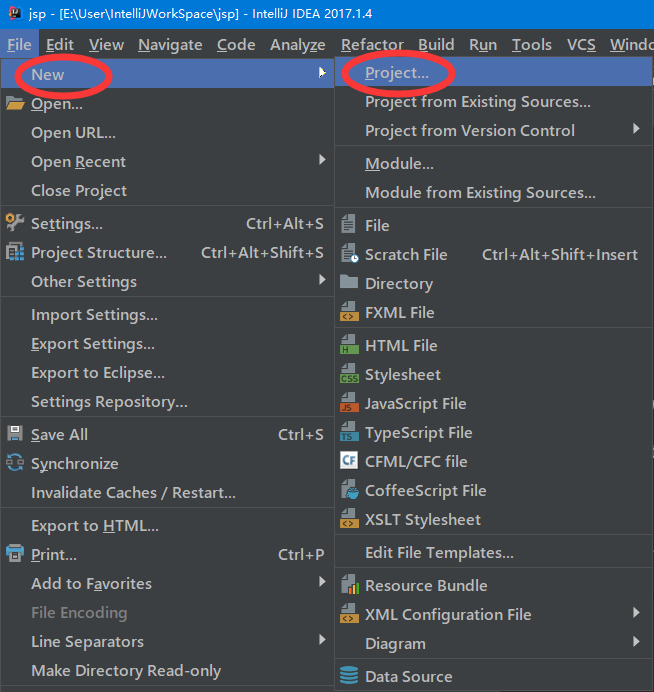
2、项目配置内容
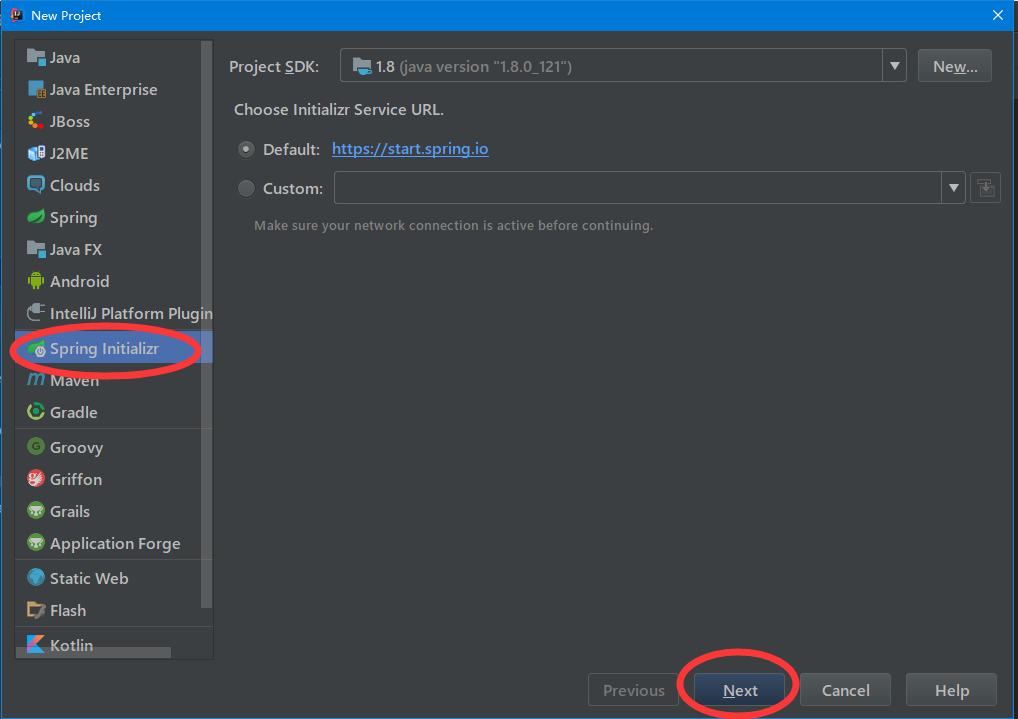
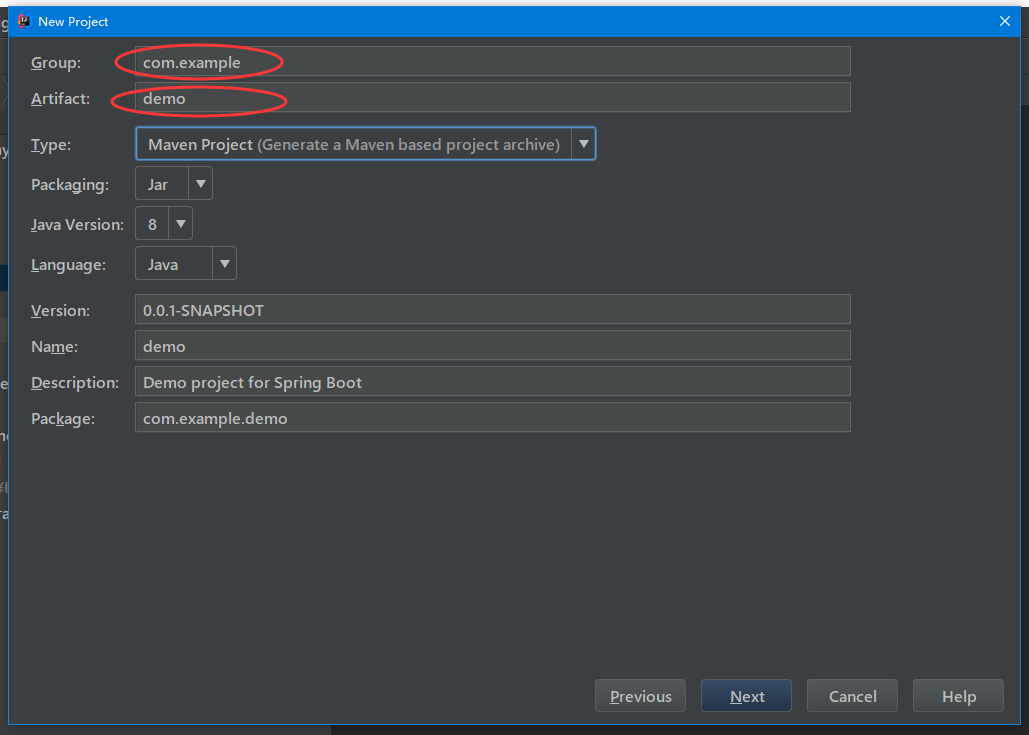
3、选择配置项目的Group包名,Artifact项目名称
4、选择项目类型为web类型

5、创建成功,点击最后一步finish
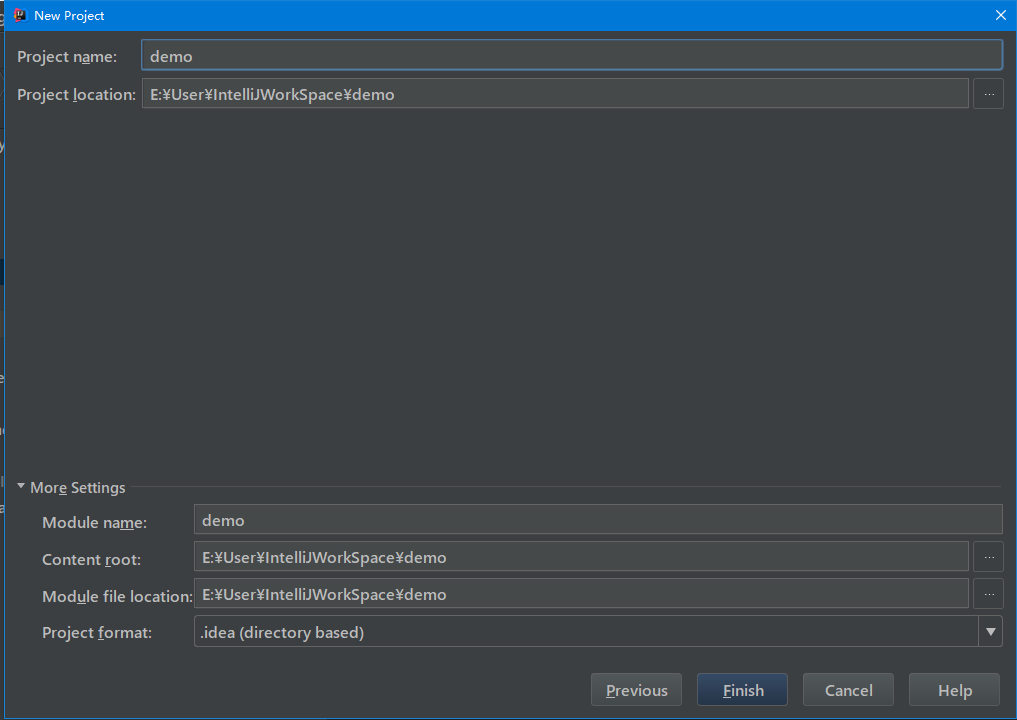
二、代码编写
1、搭建pom.xml文件
 <?xml version="1.0" encoding="UTF-8"?>

 <project xmlns="http://maven.apache.org/POM/4.0.0" xmlns:xsi="http://www.w3.org/2001/XMLSchema-instance"

          xsi:schemaLocation="http://maven.apache.org/POM/4.0.0 http://maven.apache.org/xsd/maven-4.0.0.xsd">

     <modelVersion>4.0.0</modelVersion>

     <groupId>com.springboot</groupId>

     <artifactId>jsp</artifactId>

     <version>0.0.1-SNAPSHOT</version>

     <packaging>jar</packaging>

     <name>jsp</name>

     <url>http://maven.apache.org</url>

     <description>Demo project for Spring Boot</description>

     <parent>

         <groupId>org.springframework.boot</groupId>

         <artifactId>spring-boot-starter-parent</artifactId>

         <version>1.5.9.RELEASE</version>

         <relativePath/> <!-- lookup parent from repository -->

     </parent>

     <properties>

         <project.build.sourceEncoding>UTF-8</project.build.sourceEncoding>

         <project.reporting.outputEncoding>UTF-8</project.reporting.outputEncoding>

         <java.version>1.8</java.version>

     </properties>

     <dependencies>

         <dependency>

             <groupId>org.springframework.boot</groupId>

             <artifactId>spring-boot-starter-web</artifactId>

         </dependency>

         <dependency>

             <groupId>org.springframework.boot</groupId>

             <artifactId>spring-boot-starter-test</artifactId>

             <scope>test</scope>

         </dependency>

         <!-- servlet 依赖. -->

         <dependency>

             <groupId>javax.servlet</groupId>

             <artifactId>javax.servlet-api</artifactId>

             <scope>provided</scope>

         </dependency>

         <!--

                 JSTL(JSP Standard Tag Library,JSP标准标签库)是一个不断完善的开放源代码的JSP标签库,是由apache的jakarta小组来维护的。

          -->

         <dependency>

             <groupId>javax.servlet</groupId>

             <artifactId>jstl</artifactId>

         </dependency>

         <!-- tomcat 的支持.-->

         <dependency>

             <groupId>org.springframework.boot</groupId>

             <artifactId>spring-boot-starter-tomcat</artifactId>

             <scope>provided</scope>

         </dependency>

         <dependency>

             <groupId>org.apache.tomcat.embed</groupId>

             <artifactId>tomcat-embed-jasper</artifactId>

             <!--<scope>provided</scope>-->

         </dependency>

         <dependency>

             <groupId>org.eclipse.jdt.core.compiler</groupId>

             <artifactId>ecj</artifactId>

             <version>4.6.1</version>

             <scope>provided</scope>

         </dependency>

     </dependencies>

     <build>

         <plugins>

             <plugin>

                 <groupId>org.springframework.boot</groupId>

                 <artifactId>spring-boot-maven-plugin</artifactId>

             </plugin>

         </plugins>

     </build>

 </project>
2、application配置
 #页面默认前缀目录

 spring.mvc.view.prefix=/WEB-INF/jsp/

 # 响应默认后缀

 spring.mvc.view.suffix=.jsp
3、Application类编辑
 package com.springboot;

 import org.springframework.boot.SpringApplication;

 import org.springframework.boot.autoconfigure.SpringBootApplication;

 @SpringBootApplication

 public class JspApplication {

     public static void main(String[] args) {

         SpringApplication.run(JspApplication.class, args);

     }

 }
4、Controller测试类编辑
 package com.springboot.controller;

 import org.springframework.stereotype.Controller;

 import org.springframework.web.bind.annotation.RequestMapping;

 import java.util.Map;

 /**

  * Created by liuya on 2018-01-28.

  */

 @Controller

 public class JSPController {

     @RequestMapping("/index")

     public String index(Map<String, Object> map) {

         map.put("name","Andy");

         return "mytest";

     }

 }
三、界面配置
由于IntellJ下的项目不自带webapp,所以需要手动自行添加
方法如图
1、选中项目--->file-->Project Structure

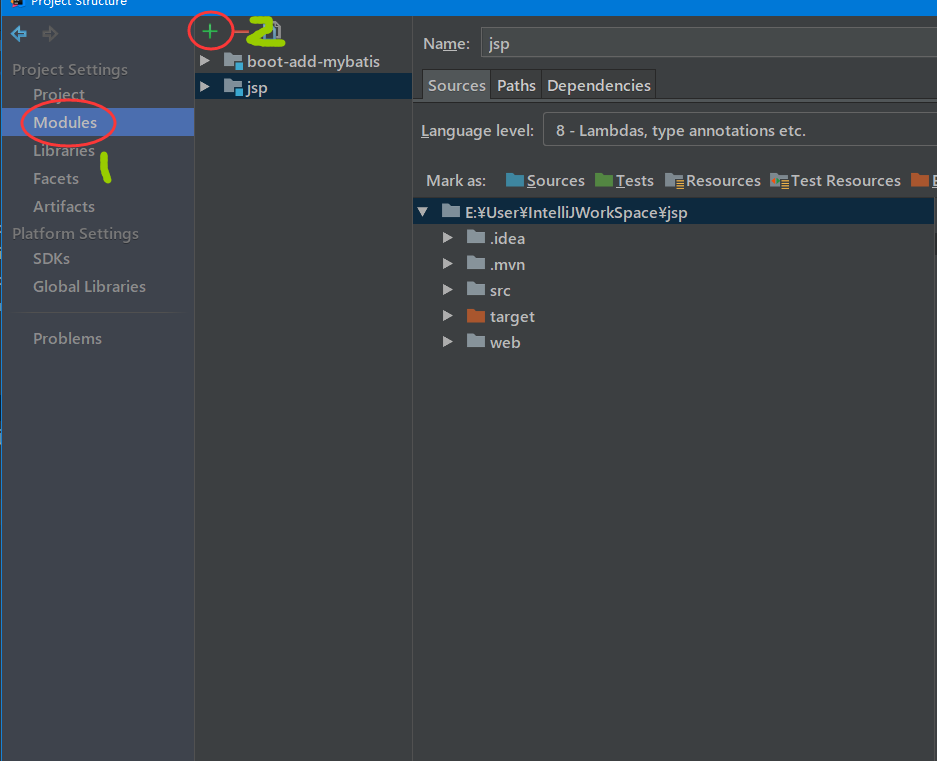
2、如图选中module ,选中jsp,然后选择2的加号
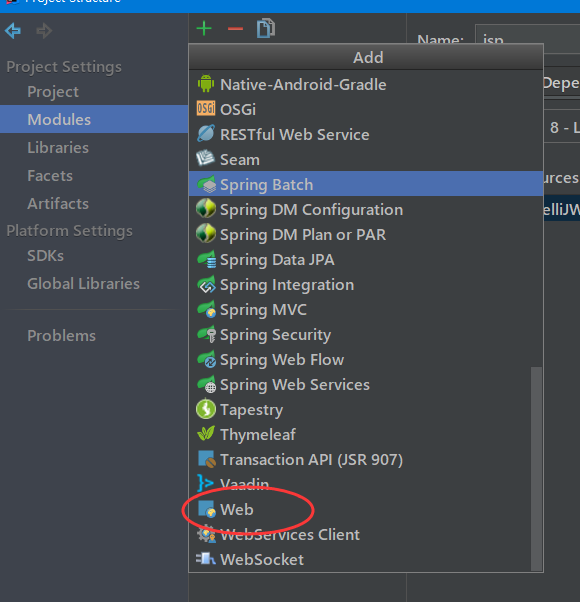
3、加号弹出框中选择web
4、就会在目录下生成一个web,然后我们对web进行配置
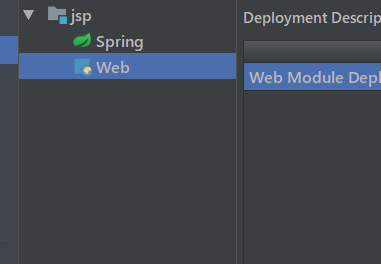
5、web配置到项目中,选中web然后找到右边的小加号

6、找到自己的项目,然后选择你自己建立的web文件夹(一般有个默认路径,但是我们不用,选择后边的省略号)
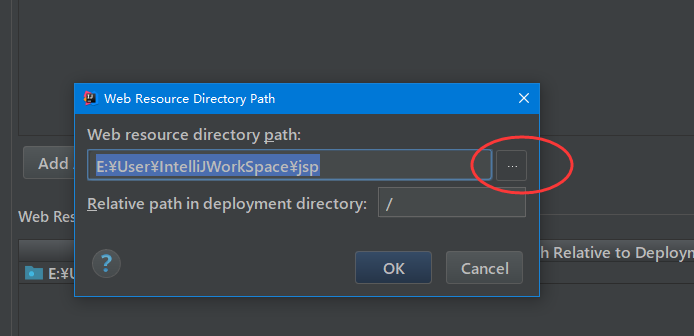
7、点击后弹出如图,然后选择自己的web,如图
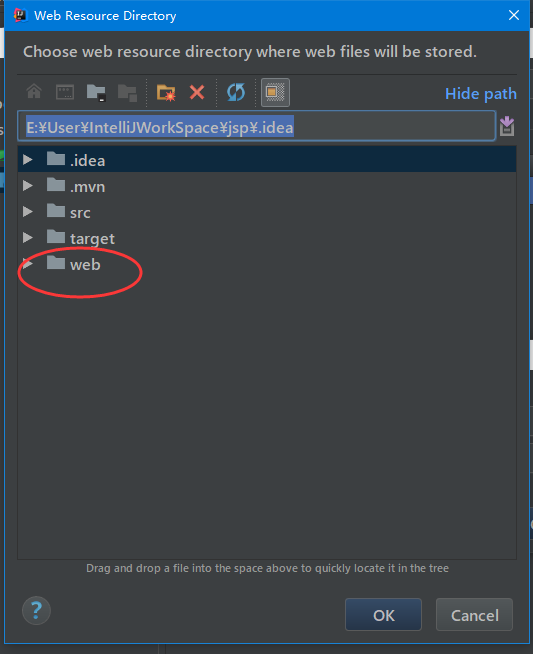
8、点击ok,然后就发现文件夹变为了带点的文件夹,然后在文件夹下建立jsp子文件夹,然后在其中加入测试代码
 <%--

   Created by IntelliJ IDEA.

   User: liuya

   Date: 2018-01-28

   Time: 下午 06:12

   To change this template use File | Settings | File Templates.

 --%>

 <%@ page contentType="text/html;charset=UTF-8" language="java" %>

 <html>

 <head>

     <title>mytestdemo</title>

 </head>

 <body>

 <center>

     <h2>Hello ${name} </h2>

 </center>

 </body>

 </html>
9、项目的各个目录层级
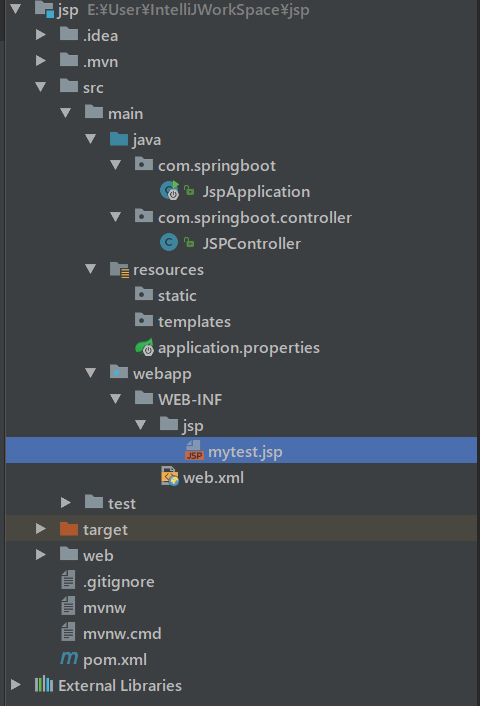
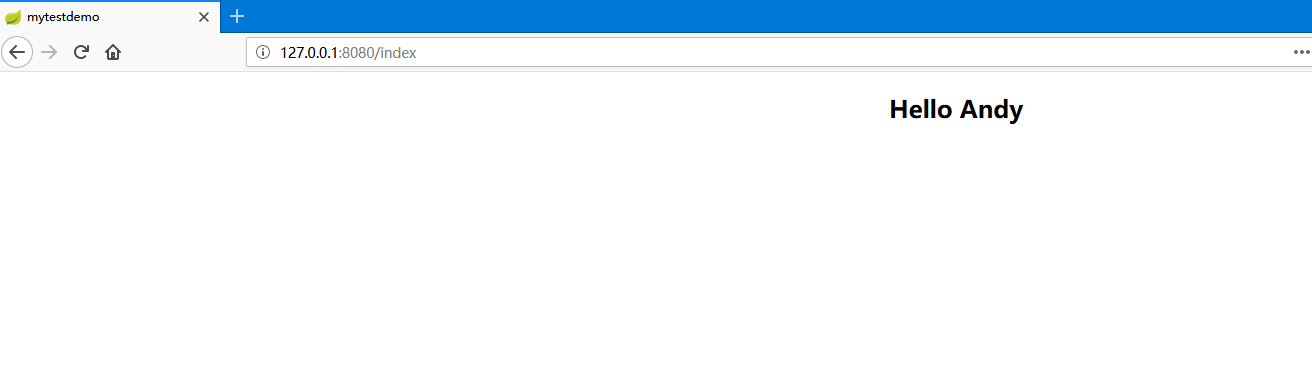
10、访问地址:http://127.0.0.1:8080/index,测试如图返回为测试成功
IntelliJ IDEA 2017版 spring-boot加载jsp配置详解(详细图文实例)的更多相关文章
- spring boot加载自定义配置
1.通过@Value 配置文件中 wechat: ssh: host: 192.0.1.1 port: 22 加载类 @Component @Data public class SftpConfig ...
- spring boot 加载jsp
1.spring boot启动类继承SpringBootServletInitializer ,并且重写configure方法 package com.springapp.mvc;import jav ...
- Spring Boot 2.0 教程 - 配置详解
Spring Boot 可以通过properties文件,YAML文件,环境变量和命令行参数进行配置.属性值可以通过,@Value注解,Environment或者ConfigurationProper ...
- web.xml的加载过程配置详解
一:web.xml加载过程 简单说一下,web.xml的加载过程.当我们启动一个WEB项目容器时,容器包括(JBoss,Tomcat等).首先会去读取web.xml配置文件里的配置,当这一步骤没有 ...
- spring boot slf4j日记记录配置详解
https://blog.csdn.net/liuweixiao520/article/details/78900779
- Spring Boot加载配置文件
问题1:Spring如何加载配置,配置文件位置? 1.默认位置: Spring Boot默认的配置文件名称为application.properties,SpringApplication将从以下位置 ...
- Spring Boot加载application.properties配置文件顺序规则
SpringApplication会从以下路径加载所有的application.properties文件: 1.file:./config/(当前目录下的config文件夹) 2.file:./(当前 ...
- spring boot 加载web容器tomcat流程源码分析
spring boot 加载web容器tomcat流程源码分析 我本地的springboot版本是2.5.1,后面的分析都是基于这个版本 <parent> <groupId>o ...
- Spring Boot源码中模块详解
Spring Boot源码中模块详解 一.源码 spring boot2.1版本源码地址:https://github.com/spring-projects/spring-boot/tree/2.1 ...
随机推荐
- Window python下载安装
Window python下载安装 http://www.runoob.com/python/python-install.html https://pan.baidu.com/s/1MoR9nWUY ...
- spring cloud 服务提供者
1. pom 依赖: <parent> <groupId>org.springframework.boot</groupId> <artifactId> ...
- java.util包简介
java.util包含集合框架.遗留的 collection 类.事件模型.日期和时间设施.国际化和各种实用工具类(字符串标记生成器.随机数生成器和位数组.日期Date类.堆栈Stack类.向量Vec ...
- Optimizing graphics performance
看U3D文档,心得:对于3D场景,使用分层次的距离裁剪,小物件分到一个层,稍远时就被裁掉,大物体分到一个层,距离很远时才裁掉,甚至不载.中物体介于二者之间. 文档如下: Good performanc ...
- nodejs文件操作笔记
nodejs添加了流的概念,通过流操作文件如行云流水,比早前便利畅快多了. 先来第一个例子,我们建一个stream.js文件,里面内容如下: var fs = require("fs&quo ...
- js获取或判断任意数据类类型的通用方法(getDataType)和将NodeList转为数组(NodeListToArray)
function getDataType(any){ /* (1) Object.prototype.toString.call 方法判断类型: 优点:通用,返回"[object Strin ...
- MySQL 事务 是对数据进行操作,对结构没有影响,比如创建表、删除表,事务就不起作用
- js 获取input选择的图片的信息
1JS $("#btn").click(function () { var imageEle = document.getElementById("images" ...
- GEOquery
1)介绍 来自NCBI的Gene Expression Omnibus(GEO)作为各种高通量实验数据的公共存储库. 这些数据包括基于单通道和双通道微阵列的实验,测量mRNA,基因组DNA和蛋白质丰度 ...
- fasta/fastq格式解读
1)知识简介--------------------------------------------------------1.1)测序质量值 首先在了解fastq,fasta之前,了解一下什么是质量 ...