
angular2.0---服务Service,使用服务进行数据处理
1.创建服务
打开命令窗口,cd到项目目录下,输入 ng g service myData1 回车 创建服务,如下图所示:
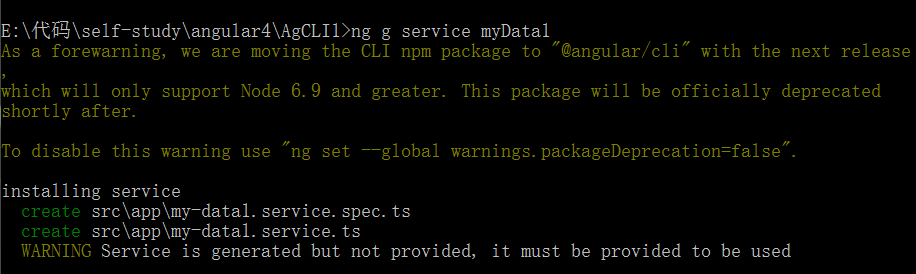
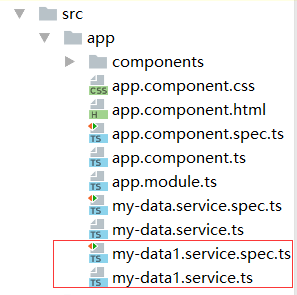
这样就成功创建了服务,此时,可以在项目的app文件夹下生成了两个service文件,
2.引入注册服务
服务创建好之后,要先引入注册之后才能用。
首先要在app.module.ts里:
引入 import { MyDataService } from './my-data.service';
注册 providers:[MyDataService];
app.module.ts整体代码如下:
import { NgModule }      from '@angular/core';//引入angular核心模块

import { BrowserModule } from '@angular/platform-browser'; //浏览器解析

import { FormsModule }   from '@angular/forms'; // <-- NgModel lives here

//引入组件

import { AppComponent } from './app.component';

import { HeaderComponent } from './components/header/header.component';

import { NewsComponent } from './components/news/news.component';

//1.引入服务  注册服务

import { MyDataService } from './my-data.service';

@NgModule({

  imports: [    //配置模块   /*引入模块   请求数据模块*/

    BrowserModule,

    FormsModule // <-- import the FormsModule before binding with [(ngModel)]

  ],

  declarations: [       //声明 注册  组件     所有自定义的组件都要在这里声明

    AppComponent,

    HeaderComponent,

    NewsComponent

  ],

  providers:[MyDataService],    /*服务  工具*/

  bootstrap: [ AppComponent ]   //启动模块  /*加载根组件*/

})

export class AppModule { }    //暴露跟模块
app.module.ts里引入注册之后,还需要在用到服务的地方引用,我写的demo是在news组件里用到了MyDataService服务,所以就在news.component.ts里引入
//要用服务 1.需要在app.module.ts 引入和注册    2.在使用的地方引入

import { MyDataService } from '../../my-data.service';
这样就可以在news.component.ts中使用MyDataService服务了;
3.使用服务
使用服务就是把服务实例化,在news.component.ts中用构造函数来实例化我们定义的服务:
  constructor(private  storage:MyDataService) {

      console.log(this.storage);

      this.news = this.storage.getItem('msgList') || [];

  }
这样就可以使用服务了。
我这里写了一个小demo,使用服务实现数据的缓存处理:
html:
<h3>{{newsTitle}}</h3>

<input type="text" [(ngModel)]="currentMsg"><button (click)="addList()">增加+</button>

<ul>

  <li *ngFor="let item of news;let key =index">

    {{item}}------<button (click)="delete(key)">删除</button>

  </li>

</ul>
news.component.ts:
import { Component, OnInit } from '@angular/core';

//要用服务 1.需要在app.module.ts 引入和注册    2.在使用的地方引入

import { MyDataService } from '../../my-data.service';

@Component({

  selector: 'app-news',

  templateUrl: './news.component.html',

  styleUrls: ['./news.component.css']

})

export class NewsComponent implements OnInit {

  public news = [];

  public newsTitle = '填写个人信息,添加到列表';

  public currentMsg;

  constructor(private  storage:MyDataService) {

      this.news = this.storage.getItem('msgList') || [];

  }

  ngOnInit() {

  }

  addList() {

    this.news.push(this.currentMsg);

    this.storage.setItem('msgList',this.news);

  }

  delete(i){

    this.news.splice(i,1);

    this.storage.setItem('msgList',this.news);

  }

}
my-data1.sevice.ts:
import { Injectable } from '@angular/core';

@Injectable()

export class MyDataService {

  constructor() { }

  setItem(key,value){

    localStorage.setItem(key,JSON.stringify(value));

  }

  getItem(key){

    return JSON.parse(localStorage.getItem(key));

  }

  removeItem(key){

    localStorage.removeItem(key);

  }

}
angular2.0---服务Service,使用服务进行数据处理的更多相关文章
- 安卓第十三天笔记-服务(Service)
安卓第十三天笔记-服务(Service) Servcie服务 1.服务概念 服务 windows 服务没有界面,一直运行在后台, 运行在独立的一个进程里面 android 服务没有界面,一直运行在后台 ...
- Angular.js之服务与自定义服务学习笔记
<!DOCTYPE html> <html lang="en"> <head> <meta charset="UTF-8&quo ...
- 在 CentOS7 上将自定义的 jar 包注册为 linux 服务 service
在 CentOS7 上将自定义的 jar 包注册为 linux 服务 service 1.在 /etc/rc.d/init.d/ 目录下创建一个名字和服务名完全相同的 shell 脚本文件 joyup ...
- Windows Service插件服务开源
WindowsService 插件服务是一个为简化NTService开发和打包程序,提供插件开发的方式进行动态加入或删除业务. 插件式服务程序的由来,在系统维护的过程中,根据企业的要求经常要进行一些周 ...
- 安卓服务(Service)的两种开启方式以及服务的生命周期
安卓中服务的开启方式 一:採用start的方式开启服务 调用函数:startService(Intent)->onCreate()->onStart()/onStartCommand()- ...
- 服务 Service 基本介绍
Activity public class MainActivity extends ListActivity { private boolean flag;//是否开启线程 publ ...
- Android服务Service总结
转自 http://blog.csdn.net/liuhe688/article/details/6874378 富貴必從勤苦得,男兒須讀五車書.唐.杜甫<柏學士茅屋> 作为程序员的我们, ...
- Android学习笔记--服务(Service)
1.服务概述 1.服务是Android四大组件之一,在使用上可以分为本地服务和远程服务,本地服务是指在不影响用户操作的情况下在后台默默的执行一个耗时操作,例如下载,音频播放等.远程服务是指可以供其他应 ...
- BZOJ 1820: [JSOI2010]Express Service 快递服务( dp )
dp(i,j,k)表示在处理第i个业务, 另外2个在j,k处. 第一维可以滚动... --------------------------------------------------------- ...
随机推荐
- 【loj6437】 【PKUSC2018】 PKUSC 计算几何
题目大意:给你一个m个点的简单多边形.对于每个点i∈[1,n],作一个以O点为原点且过点i的圆,求该圆在多边形内的圆弧长度/圆长. 其中n≤200,m≤500. 我们将n个点分开处理. 首先,我们要判 ...
- 关于component-scan中base-package包含通配符的问题探究
http://blog.csdn.net/u012325167/article/details/75388990 今天在配置Spring的component-scan时,发现了一个有趣的问题.就是在指 ...
- java编写service详细笔记 - centos7.2实战笔记(windows类似就不在重复了)
java编写service详细笔记 - centos7.2实战笔记(windows类似就不在重复了) 目标效果(命令行启动服务): service xxxxd start #启动服务 servic ...
- (转)Mysql备份还原数据库之mysqldump实例及参数详细说明
http://www.xuejiehome.com/blfl-2.html http://www.cnblogs.com/xuejie/archive/2013/01/11/2856911.html ...
- 搭建Nuget.Server push时,"Failed to process request. 'Method Not Allowed'"
环境: windows server 2012,已经安装web dev工具. nuget.server版本2.11 输入网站地址正常访问: VS也能正常添加,nuget服务,在项目打包后上传服务器时报 ...
- activity生命周期实例(不同启动模式)
1.生命周期的几个阶段介绍: onCreate: 表示activity被创建,做一些初始化工作如调用setContentView去加载界面布局资源.初始化Acitivity所需数据等. onResta ...
- Java之IO(五)文件系统
转载请注明源出处:http://www.cnblogs.com/lighten/p/6992043.html 1.前言 在讲解Java的文件流之前,先来认识一下Java的文件系统的实现.值得一提的是, ...
- 在Vue的webpack中结合runder函数
在Vue的webpack中结合runder函数 1.引入: <h1>下面是vue的内容:</h1> <div id="app"> <log ...
- 【转】如何选择Html.RenderPartial和Html.RenderAction
Html.RenderPartial与Html.RenderAction这两个方法都是用来在界面上嵌入用户控件的. Html.RenderPartial是直接将用户控件嵌入到界面上: <%Htm ...
- 【jQuery源码】jQuery对象初始化
看了一下午还是有很多地方没弄明白,jQuery的一些工具方法的原理也不完全清楚,这篇文章会随着我深入阅读jQuery源码的同时不断更新. // Initialize a jQuery object / ...