
TSQL Merge 用法
在更新数据仓库时,经常需要根据源表对Target表进行数据同步,Merge 命令具有数据更新,删除,插入的功能,专门用于数据同步,并将数据的更新输出到表中。在使用Merge命令时,需要注意when not matche子句:
- when not matched by target :当Target Table不匹配时,数据行不存在于Target Table中,存在于Source Table;
- when not matched by source:当Source Table不匹配时,数据行不存在于Source Table中,存在于Target Table;
- 当不指定by子句时,默认值是by target;
1,创建示例数据
use tempdb

go

create table dbo.tar

(

id int not null,

name varchar(11) not null

)

go

create table dbo.src

(

id int not null,

name varchar(11) not null

)

go

insert into dbo.tar

values(1,'t1'),(2,'t2'),(3,'t3')

insert into dbo.src(id,name)

values(1,'t1'),(2,'s2'),(4,'s4')

create table dbo.dt_merge_output

(

action nvarchar(10) not null,

Deleted_ID int not null,

Deleted_Name nvarchar(11) not null,

Inserted_ID int not null,

Inserted_Name nvarchar(11) not null

)

go
2,同步数据,将源表的数据同步到靶表中
merge into dbo.tar as t

using dbo.src as s

    on t.id=s.id

 --matched表示On子句匹配成功,加上额外的and条件,如果when子句成功,那么更新Targe表中的数据

when matched and t.name<>s.name

    then update set t.name=s.name

--not matched表示On子句不匹配

--ID不存在于Targe表,存在于Source表,则将行插入到Targe表

when not matched --default by target

    then insert (id,name)

        values(s.id,s.name)

--ID存在于Targe表,而不存在于Source表,那么将行从Target表删除

when not matched by source

    then delete;
2,使用output子句,将靶表中更新的数据输出
merge into dbo.tar as t

using dbo.src as s

    on t.id=s.id

 --matched表示On子句匹配成功,加上额外的and条件,如果when子句成功,那么更新Targe表中的数据

when matched and t.name<>s.name

    then update set t.name=s.name

--not matched表示On子句不匹配

--ID不存在于Targe表,存在于Source表,则将行插入到Targe表

when not matched --default by target

    then insert (id,name)

        values(s.id,s.name)

--ID存在于Targe表,而不存在于Source表,那么将行从Target表删除

when not matched by source

    then delete

output $action,deleted.id as Deleted_ID,deleted.name as Deleted_Name,inserted.id as Instered_ID,inserted.name as Instered_Name

;
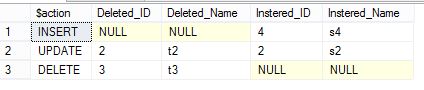
3,将靶表中更新的数据插入到一个表中有两种方式,一种是output into,一种是使用insert into
第一种方式,使用ouput into方式,将数据插入到staging table中
;merge into dbo.tar as t

using dbo.src as s

    on t.id=s.id

 --matched表示On子句匹配成功,加上额外的and条件,如果when子句成功,那么更新Targe表中的数据

when matched and t.name<>s.name

    then update set t.name=s.name

--not matched表示On子句不匹配

--ID不存在于Targe表,存在于Source表,则将行插入到Targe表

when not matched --default by target

    then insert (id,name)

        values(s.id,s.name)

--ID存在于Targe表,而不存在于Source表,那么将行从Target表删除

when not matched by source

    then delete

output $action,deleted.id as Deleted_ID,deleted.name as Deleted_Name,inserted.id as Instered_ID,inserted.name as Instered_Name

into dbo.dt_merge_output

;

select *

from dbo.dt_merge_output
第二种方式,将output子句的输出作为派生表,使用Insert Into子句将数据插入到staging 表中
insert into dbo.dt_merge_output

select *

from

(

merge into dbo.tar as t

using dbo.src as s

    on t.id=s.id

 --matched表示On子句匹配成功,加上额外的and条件,如果when子句成功,那么更新Targe表中的数据

when matched and t.name<>s.name

    then update set t.name=s.name

--not matched表示On子句不匹配

--ID不存在于Targe表,存在于Source表,则将行插入到Targe表

when not matched --default by target

    then insert (id,name)

        values(s.id,s.name)

--ID存在于Targe表,而不存在于Source表,那么将行从Target表删除

when not matched by source

    then delete

output $action,deleted.id as Deleted_ID,deleted.name as Deleted_Name,inserted.id as Instered_ID,inserted.name as Instered_Name

) as p(Action,Deleted_ID,Deleted_Name,Instered_ID,Instered_Name)
4,Output子句
Output子句,用于输出在Target Table中更新的数据,在每个数据行中,有一个特殊的字段,$Action,数据类型是nvarchar(10),能够标识出Merge操作的类型:Insert Delete,Update。
<OUTPUT_CLAUSE> ::=

{

  [ OUTPUT <dml_select_list> INTO { @table_variable | output_table } [ ( column_list ) ] ]

  | [ OUTPUT <dml_select_list> ]

}

<dml_select_list> ::= { <column_name> | scalar_expression } [ [AS] column_alias_identifier ][ ,...n ]

<column_name> ::= { DELETED | INSERTED | from_table_name } . { * | column_name }| $action
表Deleted和Inserted 是特殊的两个系统表,由系统创建,并且用户语句只能读取,不能修改,作用域是语句级别,当语句结束时,系统自动回收。DELETED 用于标识被Merge命令删除的数据行,INSERTED 用于标识被Merge命令插入的数据行,如果执行的是Update操作,那么inserted 用于标识更新之后的数据,deleted 用于标识数据行更新之前的数据。
5,在使用Merge命令更新Target表时,同一行数据只能被更新一次
If UPDATE is specified in the <merge_matched> clause, and more than one row of <table_source>matches a row in target_table based on <merge_search_condition>, SQL Server returns an error. The MERGE statement cannot update the same row more than once, or update and delete the same row.
Target表中一个数据行只能被更新一次,SQL Server会报错,错误原因是Source Table的中的多行数据和Target Table中一行数据匹配。
The MERGE statement attempted to UPDATE or DELETE the same row more than once. This happens when a target row matches more than one source row. A MERGE statement cannot UPDATE/DELETE the same row of the target table multiple times. Refine the ON clause to ensure a target row matches at most one source row, or use the GROUP BY clause to group the source rows.
参考MSDN
TSQL Merge 用法的更多相关文章
- Merge用法
Merge用来从一个表中选择一些数据更新或者插入到另一个表中.而最终是用更新还是用插入的方式取决于该语句中的条件. 下面我们简单的举一个例子: SQL> create table merge ...
- Oracle之Merge用法
Merge用来从一个表中选择一些数据更新或者插入到另一个表中.而最终是用更新还是用插入的方式取决于该语句中的条件. 下面我们简单的举一个例子: SQL)) 表已创建. SQL)) 表已创建. SQL, ...
- TSQL Merge On子句和When not matched 语义理解
Merge 的On子句指定Match condition,When子句指定过滤条件,如果Source Table和Targe Table匹配的上,很好理解:如果匹配不上,必须深入理解不匹配的条件,否则 ...
- TSql Top 用法
第一部分:TSql Top 有两种用法 1,限制查询结果集返回的行数或总行数的百分比. 当将 TOP 与 ORDER BY 子句结合使用时,结果集限制为前 N 个已排序行:否则,以未定义的顺序返回前 ...
- TSQL HASHBYTES 用法
HashBytes 使用Hash 算法,能够产生高质量的Hash值,大幅度提高识别数据相异的准确性,但是HashBytes函数无法提供100%的准确度,如果业务逻辑要求不允许有误差,那么不要使用任何H ...
- MERGE 用法
1.不带输出的SET ANSI_NULLS ON GO SET QUOTED_IDENTIFIER ON GO ALTER proc [dbo].[InsertShiGongJiao] ), @com ...
- oracle merge用法
动机: 想在Oracle中用一条SQL语句直接进行Insert/Update的操作. 说明: 在进行SQL语句编写时,我们经常会遇到大量的同时进行Insert/Update的语句 ,也就是说当存在记录 ...
- Sql server2008中merge用法
/// <summary> /// 修改:添加条件: AND roleModule.FuncCode = tvpRoleModule.FuncCode /// </summary&g ...
- SQL Server merge用法
有两个表名:source 表和 target 表,并且要根据 source 表中匹配的值更新 target 表. 有三种情况: source 表有一些 target 表不存在的行.在这种情况下,需要将 ...
随机推荐
- STL源码--序列式容器
1. vector: vector的内存管理,动态分配内存,不需要程序员来维护存储空间,是与array最大的区别,程序员只需从逻辑上关注代码,而不需要对内部的存储空间的分配和回收分心.首先,vecto ...
- matlab linux 安装
1. 获取matlab的iso文件,并挂载到目录下2. sudo sh $(matlab_path)/matlab安装(破解,相关见说明)3. 加入系统路径,将$(matlab_install_pat ...
- NOI 4976:硬币
描述 宇航员Bob有一天来到火星上,他有收集硬币的习惯.于是他将火星上所有面值的硬币都收集起来了,一共有n种,每种只有一个:面值分别为a1,a2- an. Bob在机场看到了一个特别喜欢的礼物,想买来 ...
- Python中的random模块,来自于Capricorn的实验室
Python中的random模块用于生成随机数.下面介绍一下random模块中最常用的几个函数. random.random random.random()用于生成一个0到1的随机符点数: 0 < ...
- struts2 validation.xml 注意点
1.首先应该注意validation.xml的名字,一定要以Action的类名加“-validation.xml”作为文件名.入LoginAction-validation.xml. 2.LoginA ...
- 使用Fragment的两种方式:<fragment>与<FrameLayout>
Android中使用Fragment的两种方式:<fragment>与<FrameLayout> 1.静态使用:自定义类,继承Fragment,在xml中使用<fragm ...
- 【整理】--【GPIO】OK6410
S3C6410的GPIO引脚相对来说比较多,而且大部分引脚都具有多重复用功能,如何在linux上用最简单的方式来控制GPIO这需要我们好好研究一下底层的代码了,其实方法有很多种,鉴于在操作系统端控制G ...
- 使用css3制作蚂蚁线
涉及知识点:background-clip.animation; 代码请查看codepen:https://codepen.io/guoxianqiang/pen/jVXPbm
- mfc
(1)编写mfc程序的基本步骤: 1.资源编辑: 2.关联控件变量: 3.编写新的类和成员函数: 4.添加消息处理函数. (2)消息映射机制: (3)常用控件: (4)界面美化:
- 使用C#开发ActiveX控件(新)
前言 ActiveX控件以前也叫做OLE控件,它是微软IE支持的一种软件组件或对象,可以将其插入到Web页面中,实现在浏览器端执行动态程序功能,以增强浏览器端的动态处理能力.通常ActiveX控件都是 ...