
用canvas开发H5游戏小记

<div id="gamepanel">

     <canvas id="stage" width="320" height="568"></canvas>

</div>
#gamepanel{

     width: 320px;

     margin: 0 auto;

     height: 568px;

     position: relative;

     overflow: hidden;

}
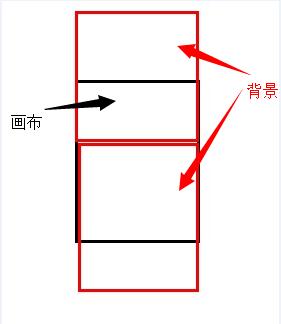
rollBg : function(ctx){

          if(this.bgDistance>=this.bgHeight){

               this.bgloop = 0;

          }

          this.bgDistance = ++this.bgloop * this.bgSpeed;

          ctx.drawImage(this.bg, 0, this.bgDistance-this.bgHeight, this.bgWidth, this.bgHeight);

          ctx.drawImage(this.bg, 0, this.bgDistance, this.bgWidth, this.bgHeight);

     },
function ImageMonitor(){

     var imgArray = [];

     return {

          createImage : function(src){

               return typeof imgArray[src] != 'undefined' ? imgArray[src] : (imgArray[src] = new Image(), imgArray[src].src = src, imgArray[src])

          },

          loadImage : function(arr, callback){

               for(var i=0,l=arr.length; i<l; i++){

                    var img = arr[i];

                    imgArray[img] = new Image();

                    imgArray[img].onload = function(){

                         if(i==l-1 && typeof callback=='function'){

                              callback();

                         }

                    }

                    imgArray[img].src = img

               }

          }

     }

}
function Ship(ctx){

     gameMonitor.im.loadImage(['static/img/player.png']);

     this.width = 80;

     this.height = 80;

     this.left = gameMonitor.w/2 - this.width/2;

     this.top = gameMonitor.h - 2*this.height;

     this.player = gameMonitor.im.createImage('static/img/player.png');

     this.paint = function(){

          ctx.drawImage(this.player, this.left, this.top, this.width, this.height);

     }

     this.setPosition = function(event){

          this.left = event.changedTouches[0].clientX - this.width/2 - 16;

          this.top = event.changedTouches[0].clientY - this.height/2;

          if(this.left<0){

               this.left = 0;

          }

          if(this.left>320-this.width){

               this.left = 320-this.width;

          }

          if(this.top<0){

               this.top = 0;

          }

          if(this.top>gameMonitor.h - this.height){

               this.top = gameMonitor.h - this.height;

          }

          this.paint();

     }

     this.controll = function(){

          var _this = this;

          var stage = $('#gamepanel');

          var currentX = this.left,

               currentY = this.top,

               move = false;

          stage.on('touchstart', function(event){

               _this.setPosition(event);

               move = true;

          }).on('touchend', function(){

               move = false;

          }).on('touchmove', function(event){

               event.preventDefault();

               _this.setPosition(event);

          });

     }

}
function Food(type, left, id){

     this.speedUpTime = 300;

     this.id = id;

     this.type = type;

     this.width = 50;

     this.height = 50;

     this.left = left;

     this.top = -50;

     this.speed = 0.04 * Math.pow(1.2, Math.floor(gameMonitor.time/this.speedUpTime));

     this.loop = 0;

     var p = this.type == 0 ? 'static/img/food1.png' : 'static/img/food2.png';

     this.pic = gameMonitor.im.createImage(p);

}

Food.prototype.paint = function(ctx){

     ctx.drawImage(this.pic, this.left, this.top, this.width, this.height);

}

Food.prototype.move = function(ctx){

     if(gameMonitor.time % this.speedUpTime == 0){

          this.speed *= 1.2;

     }

     this.top += ++this.loop * this.speed;

     if(this.top>gameMonitor.h){

          gameMonitor.foodList[this.id] = null;

     }

     else{

          this.paint(ctx);

     }

}
genorateFood : function(){

          var genRate = 50; //产生月饼的频率

          var random = Math.random();

          if(random*genRate>genRate-1){

               var left = Math.random()*(this.w - 50);

               var type = Math.floor(left)%2 == 0 ? 0 : 1;

               var id = this.foodList.length;

               var f = new Food(type, left, id);

               this.foodList.push(f);

          }

     }
this.eat = function(foodlist){

          for(var i=foodlist.length-1; i>=0; i--){

               var f = foodlist[i];

               if(f){

                    var l1 = this.top+this.height/2 - (f.top+f.height/2);

                    var l2 = this.left+this.width/2 - (f.left+f.width/2);

                    var l3 = Math.sqrt(l1*l1 + l2*l2);

                    if(l3<=this.height/2 + f.height/2){

                         foodlist[f.id] = null;

                         if(f.type==0){

                              gameMonitor.stop();

                              $('#gameoverPanel').show();

                              setTimeout(function(){

                                   $('#gameoverPanel').hide();

                                   $('#resultPanel').show();

                                   gameMonitor.getScore();

                              }, 2000);

                         }

                         else{

                              $('#score').text(++gameMonitor.score);

                              $('.heart').removeClass('hearthot').addClass('hearthot');

                              setTimeout(function() {

                                   $('.heart').removeClass('hearthot')

                              }, 200);

                         }

                    }

               }

          }

     }
run : function(ctx){

          var _this = gameMonitor;

          ctx.clearRect(0, 0, _this.bgWidth, _this.bgHeight);

          _this.rollBg(ctx);

          //绘制飞船

          _this.ship.paint();

          _this.ship.eat(_this.foodList);

          //产生月饼

          _this.genorateFood();

          //绘制月饼

          for(i=_this.foodList.length-1; i>=0; i--){

               var f = _this.foodList[i];

               if(f){

                    f.paint(ctx);

                    f.move(ctx);

               }

          }

          _this.timmer = setTimeout(function(){

               gameMonitor.run(ctx);

          }, Math.round(1000/60));

          _this.time++;

     }
用canvas开发H5游戏小记的更多相关文章
- 开发H5游戏引擎的选择:Egret或Laya?
开发H5游戏引擎的选择:Egret或Laya? 一.总结 一句话总结:选laya吧 二.开发H5游戏引擎的选择:Egret或Laya? 一.H5游戏开发的引擎介绍 开发H5游戏的引擎有很多,比如egr ...
- 模仿开发H5游戏,看你有多色
开发记录 前言 之前跟着慕课网学习开发H5小游戏开心鱼,勾起我的兴趣. 在写代码的过程中,不怎么会遇到问题.虽然代码是亲手敲出来的,但是由于并没有对游戏的整体思路,所以并不知道开发与优化的过程. 为了 ...
- H5游戏开发之抓住小恐龙
第一次写技术性博文,以前都只是写一些生活感想,记录一些生活发生的事情. 博主大三学生一枚,目前学习JS一年多,还处于学习阶段,有什么说的不好的希望大牛指点下,由于第一次写博文,排版什么的有待改进,希望 ...
- 开发H5小游戏
Egret白鹭H5小游戏开发入门(一) 前言: 好久没更新博客了,以前很多都不会,所以常常写博客总结,倒是现在有点点经验了就懒了.在过去的几个月里,在canvas游戏框架方面,撸过了CreateJ ...
- 使用Phaser开发你的第一个H5游戏(一)
本文来自网易云社区 作者:王鸽 不知你是否还记得当年风靡一时的2048这个游戏,一个简单而又不简单的游戏,总会让你在空闲时间玩上一会儿. 在这篇文章里,我们将使用开源的H5框架--Phaser来重现这 ...
- 今天我看了一个H5游戏EUI的例子,我都快分不清我到底是在用什么语言编译了代码了,作为刚刚学习H5游戏开发的菜鸟只能默默的收集知识
今天看了一个EUI的demo,也是接触H5游戏开发的第五天了,我想看看我能不能做点什么出来,哎,自己写果然还是有问题的.在看EUI哪一个demo的时候就遇见了一些摇摆不定的问题,我觉得提出来 1.to ...
- 最近这两天看了关于H5游戏开发的一个教程,实践很短暂,看了很多理论的东西,现在呢也只是想回忆回忆关于EUI的部分知识吧
首先我了解了什么是Egret: Egret中文就是白鹭的意思,Egret是一套H5游戏开发的软件.(纯粹属于个人理解) 其次我对以下几款软件的相关知识做了些了解: Egret Engine(引擎),E ...
- 关于h5游戏开发,你想了解的一切都在这儿!
2020年,受疫情影响,线下产业红利褪去,线上迎来的新一轮的高峰.众多商家纷纷抓住了转型时机,开启了流量争夺战.H5游戏定制无疑是今年引流的大热门.如何开发一款有趣.有爆点.用户爱买单的好游戏呢? ...
- 为什么选择H5游戏开发定制?
为什么选择H5游戏开发定制? 随着微信H5游戏推广带来的显著效果,越来越多的商家已经加入到游戏营销的队伍中来, 对H5小游戏有了解的商家都知道,[模板游戏]的价格往往低于[定制游戏]的价格,可是为什么 ...
随机推荐
- [python] os.path说明
os.path - Common pathname manipulations操作 This module implements some useful functions on pathnames. ...
- boot from volume
nova boot --flavor 1 --block-device source=image,id=<image_id>,dest=volume,size=5,shutdown=pre ...
- angular js 自定义js错误处理(Angularjs js error handler)
使用AngularJS的时候,对JS错误如何自定义处理?(比如用Google Analytics记录angularjs使用中出现的js错误) AngularJS自带一个错误处理service:$exc ...
- windows平台升级ORACLE11.2.0.1到11.2.0.4
原创作品,允许转载,转载时请务必以超链接形式标明文章 原始出处 .作者信息和本声明.否则将追究法律责任.http://4445027.blog.51cto.com/4435027/1674217 一 ...
- c#datagirdview ,用DataSource 方式赋值,然后更新出问题问题
先说一下程序 主窗体 ,两个子窗体A,B.嵌入主窗体的Panel里边 主窗体,启动类C里边的查找方法,查到的值,通过事件委托送到窗体A C类里同时修改查询表,把修改的查询表通过事件委托发送给窗体B, ...
- third class
09remain timer 1.button的背景改变:放在背景图片里面,改变背景图片的位置,这样更简洁 08 simple clock 1.上下padding一样,居中2.setInterval( ...
- onselectstart和onselect的使用
1.onselectstart 这个事件主要是用于禁止选择网页中的文字.代码为: document.onselectstart =function(){ return false; } 另外ff/op ...
- C语言小练习二
题目要求: 编程实现功能:将4行4列数组的左下三角设置为下图所示的数据.43 7 2 6 91 5 8 10 程序源码: #include <stdio.h> int main(void) ...
- hdu 1181(DFS)变 形 课
变形课 Time Limit: 2000/1000 MS (Java/Others) Memory Limit: 131072/65536 K (Java/Others)Total Submis ...
- 关于L'Hopital法则
1.首先需要使用 罗尔定理 函数f(x)在闭区间[a,b]连续在开区间(a,b)可微,如果f(a)=f(b),那么至少存在一点c使函数导数f'(c)=0 注意需要再(a,b)可微,如果函数有角点,断点 ...