
Install SVN (Subversion) Server on Fedora 20/19, CentOS/Red Hat (RHEL) 6.5/5.10
Install SVN (Subversion) Server on Fedora 20/19, CentOS/Red Hat (RHEL) 6.5/5.10
Updated by JR on Mar 7, 2014 in CentOS, Featured, Fedora, Linux, Most Popular, Programming, Programs, Red Hat (RHEL), Servers,Version Control | 280 comments
 This is guide, howto install SVN (Subversion) server on Fedora 20/19/18/17/16/15/14, CentOS 6.5/6.4/6.3/6.2/6.1/6/5.10, Red Hat (RHEL) 6.5/6.4/6.3/6.2/6.1/6/5.10.
What is SVN (Subversion)?
Subversion is a free/open-source version control system. Subversion manages files and directories, and the changes made to them, over time. This allows you to recover older versions of your data, or examine the history of how your data changed. In this regard, many people think of a version control system as a sort of “time machine”.
Install SVN (Subversion) Server on Fedora 20/19/18, CentOS 6.5/5.10, Red Hat (RHEL) 6.5/5.10
1. Change root user
su - |
2. Install needed packages (mod_dav_svn and subversion)
yum install mod_dav_svn subversion |
Note: If you don’t have Apache installed already, this command installs it also. Read more about installing Apache and PHP >>
3. Modify Subversion config file /etc/httpd/conf.d/subversion.conf
Add following config to /etc/httpd/conf.d/subversion.conf file:
LoadModule dav_svn_module modules/mod_dav_svn.so |
Read more SVN Access Control >>
4. Add SVN (Subversion) users
Use following command:
## Create testuser ## |
Note: Use exactly same file and path name as used on subversion.conf file. This example use /etc/svn-auth-users file.
Read more SVN Access Control >>
5. Create and configure SVN repository
mkdir /var/www/svn |
Restart Apache:
## Fedora ## |
Goto http://localhost/svn/testrepo address and you should see something like following, write username and password: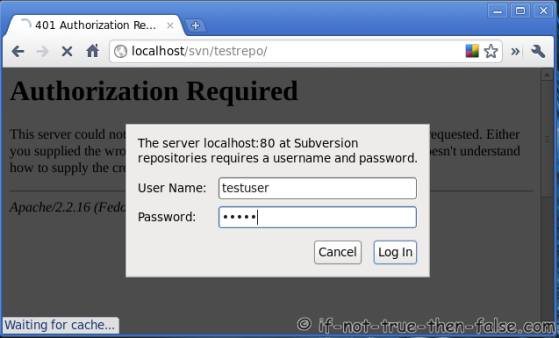
SVN testrepo revision 0: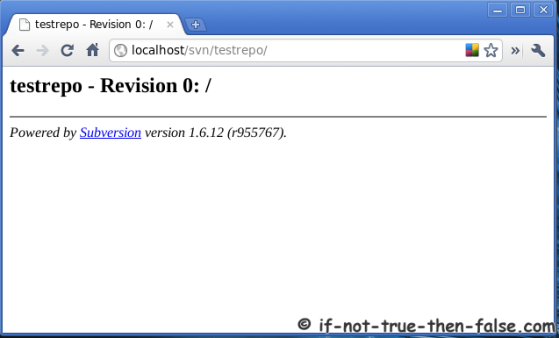
6. Configure repository
To disable anonymous access and enable access control add following rows to testrepo/conf/svnserve.conf file:
## Disable anonymous access ## |
7. Create trunk, branches and tags structure under testrepo
Create “template” directories with following command:
mkdir -p /tmp/svn-structure-template/{trunk,branches,tags}
|
Then import template to project repository using “svn import” command:
svn import -m 'Initial import' /tmp/svn-structure-template/ http://localhost/svn/testrepo/ |
Check results on browser and see testrepo revision 1: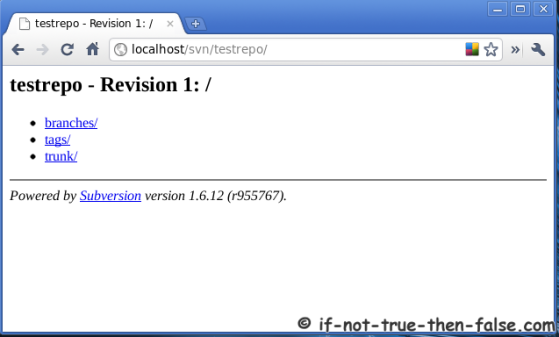
Remember also take regular backups. Here is guide howto backup and restore SVN (Subversion) Repositories.
Our forums user Will have also written guide, howto to install and configure SVN (Subversion). This is little bit different method.

Related posts:
- Install Eclipse SDK 4.3.1 (Kepler) on Fedora 20/19, CentOS/RHEL 6.5/5.10
- VirtualBox 4.3.10 on Fedora 20/19, CentOS/Red Hat (RHEL) 6.5/5.10
- Adobe Flash Player 11.2 on Fedora 20/19, CentOS/RHEL 6.5/5.10
- Install Oracle Java JDK/JRE 7u51 on Fedora 20/19, CentOS/RHEL 6.5/5.10
- Install Adobe Reader on Fedora 20/19, CentOS/RHEL 6.5/5.10
280 COMMENTS
- Akhil / August 25, 2013
Hi JR
I am getting httpd unpacking error while trying to install
mod_dav_svn.on centOS 6.4
Running Transaction
Installing : subversion-1.6.11-9.el6_4.x86_64 1/3
Installing : httpd-2.2.15-29.el6.centos.x86_64 2/3
Error unpacking rpm package httpd-2.2.15-29.el6.centos.x86_64
warning: /etc/httpd/conf/httpd.conf created as /etc/httpd/conf/httpd.conf.rpmnew
warning: /etc/httpd/conf/magic created as /etc/httpd/conf/magic.rpmnew
error: unpacking of archive failed on file /etc/httpd/logs: cpio: rename
Installing : mod_dav_svn-1.6.11-9.el6_4.x86_64 3/3
Verifying : mod_dav_svn-1.6.11-9.el6_4.x86_64 1/3
Verifying : subversion-1.6.11-9.el6_4.x86_64 2/3
Verifying : httpd-2.2.15-29.el6.centos.x86_64 3/3
Installed:
mod_dav_svn.x86_64 0:1.6.11-9.el6_4 subversion.x86_64 0:1.6.11-9.el6_4Failed:
httpd.x86_64 0:2.2.15-29.el6.centos - Jirong Hu / September 19, 2013
I followed your articles to install my SVN server with Apache2 successfully. Now I want to enable https. Do you have some instructions like this?
- sinhatpro / October 12, 2013
Hi JR
I’m post some step then I to do. Please help me a sulotion for error :
DAV svn
SVNParentPath /var/www/svn
AuthType Basic
AuthName “Subversion repositories”
AuthUserFile /etc/apache2/dav_svn.passwd
AuthzSVNAccessFile /etc/apache2/mods-enabled/dav_svn.authz
Require valid-user5. Create Repository for test:
mkdir /var/www/svn6. Authencation for user access forder
svnadmin create myproject
chown -R www-data myproject7. Create username
htpasswd -cm /etc/sapache2/dav_svn.passwd testuser1
htpasswd -m /etc/apache2/dav_svn.passwd testuser29. Configure file dav_svn.authz control access for every user.
[groups]
testuser1
testuser2[myproject:/]
testgroup1 = rw
testuser2 = r- JR / October 15, 2013
Hi sinhatpro,
I read your both comments and looks like you don’t have myproject2 just only myproject?
Then also your dav_svn.authz file groups is missing group names, you only list testuser1 and testuser2, then you set rw permission to testgroup1.
But yes you are right, it’s not SELinux problem, because you are using Ubuntu…
- zinger / October 16, 2013
If step 5 fails with message
chcon: can't apply partial context to unlabeled file
do these commands instead
chcon -h system_u:object_r:httpd_sys_content_t /var/www/svn/testrepo
chcon -R -h apache:object_r:httpd_sys_content_t /var/www/svn/testrepo/* - edivaldo / October 16, 2013
I’m not getting add.
for example:
[cit@Ltv10 repos]$ svn add test.txt
svn: ‘.’ is not a working copy[cit@Ltv10 repos]$ svn status
svn: warning: ‘.’ is not a working copy[cit@Ltv10 repos]$ svn commit
svn: ‘/var/www/svn/repos’ is not a working copyBut,
[cit@Ltv10 repos]$ sudo svn co http://localhost/svn/repos/
[sudo] password for cit:
A repos/trunk
A repos/branches
A repos/tags
Checked out revision 1.
follown my file subversion.config:LoadModule dav_svn_module modules/mod_dav_svn.so
LoadModule authz_svn_module modules/mod_authz_svn.soDAV svn
SVNParentPath /var/www/svn
SVNPathAuthz offDo you can help me?
TKS,
- Shaikh Zahid Hossain / October 30, 2013
I am following this step but Last IMPORT command Not relocalted
root@atomix# svn import -m ‘Initial import’ /tmp/svn-structure-template/ http://114.134.91.91/svn/testrepo/
Authentication realm: Subversion repositories
Password for ‘root’:
Authentication realm: Subversion repositories
Username: sk
Password for ‘sk’:
svn: Repository moved permanently to ‘http://114.134.91.91/svn/testrepo/’; please relocate
[root@atomix ~]#Can’t import “trunk,branches,tags”
pls help any one- JR / November 1, 2013
Hi Shaikh Zahid Hossain,
Could you post your config files example to http://pastebin.com
And output of following commands here:
ls -ladZ /var/www/svn


ls -laZ /var/www/svn
I assume here, that you have used /var/www/svn location for repos.
- Adi / December 11, 2013
Hi JR,
First of all I wann thank you for your useful blog.
I have same issue as Max.
I have tried below two commnads
1. chcon -R -t httpd_sys_content_t /var/www/svn/repository
Above commnad went through fine
2. chcon -R -t httpd_sys_rw_content_t /var/www/svn/repository
This Command Gave me Error:
chcon: failed to change context of /var/www/svn/repository to system_u:object_r:httpd_sys_rw_content_t: Invalid argument
chcon: failed to change context of /var/www/svn/repository/format to system_u:object_r:httpd_sys_rw_content_t: Invalid argumentThen I tried the commands as suggested to MAX
1. chcon -h system_u:object_r:httpd_sys_rw_content_t /var/www/svn/repository
Error: chcon -h system_u:object_r:httpd_sys_rw_content_t /var/www/svn/repository
chcon: failed to change context of /var/www/svn/repository to system_u:object_r:httpd_sys_rw_content_t: Invalid argument2. chcon -R -h apache:object_r:httpd_sys_rw_content_t /var/www/svn/repository/*
Error: chcon -R -h apache:object_r:httpd_sys_rw_content_t /var/www/svn/repository/*
chcon: failed to change context of /var/www/svn/repository/conf to apache:object_r:httpd_sys_rw_content_t: Invalid argument
chcon: failed to change context of /var/www/svn/repository/conf/authz to apache:object_r:httpd_sys_rw_content_t: Invalid argumentMy Machine details:
uname -a
Linux adc6140502 2.6.18-164.0.0.0.1.el5xen #1 SMP Wed Sep 2 22:48:20 EDT 2009 i686 i686 i386 GNU/Linuxlsb_release -a
LSB Version: :core-3.1-ia32:core-3.1-noarch:graphics-3.1-ia32:graphics-3.1-noarch
Distributor ID: EnterpriseEnterpriseServer
Description: Enterprise Linux Enterprise Linux Server release 5.4 (Carthage)
Release: 5.4
Codename: Carthagerpm -qa coreutils\* selinux\* |sort
coreutils-5.97-23.el5
selinux-policy-2.4.6-255.el5
selinux-policy-devel-2.4.6-255.el5
selinux-policy-minimum-2.4.6-255.el5
selinux-policy-mls-2.4.6-255.el5
selinux-policy-strict-2.4.6-255.el5
selinux-policy-targeted-2.4.6-255.el5Please help
- Steve / January 30, 2014
First off thanks for the directions. I’m up and running but having an issue on commit:
In my checked out dir, I first did an ADD for a bunch of new files and directories. svn status reports ok that files are ready to add. Upon attempting my first commit I get:svn: Commit failed (details follow):
svn: Server sent unexpected return value (503 Service Temporarily Unavailable) in response to PROPFIND request…when I did all of your steps I did as my own user but sudo’ed to root.
I did checkout, add, and attempting commit as my own user ‘steve’. All files and directories in my checked out dir are permissioned for me.Been googling around on this error and can’t find a solutions for my case. Please help.
- JR / March 7, 2014
Hi Steve,
When you checkout repo example over http, then you can use repo as any user. Did you added your user and password AuthUserFile? If you use exactly this guide then you have to do commits as testuser and use testuser password.
Could you also check what errors you see on httpd access and erros logs?
- Vasu / March 6, 2014
Thanks People for this useful blog. I could install SVN in my Linux server successfully but when I try to launch it through console (http://localhost/svn/testrepo) I get login screen but the credentials fail. I gave testuser as the login, similar to the example given above. Sucessful Users, Please advice.
- Vasu / March 7, 2014
Thanks for replies.. Yes, I used the same password, even i tried by creating another and using it. It didnt work..
I came across a file in net /etc/svn-access-control . Should we do any changes into svn-access-control file for making the credentials work..?
- JR / March 7, 2014
Excellent, just want to first make sure that there wasn’t any mistake on users or passwords…
So do you have enabled SVN Access Control?
If yes, could you then post content of /etc/httpd/conf.d/subversion.conf and /etc/svn-access-control files?
- Vasu / March 10, 2014
How can we enable SVN Access Control..? Please find below /etc/svn-access-control File for your reference.
[groups]
testgroup = testuser1, testuser2
testgroup2 = testuser3, testuser4, testuser5
testgroup3 = testuser6, testuser7[/]
* = r
@testgroup = rw
testuser4 = rw[testrepo:/]
@testgroup2 = rw
testuser6 = rw[testrepo2:/trunk]
@testgroup3 = rw
testuser5 = rw[testrepo2:/tags]
@testgroup3 = r
testuser5 = rw - Vasu / March 10, 2014
Also please let me know the purpose of authz and passwd files under /var/www/svn/testrepo/conf
It contains Username and passwords.. Do we need to enter into it.?
- JR / March 11, 2014
Hi Vasu,
Could you post content of following files /etc/httpd/conf.d/subversion.conf and testrepo/conf/svnserve.conf, example to http://pastebin.com
Normally it’s better test installation without access control to make sure, where the problem is. If basic setup is not working, then it’s wise to try fix it first without any additional configurations.
- Vasu / March 11, 2014
Good Morning..:)
Please find content of /etc/httpd/conf.d/subversion.conf belowLoadModule dav_svn_module modules/mod_dav_svn.so
LoadModule authz_svn_module modules/mod_authz_svn.soDAV svn
SVNParentPath /var/www/svn
AuthType Basic
AuthName “Subversion repositories”
AuthUserFile /etc/svn-auth-users
Require valid-usertestrepo/conf/svnserve.conf Content is
anon-access = none
autzh-db = authz
[general]
anon-access = read
auth-access = write
password-db = passwd
authz-db = authzI also want to know from which file the credentials are loaded while we login…..
- Vasu / March 12, 2014
People, the issue is resolved by changed two files like below:
/etc/svn-access-control data:
[groups]
testgroup = testuser,testuser1,testuser2,testuser3,testuser4[/]
* = rw
@testgroup = rw[testrepo:/]
@testgroup = rw[testrepo:/trunk]
@testgroup = rw[testrepo:/branches]
@testgroup = rw[testrepo:/tags]
@testgroup = rwType the below commands to add Users:
htpasswd -cm /etc/svn-auth-users testuser2
New Password:
Retype Password:This encrypts and stores password and username at /etc/svn-auth-users file
Leave a Comment
Your email address will not be published. Required fields are marked *
Name *
Email *
Website
Comment
You may use these HTML tags and attributes: <a href="" title=""> <abbr title=""> <acronym title=""> <b> <blockquote cite=""> <cite> <code> <del datetime=""> <em> <i> <q cite=""> <strike> <strong>
Notify me of followup comments via e-mail. You can also subscribe without commenting.
Trackbacks/Pingbacks
- Install SVN Server on Fedora 13/14, CentOS/Red Hat (RHEL) 5.5/6 « svn - [...] Więcej: Install SVN Server on Fedora 13/14, CentOS/Red Hat (RHEL) 5.5/6 [...]
- Install SVN (Subversion) Server on Fedora 15/14, CentOS/Red Hat (RHEL) 5.6/6 | 資訊與工作 - [...] Install SVN (Subversion) Server on Fedora 15/14, CentOS/Red Hat (RHEL) 5.6/6 Install SVN (Subversion) Server on Fedora 15/14, CentOS/Red
Install SVN (Subversion) Server on Fedora 20/19, CentOS/Red Hat (RHEL) 6.5/5.10的更多相关文章
- Install Oracle Java JDK/JRE 7u55 on Fedora 20/19, CentOS/RHEL 6.5/5.10
What’s new in Sun/Oracle Java 7 VM Compressed 64-bit object pointers Garbage-First GC (G1) JSR 292: ...
- Install MySQL 5.7 on Fedora 25/24, CentOS/RHEL 7.3/6.8/5.11
MySQL is a relational database management system (RDBMS) that runs as a server providing multi-user ...
- Fedora CentOS Red Hat中让vim支持语法高亮设置
Fedora / CentOS / Red Hat这三个系统里默认的vi是没有语法高亮显示的,白色的字体看起来很不舒服. 首先用命令行cat /etc/os-release查看当前linux系统的类型 ...
- Unix/Linux环境C编程入门教程(19)Red Hat Entetprise Linux 7.0环境搭建
位架构,包括英特尔X-86_64.Power和s390.动态定时能力将降低内核内部中断数量,Open vSwitch 2.0功能可调节虚拟机之间的流量.RHEL 7中默认的文件系统是XFS,包含了一个 ...
- Install Percona XtraDb Cluster 5.6.20 on CentOS 6.5
http://blog.51cto.com/hj192837/1546149 You should have odd number of real nodes. node #1hostname: pe ...
- SQL Server on Red Hat Enterprise Linux——RHEL上的SQL Server(全截图)
本文从零开始一步一步介绍如何在Red Hat Enterprise Linux上搭建SQL Server 2017,包括安装系统.安装SQL等相关步骤和方法(仅供测试学习之用,基础篇). 一. 创 ...
- SQL Server on Red Hat Enterprise Linux
本文从零开始一步一步介绍如何在Red Hat Enterprise Linux上搭建SQL Server 2017,包括安装系统.安装SQL等相关步骤和方法(仅供测试学习之用,基础篇). 一. 创 ...
- Install Oracle 10g on Red Hat Linux 5.3 Step by Step
一.虚拟机配置 1. 虚拟机(VBox 4.3.12) 2. 配置虚拟机网卡网络.选择host-only.VirtualBox Host-Only Network网卡IP为设置为192.168.1.1 ...
- Red Hat Enterprise 7.5 安装后无法进入图形界面 This system is not registered with an entitlement server. You can use subscription-manager to register.
This system is not registered with an entitlement server. You can use subscription-manager to regist ...
随机推荐
- 怎样用javascript获取UUID
因为javascript是单线程的东西,所以我们放一个累加变量作为id也不会反复. 但事实上javascript本身提供了能够获得唯一id的东东.还记得setTimeout()方法会返回一个唯一id用 ...
- TWebHttpRequest使用
TWebHttpRequest使用 TWebHttpRequest通过HTTP GET方法,向中间件REST API申请数据. procedure TForm1.WebButton1Click(Sen ...
- C语言控制结构
C语言流程控制 一.流程控制结构 (1)顺序结构:按书写顺序执行每一条语句. (2)选择结构:对给定的条件进行判断,根据判断结果决定执行哪一段代码. (3)循环结构:在给定条件成立的情况下,反复执行某 ...
- 【docker】docker的简单状态监控
命令: docker stats 可以使用占位符,显示想要看的信息: docker stats --format "table {{.Container}}\t{{.CPUPerc}}\t{ ...
- JKS和PFX文件相互转换方法
JKS(JavaKeysotre)格式和PFX(PKCS12)格式,是最常见的SSL证书格式文件,可以包含完整的证书密钥对,证书链和信任证书信息.PFX常用于Windows IIS服务器,JKS常用语 ...
- Button 自定义图片,代码绘制样式,添加音效的方法
Button自己在xml文件中绑定监听器 <!-- 设定onclick属性,然后在activity中定义相应的方法 --> <!-- 通过xml布局中通过button的android ...
- ExpandoObject对象的JSON序列化
如果: dynamic expando = new ExpandoObject(); d.SomeProp=SomeValueOrClass; 然后,我们在控制器中: return new JsonR ...
- MySQL中的IFNULL,IF,NULLIF函数
MySQL中的IFNULL函数和IF函数 MySQL中的IFNULL函数类似于Oracle中的NVL函数,其表达式为:IFNULL(expr1,expr2),含义是:如果第一个参数不为空,则返回第一个 ...
- 使用ASP.NET AJAX与Bootstrap 弹窗解决方案
我在做采购系统时,因为使用了ASP.NET AJAX的UpdatePanel的控件,可以使得页面局部刷新显示.但是使用起来问题还是很多. 下面列出了一种情况,花了将近5个小时才算解决,虽然不是很完美, ...
- 10分钟理解Android数据库的创建与使用(附具体解释和演示样例代码)
1.Android数据库简单介绍. Android系统的framework层集成了Sqlite3数据库.我们知道Sqlite3是一种轻量级的高效存储的数据库. Sqlite数据库具有以下长处: (1) ...