
模仿WIN32程序处理消息
#include "stdafx.h"

#include "MyMessage.h"

#include <conio.h>

using namespace std;

#ifdef _DEBUG

#define new DEBUG_NEW

#define DBUG_LOG(st)	printf("%s\r\n",st);

#else

#define DBUG_LOG(st)

#endif

#define MSG_KEY		0X1224	//有键盘输入

#define MSG_CHAR	0X1225	//有字符输入

#define MSG_QUIT	0X0001	//退出

#define MSG_CLOSE	0X0002	//关闭

//定义消息

struct _MSG

{

	int msg;	//消息

	int param;	//消息参数

};

//消息队列

CList<_MSG>	_MsgQueue;

//消息处理函数

typedef void (*MessageProc)(int msg,int param);

MessageProc	_MessageHandler;

void MyMessageProc(int msg,int param);

//发送消息---投递消息

void _PostMessage(int msg,int param)

{

	_MSG NewMsg;

	NewMsg.msg = msg;

	NewMsg.param = param;

	_MsgQueue.AddTail(NewMsg);

}

//读取消息队列中的新消息

bool _GetMessage(_MSG* pMsg)

{

	while (_MsgQueue.IsEmpty());

	_MSG LastMsg = _MsgQueue.RemoveHead();

	*pMsg = LastMsg;

	if (pMsg->msg == MSG_QUIT)

	{

		return false;

	}

	return true;

}

//转换消息

void _TranslateMessage(_MSG *pMsg)

{

	//x键为系统键

	if (pMsg->msg == MSG_KEY && pMsg->param == _T('x'))

	{

		pMsg->msg = MSG_CLOSE;

		return;

	}

	//将键盘消息转换成字符消息

	if (pMsg->msg == MSG_KEY)

	{

		pMsg->msg = MSG_CHAR;

	}

}

//分发消息

void _DispatchMessage(_MSG *pMsg)

{

	_MessageHandler = MyMessageProc;

	//直接调用消息处理函数---MyMessageProc

	(*_MessageHandler)(pMsg->msg,pMsg->param);

}

//消息大循环,负责读取消息-》分发消息

void MessageLoop(/*MessageProc handler*/)

{

	//_MessageHandler = handler;

	_MSG msg;

	while (_GetMessage(&msg))

	{

		_TranslateMessage(&msg);

		_DispatchMessage(&msg);

	}

}

//对MSG_CHAR的响应

void OnChar(int charInput)

{

	DBUG_LOG("进入OnChar函数")

	if (charInput == _T('q'))

	{

		_PostMessage(MSG_QUIT,0);

	}

	cout<<"输入:"<<(char)charInput<<endl;

}

//对MSG_CLOSE的响应

void OnClose(int charInput)

{

	_PostMessage(MSG_QUIT,0);

}

//相似于WIN32编程里的消息处理回调函数

void MyMessageProc(int msg,int param)

{

	switch (msg)

	{

	case MSG_CHAR:

		{

			OnChar(param);

			break;

		}

	case MSG_CLOSE:

		{

			OnClose(param);

			break;

		}

	}

}

//消息发生器

UINT GatherMessage(LPVOID pParam)

{

	while (*(bool*)pParam)

	{

		//键盘输入

		if (_kbhit())

		{

			int ch = _getch();

			_PostMessage(MSG_KEY,ch);

		}

	}

	return 0;

}

int _tmain(int argc, TCHAR* argv[], TCHAR* envp[])

{

	bool flag = true;

	//打开消息发生器

	AfxBeginThread(GatherMessage,&flag);

	//开始消息处理循环

	MessageLoop(/*MyMessageProc*/);

	flag = false;

	AfxEndThread(0);

	return 0;

}
流程图如下
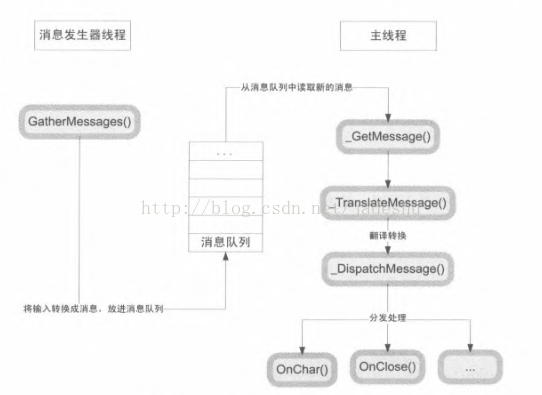
模仿WIN32程序处理消息的更多相关文章
- 实现 Win32 程序的消息映射宏(类似 MFC )
对于消息映射宏,不用多说了,用过 MFC 的人都很清楚.但目前有不少程序由于各种原因并没有使用 MFC,所以本帖讨论一下如何在 Win32 程序中实现类似MFC的消息映射宏.其实 Windows 的头 ...
- win32编程中消息循环和WndProc()窗口过程函数
原文地址:https://blog.csdn.net/zxxSsdsd/article/details/45504383 在win32程序的消息循环函数中 while (GetMessage (&a ...
- win32程序之窗口程序,以及消息机制
win32程序值窗口程序,以及消息机制 一丶简介 通过上一讲.我们了解了窗口其实是绘制出来的.而且是不断绘制的过程. 所以窗口的本质是绘制. 但是我们现在看到的窗口程序.都可以点击关闭按钮. 使用鼠标 ...
- 什么是消息循环,一个简单的win32程序如何运行?
预备知识 1.什么是句柄? (HANDLE) 在win32编程中有各种句柄,那么什么是句柄呢? #define DECLARE_HANDLE(name) struct name##_ { int un ...
- WPF中嵌入普通Win32程序的方法
公司现在在研发基于.Net中WPF技术的产品,由于要兼容旧有产品,比如一些旧有的Win32程序.第三方的Win32程序等等,还要实现自动登录这些外部Win32程序,因此必须能够将这些程序整合到我们的系 ...
- win32程序之子窗口编程
win32程序之子窗口编程 一丶简介.什么是子窗口 在前边我们已经讲解了窗口的本质.以及如何注册窗口类跟创建窗口. 还讲了消息循环. 那么有很多窗口其实Windows已经帮我们创建出来了.我们直接使用 ...
- 深入浅出MFC——Win32程序基本概念(一)
1. Windows程序分为“程序代码”和“UI资源”,下图所示: 2. Windows支持动态链接(应用程序所调用的Windows API函数是在“执行时期”才链接上的).Windows程序调用的函 ...
- win32程序显示网页
说是win32,实际程序中使用了atl的东西.所以新建win32程序时,记得勾选使用atl: 代码如下: #include "stdafx.h" #include "Wi ...
- Win32 程序开发:创建一个应用程序窗口
一.创建一个应用程序窗口 代码如下: // 头文件 #include <windows.h> // 全局变量 WCHAR g_lpszClassName[] = L"CLASSN ...
随机推荐
- POJ-2329 Nearest number - 2(BFS)
Nearest number - 2 Time Limit: 5000MS Memory Limit: 65536K Total Submissions: 4100 Accepted: 1275 De ...
- HDU 6312 - Game - [博弈][杭电2018多校赛2]
题目链接:http://acm.hdu.edu.cn/showproblem.php?pid=6312 Problem Description Alice and Bob are playing a ...
- codeforces 792D - Paths in a Complete Binary Tree
#include<cstdio> #include<iostream> #define lowbit(x) x&(-x) typedef long long ll; u ...
- PyQT5-QSlide滑块
""" QSlider:是一个小滑块组件,这个小滑块能够被拖着一起滑动,用于通常修改具有一定范围的数据 Author: dengyexun DateTime: 2018. ...
- 在python中读写matlab文件
scipy.io提供有两个函数loadmat和savemat,用来读取和存储mat的数据文件 import scipy.io as sio 还有一些其他常用的模块 import numpy as np ...
- Kettle 4.2源码分析第三讲--Kettle 转换机制transformation介绍
转换机制 每个转换步骤都是ETL数据流里面的一个任务.转换步骤包括输入.处理和输出.输入步骤从外部数据源获取数据,例如文件或者数据库:处理步骤处理数据流,字段计算,流处理等,例如整合或者过滤.输出步骤 ...
- LAMP下安装zabbix流水
一.安装zabbix (1)创建用户和组 [root@dbking zabbix-2.2.1]# groupadd zabbix [root@dbking zabbix-2.2.1]# useradd ...
- hadoop2.x编译安装
Build instructions for Hadoop (Hadoop 编译安装,参考hadoop源码包中BUILDING.txt文档) ----------------------------- ...
- android 控制POS机图文打印(二)
上一篇文章结束了ESC/POS的指令集,没看过的可以去看一下,可以当作工具文档来使用的 android 控制POS机图文打印(一) 这一篇正式介绍如何使用POS机来打印图文信息. 首先介绍一下,ESC ...
- 问题:bower git is not installed or not in the path
用bower install jquery安装jquery,bower提示错误bower git is not installed or not in the path. 根据错误信息的知道出现错误两 ...