
MapReduce排序
- 在map和reduce阶段进行排序时,比较的是k2。v2是不参与排序比较的。如果要想让v2也进行排序,需要把k2和v2组装成新的类,作为k2,才能参与比较。
例子:

二次排序:在第一列有序得到前提下第二列進行排序。
思路:先找<k3,v3>在找<k2,v2>之後的mapreduce就容易寫了
方法1:让输出的第一列作为k3,第二列作为v3 关键:输出的v3需要参与排序,此种方式无法实现二次排序
方法2:让1,2列只作为k3,而v3为空。(
方法3:有可能让k3为空,v3为第二列吗? 答案是不能的,假设k3为空,一般情况下k2也为空,则v2中存放的数据进入后每一组都会放入一个value中,目前没有遇到)
因此,只能选择方法二进行二次排序。
根据前面知识,关键思路:排序和分组是按照k2进行排序和分组的情形需铭记。
第一部分:分部代码
自定义排序:
 private static class TwoInt implements WritableComparable<TwoInt>{

     public int t1;

     public int t2;

     public void write(DataOutput out) throws IOException {

         out.writeInt(t1);

         out.writeInt(t2);

     }

     public void set(int t1, int t2) {

         this.t1=t1;

         this.t2=t2;

     }

     public void readFields(DataInput in) throws IOException {

         this.t1=in.readInt();

         this.t2=in.readInt();

     }

     public int compareTo(TwoInt o) {

         if (this.t1 ==o.t1) { //當第一列相等的時候,第二列升序排列

             return this.t2 -o.t2;

         }

         return this.t1-o.t1;//當第一列不相等的時候,按第一列升序排列

     }

 }
自定义Mapper类
 private static class MyMapper extends Mapper<LongWritable, Text, TwoInt, NullWritable>{

     TwoInt K2 = new TwoInt();

     @Override

     protected void map(LongWritable key, Text value,

             Mapper<LongWritable, Text, TwoInt, NullWritable>.Context context)

             throws IOException, InterruptedException {

            String[] splited = value.toString().split("\t");

            K2.set(Integer.parseInt(splited[0]),Integer.parseInt(splited[1]));

            context.write(K2, NullWritable.get());

     }

 }
自定义Reduce类
 //按照k2進行排序,分組,此數據分爲6組,在調用Reduce

 private static class MyReducer extends Reducer<TwoInt, NullWritable, TwoInt, NullWritable>{

     @Override

     protected void reduce(TwoInt k2, Iterable<NullWritable> v2s,

             Reducer<TwoInt, NullWritable, TwoInt, NullWritable>.Context context)

             throws IOException, InterruptedException {

         context.write(k2, NullWritable.get());

     }

 }
捆绑Map和Reduce在一起
 public static void main(String[] args) throws Exception {

     Job job = Job.getInstance(new Configuration(), SecondarySortTest.class.getSimpleName());

     job.setJarByClass(SecondarySortTest.class);

     //1.自定义输入路径

     FileInputFormat.setInputPaths(job, new Path(args[0]));

     //2.自定义mapper

     //job.setInputFormatClass(TextInputFormat.class);

     job.setMapperClass(MyMapper.class);

     //job.setMapOutputKeyClass(Text.class);

     //job.setMapOutputValueClass(TrafficWritable.class);

     //3.自定义reduce

     job.setReducerClass(MyReducer.class);

     job.setOutputKeyClass(TwoInt.class);

     job.setOutputValueClass(NullWritable.class);

     //4.自定义输出路径

     FileOutputFormat.setOutputPath(job, new Path(args[1]));

     //job.setOutputFormatClass(TextOutputFormat.class);//对输出的数据格式化并写入磁盘

     job.waitForCompletion(true);

 }
由此,可以完成二次排序的完整代码如下:
 package Mapreduce;

 import java.io.DataInput;

 import java.io.DataOutput;

 import java.io.IOException;

 import org.apache.hadoop.conf.Configuration;

 import org.apache.hadoop.fs.Path;

 import org.apache.hadoop.io.LongWritable;

 import org.apache.hadoop.io.NullWritable;

 import org.apache.hadoop.io.Text;

 import org.apache.hadoop.io.WritableComparable;

 import org.apache.hadoop.mapreduce.Job;

 import org.apache.hadoop.mapreduce.Mapper;

 import org.apache.hadoop.mapreduce.Reducer;

 import org.apache.hadoop.mapreduce.lib.input.FileInputFormat;

 import org.apache.hadoop.mapreduce.lib.output.FileOutputFormat;

 public class SecondarySortTest {

 public static void main(String[] args) throws Exception {

     Job job = Job.getInstance(new Configuration(), SecondarySortTest.class.getSimpleName());

     job.setJarByClass(SecondarySortTest.class);

     //1.自定义输入路径

     FileInputFormat.setInputPaths(job, new Path(args[0]));

     //2.自定义mapper

     //job.setInputFormatClass(TextInputFormat.class);

     job.setMapperClass(MyMapper.class);

     //job.setMapOutputKeyClass(Text.class);

     //job.setMapOutputValueClass(TrafficWritable.class);

     //3.自定义reduce

     job.setReducerClass(MyReducer.class);

     job.setOutputKeyClass(TwoInt.class);

     job.setOutputValueClass(NullWritable.class);

     //4.自定义输出路径

     FileOutputFormat.setOutputPath(job, new Path(args[1]));

     //job.setOutputFormatClass(TextOutputFormat.class);//对输出的数据格式化并写入磁盘

     job.waitForCompletion(true);

 }

 private static class MyMapper extends Mapper<LongWritable, Text, TwoInt, NullWritable>{

     TwoInt K2 = new TwoInt();

     @Override

     protected void map(LongWritable key, Text value,

             Mapper<LongWritable, Text, TwoInt, NullWritable>.Context context)

             throws IOException, InterruptedException {

            String[] splited = value.toString().split("\t");

            K2.set(Integer.parseInt(splited[0]),Integer.parseInt(splited[1]));

            context.write(K2, NullWritable.get());

     }

 }

 //按照k2進行排序,分組,此數據分爲6組,在調用Reduce

 private static class MyReducer extends Reducer<TwoInt, NullWritable, TwoInt, NullWritable>{

     @Override

     protected void reduce(TwoInt k2, Iterable<NullWritable> v2s,

             Reducer<TwoInt, NullWritable, TwoInt, NullWritable>.Context context)

             throws IOException, InterruptedException {

         context.write(k2, NullWritable.get());

     }

 }

 private static class TwoInt implements WritableComparable<TwoInt>{

     public int t1;

     public int t2;

     public void write(DataOutput out) throws IOException {

         out.writeInt(t1);

         out.writeInt(t2);

     }

     public void set(int t1, int t2) {

         this.t1=t1;

         this.t2=t2;

     }

     public void readFields(DataInput in) throws IOException {

         this.t1=in.readInt();

         this.t2=in.readInt();

     }

     public int compareTo(TwoInt o) {

         if (this.t1 ==o.t1) { //當第一列相等的時候,第二列升序排列

             return this.t2 -o.t2;

         }

         return this.t1-o.t1;//當第一列不相等的時候,按第一列升序排列

     }

     @Override

     public String toString() {

         return t1+"\t"+t2;

     }

 }

 }
二次排序
第二部分:测试代码
(1)准备环境,准备测试数据

[root@neusoft-master filecontent]# vi twoint
3 3
3 2
3 1
2 2
2 1
1 1
(2)创建文件夹,并将文件上传到HDFS中
[root@neusoft-master filecontent]# hadoop dfs -mkdir /neusoft/

[root@neusoft-master filecontent]# hadoop dfs -put twoint /neusoft/

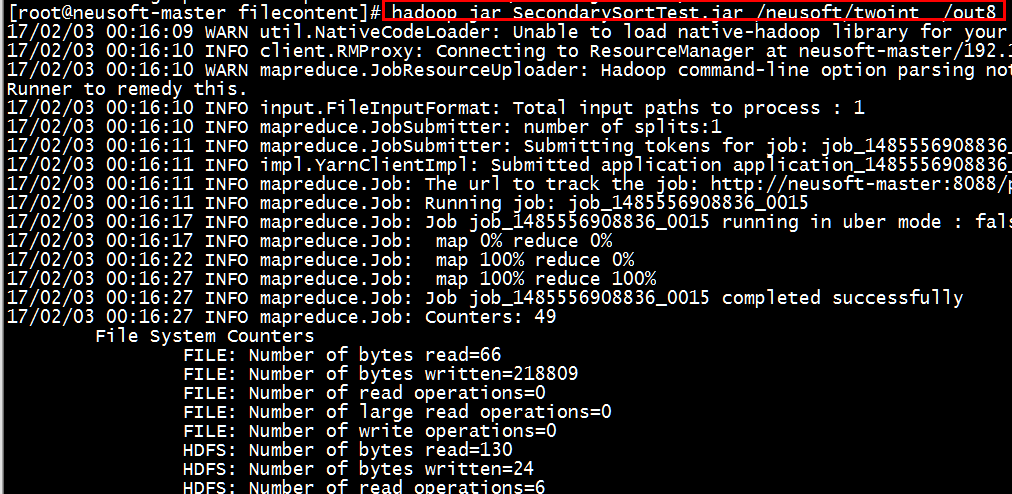
(3)执行jar包,查看中间过程
[root@neusoft-master filecontent]# hadoop jar SecondarySortTest.jar /neusoft/twoint /out8
(4)查看结果
[root@neusoft-master filecontent]# hadoop dfs -ls /out8
[root@neusoft-master filecontent]# hadoop dfs -text /out8/part-r-00000
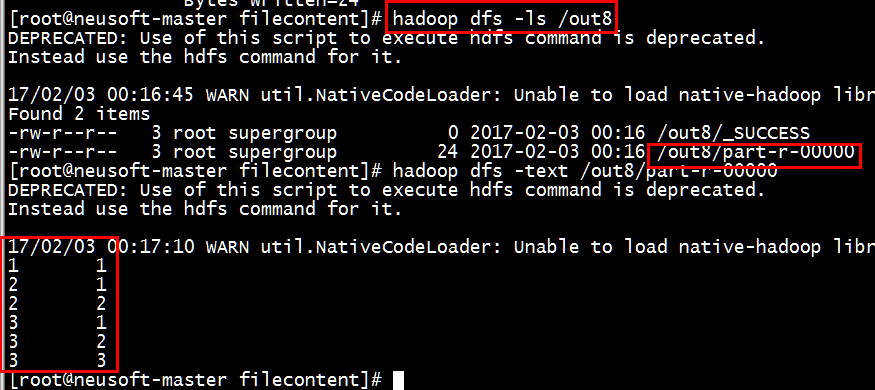
结果正确。
- 如果输出有错误的话,或者输出不是数字(有时候是对象),需要查看是否重写了tostring()方法
注意:如果需求变更为第一列的升序和第二列的降序,只需更改第3行
     public int compareTo(TwoInt o) {

         if (this.t1 ==o.t1) { //當第一列相等的時候,第二列降序排列

             return o.t2-this.t2;
  }  return this.t1-o.t1;//當第一列不相等的時候,按第一列升序排列  }
总结:value不能参与排序,如果想参加排序需要放在key中,作为一个新的key进行排序。
MapReduce排序的更多相关文章
- Hadoop阅读笔记(三)——深入MapReduce排序和单表连接
继上篇了解了使用MapReduce计算平均数以及去重后,我们再来一探MapReduce在排序以及单表关联上的处理方法.在MapReduce系列的第一篇就有说过,MapReduce不仅是一种分布式的计算 ...
- MapReduce排序输出
hadoop的map是具有输出自动排序功能的~继续学习~ import org.apache.hadoop.conf.Configuration; import org.apache.hadoop.c ...
- [大牛翻译系列]Hadoop(5)MapReduce 排序:次排序(Secondary sort)
4.2 排序(SORT) 在MapReduce中,排序的目的有两个: MapReduce可以通过排序将Map输出的键分组.然后每组键调用一次reduce. 在某些需要排序的特定场景中,用户可以将作业( ...
- [大牛翻译系列]Hadoop(6)MapReduce 排序:总排序(Total order sorting)
4.2.2 总排序(Total order sorting) 有的时候需要将作业的的所有输出进行总排序,使各个输出之间的结果是有序的.有以下实例: 如果要得到某个网站中最受欢迎的网址(URL),就需要 ...
- Mapreduce之排序&规约&实战案例
MapReduce 排序和序列化 简单介绍 ①序列化 (Serialization) 是指把结构化对象转化为字节流②反序列化 (Deserialization) 是序列化的逆过程. 把字节流转为结构化 ...
- Hadoop (六):MapReduce基本使用
MapReduce原理 背景 因为如果要对海量数据进行计算,计算机的内存可能会不够. 因此可以把海量数据切割成小块多次计算. 而分布式系统可以把小块分给多态机器并行计算. MapReduce概述 Ma ...
- Hadoop学习笔记—10.Shuffle过程那点事儿
一.回顾Reduce阶段三大步骤 在第四篇博文<初识MapReduce>中,我们认识了MapReduce的八大步骤,其中在Reduce阶段总共三个步骤,如下图所示: 其中,Step2.1就 ...
- [大牛翻译系列]Hadoop 翻译文章索引
原书章节 原书章节题目 翻译文章序号 翻译文章题目 链接 4.1 Joining Hadoop(1) MapReduce 连接:重分区连接(Repartition join) http://www.c ...
- Hadoop系列(三):hadoop基本测试
下面是对hadoop的一些基本测试示例 Hadoop自带测试类简单使用 这个测试类名叫做 hadoop-mapreduce-client-jobclient.jar,位置在 hadoop/share/ ...
随机推荐
- while 1要小心
之前判断一个接口的返回,一定约定好了是返回retcode 1或者retcode 0,就用的这个判断,但是接口挂了的时候,一直返回未登录,找了很长时间为什么cpu一直消耗那么高. 使用wihle 1时候 ...
- C语言realloc,malloc,calloc的区别【转载】
转载自:http://www.cnblogs.com/BlueTzar/articles/1136549.html 三个函数的申明分别是: void* realloc(void* ptr, unsig ...
- Linux下修改当前用户的最大线程数和 open files
1 查看当前用户的线程 ulimit -a 2 修改配置文件 vi /etc/security/limits.d/90-nproc.conf 3 改完即可生效 4 修改可打开的最大文件数 vi /e ...
- PHPDragon设计结构
PHPDragon的设计思路来源至YII框架,可以吐槽作者本人完全copy,但希望在后面,会慢慢的走出一条不同的分支. 1.Dragon.php(DragonBase.php)入口文件,负责程序的自动 ...
- RESTful api架构设计
阮老师的这两篇文章足够了 理解 RESTful 架构 RESTful API 设计指南
- messagpack的使用
我打算使用messagepack对通信的对象进行序列化,使用的方式参考这篇文章: http://www.cppfans.org/1410.html 此处记录一下自己遇到的一些问题 先是用VS2010对 ...
- 安装eclipse,配置tomcat
1.去官网(https://www.eclipse.org/downloads/download.php?file=/oomph/epp/oxygen/R/eclipse-inst-win64.exe ...
- npm yarn
1.从接触nodejs开始,一直就青睐于npm包管理工具,熟悉的命令以及提供的各种便利,也让自己没有想过更换为其他的:但是,有人也说过“海纳百川,方可走远”.因此还是有必要了解一下其他的包管理工具,比 ...
- 音频中PCM的概念
本文取自由http://blog.csdn.net/droidphone一部分 1. PCM是什么 PCM是英文Pulse-code modulation的缩写,中文译名是脉冲编码调制.我们知道在现实 ...
- 解决Sublime Text 3中文显示乱码问题(转)
解决Sublime Text 3中文显示乱码问题(转) 1.打开Sublime Text 3,按Ctrl+-打开控制行,复制粘贴以下python代码,然后回车运行. 2. 复制并粘贴如下代码: 2.重 ...