
树莓派进阶之路 (016) - 通过595驱动4位LED显示系统时间
模块图片,4位共阳极数码管.

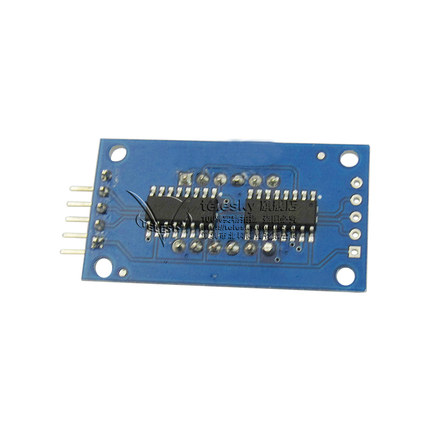
我们使用树莓派wiringPi的库来通过74HC595驱动4位数码管:
C 代码如下:
 #include <wiringPi.h>

 #include <stdio.h>

 #include <stdlib.h>

 #include <stdint.h>

 #include <time.h>

 #define SCLK 12

 #define RCLK 13

 #define DIO 14

 unsigned int code_char[]={0xc0,0xf9,0xa4,0xb0,0x99,0x92,0x82,0xf8,0x80,0x90};

 unsigned char code_segbit[]={0x01,0x02,0x04,0x08};

 int pins[]={SCLK,RCLK,DIO};

 int init(){

     int i=;

     for(i=;i<;i++){

     pinMode(pins[i],OUTPUT);

     digitalWrite(pins[i],LOW);

     }

 }

 int destroy(){

     int i=;

     for(i=;i<;i++){

     digitalWrite(pins[i],LOW);

     pinMode(pins[i],INPUT);

     }

 }

 void loop(){

     time_t rawtime;

     time(&rawtime);

     struct tm *timeinfo;

     timeinfo=localtime(&rawtime);

     digitalWrite(RCLK,LOW);

     if(timeinfo->tm_min>=)shiftOut(DIO,SCLK,,code_char[timeinfo->tm_min%]);//character

     else shiftOut(DIO,SCLK,,code_char[timeinfo->tm_min]);

     shiftOut(DIO,SCLK,,code_segbit[]);//bit

     digitalWrite(RCLK,HIGH);

     digitalWrite(RCLK,LOW);

     if(timeinfo->tm_min>=)shiftOut(DIO,SCLK,,code_char[timeinfo->tm_min/]);//character

     else shiftOut(DIO,SCLK,,code_char[]);

     shiftOut(DIO,SCLK,,code_segbit[]);//bit

     digitalWrite(RCLK,HIGH);

     digitalWrite(RCLK,LOW);

     if(timeinfo->tm_hour>=)shiftOut(DIO,SCLK,,code_char[timeinfo->tm_hour%]);//character

     else shiftOut(DIO,SCLK,,code_char[timeinfo->tm_hour]);

     shiftOut(DIO,SCLK,,code_segbit[]);//bit

     digitalWrite(RCLK,HIGH);

     digitalWrite(RCLK,LOW);

     if(timeinfo->tm_hour>=)shiftOut(DIO,SCLK,,code_char[timeinfo->tm_hour/]);//character

     else shiftOut(DIO,SCLK,,code_char[]);

     shiftOut(DIO,SCLK,,code_segbit[]);//bit

     digitalWrite(RCLK,HIGH);

     //printf("%d %d\t%d %d %d %d\n",

     // timeinfo->tm_hour,timeinfo->tm_min,

     // timeinfo->tm_hour/10,timeinfo->tm_hour%10,

     // timeinfo->tm_min/10,timeinfo->tm_min%10);

     delayMicroseconds();

 }

 int main(void){

     if(wiringPiSetup()==-) //wiringPiSetupGpio==BCM

         exit();

     init();

     while() {

         loop();

     }

     destroy();

     return ;

 }
74HC595.h
 /*

  * wiringShift.h:

  *    Emulate some of the Arduino wiring functionality.

  *

  * Copyright (c) 2009-2012 Gordon Henderson.

  ***********************************************************************

  * This file is part of wiringPi:

  *    https://projects.drogon.net/raspberry-pi/wiringpi/

  *

  *    wiringPi is free software: you can redistribute it and/or modify

  *    it under the terms of the GNU Lesser General Public License as published by

  *    the Free Software Foundation, either version 3 of the License, or

  *    (at your option) any later version.

  *

  *    wiringPi is distributed in the hope that it will be useful,

  *    but WITHOUT ANY WARRANTY; without even the implied warranty of

  *    MERCHANTABILITY or FITNESS FOR A PARTICULAR PURPOSE.  See the

  *    GNU Lesser General Public License for more details.

  *

  *    You should have received a copy of the GNU Lesser General Public License

  *    along with wiringPi.  If not, see <http://www.gnu.org/licenses/>.

  ***********************************************************************

  */

 #define    LSBFIRST    0

 #define    MSBFIRST    1

 #ifndef    _STDINT_H

 # include <stdint.h>

 #endif

 #ifdef __cplusplus

 extern "C" {

 #endif

 extern uint8_t shiftIn      (uint8_t dPin, uint8_t cPin, uint8_t order) ;

 extern void    shiftOut     (uint8_t dPin, uint8_t cPin, uint8_t order, uint8_t val) ;

 #ifdef __cplusplus

 }

 #endif
74HC595.C
 /*

  * wiringShift.c:

  *    Emulate some of the Arduino wiring functionality.

  *

  * Copyright (c) 2009-2012 Gordon Henderson.

  ***********************************************************************

  * This file is part of wiringPi:

  *    https://projects.drogon.net/raspberry-pi/wiringpi/

  *

  *    wiringPi is free software: you can redistribute it and/or modify

  *    it under the terms of the GNU Lesser General Public License as published by

  *    the Free Software Foundation, either version 3 of the License, or

  *    (at your option) any later version.

  *

  *    wiringPi is distributed in the hope that it will be useful,

  *    but WITHOUT ANY WARRANTY; without even the implied warranty of

  *    MERCHANTABILITY or FITNESS FOR A PARTICULAR PURPOSE.  See the

  *    GNU Lesser General Public License for more details.

  *

  *    You should have received a copy of the GNU Lesser General Public License

  *    along with wiringPi.  If not, see <http://www.gnu.org/licenses/>.

  ***********************************************************************

  */

 #include <stdint.h>

 #include "wiringPi.h"

 #include "wiringShift.h"

 /*

  * shiftIn:

  *    Shift data in from a clocked source

  *********************************************************************************

  */

 uint8_t shiftIn (uint8_t dPin, uint8_t cPin, uint8_t order)

 {

   uint8_t value =  ;

   int8_t  i ;

   if (order == MSBFIRST)

     for (i =  ; i >=  ; --i)

     {

       digitalWrite (cPin, HIGH) ;

       value |= digitalRead (dPin) << i ;

       digitalWrite (cPin, LOW) ;

     }

   else

     for (i =  ; i <  ; ++i)

     {

       digitalWrite (cPin, HIGH) ;

       value |= digitalRead (dPin) << i ;

       digitalWrite (cPin, LOW) ;

     }

   return value;

 }

 /*

  * shiftOut:

  *    Shift data out to a clocked source

  *********************************************************************************

  */

 void shiftOut (uint8_t dPin, uint8_t cPin, uint8_t order, uint8_t val)

 {

   int8_t i;

   if (order == MSBFIRST)

     for (i =  ; i >=  ; --i)

     {

       digitalWrite (dPin, val & ( << i)) ;

       digitalWrite (cPin, HIGH) ;

       digitalWrite (cPin, LOW) ;

     }

   else

     for (i =  ; i <  ; ++i)

     {

       digitalWrite (dPin, val & ( << i)) ;

       digitalWrite (cPin, HIGH) ;

       digitalWrite (cPin, LOW) ;

     }

 }
树莓派进阶之路 (016) - 通过595驱动4位LED显示系统时间的更多相关文章
- 树莓派进阶之路 (029) - 语音识别模块 LD3320(原创)
近几天听朋友有说到LD3320 语音模块,刚好身边有块树莓派3,就在某宝上买了块自带mcu的LD3320 . 准备: 树莓派一个(配置了wiringPi开发环境的详情见本人博客:树莓派进阶之路 (00 ...
- 树莓派进阶之路 (030) -Picustom.h(原创)
写代码的时候敢接每次查wiringPi库函数挺麻烦的,自己wiringPi库封装了一下: #ifndef __PICUSTOM_H__ #define __PICUSTOM_H__ /******** ...
- 树莓派进阶之路 (023) - Windows下用串行连接控制树莓派(转)
转载:http://shumeipai.nxez.com/2014/05/04/under-windows-serial-connection-control-raspberry-pi.html 在没 ...
- 树莓派进阶之路 (021) - 3.2inch RPi LCD (B)
参考文档:http://www.waveshare.net/wiki/3.2inch_RPi_LCD_(B) 产品特点 320x240分辨率 电阻式触摸控制 兼容并可直接插入任何版本树莓派 提供Ras ...
- 树莓派进阶之路 (012) - 树莓派配置文档 config.txt 说明
原文连接:http://elinux.org/RPi_config.txt 由于树莓派并没有传统意义上的BIOS, 所以现在各种系统配置参数通常被存在”config.txt”这个文本文件中. 树莓派的 ...
- 树莓派进阶之路 (010) - 树莓派raspi-config配置(转)
经过前面两步我们的树莓派已经正常的工作起来了,但是在真正用它开发之前还需要进行一些列的配置以及软件的安装,这样开发起来才会得心应手,下面我们介绍一下常用的软件和服务 1.配置选项: 树莓派第一次使用的 ...
- 树莓派进阶之路 (006) - 树莓派安装wiringPi
安装git-core sudo apt-get install git-core 下载winringPi库 git clone git://git.drogon.net/wiringPi 编译和安装库 ...
- 树莓派进阶之路 (038) - P2P 文件下载机
硬件要求: 树莓派开发板 USB外接硬盘 一. Together 1. 更新安装程序 sudo apt-get update sudo apt-get upgrade sudo apt-get ins ...
- 树莓派进阶之路 (031) -字符问题(1) - GBK汉字编码表(转)
转载:http://blog.sina.com.cn/s/blog_8184e033010109ug.html 基本简介 GB码,全称是GB2312-80<信息交换用汉字编码字符集基本集&g ...
随机推荐
- HMM与分词、词性标注、命名实体识别
http://www.hankcs.com/nlp/hmm-and-segmentation-tagging-named-entity-recognition.html HMM(隐马尔可夫模型)是用来 ...
- sort命令的使用,结合uniq, awk等
这条命令的意思:lastb | awk -F " " '{print $3}' | sort | uniq -c | sort -k1,1nr > output.log 过滤 ...
- 使用phpqrcode生成二维码
使用PHP语言生成二维码,还是挺有难度的,当然调用生成二维码图片的接口(比如:联图网http://www.liantu.com/的接口)除外,如果自己写代码生成,真的无从下手.然而,我们可以使用php ...
- 如何让windows更高效?
首先解释一下个标题: "让windows更高效,既指让windows更友好更优化,也指可以让使用windows来工作或学习的人更高效的工作学习." 解释下本文的动机: 指导我自己或 ...
- 详解使用DockerHub官方的mysql镜像生成容器
详解使用DockerHub官方的mysql镜像生成容器 收藏 yope 发表于 10个月前 阅读 1506 收藏 32 点赞 1 评论 0 腾讯云·云上实验室:开发者零门槛,免费使用真机在线实验!&g ...
- iOS开发技巧 - 使用UIDatePicker来选择日期和时间
(Swift) import UIKit class ViewController: UIViewController { var datePicker: UIDatePicker! func dat ...
- WebStorm 之 Cordova 环境搭建
一.环境搭建 Cordova 环境配置之前,应先下载安装 Node.js ,中文官网:http://nodejs.cn/. 以管理员身份运行 cmd 命令行工具: 1.查看 Node.js 是否已安装 ...
- vCenter Server Virtual Appliance features and benefits
http://vmwire.com/tag/vcsa/ Installed on SUSE Linux Enterprise Server 11 x64. OVF when deployed is c ...
- vSphere Replication:虚拟机的保护伞
http://server.zdnet.com.cn/server/2013/0401/2151318.shtml ZDNet至顶网服务器频道 04月01日 新闻消息: 保护IT环境的一个基本方面就是 ...
- Windows上Boost的编译步骤
一.FQ下载Boost最新版本 官网:http://www.boost.org/ 假设解压到:D:\Applicaton\DevTools\boost\boost_1_65_1 二.使用VS编译器 c ...