
【C#】使用user32.dll的MessageBox弹窗消息
要使用user32.dll的MessageBox弹窗消息,自然需要引入user32.dll到项目中。
一个最简单的实例如下:
using System;

using System.Runtime.InteropServices;

class Example

{

    // Use DllImport to import the Win32 MessageBox function.

    [DllImport("user32.dll", CharSet = CharSet.Unicode)]

    public static extern int MessageBox(IntPtr hWnd, String text, String caption, uint type);

    static void Main()

    {

        // Call the MessageBox function using platform invoke.

        MessageBox(new IntPtr(), "Hello World!", "Hello Dialog", );

    }

}
运行项目后,直接弹出弹窗消息。
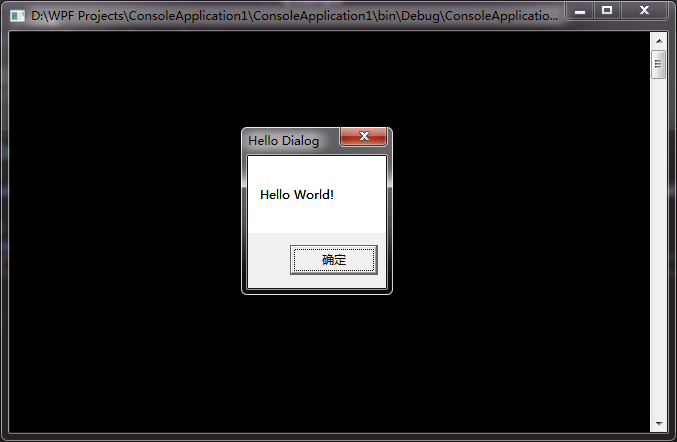
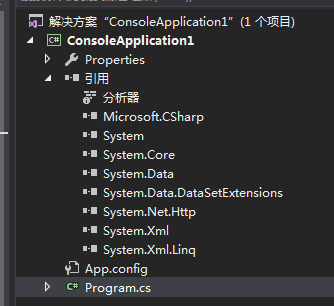
这是C#使用外部DLL中的方法,项目的引用中并没有显示该user32.dll。
【C#】使用user32.dll的MessageBox弹窗消息的更多相关文章
- 对类HelloWorld程序中添加一个MessageBox弹窗
对类HelloWorld程序中添加一个MessageBox弹窗 分析: 任一程序运行的时候都会加载kernel32.dll的,但MessageBoxA()这个API却是在user32.dll中的.所以 ...
- 控制台——对WIN32 API的使用(user32.dll)
Win32 API概念:即为Microsoft 32位平台的应用程序编程接口(Application Programming Interface).所有在Win32平台上运行的应用程序都可以调用这些函 ...
- C#中可直接调用WIN32的API函数--USER32.DLL
Win32的API函数可以直接在C#中直接调用,在做WinForm时还是很有帮助的.有时候直接调用Win32的API,可以很高效的实现想要的效果. using System; using System ...
- Winform API "user32.dll"中的函数
命名空间:System.Runtime.InteropServices /// <summary> /// 该函数检索一指定窗口的客户区域或整个屏幕的显示设备上下文环境的句柄,以后可以在G ...
- 【转】c# 调用windows API(user32.dll)
using System; using System.Collections.Generic; using System.Linq; using System.Text; using System.R ...
- user32.dll
user32.dll中的所有函数 using System; using System.Collections.Generic; using System.Linq; using System.Tex ...
- 【WinAPI】User32.dll注释
#region User32.dll 函数 /// <summary> /// 该函数检索一指定窗口的客户区域或整个屏幕的显示设备上下文环境的句柄,以后可以在GDI函数中使用该句柄来在设备 ...
- 【整理】c# 调用windows API(user32.dll)
User32.dll提供了很多可供调用的接口,大致如下(转自http://blog.csdn.net/zhang399401/article/details/6978803) using System ...
- C# user32.dll
#region User32.dll 函数 /// <summary> /// 该函数检索一指定窗口的客户区域或整个屏幕的显示设备上下文环境的句柄,以后可以在GDI函数中使用该句柄来在设备 ...
随机推荐
- React Native工程修改Android包名
默认初始化的React Native工程,生成Android工程的时候,包名默认是React Native工程的名字,跟一般Android工程com.company.xxx不一样. 这时候就需要手动修 ...
- 【转】Tesla autopilot 引起致命车祸
Tesla autopilot 引起致命车祸 好一段时间没关心 Tesla 了,今天才发现他们的 autopilot 终于引起了致命的车祸.这场 Model S 撞上18轮大卡车的车祸,发生于5月7号 ...
- C#基础第六天-作业-利用面向对象的思想去实现名片
1.利用面向对象的思想去实现: (增加,修改,删除,查询,查询全部)需求:根据人名去(删除/查询).指定列:姓名,年龄,性别,爱好,电话. 本系列教程: C#基础总结之八面向对象知识点总结-继承与多态 ...
- django -- 对行的更新只有在save调用后才会入库
python3 manage.py shell Python 3.6.2 (v3.6.2:5fd33b5926, Jul 16 2017, 20:11:06) [GCC 4.2.1 (Apple In ...
- Ingress 原理及实例
什么是Ingress 在Kubernetes中,Service和Pod的IP地址只能在集群内部网络中路由,所有到达“边界路由器”(Edge Router)的网络流量要么被丢弃,要么被转发到别处,从概念 ...
- struts2:OGNL表达式之#、%、$符号运用
1. OGNL表达达符号"#" 1.1 #用于访问OGNL上下文和Action上下文,#相当于ActionContext.getContext() 注意:当系统创建了Action实 ...
- Python 父目录获取
# coding=utf-8import os currentPath = os.getcwd() # 当前目录parent_path = os.path.dirname(currentPath) # ...
- 用“网建”平台发手机短信的C#代码
一直都用这个平台发手机短信的,今天做新项目的时候用到了,但是上来博客搜索不到,只好翻以前的源代码翻了好久才找到了,先记下来,以作备用: using System; using System.Colle ...
- Atitit 架构的原则attilax总结
Atitit 架构的原则attilax总结 1.1. Rule of three称为"三次原则",指的是当某个功能第三次出现时,才进行"抽象化".是DRY原则和 ...
- [sql]mysql参数(配置)手册
my-innodb-heavy-4G.cnf配置文件注解 [client] #客户端 port = 3306 #mysql客户端连接时的默认端口号 socket = /application/mysq ...