
【C#】使用user32.dll的MessageBox弹窗消息
要使用user32.dll的MessageBox弹窗消息,自然需要引入user32.dll到项目中。
一个最简单的实例如下:
using System;

using System.Runtime.InteropServices;

class Example

{

    // Use DllImport to import the Win32 MessageBox function.

    [DllImport("user32.dll", CharSet = CharSet.Unicode)]

    public static extern int MessageBox(IntPtr hWnd, String text, String caption, uint type);

    static void Main()

    {

        // Call the MessageBox function using platform invoke.

        MessageBox(new IntPtr(), "Hello World!", "Hello Dialog", );

    }

}
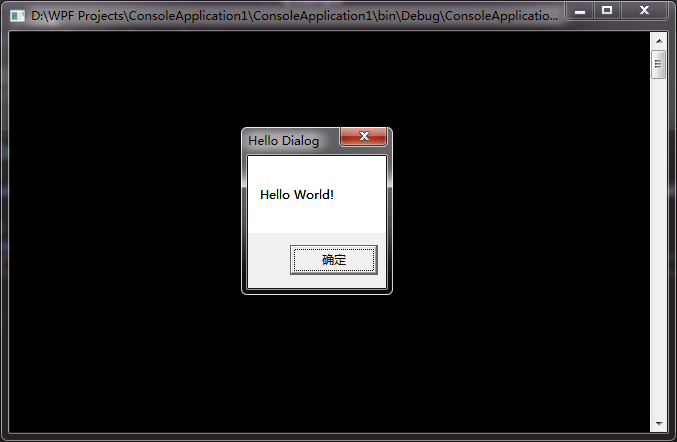
运行项目后,直接弹出弹窗消息。
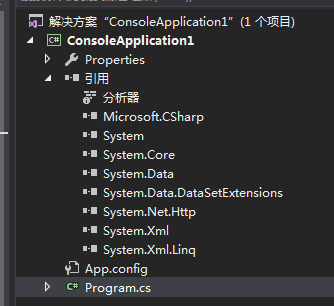
这是C#使用外部DLL中的方法,项目的引用中并没有显示该user32.dll。
【C#】使用user32.dll的MessageBox弹窗消息的更多相关文章
- 对类HelloWorld程序中添加一个MessageBox弹窗
对类HelloWorld程序中添加一个MessageBox弹窗 分析: 任一程序运行的时候都会加载kernel32.dll的,但MessageBoxA()这个API却是在user32.dll中的.所以 ...
- 控制台——对WIN32 API的使用(user32.dll)
Win32 API概念:即为Microsoft 32位平台的应用程序编程接口(Application Programming Interface).所有在Win32平台上运行的应用程序都可以调用这些函 ...
- C#中可直接调用WIN32的API函数--USER32.DLL
Win32的API函数可以直接在C#中直接调用,在做WinForm时还是很有帮助的.有时候直接调用Win32的API,可以很高效的实现想要的效果. using System; using System ...
- Winform API "user32.dll"中的函数
命名空间:System.Runtime.InteropServices /// <summary> /// 该函数检索一指定窗口的客户区域或整个屏幕的显示设备上下文环境的句柄,以后可以在G ...
- 【转】c# 调用windows API(user32.dll)
using System; using System.Collections.Generic; using System.Linq; using System.Text; using System.R ...
- user32.dll
user32.dll中的所有函数 using System; using System.Collections.Generic; using System.Linq; using System.Tex ...
- 【WinAPI】User32.dll注释
#region User32.dll 函数 /// <summary> /// 该函数检索一指定窗口的客户区域或整个屏幕的显示设备上下文环境的句柄,以后可以在GDI函数中使用该句柄来在设备 ...
- 【整理】c# 调用windows API(user32.dll)
User32.dll提供了很多可供调用的接口,大致如下(转自http://blog.csdn.net/zhang399401/article/details/6978803) using System ...
- C# user32.dll
#region User32.dll 函数 /// <summary> /// 该函数检索一指定窗口的客户区域或整个屏幕的显示设备上下文环境的句柄,以后可以在GDI函数中使用该句柄来在设备 ...
随机推荐
- Android App解决卡顿慢之内存抖动及内存泄漏(发现和定位)
内存抖动是指在短时间内有大量的对象被创建或者被回收的现象,内存抖动出现原因主要是频繁(很重要)在循环里创建对象(导致大量对象在短时间内被创建,由于新对象是要占用内存空间的而且是频繁,如果一次或者两次在 ...
- git经常使用命令和问题
和远程仓库相关的命令: 下载仓库代码:git clone 远程仓库地址 查看远程仓库:git remote -v 加入远程仓库:git remote add origin [url], 当中origi ...
- Mysql:MyIsam和InnoDB的区别
MyISAM: 这个是默认类型,它是基于传统的ISAM类型,ISAM是Indexed Sequential Access Method (有索引的 顺序访问方法) 的缩写,它是存储记录和文件的标准方法 ...
- [转]python数据持久存储:pickle模块的基本使用
python的pickle模块实现了基本的数据序列和反序列化.通过pickle模块的序列化操作我们能够将程序中运行的对象信息保存到文件中去,永久存储:通过pickle模块的反序列化操作,我们能够从文件 ...
- metaspolit 命令大全
一.msfconsole相关命令 二.database 三.autopwn自动化攻击工具 四.metaspolit常见渗透命令大全
- elk 使用中遇到的问题(kafka 重复消费)
问题描述: 在使用过程中,当遇到大量报错的时候,我们到eagle后台看到报错的那个consumer的消费情况到到lag 远远大于0(正常情况应该为0),activie 节点没有,kibana面板上没 ...
- php分享二十六:读写日志
一:读写日志注意事项: 1:fgets取出日志行后,注意用trim过滤下 2:explode(“\t", $line) 拆分后,注意判断下个数是否正确,如果不正确,怎么处理? 如果某一列 ...
- 启动 angular-phonecat 项目时出现这玩意 。('The header content contains invalid characters');
最近学习angular, 跟着视频做一个动作,启动 “ angular-phonecat ” 这个项目 敲入 “npm start ” 启动没有问题,但是 "http://localhost ...
- 如何在JS数组特定索引处指定位置插入元素?
如何在JS数组特定索引处指定位置插入元素? 需求: 将一个元素插入到现有数组的特定索引处.听起来很容易和常见,但需要一点时间来研究它. // 原来的数组var array = ["one&q ...
- 2.2 Apache Axis2 快速学习手册之 AXIOM 构建 Web Service
和上一篇的POJO 部署相比主要是services.xml 中配置的消息接受处理器类不一样和Java 类中写法不一样. 使用AXIOM构建服务 样例源码路径: C:\Apps\axis2\axis2- ...