
iOS网络通信http之NSURLConnection
iOS网络通信http之NSURLConnection
移动互联网时代,网络通信已是手机终端必不可少的功能。我们的应用中也必不可少的使用了网络通信,增强客户端与服务器交互。这一篇提供了使用NSURLConnection实现http通信的方式。
NSURLConnection提供了异步请求、同步请求两种通信方式。
1、异步请求
iOS5.0 SDK NSURLConnection类新增的sendAsynchronousRequest:queue:completionHandler:方法,从而使iOS5支持两种异步请求方式。我们先从新增类开始。
1)sendAsynchronousRequest
iOS5.0开始支持sendAsynchronousReques方法,方法使用如下:
- (void)httpAsynchronousRequest{

    NSURL *url = [NSURL URLWithString:@"http://url"];

    NSString *post=@"postData";

    NSData *postData = [post dataUsingEncoding:NSASCIIStringEncoding allowLossyConversion:YES];

    NSMutableURLRequest *request = [NSMutableURLRequest requestWithURL:url];

    [request setHTTPMethod:@"POST"];

    [request setHTTPBody:postData];

    [request setTimeoutInterval:10.0];

    NSOperationQueue *queue = [[NSOperationQueue alloc]init];

    [NSURLConnection sendAsynchronousRequest:request

                                       queue:queue

                           completionHandler:^(NSURLResponse *response, NSData *data, NSError *error){

                               if (error) {

                                   NSLog(@"Httperror:%@%d", error.localizedDescription,error.code);

                               }else{

                                   NSInteger responseCode = [(NSHTTPURLResponse *)response statusCode];

                                   NSString *responseString = [[NSString alloc] initWithData:data encoding:NSUTF8StringEncoding];

                                   NSLog(@"HttpResponseCode:%d", responseCode);

                                   NSLog(@"HttpResponseBody %@",responseString);

                               }

                           }];

}
sendAsynchronousReques可以很容易地使用NSURLRequest接收回调,完成http通信。
2)connectionWithRequest
iOS2.0就开始支持connectionWithRequest方法,使用如下:
- (void)httpConnectionWithRequest{

    NSString *URLPath = [NSString stringWithFormat:@"http://url"];

    NSURL *URL = [NSURL URLWithString:URLPath];

    NSMutableURLRequest *request = [NSMutableURLRequest requestWithURL:URL];

    [NSURLConnection connectionWithRequest:request delegate:self];

}

- (void)connection:(NSURLConnection *)theConnection didReceiveResponse:(NSURLResponse *)response

{

    NSInteger responseCode = [(NSHTTPURLResponse *)response statusCode];

    NSLog(@"response length=%lld  statecode%d", [response expectedContentLength],responseCode);

}

// A delegate method called by the NSURLConnection as data arrives.  The

// response data for a POST is only for useful for debugging purposes,

// so we just drop it on the floor.

- (void)connection:(NSURLConnection *)theConnection didReceiveData:(NSData *)data

{

    if (mData == nil) {

        mData = [[NSMutableData alloc] initWithData:data];

    } else {

        [mData appendData:data];

    }

    NSLog(@"response connection");

}

// A delegate method called by the NSURLConnection if the connection fails.

// We shut down the connection and display the failure.  Production quality code

// would either display or log the actual error.

- (void)connection:(NSURLConnection *)theConnection didFailWithError:(NSError *)error

{

    NSLog(@"response error%@", [error localizedFailureReason]);

}

// A delegate method called by the NSURLConnection when the connection has been

// done successfully.  We shut down the connection with a nil status, which

// causes the image to be displayed.

- (void)connectionDidFinishLoading:(NSURLConnection *)theConnection

{

    NSString *responseString = [[NSString alloc] initWithData:mData encoding:NSUTF8StringEncoding];

     NSLog(@"response body%@", responseString);

}
connectionWithRequest需要delegate参数,通过一个delegate来做数据的下载以及Request的接受以及连接状态,此处delegate:self,所以需要本类实现一些方法,并且定义mData做数据的接受。
需要实现的方法:
1、获取返回状态、包头信息。
- (void)connection:(NSURLConnection *)connection didReceiveResponse:(NSURLResponse *)response;
2、连接失败,包含失败。
- (void)connection:(NSURLConnection *)connection didFailWithError:(NSError *)error;
3、接收数据
- (void)connection:(NSURLConnection *)connection didReceiveData:(NSData *)data;
4、数据接收完毕
- (void)connectionDidFinishLoading:(NSURLConnection *)connection;
connectionWithRequest使用起来比较繁琐,而iOS5.0之前用不支持sendAsynchronousRequest。有网友提出了AEURLConnection解决方案。
AEURLConnection is a simple reimplementation of the API for use on iOS 4. Used properly, it is also guaranteed to be safe against The Deallocation Problem, a thorny threading issue that affects most other networking libraries.
2、同步请求
同步请求数据方法如下:
- (void)httpSynchronousRequest{

    NSURLRequest * urlRequest = [NSURLRequest requestWithURL:[NSURL URLWithString:@"http://google.com"]];

    NSURLResponse * response = nil;

    NSError * error = nil;

    NSData * data = [NSURLConnection sendSynchronousRequest:urlRequest

                                          returningResponse:&response

                                                      error:&error];

    if (error == nil)

    {

        // 处理数据

    }

}
初识MemCached
吹牛
没接触过MemCached,也没有打算要学习它,本人做web起步晚(有365天这样),近两周来是想了解一下asp.net的缓存和Session的工作原理,但"上错花轿遇到狼",便开始对MemCached产生好感觉,官网上看看其.net客户端,发现都是使用其文本协议现实现,于是突发其想,自己来实现个基于二进制协议的.net客户端(算是给.net打气还是丢脸呢?),并以此实现了asp.net的分布式OutputCache和分布式Session。当然,我实现的未必好,个人能力有限,时间也比较少。
描述
Memcached 是一个高性能的分布式内存对象缓存系统,用于动态Web应用以减轻数据库负载。它通过在内存中缓存数据和对象来减少读取数据库的次数,从而提供动态、数据库驱动网站的速度。Memcached基于一个存储键/值对的hashmap。其守护进程(daemon )是用C写的,但是客户端可以用任何语言来编写,并通过memcached协议与守护进程通信。这段落引用自百度百科,MemCached网站是http://memcached.org/,二进制协议的webi是http://code.google.com/p/memcached/wiki/BinaryProtocolRevamped
正文
我不想在此随笔就把全部内容写完,因为可能比较多,我会写好的每一篇的链接放到此页面中,做一个小小的系列来讲解:
MemCached相关下载:点击下载 压缩包包含x86和x64版的Memcached服务端、本人写的memcached管理器(MemCachedManager.exe)、C#实现的memecahced二进制协议调用组件MemCachedLib.dll
下载包包后,可以直接启动管理器来对memcached服务端的添加、删除、修改、停止等,还可以简单的通过命令与服务端进行交互。
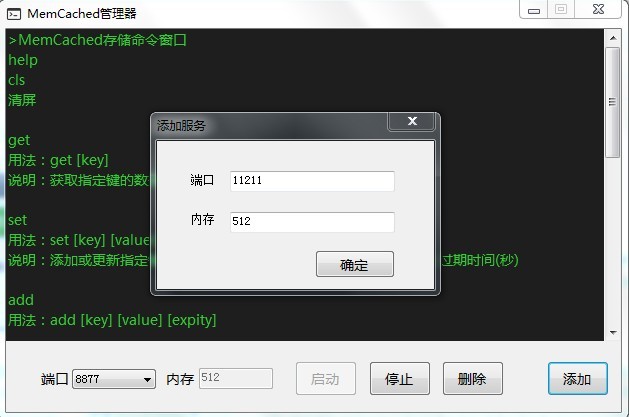
能提供MemcacheLib的实现代码吗?
当然能,留着发霉是不好的,后期我会继续维护,如果可能,放到开源服务上(怕是Memcached越来越没人鸟)
这里是整个解决方案,大家可以下来看看我拙劣的代码,代码有注释,将就一下,周末我再把上面的空白补充。
MemCached二进制协议请求包详解
敬请关注
Memcached二进制协议响应包详解
敬请关注
通过MemcachedLib实现自己的缓存提供者
敬请关注
通过MemcachedLib实现自己的Session提供者
敬请关注
iOS网络通信http之NSURLConnection的更多相关文章
- iOS学习笔记(八)——iOS网络通信http之NSURLConnection
转自:http://blog.csdn.net/xyz_lmn/article/details/8968182 移动互联网时代,网络通信已是手机终端必不可少的功能.我们的应用中也必不可少的使用了网络通 ...
- 【转】iOS学习笔记(八)——iOS网络通信http之NSURLConnection
移动互联网时代,网络通信已是手机终端必不可少的功能.我们的应用中也必不可少的使用了网络通信,增强客户端与服务器交互.这一篇提供了使用NSURLConnection实现http通信的方式. NSURLC ...
- iOS开发网络篇—NSURLConnection基本使用
iOS开发网络篇—NSURLConnection基本使用 一.NSURLConnection的常用类 (1)NSURL:请求地址 (2)NSURLRequest:封装一个请求,保存发给服务器的全部数据 ...
- iOS网络通信类库
iOS网络通信类库 iOS网络通信类库:ASIHTTPRequest,AFNetworking,MKNetWorkKIt. ASIHTTPRequest在ios5.0之后就不在维护了,所以之后主要就是 ...
- iOS之数据请求NSURLConnection
iOS之数据请求NSURLConnection NSString *lcsUrl = @"http://192.168.1.1:8080/lcsUrl"; //假设网址中有汉字.须 ...
- iOS开发网络篇—NSURLConnection基本使用(一)
一.NSURLConnection的常用类 (1)NSURL:请求地址 (2)NSURLRequest:封装一个请求,保存发给服务器的全部数据,包括一个NSURL对象,请求方法.请求头.请求体.. ...
- iOS 网络编程:NSURLConnection
1 简介 1.1 概念 NSURLConnection类似NSURLSession,都是进行网络数据传输的.其中NSURLSession是NSURLConnection的替代版本,目前IOS9.0几乎 ...
- 关于IOS网络通信的学习
最近由于需要在看关于网络通信方面的知识,所以在网上找了找关于网络解释方面的知识.找了半天没有找到一篇能详细解释通讯流程的,心里忍不住就万马奔腾了.没办法,谁让自己想学呢!于是又找了找,觉得没有满意的. ...
- iOS网络-01-NSURLRequest与NSURLConnection
NSURLRequest NSURLRequest封装了一次网络请求所需要的数据,主要封装了以下信息: 请求路径(URL) 请求方法(GET或POST) 请求头 请求体 超时参数 NSURLReque ...
随机推荐
- FindBugs:Compiler output path for module can not be null. check your module/project settings问题原因
这可能是很多人在使用Android studio 该插件会发现此错误信息:Compiler output path for module can not be null. check your mod ...
- POJ3342——Party at Hali-Bula
Party at Hali-Bula Time Limit: 2000MS Memory Limit: 65536K Total Submissions: 5418 Accepted: 192 ...
- 使用PHP生成PDF文档
原文:使用PHP生成PDF文档 实际工作中,我们要使用PHP动态的创建PDF文档,目前有许多开源的PHP创建PDF的类库,今天我给大家来介绍一款优秀的PDF库,它就是TCPDF,TCPDF是一个用于快 ...
- Hibeernate中的两种分页方式
1. return getHibernateTemplate().executeFind(new HibernateCallback() { public Object doInHibernate(S ...
- 如何运行代码apk安装
import java.io.File; import android.app.Activity; import android.content.Intent; import android.net. ...
- CORS(跨域资源共享)跨域问题及解决
当使用ajax跨域请求时,浏览器报错:XmlHttpRequest error: Origin null is not allowed by Access-Control-Allow-Origin.肯 ...
- Hybrid
“榕树下·那年”移动app ( hybrid ) 开发总结 榕树下网站本身的技术人员并不多,所以app开发的任务就到了母公司盛大文学这边. 盛大文学无线业务中心负责这次具体开发任务. ...
- View & ViewData
ViewData 似乎没啥好说的,一个向 View 传送数据的字典. ----------------------------------------------------------------- ...
- AR9331中Linux内核启动中与IRQ中断相关的文件
先列出框架,具体后继再来分析. 首先是lds文件,该文件设置了各个section在FLASH或RAM中的先后顺序. 位于~/openwrt1407/build_dir/target-mips_34kc ...
- Android Studio设置自己主动编project
在Eclipse自己主动编译兄弟习惯,刚搬到Android Studio.当然,错过这个功能,自己主动编译每次执行意味着更短的时间. Android Studio里面事实上也是有自己主动编译功能的,只 ...